Táirge Tharview
Introducing the VR SHINECON 3D Virtual Reality Headset, designed to provide immersive experiences for both iPhone and Android users. This Virtual Reality Goggles Set transports you to new dimensions of entertainment and exploration, offering compatibility with devices ranging from 4.7 to 6.7 inches. Experience breathtaking landscapes, engaging adventures, and immersive 360-degree videos with its comfortable design and intuitive controls.
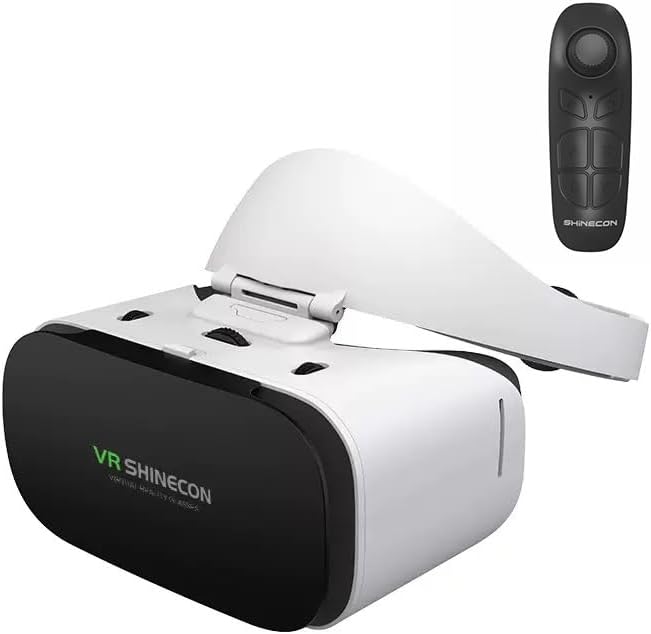
Image: The VR SHINECON 3D Virtual Reality Headset, white and black, shown with its accompanying remote control.
Cad atá sa Bhosca
- Headset VR
Note: Additional accessories such as a remote control may be included depending on the specific package. Please check your product packaging for a complete list of contents.
Príomhghnéithe
- Taithí Tumoideachais: Dive into a world of limitless possibilities with our Virtual Reality Goggles Set. Whether you're exploring stunning landscapes, embarking on thrilling adventures, or simply relaxing with 360-degree videos, our headset delivers an immersive experience that transports you to new dimensions.
- Comhoiriúnacht Uilíoch: Our VR headset is designed to work seamlessly with both iPhones and Android devices, ensuring that users of various smartphones can enjoy immersive VR experiences without any compatibility issues.
- Dearadh Compordach: We prioritize user comfort with our headset's ergonomic design. From adjustable straps to cushioned padding, every detail is crafted for maximum comfort.
- Tógáil Cáilíochta: Built with quality materials and precision engineering, our Virtual Reality Goggles Set is designed to provide durability and reliability. From the lenses to the casing, every component is carefully crafted to deliver a premium VR experience that you can enjoy for years to come.

Íomhá: Taobh view of the VR SHINECON headset highlighting its ergonomic and comfortable design.
Treoir Socraithe
- Ullmhaigh do ghuthán cliste: Ensure your smartphone is charged and has a VR-compatible application installed. Many VR apps are available on the App Store (iOS) and Google Play Store (Android).
- Oscail Urrann na gCluasán: Gently press the release button or slide the front cover of the VR headset to open the smartphone compartment.
- Cuir isteach do ghuthán: Carefully place your smartphone into the designated slot within the headset. Ensure it is centered and securely held by the phone holder. The headset supports phones between 4.7 and 6.7 inches.
- Dún an Roinn: Close the front cover securely until it clicks into place.
- Coigeartaigh na Strapaí Ceann: Place the headset on your head and adjust the elastic head straps for a comfortable and secure fit. The straps should hold the headset firmly without causing discomfort.
- Coigeartaigh Lionsaí: Use the focus and interpupillary distance (IPD) adjustment knobs on the top and sides of the headset to achieve a clear and comfortable viewing experience. Rotate the knobs until the image is sharp and your eyes feel relaxed.

Image: A visual guide demonstrating four easy steps to use the VR headset: download a VR app, run it, insert phone, and enjoy.
Video: An official product video from VR SHINECON demonstrating the unboxing, features, and setup of the 3D VR Headset.
Treoracha Oibriúcháin
Once your smartphone is securely placed and the headset is comfortably adjusted, you are ready to begin your VR experience.
- Launching VR Content: Open your chosen VR application or 360-degree video on your smartphone roimhe inserting it into the headset.
- Viewá: Look straight ahead. The VR content will automatically adjust to your head movements, providing an immersive 360-degree view.
- Idirghníomhaíocht: If your VR content requires interaction, use the included remote control (if applicable) or follow the on-screen instructions provided by the VR application.
- Taking Breaks: For optimal comfort and to prevent eye strain, take regular breaks during extended VR sessions.
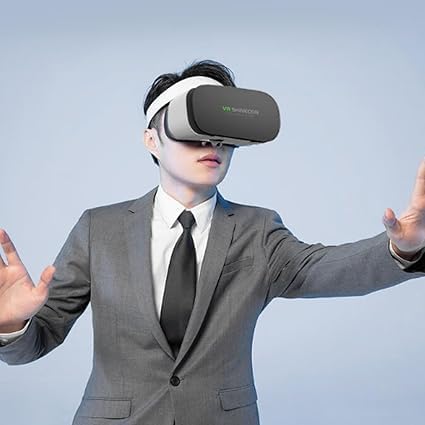
Image: A person wearing the VR SHINECON headset, demonstrating how it looks when in use.
Cothabháil
- Glanadh Lionsaí: Use a soft, dry microfiber cloth specifically designed for optical lenses to gently wipe the headset lenses. Avoid using abrasive materials or chemical cleaners, which can damage the lens coating.
- Glanadh Taobh Amuigh: Cuimil taobh amuigh na gcluasán le clúdach bog, beagán fliuch.amp éadach. Ná húsáid taise iomarcach agus ná tum an gléas in uisce.
- Stóráil: Store the VR headset in a cool, dry place away from direct sunlight and extreme temperatures. Keep it in its original packaging or a protective case to prevent dust accumulation and scratches.
- Head Straps: The head straps can be gently hand-washed with mild soap and water if necessary. Ensure they are completely dry before reattaching them to the headset.
Fabhtcheartú
| Fadhb | Cúis Féideartha | Réiteach |
|---|---|---|
| Tá an íomhá doiléir nó as fócas. | Incorrect lens adjustment; phone not centered. | Adjust the focus and IPD knobs until the image is clear. Ensure your smartphone is perfectly centered within the headset's phone holder. |
| Phone does not fit or is loose. | Phone size outside compatible range; improper insertion. | Verify your phone's screen size is between 4.7 and 6.7 inches. Re-insert the phone, ensuring it is properly seated and secured by the internal clips. |
| No VR effect or distorted view. | Incorrect VR app settings; phone orientation issue. | Ensure the VR app is configured for a cardboard-style headset. Check your phone's display settings and orientation lock. Restart the VR application. |
| Míchompord le linn úsáide. | Head straps too tight/loose; prolonged use. | Adjust the head straps for a comfortable fit. Take frequent breaks to rest your eyes and prevent discomfort. |
Sonraíochtaí
| Gné | Sonraigh |
|---|---|
| Toisí Táirge | 6.5 x 6.5 x 4.5 orlach (16.51 x 16.51 x 11.43 cm) |
| Meáchan Mír | 12 unsa (340.19 ghram) |
| Branda | VR SHINECON |
| Dath | Sc-g19 |
| Gné Speisialta | Comhoiriúnach do Smartphone |
| Teicneolaíocht Nascachta | Sreangaithe |
| Gléasanna Comhoiriúnacha | Smartphone (4.7-6.7 inch) |
| Úsáidí Sonracha Do Tháirge | Gaming, Video |
| Raon Aoise (Cur síos) | 8 Years And Up |
| Comhoiriúnacht an Chórais Oibriúcháin | Android, iOS |
| Trasnánach Scáileáin Infheicthe | 7" / 18 cm |
Barántas & Tacaíocht
For warranty information and technical support, please refer to the documentation included with your product or visit the official VR SHINECON website. You may also contact customer service through the retailer where the product was purchased.
Le haghaidh tuilleadh cúnaimh, tabhair cuairt ar VR SHINECON Store on Amazon.


