1. Réamhrá
The MiBOXER WL-SW1 Smart Switch is designed to integrate traditional lighting and electrical appliances into a smart home system. It offers control via WiFi and 2.4G wireless technologies, enabling remote operation through a smartphone application, voice commands, and traditional manual switches. This manual provides essential information for the safe installation, setup, and operation of your WL-SW1 Smart Switch.
2. Faisnéis Sábháilteachta
- Sábháilteacht Leictreach: Installation must be performed by a qualified electrician or service personnel in accordance with all local and national electrical codes.
- Dícheangal Cumhachta: Dícheangail an chumhacht i gcónaí ag an mbriseoir ciorcaid sula ndéantar an gléas a shuiteáil nó a sheirbhísiú.
- Imltage Comhoiriúnacht: Cinntigh an t-ionchur toirtetage (100-240V AC, 50/60Hz) and maximum load (10A) are compatible with your electrical system and connected appliances.
- Úsáid Laistigh Amháin: This device is intended for indoor use in dry environments. Avoid exposure to moisture or extreme temperatures.
- Naisc Shlán: Ensure all wire connections are secure and properly insulated to prevent short circuits.
3. Ábhar Pacáiste
Deimhnigh go bhfuil na míreanna uile i láthair sa phacáiste:
- MiBOXER WL-SW1 Smart Switch
- Lámhleabhar Úsáideora (an doiciméad seo)

Figure 3.1: The MiBOXER WL-SW1 Smart Switch alongside its retail packaging and a small instruction leaflet, indicating typical package contents.
4. Táirge Tharview
The WL-SW1 Smart Switch is a compact device designed for seamless integration into your electrical system. It features multiple connection points for input power, output to appliances, and connections for external manual switches.

Fíor 4.1: Tosaigh view of the MiBOXER WL-SW1 Smart Switch, showing input and output terminals, model number, and basic electrical specifications.
Príomhghnéithe:
- Nascacht Dhéach: Supports both WiFi and 2.4G wireless protocols for flexible control.
- Rialú Aip Chliste: Compatible with the 'Tuya Smart' app for remote management.
- Comhtháthú Cúntóra Gutha: Works with third-party voice control systems like Alexa and Google Assistant.
- Multi-Timer Function: Allows scheduling of operations.
- Oibríocht Láimhe: Retains compatibility with traditional push or rocker switches.
- Feidhm Cuimhne: Remembers the last state after a power interruption.
- Comhoiriúnacht Leathan: Suitable for various electrical equipment.

Figure 4.2: Detailed diagram highlighting the various interfaces of the WL-SW1 Smart Switch, including input/output terminals, wire preparation guidelines, and construction features like screw lock terminals and a fire-resistant PC shell.
5. Sonraíochtaí
| Tréith | Luach |
|---|---|
| Uimhir Mhúnla | WL-SW1 |
| Ionchur Voltage | 100-240V~, 50/60Hz |
| Aschur Voltage | 100-240V~, 50/60Hz |
| Max Reatha | 10A |
| Teocht Oibre | -10~40°C |
| Nascacht Gan Sreang | WiFi + 2.4G |
| Toisí Pacáiste | 3 x 3 x 1.5 orlach |
| Meáchan Mír | 2.24 unsa |
6. Suiteáil
Tábhachtach: Cinntigh go bhfuil an chumhacht dícheangailte ag an mbriseoir ciorcaid sula dtosaíonn tú ar an suiteáil.
- Prepare the Installation Location: The WL-SW1 Smart Switch is designed to fit into standard bottom boxes with a depth greater than 50mm.
- Ullmhú sreang: Strip approximately 7mm of insulation from the ends of your wires.
- Nasc Cumhacht Ionchuir: Connect the Live (L) and Neutral (N) wires from your power supply to the 'L' and 'N' terminals under the 'INPUT' section of the switch.
- Connect Output to Appliance: Connect the Live (L1) and Neutral (N) wires leading to your electrical appliance (e.g., light, fan) to the 'L1' and 'N' terminals under the 'OUTPUT' section.
- Connect Manual Switch (Optional): If using a traditional push or rocker switch, connect its terminals to 'S1' and 'S2' on the WL-SW1. This allows for manual control in addition to smart control.
- Secure the Device: Carefully place the WL-SW1 into the electrical box, ensuring no wires are pinched. Secure it in place.
- Athchóirigh Cumhacht: Once all connections are secure and the device is properly installed, restore power at the circuit breaker.

Figure 6.1: Step-by-step installation diagram for the WL-SW1 Smart Switch, detailing how it fits into standard electrical boxes (depth > 50mm) and connects to a push or rocker switch.
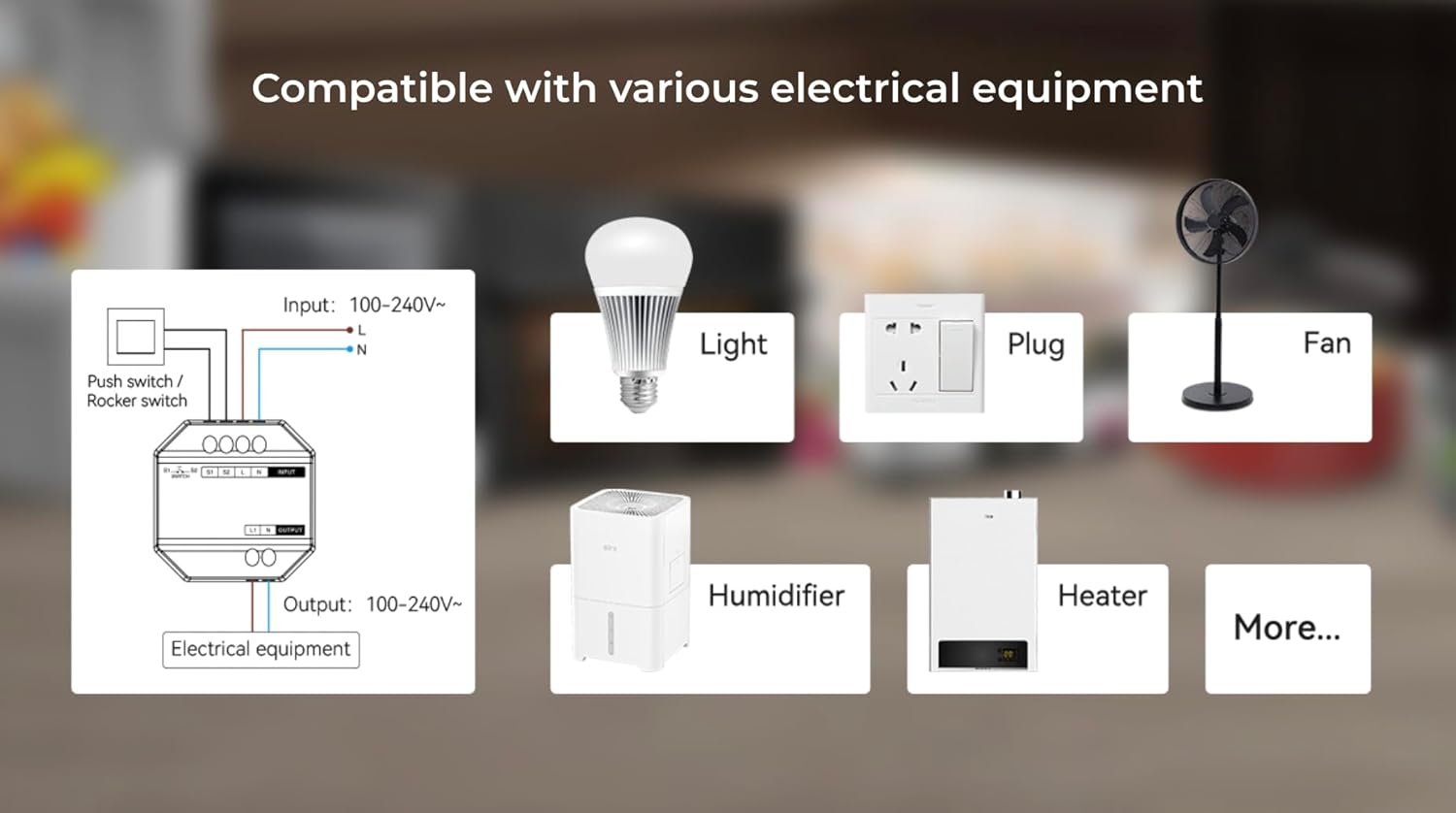
Figure 6.2: An illustrative diagram demonstrating the broad compatibility of the WL-SW1 Smart Switch with diverse electrical appliances, including lighting, fans, and heating devices.
7. Socrú
7.1. App Pairing (Tuya Smart)
- Íoslódáil Aip: Download the 'Tuya Smart' app from your smartphone's app store (iOS or Android).
- Cláraigh/Logáil Isteach: Oscail an aip agus cláraigh le haghaidh cuntas nua nó logáil isteach le ceann atá ann cheana féin.
- Cuir Gléas leis: Follow the in-app instructions to add a new device. The WL-SW1 typically enters pairing mode automatically upon first power-up or after a reset.
- Ceangail le WiFi: Select your 2.4GHz WiFi network and enter the password. The app will guide you through the connection process.
- Athainmniú Gléas: Once connected, you can rename the switch for easier identification.

Figure 7.1: An illustration of the MiBOXER WL-SW1 Smart Switch being controlled via a smartphone application, demonstrating remote operation.

Fíor 7.2: Thar barrview of the 'Tuya Smart' application features compatible with the WL-SW1 Smart Switch, such as timing settings, device sharing, automation, and child lock functionality.
7.2. Comhtháthú Cúntóir Gutha
To enable voice control with platforms like Amazon Alexa or Google Assistant:
- Ensure your WL-SW1 is successfully paired with the 'Tuya Smart' app.
- Oscail d’aip Alexa nó Google Home.
- Navigate to the 'Skills' or 'Works with Google' section.
- Cuardaigh le haghaidh and enable the 'Tuya Smart' skill/service.
- Link your Tuya Smart account when prompted.
- Discover devices. Your WL-SW1 Smart Switch should now appear and be controllable via voice commands.
8. Treoracha Oibriúcháin
8.1. Rialú App
Once paired, you can control your WL-SW1 Smart Switch from the 'Tuya Smart' app:
- Ar/As: Tap the switch icon in the app to toggle the connected appliance on or off.
- Timing Settings: Use the app's timing function to set schedules for automatic on/off operations.
- Comhroinnt Gléas: Share control of the switch with other family members through the app.
- Uathoibriú: Create smart scenes and automations based on conditions like time, weather, or other device states.
8.2. Rialú Lámhleabhar
If an external push or rocker switch is connected to the 'S1' and 'S2' terminals, you can operate the connected appliance manually by pressing the physical switch. This functionality works independently of the smart control system.

Figure 8.1: The MiBOXER WL-SW1 Smart Switch shown installed behind a conventional wall switch, illustrating its compatibility with existing manual controls.
8.3. Feidhm Cuimhne
The WL-SW1 Smart Switch features a memory function. In the event of a power outage, the switch will return to its last known state (on or off) once power is restored.
9. Cothabháil
- Glanadh: Disconnect power before cleaning. Wipe the device with a soft, dry cloth. Do not use liquid cleaners or aerosols.
- Nuashonruithe Firmware: Periodically check the 'Tuya Smart' app for available firmware updates to ensure optimal performance and security.
- Coinníollacha Comhshaoil: Ensure the device is kept within its specified working temperature range (-10~40°C) and away from excessive moisture.
10. Fabhtcheartú
- Gléas Neamhfhreagartha: Check if the power supply is connected correctly. Verify the WiFi connection in the 'Tuya Smart' app. Ensure the device is within range of your WiFi router.
- Cannot Pair with App: Ensure your smartphone is connected to a 2.4GHz WiFi network (5GHz networks are not supported for initial pairing). Reset the device (refer to app instructions for reset procedure, typically involves holding a button or cycling power).
- Rialú Gutha Gan Obair: Confirm that the 'Tuya Smart' skill/service is enabled and linked in your Alexa or Google Home app. Ensure the device is discovered and named appropriately.
- Manual Switch Not Working: Verify that the 'S1' and 'S2' terminals are correctly wired to your physical switch.
11. Barántas agus Tacaíocht
For warranty information and technical support, please refer to the documentation provided with your purchase or visit the official MiBOXER websuíomh. Coinnigh do chruthúnas ceannaigh le haghaidh éilimh bharántais.


