1. Réamhrá
This manual provides essential instructions for the safe and efficient use of your Meizu Note 21 Pro smartphone. Please read this manual thoroughly before operating the device and retain it for future reference.
2. Cad atá sa Bhosca
- Meizu Note 21 Pro Smartphone
- Cuibheoir Cumhachta
- (Other accessories such as USB cable, SIM ejector tool, and documentation may vary by region.)
3. Leagan Amach an Ghléis
Familiarize yourself with the physical components of your Meizu Note 21 Pro.
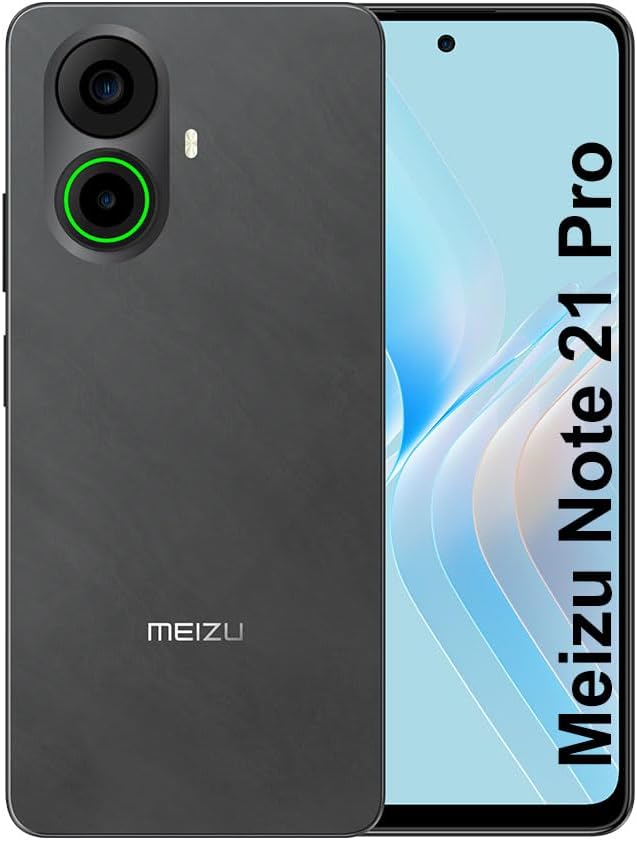
Íomhá 3.1: Tosaigh agus cúil view of the Meizu Note 21 Pro. The front displays the screen with a punch-hole camera. The rear shows the dual camera module with a green accent ring on one lens, a flash, and the "MEIZU" logo at the bottom.
- Taispeántas Tosaigh: 6.78-inch FHD+ screen with a 120Hz refresh rate.
- Ceamara Tosaigh: Suite ag barr lár an taispeántais.
- Ceamaraí Cúil: Dual camera system, including a 64MP main camera.
- Braiteoir Méarloirg Taobh: Integrated for secure access.
- USB Port: Le haghaidh muirearú agus aistriú sonraí.
- Jack Fuaime 3.5mm: Le haghaidh cluasáin.
- SIM/MicroSD Card Tray: Supports Dual Nano SIM and MicroSD cards.
4. Socrú
4.1. Cártaí SIM agus MicroSD a Chur Isteach
- Aimsigh an tráidire cárta SIM ar thaobh do ghléis.
- Cuir an uirlis eisfhearaidh SIM isteach sa pholl beag in aice leis an tráidire agus brúigh go réidh go dtí go dtiocfaidh an tráidire amach.
- Place your Nano SIM card(s) and/or MicroSD card into the designated slots on the tray. Ensure the gold contacts face downwards.
- Cuir an tráidire ar ais san fheiste go cúramach go dtí go gcliceálann sé ina áit.
4.2. Cumhdach Ar Siúl agus Socrú Tosaigh
- Press and hold the Power button until the Meizu logo appears.
- Lean na leideanna ar an scáileán chun do theanga a roghnú, ceangal le líonra Wi-Fi, agus do chuntas Google a bhunú.
- During setup, you will be guided to configure security features such as a PIN, pattern, or password.
4.3. Fingerprint Recognition Setup
- Déan nascleanúint chuig Socruithe > Slándáil & príobháideacht > Díghlasáil méarloirg.
- Follow the on-screen instructions to register your fingerprint by repeatedly touching the side-mounted sensor.
- Ensure your finger covers the entire sensor area during registration for optimal performance.
5. Do Ghléas a Oibriú
5.1. Taispeántas agus Nascleanúint
- The 6.78-inch FHD+ display operates at a 120Hz refresh rate for smooth visuals.
- Navigate the Android 14 operating system using touch gestures: tap, swipe, pinch-to-zoom.
- Access quick settings by swiping down from the top of the screen.
5.2. Feidhmeanna Ceamara
- Oscail an feidhmchlár Ceamara ón scáileán baile nó ón tarraiceán aipeanna.
- The rear camera system features a 64MP main sensor for high-resolution photos and a 2MP depth-of-field camera for portrait effects.
- The 13MP front-facing camera is suitable for selfies and video calls.
- Tap on the screen to focus, and use the on-screen shutter button to capture images. Explore various modes like Portrait, Night, and Pro within the camera app.
5.3. Feidhmíocht agus Stóráil
- The MediaTek G99 Octa Core processor ensures efficient performance for applications and multitasking.
- The device comes with 256GB of internal storage and 8GB of RAM.
- Storage can be expanded using a MicroSD card (sold separately).
5.4. Ceallraí agus Muirearú
- The Meizu Note 21 Pro is equipped with a 5000mAh battery.
- Use the provided Power Adapter for 30W fast charging.
- To charge, connect the USB cable to the phone's USB port and the power adapter, then plug the adapter into a wall outlet.
5.5. Nascacht
- 4G LTE: Supports various LTE FDD and TDD bands for cellular data. Note: This international version works on T-Mobile in the USA and globally with other carriers.
- Wi-Fi 5: Ceangail le líonraí gan sreang le haghaidh rochtain idirlín.
- Bluetooth: Pair with wireless accessories like headphones and speakers.
- NFC: Le haghaidh íocaíochtaí gan tadhall agus péireáil thapa le gléasanna comhoiriúnacha.
- GPS: Le haghaidh seirbhísí suímh agus loingseoireachta.
6. Cothabháil
- Glanadh: Use a soft, lint-free cloth to clean the screen and body of the device. Avoid harsh chemicals or abrasive materials.
- Cúram Battery: Avoid extreme temperatures. Do not fully discharge the battery frequently. For optimal battery longevity, keep the charge between 20% and 80%.
- Nuashonruithe Bogearraí: Regularly check for and install system updates to ensure optimal performance and security. Go to Socruithe > Córas > Nuashonrú córais.
7. Fabhtcheartú
| Eisiúint | Réiteach Féideartha |
|---|---|
| Ní chuireann an gléas cumhacht ar | Ensure the battery is charged. Connect the device to the power adapter and try again. If unresponsive, press and hold the Power button for 10-15 seconds to force a restart. |
| Comhartha líonra lag | Check if the SIM card is correctly inserted. Move to an area with better network coverage. Restart the device. Verify with your carrier that your plan is active. |
| Tá aipeanna mall nó ag tuairteáil | Close background applications. Clear app cache (Socruithe > Feidhmchláir > roghnaigh aip > Stóráil & taisce > Glan taisce). Atosaigh an gléas. Cinntigh go bhfuil dóthain spáis stórála ann. |
| Braiteoir méarloirg nach bhfuil ag obair | Ensure your finger and the sensor are clean and dry. Re-register your fingerprint in settings. |
8. Sonraíochtaí
- Múnla: Meizu Note 21 Pro
- Córas Oibriúcháin: Android 14
- Próiseálaí: MediaTek G99 Octa Core (2.2GHz)
- Taispeáin: 6.78 inches FHD+ (1080 x 2160 resolution), 120Hz Refresh Rate
- RAM: 8 GB
- Stóráil Inmheánach: 256 GB
- Ceamara Cúil: Príomh-64MP + Doimhneacht 2MP
- Ceamara Tosaigh: 13MP
- Battery: 5000mAh, Muirearú Tapa 30W
- Nascacht: 4G LTE (FDD:1,2,3,4,5,7,8,12,17,18,19,20,26,28,66; TDD:38,40,41), 3G WCDMA, 2G Quad Band, Wi-Fi 5, Bluetooth, NFC, GPS
- Jack Fuaime: 3.5 mm
- Toisí: 6.64 x 2.96 x 0.33 orlach
- Meáchan: 1.1 punt
9. Barántas agus Tacaíocht
For warranty information and technical support, please refer to the warranty card included with your product or visit the official Meizu websuíomh. Coinnigh do chruthúnas ceannaigh le haghaidh éilimh bharántais.
For further assistance, you may contact Meizu customer service through their official channels.


