Réamhrá
Welcome to the user manual for your Tibuta Smartpad A40 tablet. This guide provides essential information on setting up, operating, maintaining, and troubleshooting your device. The Smartpad A40 is designed for versatile use, featuring a large 10.1-inch display, a powerful quad-core processor, and the Android 14 operating system.

Image: The Tibuta Smartpad A40 tablet, shown with its protective case, highlighting its Android 14 operating system and 6GB RAM + 64GB ROM configuration.
Treoir Socraithe
1. Unboxing agus Cigireacht Tosaigh
Carefully remove all components from the packaging. Ensure the tablet, protective case, charging cable, and power adapter are present. Inspect the tablet for any physical damage.

Image: The Tibuta Smartpad A40 tablet with its included case and headphones, illustrating its core features such as Android 14, IPS display, memory, battery capacity, and camera specifications.
2. Muirearú an Tablet
Before first use, fully charge the tablet. Connect the Type-C charging cable to the tablet's charging port and the other end to the power adapter. Plug the adapter into a wall outlet. The charging indicator will show the charging status.

Image: The Tibuta Smartpad A40 tablet connected to a Type-C charger, emphasizing its 5000mAh battery capacity and estimated usage times for video playback and overall endurance.
3. Cumhacht Ar / As
- Chun Cumhacht a Chur ar: Press and hold the Power button located on the side of the tablet until the Tibuta logo appears.
- Chun Cumhacht as: Brúigh agus coinnigh an cnaipe Cumhachta go dtí go mbeidh an roghchlár roghanna cumhachta le feiceáil. Roghnaigh "Múch" agus deimhnigh.
- Chun Atosaigh: From the power options menu, select "Restart" and confirm.
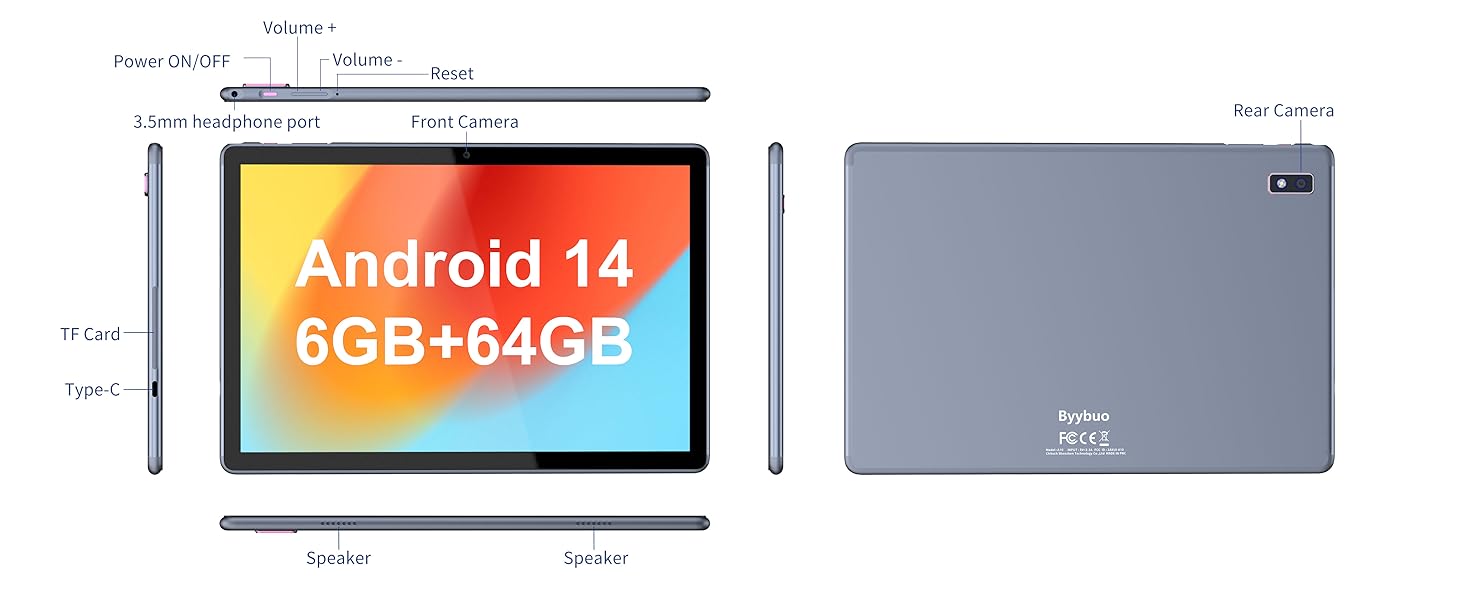
Image: A detailed diagram illustrating the physical layout of the Tibuta Smartpad A40, including the positions of its buttons, ports, and cameras for easy identification.
4. Treoraí Socrú Tosaigh
Upon first power-on, the tablet will guide you through the initial setup process. Follow the on-screen prompts to:
- Roghnaigh do theanga.
- Ceangail le líonra Wi-Fi.
- Sínigh isteach le do chuntas Google nó cruthaigh ceann nua.
- Socraigh glas scáileáin (PIN, patrún, pasfhocal).
- Review agus glac leis na téarmaí agus coinníollacha.
Operating Your Tibuta Smartpad A40
1. Navigation and Touchscreen Gestures
The Smartpad A40 features a responsive multi-touch display. Common gestures include:
- Tapáil: Chun mír a roghnú nó aip a oscailt.
- Tapáil & Coinnigh: Chun rochtain a fháil ar roghchláir chomhthéacsúla nó deilbhíní a bhogadh.
- Swipe: To scroll through pages or navigate between screens.
- Pinch-to-Zúmáil: To zoom in or out on images and web leathanaigh.
2. Taispeántas agus Fuaim
Experience vibrant visuals on the 10.1-inch IPS HD display with a resolution of 1280 x 800 pixels. The tablet also features an eye protection mode to reduce strain during prolonged use. Enjoy clear audio through the integrated dual high-fidelity speakers.

Image: The Tibuta Smartpad A40 tablet showcasing its IPS Full HD display and dual speakers, emphasizing its 10.1-inch screen size, 1280x800 IPS resolution, eye protection mode, and high-fidelity audio output.
3. Performance and Operating System
Powered by a robust Quad-Core processor and running on Android 14, the Smartpad A40 delivers smooth performance for multitasking, gaming, and streaming. The Android 14 system ensures access to the latest features and security updates.

Image: The Tibuta Smartpad A40 tablet showcasing its Android 14 operating system and GMS certification, with various application icons visible on the screen.
4. Stóráil agus Cuimhne
The tablet comes with 6GB of RAM (2GB + 4GB virtual) and 64GB of internal storage, providing ample space for your applications, photos, videos, and documents. Storage can be expanded up to 128GB using a microSD card (not included).

Image: The Tibuta Smartpad A40 tablet highlighting its 6GB RAM and 64GB internal storage, along with the option to expand storage up to 128GB via a microSD card.
5. Ceamaraí
Capture moments with the tablet's dual cameras: a 5 MP front camera for video calls and selfies, and an 8 MP rear camera for photos and videos.

Image: Demonstrates the Tibuta Smartpad A40's camera capabilities, featuring a 5.0 MP front camera for HD video and an 8.0 MP rear camera with autofocus for capturing photos.
6. Nascacht
The Smartpad A40 supports Wi-Fi (802.11ac) for fast internet access and Bluetooth for connecting to wireless peripherals like headphones and speakers.
7. Versatile Use Cases
The Tibuta Smartpad A40 is designed for a wide range of activities, from entertainment to productivity. Its portability makes it ideal for on-the-go use, while its features support various daily needs.

Image: Illustrates the diverse applications of the Tibuta Smartpad A40, including watching videos, assisting with daily tasks, and serving as a tablet for both children and seniors.
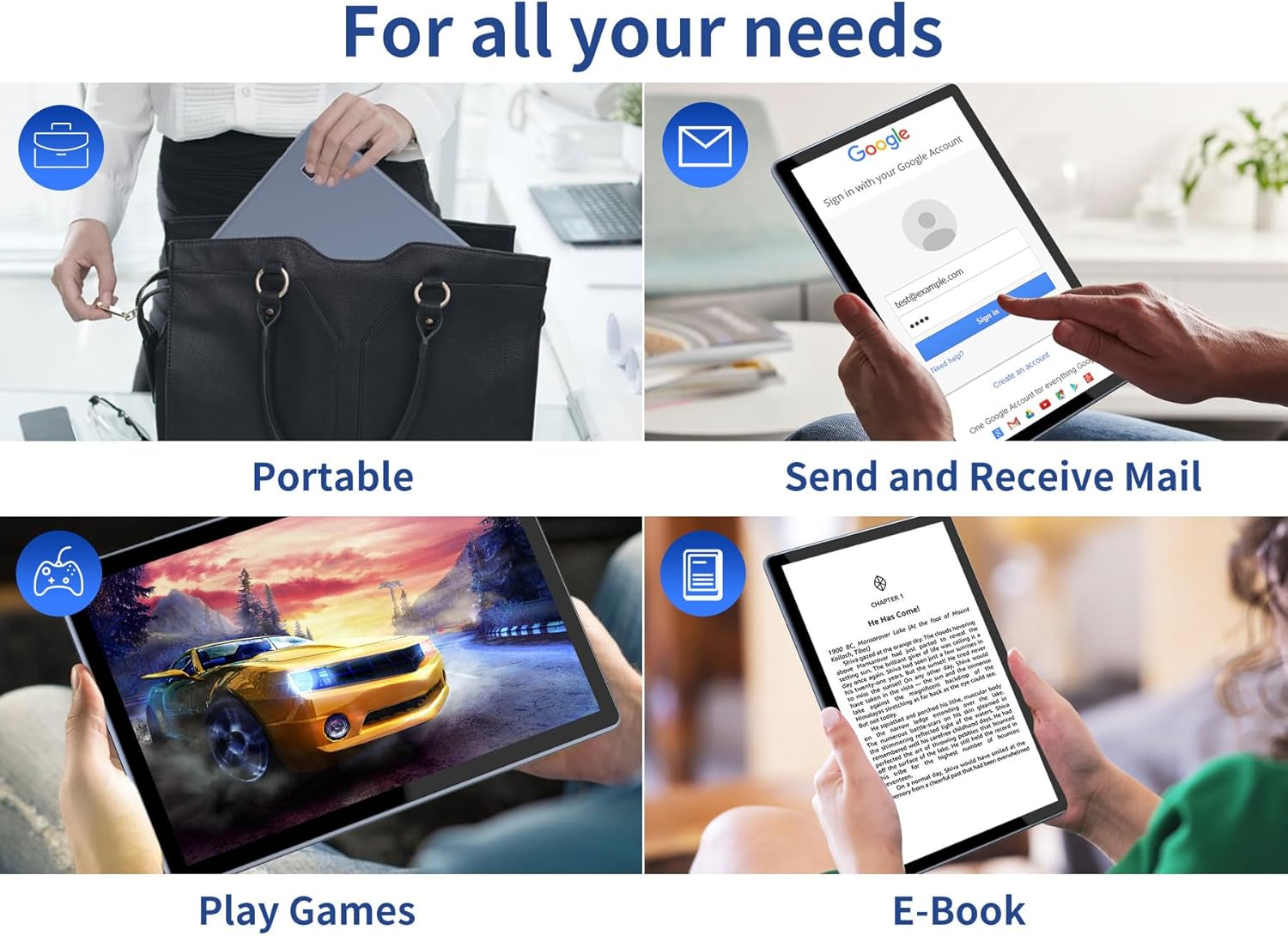
Image: Depicts the versatility of the Tibuta Smartpad A40 for various user needs, including portability, email communication, gaming, and e-book reading.
Cothabháil
1. Cleaning Your Tablet
Bain úsáid as éadach bog, saor ó lint chun an scáileán agus corp an táibléid a ghlanadh. I gcás smúdáin righne, déan beagán díampNigh an t-éadach le huisce nó le glantóir scáileáin. Seachain ceimiceáin ghéara nó ábhair scríobacha a úsáid.
2. Nuashonruithe Bogearraí
Seiceáil go rialta le haghaidh nuashonruithe córais agus suiteáil iad lena chinntiú go bhfuil na gnéithe, na paistí slándála agus na feabhsuithe feidhmíochta is déanaí ar do tháibléad. Téigh go Socruithe > Córas > Nuashonrú córais a sheiceáil le haghaidh nuashonruithe.
3. Cúram Battery
Fad a chur le saol na ceallraí:
- Seachain teochtaí foircneacha.
- Ná lig don cheallraí draenáil go hiomlán sula ndéantar í a athluchtú go minic.
- Díphlugáil an luchtaire nuair a bheidh an ceallraí lán.
4. Bainistíocht Stórála
Go tréimhsiúil maidir leview your installed applications and files. Díshuiteáil aipeanna neamhúsáidte agus scrios aon rud nach bhfuil gá leis. files to free up storage space and maintain optimal performance. Utilize the microSD card slot for additional storage if needed.
Fabhtcheartú
| Fadhb | Cúis Féideartha | Réiteach |
|---|---|---|
| Tablet does not turn on. | Low battery; system crash. | Charge the tablet for at least 30 minutes. Press and hold the Power button for 10-15 seconds to force restart. If unresponsive, locate the small reset pinhole (refer to diagram in Setup Guide) and gently press it with a paperclip. |
| Fadhbanna le nasc Wi-Fi. | Incorrect password; router issue; tablet Wi-Fi off. | Ensure Wi-Fi is enabled in Settings. Re-enter Wi-Fi password. Restart your Wi-Fi router. Forget the network and reconnect. |
| Feidhmíocht mhall. | Too many apps running; low storage; outdated software. | Close background apps. Clear cache. Uninstall unused apps. Check for system updates. Restart the tablet. |
| Apps crashing or freezing. | App bug; insufficient resources. | Force close the app (Settings > Apps > [App Name] > Force Stop). Clear app cache/data. Reinstall the app. Ensure system is updated. |
Sonraíochtaí
| Gné | Sonraigh |
|---|---|
| Branda | tibuta |
| Uimhir Mhúnla | A40 |
| Córas Oibriúcháin | Android 14 (Android 13 listed in some specs, but product title indicates 14) |
| Méid an Scáileáin | 10.1 orlach |
| Taifeach Scáileáin | 1280 x 800 Pixels (IPS HD) |
| Branda Próiseálaí | Allwinner (Quad-Core) |
| Méid RAM Suiteáilte | 6 GB (2+4GB) |
| Cumas Stórála Cuimhne | 64 GB |
| Stóráil Expandable | Micrimhilseogra SD (suas le 128GB) |
| Ceamara Tosaigh | 5 MP |
| Ceamara Cúil | 8 MP |
| Cumas Battery | 5000 mAh |
| Nascacht | Wi-Fi (802.11ac), Bluetooth |
| Port Muirearú | Cineál-C |
| Toisí na Mír (L x W x H) | 25.8 x 15.8 x 2 cm |
| Meáchan Mír | 1.16 cileagram |
Barántas & Tacaíocht
Faisnéis Bharántas
Specific warranty details for the Tibuta Smartpad A40 are typically provided with your purchase documentation or on the product packaging. Please refer to these resources for information regarding warranty period, coverage, and terms. In general, manufacturer warranties cover defects in materials and workmanship under normal use.
Tacaíocht do Chustaiméirí
For technical assistance, troubleshooting beyond this manual, or warranty claims, please contact Tibuta customer support through the following channels:
- Féach ar an bhfaisnéis teagmhála atá ar fáil ar phacáistiú do tháirge.
- Visit the official Tibuta websuíomh le haghaidh acmhainní tacaíochta, ceisteanna coitianta, agus foirmeacha teagmhála.
- If purchased through an online retailer, their customer service portal may also offer support or direct you to the manufacturer.


