Réamhrá
The Maxcom FW55 Aurum Pro Smartwatch is designed to enhance your daily life with its comprehensive health monitoring, communication, and fitness tracking capabilities. This manual provides detailed instructions on how to set up, operate, and maintain your smartwatch to ensure optimal performance and longevity.
I measc na bpríomhghnéithe tá:
- Integrated health monitor for sleep, blood pressure, heart rate, and oxygen levels.
- Ability to answer calls directly from the watch.
- Lightweight design for comfortable wear.
- Extensive fitness tracking for various activities like fitness, hiking, running, badminton, cycling, and football.
- Music control functionality.
- Customizable watch faces and interchangeable straps.
- Notifications for SMS, applications, emails, social media, and news.
- Friotaíocht uisce IP67.

Íomhá: Tosaigh view of the Maxcom FW55 Aurum Pro Smartwatch, displaying the watch face with time, step count, and heart rate. The watch features a silver casing agus strap silicone gorm.
Treoir Socraithe
1. Muirearú Tosaigh
Before first use, fully charge your Maxcom FW55 Aurum Pro Smartwatch. Connect the provided charging cable to the charging points on the back of the watch and to a USB power source. A full charge typically takes approximately 2 hours. The battery indicator on the watch screen will show charging progress.

Íomhá: Cúl view of the Maxcom FW55 Aurum Pro Smartwatch, highlighting the two metallic charging pins and the optical sensors for health monitoring.
2. Suiteáil agus Péireáil Aipeanna
To unlock the full potential of your smartwatch, download the companion application on your smartphone. Cuardaigh le haghaidh the official Maxcom app in your device's app store (Google Play Store for Android or Apple App Store for iOS). Once installed:
- Open the Maxcom app on your smartphone.
- Ensure Bluetooth is enabled on both your smartphone and smartwatch.
- Follow the on-screen instructions in the app to search for and connect to your FW55 Aurum Pro Smartwatch.
- Confirm the pairing request on both devices if prompted.
Successful pairing will synchronize data and enable notifications and call functions.
3. Changing the Watch Strap
Your Maxcom FW55 Aurum Pro Smartwatch comes with two interchangeable straps, allowing for personalization. To change the strap:
- Locate the quick-release pins on the underside of the strap where it connects to the watch body.
- Gently slide the pin inwards to detach the strap from the watch lug.
- Repeat for the other side of the strap.
- To attach a new strap, align one end of the pin with the hole in the watch lug, then slide the pin inwards and guide the other end into the corresponding hole. Release the pin to secure the strap.
- Ensure both ends of the strap are securely fastened before wearing.

Íomhá: Uilleach view of the Maxcom FW55 Aurum Pro Smartwatch fitted with a silver mesh strap, demonstrating an alternative strap option.
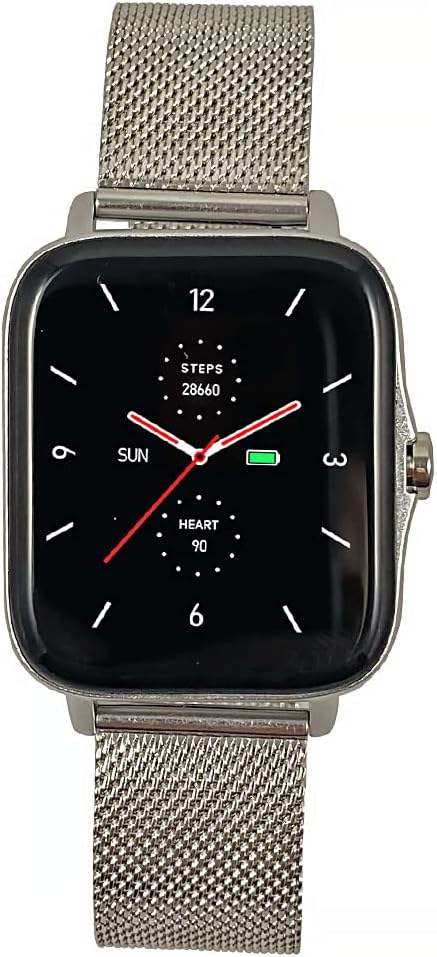
Íomhá: Tosaigh view of the Maxcom FW55 Aurum Pro Smartwatch with a silver mesh strap, showing the watch face with time, steps, and heart rate.
Treoracha Oibriúcháin
1. Nascleanúint Bhunúsach
The Maxcom FW55 Aurum Pro Smartwatch features a responsive touchscreen and a side button for navigation:
- Swipe Suas/Síos: Scrollaigh trí roghchláir agus fógraí.
- Swipe Ar Chlé/Deas: Access quick functions or different widgets (e.g., heart rate, weather).
- Tapáil: Roghnaigh mír nó deimhnigh gníomh.
- Cnaipe Taobh: Brúigh chun filleadh ar an scáileán baile nó chun an gléas a dhúiseacht. Brúigh fada le haghaidh roghanna cumhachta.
2. Calls and Notifications
Once paired with your smartphone, the smartwatch allows you to manage calls and receive notifications:
- Ag Freagairt Glaonna: When an incoming call is received, the watch will display the caller ID. Tap the green phone icon on the screen to answer the call directly from your watch.
- Glaonna a Dhéanamh: Access the call menu on your watch to view recent calls or dial a number.
- Fógraí: Messages from SMS, various applications, emails, social media platforms, and news alerts will appear on your watch screen. Swipe down from the top of the watch face to view do stair fógraí.
3. Monatóireacht Sláinte
The FW55 Aurum Pro Smartwatch provides continuous health monitoring:
- Ráta Croí: Access the heart rate monitor from the main menu or by swiping to the heart rate widget. The watch will measure and display your current heart rate.
- Blood Pressure & Oxygen: Similar to heart rate, dedicated sections in the health menu allow for on-demand measurements of blood pressure and blood oxygen saturation (SpO2).
- Rianú Codlata: Wear the watch to bed to automatically track your sleep patterns, including deep sleep, light sleep, and awake times. Data is synchronized with the app for detailed analysis.
4. Rianú Aclaíochta
Track your physical activity with precision:
- Modhanna Gníomhaíochta: Select from over 100 sports modes including fitness, hiking, running, badminton, cycling, and football. The watch will record relevant metrics for each activity.
- Daily Metrics: Automatically tracks steps taken, calories burned, and distance covered (mileage) throughout the day.
- Sioncronú Sonraí: All fitness data is synchronized with the companion app, allowing you to review your progress, set goals, and optimize your training sessions.
5. Rialú Ceoil
Control music playback on your connected smartphone directly from your smartwatch. Access the music control feature to play, pause, skip tracks, and adjust volume without needing to take out your phone.
6. Saincheapadh
Pearsantaigh do thaithí uaireadóra cliste:
- Aghaidheanna Faire: Choose from over 100 dial models available through the watch or the companion app to match your style or mood.
- Menu Layout: Customize the menu layout and arrangement of applications to suit your preferences for quick access.
Cothabháil
1. Glanadh d'Uaireadóir Cliste
Chun cuma agus feidhmiúlacht d’uaireora cliste a choinneáil:
- Cuimil an scáileán agus corp an uaireadóra le héadach bog, saor ó lint.
- Le haghaidh smúdáin righne, beagán dampNigh an t-éadach le huisce. Seachain ceimiceáin ghéara nó ábhair scríobacha a úsáid.
- Clean the charging contacts and sensors on the back of the watch regularly to ensure proper charging and accurate readings.
2. Friotaíocht Uisce (IP67)
The Maxcom FW55 Aurum Pro Smartwatch is rated IP67, meaning it is fully waterproof up to a depth of 1 meter. This makes it suitable for daily use, including hand washing and exposure to rain. However, it is not recommended for swimming, diving, or prolonged submersion in water, especially hot water or steam, as this can compromise the seals over time.
3. Cúram Battery
Chun saolré agus fad saoil na ceallraí a uasmhéadú:
- Muirearaigh an faire go hiomlán roimh an gcéad úsáid.
- Seachain an ceallraí a dhraenáil go hiomlán go minic.
- Stóráil an faire in áit fhionnuar, thirim nuair nach bhfuil sé in úsáid ar feadh tréimhsí fada.
- Typical battery life is 6-10 days with intensive use.
Fabhtcheartú
If you encounter issues with your Maxcom FW55 Aurum Pro Smartwatch, please refer to the following common solutions:
- Ní chasann an faire air: Cinntigh go bhfuil an faire lánluchtaithe. Ceangail leis an luchtaire é agus fan cúpla nóiméad sula ndéanann tú iarracht é a chur air arís.
- Ní féidir péireáil le fón cliste:
- Cinntigh go bhfuil Bluetooth cumasaithe ar an dá ghléas.
- Cinntigh go bhfuil an faire laistigh de raon Bluetooth do ghutháin.
- Atosaigh an faire agus an fón cliste araon.
- Forget the device in your phone's Bluetooth settings and try pairing again through the Maxcom app.
- Inaccurate health/fitness data:
- Cinntigh go bhfuil an uaireadóir caite go docht ar do chaol na láimhe, ach gan é a bheith ró-dhlúth.
- Glan na braiteoirí ar chúl an uaireadóra.
- Ensure your personal information (height, weight, age) is accurately entered in the companion app.
- Fógraí nach bhfuil le feiceáil:
- Check notification permissions for the Maxcom app on your smartphone.
- Cinntigh go bhfuil an faire ceangailte trí Bluetooth.
- Verify that "Do Not Disturb" mode is not active on either device.
If the issue persists, please contact Maxcom customer support for further assistance.
Sonraíochtaí
| Gné | Sonraigh |
|---|---|
| Branda | Maxcom |
| Uimhir Mhúnla | FW55 |
| Dath | Silver (with silverl strap option) |
| Méid an Scáileáin | 1.5 Orlach |
| Toisí Cásanna | 44 x 38 x 10 mm |
| Méid Strap | 255 x 20 mm |
| Meáchan | 46g |
| Cumarsáid Gan Sreang | Bluetooth |
| Battery Life (Intensive Use) | 6-10 lá |
| Friotaíocht Uisce | IP67 (fully waterproof up to 1 meter) |
| Monaróir | Maxcom |
| Tír Bhunaidh | an Phortaingéil |

Image: Diagram illustrating the dimensions of the Maxcom FW55 Aurum Pro Smartwatch, indicating a height of 44mm and a width of 38mm for the watch case.
Barántas agus Tacaíocht
Maxcom products are designed for reliability and performance. For information regarding warranty coverage, please refer to the warranty card included with your product or visit the official Maxcom websuíomh.
For technical support, troubleshooting assistance beyond this manual, or service inquiries, please contact Maxcom customer support through their official channels. Contact information can typically be found on the Maxcom websuíomh nó i bpacáistiú an táirge.
Monaróir: Maxcom


