Réamhrá
Go raibh maith agat as an gceannachasing the Panasonic TX-55MZ1500E 55-inch 4K OLED TV. This television combines advanced OLED display technology with smart features and high-performance processing to deliver an exceptional viewing and gaming experience. This manual provides essential information for setting up, operating, and maintaining your new television. Please read it thoroughly before use and retain it for future reference.

Íomhá 1: Tosaigh view of the Panasonic TX-55MZ1500E 55-inch 4K OLED TV, showcasing its display quality with a night city scene.
Eolas Tábhachtach Sábháilteachta
Chun oibriú sábháilte a chinntiú agus damáiste a chosc, lean na réamhchúraimí sábháilteachta seo a leanas:
- Soláthar Cumhachta: Ceangail an teilifís le foinse cumhachta AC amháin mar atá léirithe ar an lipéad rátála.
- Aeráil: Ná bac na hoscailtí aerála. Cinntigh go bhfuil dóthain spáis timpeall an teilifíseáin le go mbeidh sreabhadh aeir ceart ann.
- Uisce agus Taise: Ná nochtaigh an teilifís don bháisteach ná don taise. Ná cuir rudaí atá lán le leachtanna, amhail vásaí, ar an teilifís.
- Glanadh: Unplug the TV before cleaning. Use a soft, dry cloth. Avoid liquid cleaners or aerosol sprays.
- Socrúchán: Cuir an teilifís ar dhromchla cobhsaí, cothrom. Seachain é a chur i solas díreach na gréine nó in aice le foinsí teasa.
- Páistí: Déan maoirseacht ar leanaí chun cosc a chur orthu dreapadh ar an teilifís nó ar an seastán.
- Ag seirbhísiú: Ná déan iarracht an táirge seo a sheirbheáil ort féin. Déan gach seirbhísiú a tharchur chuig pearsanra seirbhíse cáilithe.
Ábhar an Phacáiste
Sula dtéann tú ar aghaidh leis an socrú, déan cinnte go bhfuil na míreanna go léir atá liostaithe thíos san áireamh i do phacáiste:
- Panasonic TX-55MZ1500E 55-inch 4K OLED TV
- Remote Control (requires 1 AA battery, not always included)
- Corda Cumhachta
- TV Stand (if applicable, assembly required)
- Treoir Tosaigh Tapa
- Safety Information Leaflet
Nóta: The remote control requires one AA battery. Ensure you have this battery available for initial setup.
Treoir Socraithe
1. Díphacáil agus Socrú
- Carefully remove the TV from its packaging. It is recommended to have two people for this process due to the size and weight.
- Place the TV on a flat, stable surface or prepare for wall mounting (wall mount sold separately).
- Ensure there is adequate space around the TV for ventilation (at least 10 cm on all sides).
2. Suiteáil Seasamh (más infheidhme)
If you are using the included TV stand, follow these steps:
- Cuir scáileán an teilifíse síos ar éadach bog, glan chun scríobtha a chosc.
- Attach the stand base to the TV using the provided screws, ensuring it is securely fastened. Refer to the Quick Start Guide for specific screw locations and types.
- Carefully lift the TV with the stand and place it in your desired viewsuíomh ing.
3. Gléasanna a Cheangal
The TX-55MZ1500E offers various connectivity options. Refer to the side view íomhá le haghaidh suíomhanna calafoirt.

Íomhá 2: Taobh profile of the Panasonic TX-55MZ1500E, highlighting the slim design and accessible input ports.
- HDMI: Connect your Blu-ray player, game console, or set-top box to the HDMI ports. This model supports HDMI 2.1 for high-refresh-rate gaming and advanced features.
- USB: Connect USB storage devices for media playback or software updates. The TV has 1 USB port.
- Antenna/Cábla: Connect your antenna or cable TV feed for broadcast channels.
- Ethernet (LAN): Le haghaidh nasc idirlín sreangaithe cobhsaí.
- Aschur Fuaime Digiteach Optúil: Chun ceangal le córas fuaime seachtrach.
4. Ceangal Cumhachta agus Socrú Tosaigh
- Ceangail an corda cumhachta leis an teilifís agus ansin le soicéad balla.
- Insert the AA battery into the remote control.
- Brúigh an cnaipe Cumhachta ar an gcianrialtán chun an teilifís a chasadh air.
- Follow the on-screen instructions to complete the initial setup, which typically includes:
- Roghnú teanga
- Rogha tíre/réigiúin
- Network connection (Wi-Fi or wired Ethernet)
- Scanadh cainéal (le haghaidh antenna/cábla)
- Socruithe crios ama
Ag Oibriú Do Theilifíse
Feidhmeanna Bunúsacha
- Cumhacht ar siúl / as: Brúigh an Cumhacht cnaipe ar an gcianrialtán.
- Rialú Toirte: Bain úsáid as an Imleabhar Suas/Síos cnaipí.
- Roghnú Cainéal: Bain úsáid as an Channel Up / Down buttons or enter channel numbers directly.
- Roghnú Ionchuir: Brúigh an Ionchur button to switch between connected devices (HDMI 1, HDMI 2, etc.).
- Nascleanúint an Roghchláir: Bain úsáid as na heochracha saigheada agus OK button to navigate on-screen menus.
Smart TV Features (Smart TV OS)
Your Panasonic TX-55MZ1500E runs on a Smart TV OS, providing access to a wide range of online content and applications.
- Rochtain a fháil ar Aipeanna: From the home screen, select your desired application, such as Netflix or YouTube.
- Brabhsáil Idirlín: Bain úsáid as an-tógtha i web bhrabhsálaí chun rochtain a fháil webláithreáin.
- Sruthú Gan Sreang: Utilize features like Mirroring, Swipe & Share, and DLNA to stream content from compatible devices.
Socruithe Pictiúr agus Fuaime
The TV features the HCX Pro AI processor for advanced image processing and supports various HDR formats.
- Modhanna Pictiúir: Select from various preset picture modes (e.g., Standard, Cinema, Game, Custom) to optimize viewag lorg ábhar difriúil.
- Tacaíocht HDR: The TV supports HDR10+, HDR10, HLG, and Dolby Vision, automatically adjusting for optimal contrast and color with compatible content.
- Modhanna Fuaime: Adjust audio settings for different content types (e.g., Standard, Music, Speech).
Gnéithe Cearrbhachais
Designed for a high-level gaming experience, this TV includes:
- Lag ionchuir Íseal: Íoslaghdaíonn sé an mhoill idir ionchur an rialtóra agus gníomh ar an scáileán.
- HDMI2.1: Supports advanced gaming features like Variable Refresh Rate (VRR) and Auto Low Latency Mode (ALLM) on compatible devices.
- Game Control Board: Access specific gaming settings and information quickly.
Cothabháil agus Cúram
Cuirfidh cúram ceart le saolré do theilifíse.
- Glanadh Scáileáin: Cuimil an scáileán go réidh le héadach micrea-snáithín bog, tirim. I gcás marcanna righne, déan beagán díothaithe.ampen the cloth with water or a specialized screen cleaner (apply to cloth, not directly to screen). Do not use alcohol, benzene, or abrasive cleaners.
- Glanadh Comh-Aireachta: Glan caibinéad an teilifíse le héadach bog, tirim.
- Dusadh: Glan na hoscailtí aerála go rialta chun róthéamh a chosc.
- Múch: Díphlugáil an teilifís ón asraon cumhachta i gcónaí sula ndéantar é a ghlanadh.
Fabhtcheartú
Má bhíonn fadhbanna agat le do theilifís, féach ar na fadhbanna agus na réitigh choitianta seo a leanas:
| Fadhb | Cúis / Réiteach Féideartha |
|---|---|
| Gan chumhacht |
|
| Gan pictiúr, ach tá fuaim ann |
|
| Gan fuaim, ach tá pictiúr ann |
|
| Ní féidir ceangal le Wi-Fi |
|
| Cianrialtán nach bhfuil ag obair |
|
Sonraíochtaí
Key technical specifications for the Panasonic TX-55MZ1500E:
| Gné | Sonraigh |
|---|---|
| Ainm an tSamhail | TX-55MZ1500E |
| Branda | Panasonic |
| Méid an Scáileáin | 55 orlach (139 cm) |
| Teicneolaíocht Taispeána | OLED |
| Rún | 4K Ultra HD (3840×2160) |
| Ráta Athnuachana | 100 Hz |
| Próiseálaí | HCX Pro AI |
| Tacaíocht HDR | HDR10+, HDR10, HLG, Dolby Vision |
| Córas Oibriúcháin | Smart TV OS |
| Seirbhísí Idirlín | Netflix, YouTube, and more |
| Nascacht | HDMI (HDMI 2.1 compatible), Wi-Fi, USB (1 port) |
| Cóimheas Gné | 16:9 |
| Comhpháirteanna San áireamh | Cianrialú |
| Tomhaltas Cumhachta (SDR) | 84 kWh / 1000h |
| Tomhaltas Cumhachta (HDR) | 120 kWh / 1000h |
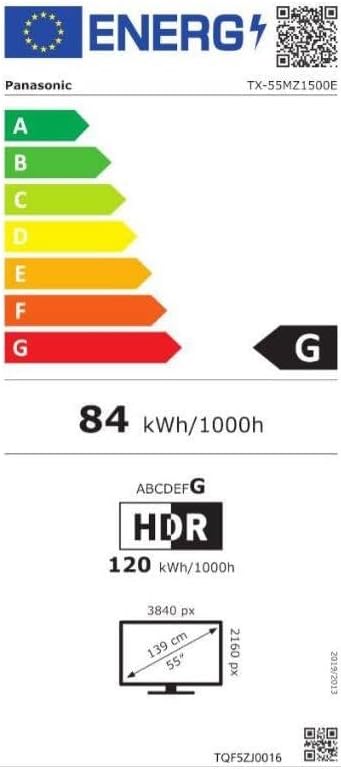
Image 3: Energy efficiency label for the Panasonic TX-55MZ1500E, detailing power consumption and display resolution.
Barántas agus Tacaíocht
Panasonic products are manufactured to high-quality standards. For information regarding your product's warranty, please refer to the warranty card included in your package or visit the official Panasonic websuíomh do do réigiún.
For technical support, troubleshooting assistance beyond this manual, or service inquiries, please contact Panasonic customer support. Contact details can typically be found on the Panasonic websuíomh nó i ndoiciméadacht do tháirge.


