1. Réamhrá
The Miuzei Pi UPS PowerPack Expansion Board is designed to provide an uninterruptible power supply (UPS) solution for your Raspberry Pi 3B+, 3B, or 2B. This board, combined with its acrylic case, ensures continuous operation and portability for your Raspberry Pi projects by providing battery backup and power management capabilities.
2. Táirge Tharview agus Gnéithe
The Miuzei Pi UPS PowerPack is an advanced power management solution for Raspberry Pi. It features a Li-polymer battery interface, multiple USB output ports, and a micro USB charging port. Key features include:
- Feidhmiúlacht UPS: Provides continuous power to the Raspberry Pi during power failures, preventing reboots when switching from charger to battery power.
- LEDanna Táscaire Ceallraí: Four LEDs display the current battery power level (25%, 50%, 75%, 100%).
- Dedicated Fan Power Interface: Includes a Raspberry Pi fan power interface that does not occupy the Raspberry Pi GPIO pins.
- Automatic Load Detection: Can automatically detect the load and output 5V. It also features an automatic cut-off of the 5V output after 20 seconds when unplugged and the switch is on, conserving battery life.
- Dual Battery Support: Supports two 3.7V Li-polymer batteries for extended runtime.
The board is designed for easy integration with Raspberry Pi models 3B+, 3B, and 2B, offering a compact and robust power solution.

Image 2.1: Comparison highlighting the features of the new version Miuzei Pi UPS PowerPack, including UPS functionality, battery indicator LEDs, and dedicated fan power interface, compared to an older version.
Board Component Identification

Íomhá 2.2: Mionsonraithe view of the UPS PowerPack board, indicating key components such as battery indicator LEDs, Micro USB charging port, USB output ports, Raspberry Pi fan power interface, power output switch, output indicator LED, battery check key, and two battery interfaces.
3. Faisnéis Sábháilteachta
- Ná nochtaigh an gléas d'uisce ná do thaise iomarcach.
- Seachain teochtaí foircneacha.
- Do not disassemble or modify the board or battery pack.
- Use only the specified battery type (3.7V Li-polymer).
- Ensure correct polarity when connecting batteries.
- Coinnigh as teacht leanaí.
4. Ábhar Pacáiste
Deimhnigh le do thoil go bhfuil na hearraí uile i láthair i do phacáiste:
- Miuzei Pi UPS PowerPack Board
- Acrylic Case (Top and Bottom plates)
- Li-polymer Battery (Quantity may vary based on kit)
- Brass Standoffs (Long and Short)
- Metal Standoffs and Nuts
- Scriúnna
- Blue Heatsinks (Various sizes)
- scriúire
- Cábla Micrimhilseogra USB

Image 4.1: The complete Miuzei Pi UPS PowerPack kit, showing an assembled unit with a Raspberry Pi, alongside all included components such as the UPS board, acrylic case parts, various standoffs, screws, heatsinks, screwdriver, and micro USB cable.
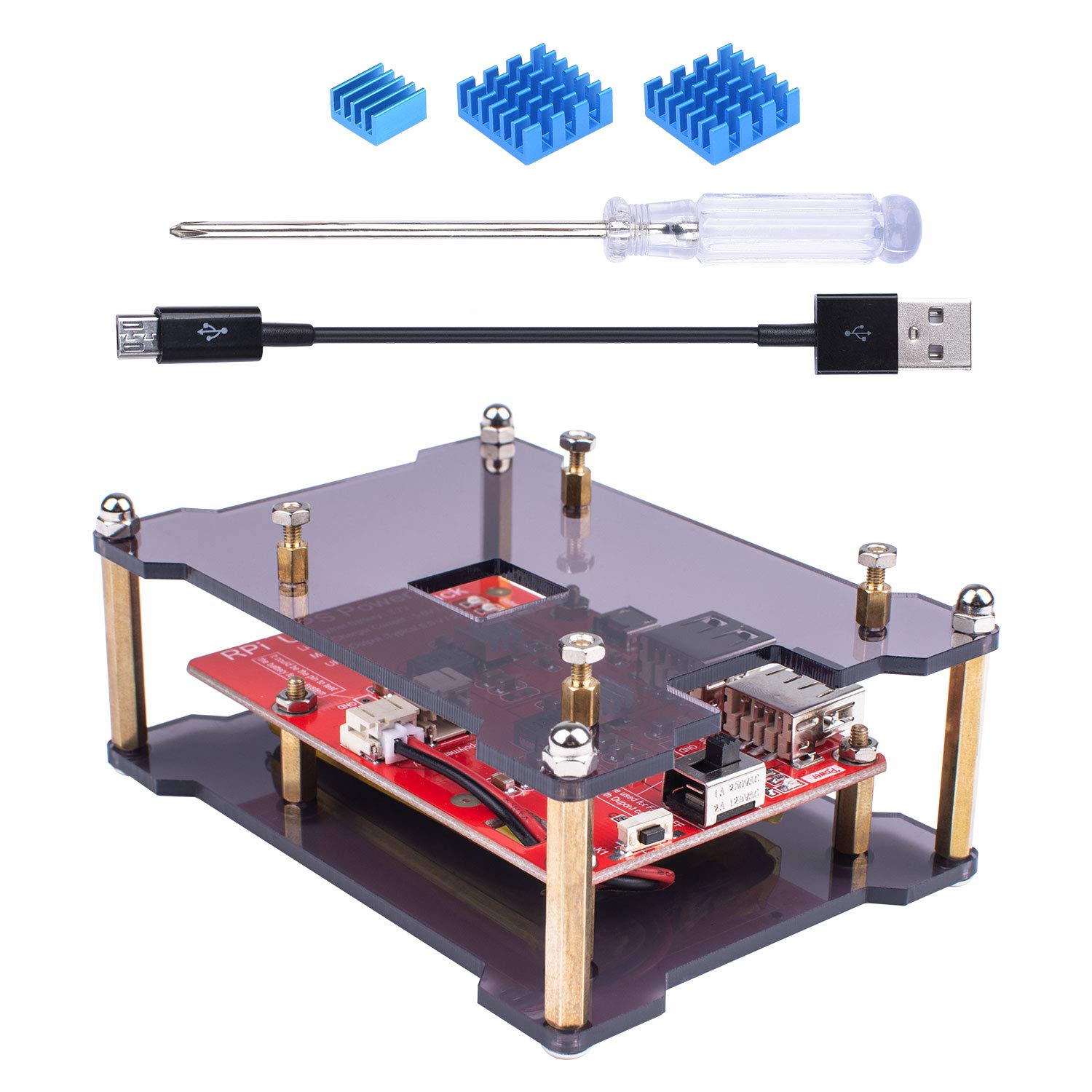
Íomhá 4.2: A view of the Miuzei Pi UPS PowerPack components, including the blue heatsinks, a small screwdriver, a micro USB cable, and the assembled acrylic case with the UPS board mounted, ready for a Raspberry Pi.
5. Cóimeáil agus Socrú
Follow these steps to assemble your Miuzei Pi UPS PowerPack and integrate it with your Raspberry Pi. A Raspberry Pi board is not included in this kit.
- Apply Heatsinks: Carefully peel off the protective film from the thermal conductive adhesive on the heatsinks. Apply the heatsinks to the appropriate chips on your Raspberry Pi board. Ensure good contact for optimal heat dissipation.
- Mount the UPS Board: Secure the Miuzei Pi UPS PowerPack board to the bottom acrylic plate using the provided screws and short standoffs.
- Ceangail an Battery: Connect the Li-polymer battery to the designated battery interface on the UPS board. Ensure correct polarity. The board supports two batteries for increased capacity.
- Mount Raspberry Pi: Place your Raspberry Pi board on top of the UPS board, aligning the mounting holes. Use the longer brass standoffs to secure the Raspberry Pi to the UPS board and the top acrylic plate.
- Final Case Assembly: Attach the top acrylic plate using the remaining screws and nuts, completing the enclosure.
- Muirear Tosaigh: Before first use, connect the Micro USB charging port on the UPS board to a 5V/2A power adapter using the provided Micro USB cable. Allow the battery to fully charge. The battery indicator LEDs will show charging progress.

Image 5.1: Illustration of the blue heatsinks provided, detailing their dimensions and the presence of thermal conductive adhesive for easy application to Raspberry Pi components.

Íomhá 5.2: Taobh view of the assembled Miuzei Pi UPS PowerPack, demonstrating how the Raspberry Pi board (not included) is mounted on top of the UPS expansion board within the acrylic case.

Image 5.3: The fully assembled Miuzei Pi UPS PowerPack, showcasing a Raspberry Pi and an optional display screen (neither included) integrated into the acrylic case, powered by the UPS board.
6. Oibríocht
Cumhachtú Ar / As
- To power on the Raspberry Pi via the UPS board, ensure the battery is connected and the power output switch (labeled 'ON/OFF' or similar) is in the 'ON' position.
- To power off, switch the power output switch to the 'OFF' position.
An Ceallraí a mhuirearú
- Connect a 5V/2A Micro USB power adapter to the Micro USB charging port on the UPS board.
- The battery indicator LEDs will illuminate to show the charging status. When all four LEDs are solid, the battery is fully charged.
- Nóta: The battery only using a micro USB power supply may not provide full power to the Raspberry Pi under heavy load. For optimal performance, ensure the power adapter meets the Raspberry Pi's requirements.
UPS Functionality
When the UPS board is connected to both a power adapter and the Raspberry Pi, it will power the Pi and simultaneously charge the battery. In the event of a power outage, the board will automatically switch to battery power without interrupting the Raspberry Pi's operation, ensuring a seamless transition.
Táscaire ceallraí LED
The four LEDs on the board indicate the approximate battery charge level:
- LED amháin: 0-25%
- Dhá soilse faoi stiúir: 25-50%
- Trí soilse faoi stiúir: 50-75%
- Ceithre soilse faoi stiúir: 75-100%
7. Cothabháil
- Cúram Battery: To prolong battery life, avoid fully discharging the battery frequently. If storing the device for an extended period, charge the battery to approximately 50-70%.
- Glanadh: Use a dry, soft cloth to clean the acrylic case and board. Do not use liquid cleaners or solvents.
- Cigireacht: Seiceáil na naisc agus na scriúnna go léir go tréimhsiúil lena chinntiú go bhfuil siad slán.
8. Fabhtcheartú
- Raspberry Pi Not Powering On:
- A chinntiú go ngearrtar an ceallraí.
- Verify the power output switch on the UPS board is in the 'ON' position.
- Check all connections between the UPS board and the Raspberry Pi.
- Ceallra Gan Muirearú:
- Confirm the Micro USB power adapter is functioning and connected correctly.
- Ensure the power adapter provides 5V/2A output.
- If the board stops accepting charging input after approximately 27 hours, try disconnecting and reconnecting the power source to reset the charging cycle. This behavior has been noted in some units.
- Short Battery Life / Unexpected Shutdowns:
- The power consumption of your Raspberry Pi setup (including peripherals) directly impacts battery life. Reduce unnecessary loads if extended runtime is required.
- Some users have reported that the unit may slowly discharge the battery even when connected to AC power, potentially leading to unexpected shutdowns after extended periods. Ensure regular monitoring of battery charge status, especially for critical applications.
- Ensure the battery is fully charged before relying on battery power.
- Róthéamh:
- Verify that the heatsinks are properly installed on the Raspberry Pi's main chips.
- Ensure adequate ventilation around the assembled unit.
9. Specifications (Model MC12-1)
| Branda | Miuzei |
| Uimhir Mhúnla Mír | MC12-1 |
| Li-polymer Battery Voltage | 3.7V (Supports two 3.7V lithium batteries) |
| Max Charger Reatha | 5.0V / 2A |
| UPS Output (Typical) | 5.0V / 2A |
| Cineál nascóirí | Micrea USB (le muirearú) |
| Cineál Cábla | USB |
| Gné Speisialta | Táscaire ceallraí LED |
| Toisí Pacáiste | 5 x 3.46 x 1.73 orlach |
| Meáchan Mír | 6.95 unsa |
| Dáta Ar Fáil den Chéad Uair | 6 Feabhra, 2018 |
10. Barántas agus Tacaíocht
Miuzei products are designed for reliability and performance. For specific warranty information regarding your Miuzei Pi UPS PowerPack Expansion Board, please refer to the documentation included with your purchase or contact Miuzei customer support directly.
For technical assistance, product inquiries, or to report issues, please visit the official Miuzei store or contact their customer service department. You can often find support resources and contact information on the brand's official websuíomh gréasáin nó tríd an miondíoltóir inar ceannaíodh an táirge.
Miuzei Store Link: Visit the Miuzei Store on Amazon


