Réamhrá
This manual provides instructions for the proper setup, operation, and maintenance of your RadioShack Pro-197 Radio Scanner. This base/mobile scanner offers advanced digital voice decoding capabilities and a range of features for monitoring various radio transmissions. Please read this manual thoroughly before operating your device.
Eolas Sábháilteachta
Observe the following safety precautions to prevent damage to the scanner or injury to yourself.
- Foinse Cumhachta: Ná húsáid ach an t-oiriúntóir cumhachta sonraithe. Toirt mhíchearttagféadann sé damáiste a dhéanamh don aonad.
- Antenna: Ensure the antenna is securely connected. Do not operate without an antenna for extended periods.
- Timpeallacht: Seachain an scanóir a nochtadh do theocht mhór, taise, deannach nó solas díreach na gréine.
- Glanadh: Dícheangail an chumhacht roimh ghlanadh. Bain úsáid as éadach bog, tirim. Ná húsáid glantóirí leachtacha ná aerasóil.
- Ag seirbhísiú: Ná déan iarracht an t-aonad a sheirbhísiú tú féin. Cuir gach seirbhísiú faoi bhráid phearsanra cáilithe.
Ábhar an Phacáiste
Deimhnigh go bhfuil na míreanna seo a leanas i do phacáiste:
- RadioShack Pro-197 Radio Scanner
- Cuibheoir Cumhachta AC
- Antenna teileascópacha
- Lámhleabhar Úsáideora
Táirge Tharview
Familiarize yourself with the main components and controls of your Pro-197 scanner.
Painéal Tosaigh
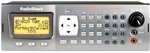
This image displays the front panel of the RadioShack Pro-197 Radio Scanner, featuring the large display screen, the numeric keypad, and various control buttons and knobs for operation.
- Taispeáin: Shows frequency, channel information, and menu options.
- Méarchlár: Used for entering frequencies, channel numbers, and menu navigation.
- Cnaipí Feidhme: Three buttons located under the display, whose purpose changes based on the current screen, with on-screen text help.
- Knob Imleabhar: Coigeartaíonn sé leibhéal aschuir fuaime.
- Squelch Knob: Adjusts the threshold for signal reception, eliminating static.
- Pad Loingseoireachta: Used for scrolling through lists and making selections.
Naisc Painéil Cúil
The rear panel typically includes connections for the antenna, power input, and auxiliary ports for external speakers or computer connectivity.
Socrú
Follow these steps for initial setup of your Pro-197 scanner.
- Ceangail an Antenna: Screw the supplied telescopic antenna into the antenna jack on the rear of the scanner. Ensure it is finger-tight.
- Cumhacht Ceangail: Plug the AC power adapter into the DC IN jack on the rear of the scanner, then plug the adapter into a standard AC outlet.
- Cumhacht ar: Press the POWER button to turn on the scanner. The display should illuminate.
Treoracha Oibriúcháin
This section details how to operate your Pro-197 scanner, including programming and utilizing its key features.
Scanadh Bunúsach
Once powered on, the scanner can begin scanning pre-programmed channels or user-defined frequencies. Refer to the on-screen prompts and the function buttons for initiating and controlling scan operations.
Programming Frequencies
The Pro-197 allows storage of up to 1,800 frequencies. Programming can be done manually or via computer software.
- Cláreagrú Lámhleabhar: Use the keypad to enter frequencies directly. This method can be complex due to the scanner's advanced features.
- Ríomhchlárú: For easier and more efficient programming, it is highly recommended to use compatible computer software (e.g., Win500) and a programming cable. Websites like Radio-Reference.com offer extensive databases of frequencies and support forums.
V-Scanner Memory
The scanner features 21 V-scanner memory banks, providing a total capacity to store over 39,000 objects (channels, talkgroups, etc.). This allows for organized storage and quick recall of different scanning configurations.
S.A.M.E. (Specific Area Message Encoding)
The Pro-197 includes S.A.M.E. reception capabilities, enabling the scanner to receive localized weather and emergency alerts specific to user-set counties. This feature helps ensure you receive relevant warnings without unnecessary alerts from distant areas.
Córais Trunking
The Pro-197 is designed to trunk all three popular system types, allowing it to follow conversations on complex trunked radio systems used by public safety and other organizations.
Cothabháil
Proper care will ensure the longevity and optimal performance of your scanner.
- Glanadh: Use a soft, dry, lint-free cloth to clean the exterior of the scanner. Do not use abrasive cleaners, solvents, or strong chemicals.
- Stóráil: When not in use for extended periods, store the scanner in a cool, dry place, away from direct sunlight and extreme temperatures.
- Cúram Antenna: Periodically check the antenna connection for tightness and ensure the antenna is not bent or damaged.
Fabhtcheartú
If you encounter issues with your scanner, refer to the following table for common problems and solutions.
| Fadhb | Réiteach |
|---|---|
| Ní lasann an scanóir. | Check that the AC power adapter is securely connected to both the scanner and a working electrical outlet. Ensure the power button is pressed. |
| Glacadh lag nó statach. | Verify the antenna is properly connected and undamaged. Adjust the squelch control. Ensure you are using an appropriate antenna for the frequency band you are trying to receive. Move the scanner away from sources of interference. |
| Difficulty programming frequencies. | Manual programming can be complex. Consider using computer programming software (e.g., Win500) and a compatible programming cable. Consult online resources like Radio-Reference.com for detailed guides and community support. |
| Gan fuaim ón gcainteoir. | Check the volume level. Ensure no headphones are plugged into the headphone jack. |
Sonraíochtaí
Technical specifications for the RadioShack Pro-197 Radio Scanner.
| Gné | Sonraigh |
|---|---|
| Uimhir Mhúnla | Le haghaidh-197 |
| Branda | Raidió Shack |
| Teicneolaíocht Nascachta | Cúnta, USB |
| Teicneolaíocht Tiúnóra | Digiteach |
| Foinse Cumhachta | Corded Leictreach |
| Bandaí Raidió Tacaithe | AM/FM (Note: Scanner supports a much wider range of frequencies) |
| Meáchan Mír | 2.69 punt |
| Toisí Pacáiste | 14.3 x 8.1 x 4.2 orlach |
| UPC | 040293019341 |
| Cumas Cuimhne | 1,800 frequencies; 21 V-scanner memory (over 39,000 objects) |
Barántas agus Tacaíocht
For warranty information, technical support, or service inquiries, please refer to the official RadioShack websuíomh gréasáin nó déan teagmháil lena roinn seirbhíse do chustaiméirí. Coinnigh d’admháil ceannaigh mar chruthúnas ceannaigh le haghaidh aon éilimh bharántais.