


Bord Forbartha WiFi ABX00087 UNO R4
Cricket Shot Recognition using Arduino UNO R4 WiFi + ADXL345 + Edge
Impulse
This document provides a complete workflow for building a cricket shot recognition system using Arduino UNO R4 WiFi with an ADXL345 accelerometer and Edge Impulse Studio. The project involves collecting accelerometer data, training a machine learning model, and deploying the trained model back to the Arduino for real-time shot classification.
Cricket shots considered in this project:
– Cover Drive
– Straight Drive
– Pull Shot
Céim 1: Ceanglais Crua-earraí
– Arduino UNO R4 WiFi
– ADXL345 Accelerometer (I2C)
– Jumper wires
– Breadboard (optional)
– Cábla USB Cineál-C
Céim 2: Riachtanais Bogearraí
– Arduino IDE (latest)
– Edge Impulse Studio account (free)
– Edge Impulse CLI tools (Node.js required)
– Adafruit ADXL345 library
Step 3: Wiring the ADXL345
Connect the ADXL345 sensor to the Arduino UNO R4 WiFi as follows:
VCC → 3.3V
GND → GND
SDA → SDA (A4)
SCL → SCL (A5)
CS → 3.3V (optional, for I2C mode)
SDO → floating or GND
Céim 4: Ullmhaigh an Braiteoir IDE
Conas Leabharlanna Braiteoirí a Shuiteáil in Arduino IDE?
Oscail Arduino IDE
Open Tools → Manage Libraries… and install: Adafruit ADXL345 Unified Adafruit Unified Sensor
(If you have LSM6DSO or MPU6050 instead: install SparkFun LSM6DSO , Adafruit LSM6DS or MPU6050 accordingly.)
Step 5: Arduino Sketch for Data Collection
Upload this sketch to your Arduino UNO R4 WiFi. It streams accelerometer data in CSV format (x,y,z) at ~18 Hz for Edge Impulse.
#cuir san áireamh
#include <Adafruit_ADXL345_U.h>
Adafruit_ADXL345_Unified accel =
Adafruit_ADXL345_Unified(12345);
socrú neamhní() {
sraith.tosaigh(115200);
má tá (!luasghéarú.tús()) {
Serial.println(“No ADXL345 detected”);
cé go (1);
}
luas.setRange(ADXL345_RANGE_4_G);
}
lúb ar neamhní() {
braiteoirí_imeacht_t e;
luas.getImeacht(&e);
Serial.print (e.acceleration.x);
Serial.print(“,”);
Serial.print(e.acceleration.y);
Serial.print(“,”);
Serial.println(e.acceleration.z);delay(55); // ~18 Hz
}
Set Up Edge Impulse

Step 6: Connecting to Edge Impulse
- Close Arduino Serial Monitor.
- Run the command: edge-impulse-data-forwarder –frequency 18
- Enter axis names: accX, accY, accZ
- Name your device: Arduino-Cricket-Board
- Confirm connection in Edge Impulse Studio under ‘Devices’.


Céim 7: Bailiú Sonraí
In Edge Impulse Studio → Data acquisition:
– Device: Arduino-Cricket-Board
– Sensor: Accelerometer (3 axes)
– Sample length: 2000 ms (2 seconds)
– Minicíocht: 18 Hz
Record at least 40 samples per class:
– Cover Drive
– Straight Drive
– Pull Shot Collect Data Examples
Clúdach Drive
Device: Arduino-Cricket-Board
Label: Cover Drive
Sensor: Sensor with 3 axes (accX, accY, accZ)
Sample length: 10000ms
Minicíocht: 18 Hz
Example Raw Data:
accX -0.32
accY 9.61
accZ -0.12
Straight Drive
Device: Arduino-Cricket-Board
Label: Straight Drive
Sensor: Sensor with 3 axes (accX, accY, accZ)
Sample length: 10000ms
Minicíocht: 18 Hz
Example Raw Data:
accX 1.24
accY 8.93
accZ -0.42
Pull Shot
Device: Arduino-Cricket-Board
Label: Pull Shot
Sensor: Sensor with 3 axes (accX, accY, accZ)
Sample length:10000 ms
Minicíocht: 18 Hz
Example Raw Data:
accX 2.01
accY 7.84
accZ -0.63 
Step 8: Impulse Design
Open Create impulse:
Bloc ionchuir: Sonraí sraithe ama (3 ais).
Window size: 1000 ms Window increase (stride): 200 ms Enable: Axes, Magnitude (optional), frequency 18.
Processing block: Spectral analysis (a.k.a. Spectral Features for motion). Window size: 1000 ms Window increase (stride): 200 ms Enable: Axes, Magnitude (optional), keep all defaults first.
Bloc foghlama: Aicmiú (Keras).
Cliceáil Sábháil impulse. 
Generate features:
Téigh go dtí anailís speictreach, cliceáil Sábháil paraiméadair, ansin Gin gnéithe don tacar oiliúna.

Train a small model
Go to Classifier (Keras) and use a compact config like:
Neural network: 1–2 dense layers (e.g., 60 → 30), ReLU
Epochs: 40–60
Ráta foghlama: 0.001–0.005
Méid an bhaisc: 32
Data split: 80/20 (train/test)
Save and train the data
Evaluate and Check Model testing with the holdout set.
Inspect the confusion matrix; if circle and up overlap, collect more diverse data or tweak
Spectral parameters (window size / noise floor).
Step 9: Deployment to Arduino
Go to Deployment:
Choose Arduino library (C++ library also works).
Cumasaigh Tiomsaitheoir EON (más féidir) chun méid an mhúnla a chrapadh. 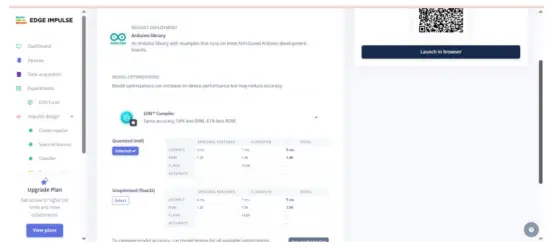 Download the .zip, then in Arduino IDE: Sketch → Include Library → Add .ZIP Library… This adds exampcosúil le maolán statach agus faoi bhun leanúnach File → Example →
Your Project Name – Edge Impulse. Inference sketch for Arduino UNO EK R4 WiFi + ADXL345.
Step 10: Arduino Inference Sketch
#cuir san áireamh
#cuir san áireamh
#include <your_project_inference.h> // Replace with Edge Impulse header
Adafruit_ADXL345_Unified accel =
Adafruit_ADXL345_Unified(12345);
statach bool debug_nn = bréagach;
socrú neamhní() {
sraith.tosaigh(115200);
agus (!Sraithuimhir) {}
má tá (!luasghéarú.tús()) {
Serial.println(“EARRÁID: Níor braitheadh ADXL345”);
cé go (1);
}
luas.setRange(ADXL345_RANGE_4_G);
}
lúb ar neamhní() {
maolán snámhphointe[EI_CLASSIFIER_DSP_INPUT_FRAME_SIZE] = {0};
for (size_t ix = 0; ix < EI_CLASSIFIER_DSP_INPUT_FRAME_SIZE; ix +=
3) {
uint64_t next_tick = micros() + (EI_CLASSIFIER_INTERVAL_MS *
1000);
braiteoirí_imeacht_t e;
luas.getImeacht(&e);
maolán[ix + 0] = e.luasghéarú.x;
maolán[ix + 1] = e.luasghéarú.y;
maolán[ix + 2] = e.luasghéarú.z;
int32_t fanacht = (int32_t)(an tic_seo chugainn – micrea());
má tá (fan > 0) moillMicrishoicindí(fan);
}
comhartha_t comhartha;
int err = numpy::signal_from_buffer(buffer,
EI_CLASSIFIER_DSP_INPUT_FRAME_SIZE, &signal);
má tá (earráid != 0) ag filleadh;
toradh ei_impulse_result_t = {0};
EI_IMPULSE_ERROR res = run_classifier(&signal, &result,
debug_nn);
má tá (res != EI_IMPULSE_OK) ar ais;
le haghaidh (size_t ix = 0; ix < EI_CLASSIFIER_LABEL_COUNT; ix++) {
ei_printf(“%s: %.3f “, result.classification[ix].label,
result.classification[ix].value);
}
#má tá neamhghnáthacht_AIGHDIÚIR_EI_AICMEORA == 1
ei_printf(“neamhrialtacht: %.3f”, toradh.neamhrialtacht);
#deireadh
ei_printf(“\n”);
}
Aschur example:
 Leideanna:
Coinnigh EI_CLASSIFIER_INTERVAL_MS sioncrónaithe le minicíocht do sheoltóra sonraí (m.sh., 100 Hz → 10 ms). Socraíonn leabharlann Impulse an tairiseach seo go huathoibríoch ó do impulse.
Más mian leat braiteadh leanúnach (fuinneog sleamhnáin), tosaigh ón sampla leanúnach.ampatá san áireamh leis an leabharlann EI agus malartaítear na léamha ADXL345.
We will be adding video tutorials soon; till then, stay tuned – https://www.youtube.com/@RobuInlabs
And If you still have some doubts, you can check out this video by Edged Impulse: https://www.youtube.com/watch?v=FseGCn-oBA0&t=468s
Doiciméid / Acmhainní
 |
Arduino ABX00087 UNO R4 WiFi Development Board [pdfTreoir Úsáideora R4 WiFi, ADXL345, ABX00087 UNO R4 WiFi Development Board, ABX00087, UNO R4 WiFi Development Board, WiFi Development Board, Development Board, Board |