

 ht 64
ht 64
Lámhleabhar úsáideora


Réamhchúraimí AGUS BEARTA SÁBHÁILTEACHTA
Dearadh an ionstraim i gcomhréir le treoir IEC/EN61010-1 a bhaineann le hionstraimí leictreonacha tomhais. Ar mhaithe le do shábháilteacht agus chun damáiste a chosc don uirlis, le do thoil lean go cúramach na nósanna imeachta a bhfuil cur síos orthu sa lámhleabhar seo agus léigh gach nóta a bhfuil siombail roimhe.  leis an aird is mó.
Roimh agus tar éis tomhais a dhéanamh, déan na treoracha seo a leanas go cúramach:
- Ná déan aon tomhas i dtimpeallachtaí tais.
- Ná déan aon tomhais ar eagla go bhfuil gás, ábhair phléascacha nó ábhair inadhainte i láthair, nó i dtimpeallachtaí deannaigh.
- Seachain aon teagmháil leis an gciorcad a thomhas mura bhfuil aon tomhas á dhéanamh.
- Seachain aon teagmháil le páirteanna miotail nochta, le tóireadóirí tomhais neamhúsáidte, ciorcaid, etc.
- Ná déan aon tomhas i gcás go bhfaighidh tú aimhrialtachtaí san ionstraim mar dhífhoirmiú, briseadh, sceitheadh substaintí, easpa taispeáint ar an scáileán, etc.
- Tabhair aird ar leith agus voltagTá sé níos airde ná 20V, toisc go bhfuil baol turrainge leictrigh ann.
Sa lámhleabhar seo, agus ar an ionstraim, úsáidtear na siombailí seo a leanas:
Rabhadh: cloí leis na treoracha a thugtar sa lámhleabhar seo; d'fhéadfadh úsáid mhíchuí dochar a dhéanamh don ionstraim nó dá comhpháirteanna.
 Méadar dúbailte inslithe
 AC toirttage nó reatha
 DC voltage nó reatha
 Ceangal leis an talamh
1.1. RÉAMH-THREORACHA
- Dearadh an ionstraim seo le húsáid i dtimpeallachtaí de chéim truaillithe 2.
- Is féidir é a úsáid le haghaidh VOLTAGTomhais E agus REATHA ar shuiteálacha le CAT IV 600V agus CAT III 1000V.
- Molaimid cloí leis na gnáthrialacha sábháilteachta arna gceapadh ag na nósanna imeachta chun oibríochtaí a dhéanamh ar chórais bheo agus úsáid a bhaint as an TCP forordaithe chun an t-úsáideoir a chosaint ar shruthanna contúirteacha agus ar an ionstraim ar úsáid mhícheart.
- I gcás an easpa tásc ar láithreacht imleabhartage féadfaidh sé a bheith ina chontúirt don oibreoir, déan tomhas leanúnachais i gcónaí sula ndéanfar an tomhas ar an gcóras beo, chun nasc ceart agus riocht na stiúir a dhearbhú.
- Ní ráthaíonn ach na treoracha a thugtar leis an ionstraim go gcomhlíontar na caighdeáin sábháilteachta. Caithfidh siad a bheith i gcoinníollacha maithe agus samhlacha comhionanna a chur ina n-ionad, nuair is gá.
- Ná déan ciorcaid a sháraíonn an toirt sonraithe a thástáiltage teorainneacha.
- Ná déan aon tástáil faoi choinníollacha comhshaoil a sháraíonn na teorainneacha a shonraítear in § 6.2.1.
- Seiceáil go bhfuil an ceallraí curtha isteach i gceart.
- Bí cinnte go léiríonn an taispeáint LCD agus an lasc rothlach an fheidhm chéanna.
1.2. LE LINN ÚSÁID
Léigh na moltaí agus na treoracha seo a leanas go cúramach le do thoil:
AIRE
Mura gcomhlíontar na nótaí foláirimh agus/nó na treoracha, d’fhéadfadh sé damáiste a dhéanamh don ionstraim agus/nó dá comhpháirteanna nó d’fhéadfadh sé a bheith ina ábhar contúirte don oibreoir.
- Sula ngníomhachtaítear an lasc rothlach, dínasc na treoraí tástála ón gciorcad atá á thomhas.
- Nuair a bhíonn an ionstraim ceangailte leis an gciorcad atá á thomhas, ná déan teagmháil le haon teirminéal nach bhfuil in úsáid.
- Ná tomhais friotaíocht i gcás voltagtá es i láthair; fiú má tá an ionstraim cosanta, imleabhar iomarcachtage féadfaidh sé a bheith ina chúis le mífheidhmiú.
- Agus tú ag tomhas, mura n-athraítear luach nó comhartha na cainníochta atá á thomhas, seiceáil an bhfuil an fheidhm HOLD cumasaithe.
1.3. TAR ÉIS ÚSÁID
- When measurement is complete, set the rotary switch to OFF to switch off the instrument.
- Mura bhfuil an ionstraim le húsáid ar feadh i bhfad, bain na cadhnraí.
1.4. AN TOMHAS A SHAINIÚ (OVERVOLTAGE) CATAGÓIR
Sainmhíníonn Caighdeán "IEC/EN61010-1: Ceanglais sábháilteachta do threalamh leictreach le haghaidh tomhais, rialaithe agus úsáide saotharlainne, Cuid 1: Ceanglais ghinearálta", an catagóir tomhais, ar a dtugtar go coitianta overvoltage category, is. § 6.7.4: Measured circuits, reads: (OMISSIS)
Roinntear ciorcaid sna catagóirí tomhais seo a leanas:
- Catagóir tomhais IV is le haghaidh tomhais a dhéantar ag foinse an íosvoltage suiteáil. Examptá méadair leictreachais agus tomhais ar fheistí cosanta forshrutha príomhúla agus aonaid rialaithe ripple.
- Catagóir tomhais III is le haghaidh tomhais a dhéantar ar shuiteálacha laistigh d'fhoirgnimh. exampIs éard atá i gceist le les ná tomhais ar chláir dáileacháin, scoradáin chiorcaid, sreangú, lena n-áirítear cáblaí, barraí bus, boscaí acomhal, lasca, asraonta soicéad sa suiteáil sheasta, agus trealamh le haghaidh úsáid thionsclaíoch agus trealamh éigin eile, le haghaidh seanample, mótair stáiseanóireachta a bhfuil nasc buan acu le suiteáil sheasta.
- Tomhais catagóir II is le haghaidh tomhais a dhéantar ar chiorcaid atá nasctha go díreach leis an toirt ísealtage suiteáil. Examptomhais ar fhearais tí, ar uirlisí iniompartha agus ar threalamh comhchosúil.
- Catagóir tomhais I is le haghaidh tomhais a dhéantar ar chiorcaid nach bhfuil nasctha go díreach leis na PRÍOMHPHÁIRTEANNA. examptomhais ar chiorcaid nach bhfuil díorthaithe ó PRÍOMHCHEANNACH iad les, agus ciorcaid atá díorthaithe go speisialta (inmheánach). Sa chás deiridh sin, tá strusanna neamhbhuan athraitheach; ar an ábhar sin, éilíonn an caighdeán go gcuirfí cumas seasaimh neamhbhuan an trealaimh in iúl don úsáideoir.
CUR SÍOS GINEARÁLTA
Déanann an uirlis na tomhais seo a leanas:
- DC/AC/AC+DC TRMS Voltage
- DC / AC voltage le impedance íseal (LoZ)
- DC/AC/AC+DC TRMS Current
- DC/AC/AC+DC TRMS Current with transducer clamps
- AC, AC+DC TRMS current
- Taispeáint 4-20mA%.
- Tástáil Friotaíocht agus Leanúnachais
- Tástáil dé-óid
- Cumas
- Minicíocht
- Timthriall Dleachta
- Teocht le taiscéalaí de chineál K
- Data Logger function and display of graphs of measured data
Is féidir gach ceann de na feidhmeanna seo a roghnú tríd an lasc cuí. Tá eochracha feidhme ag an ionstraim freisin (féach § 4.2), barragraf analógach agus taispeáint dath ardchodarsnachta LCD TFT. Tá feidhm Auto Power OFF feistithe san ionstraim freisin a mhúchtar an ionstraim go huathoibríoch tar éis am réchasta áirithe (in-ríomhchláraithe).
2.1. MEÁNLUACHANNA AGUS LUACHANNA TRÉIMHSEACH A THOMHAS
Tá ionstraimí tomhais de chainníochtaí malartacha roinnte ina dhá theaghlach mhóra:
- MEÁN-LUACH méadair: ionstraimí a thomhaiseann luach na toinne aonair ag minicíocht bhunúsach (50 nó 60 Hz).
- TRMS (Fíor Fréamh Meán Mheánchearnóg) Méadar LUACH: ionstraimí a thomhaiseann luach TRMS na cainníochta atá á tástáil.
Le tonn breá sinusoidal, soláthraíonn an dá theaghlach ionstraimí torthaí comhionanna.
I gcás tonnta saobhadh, ina ionad sin, beidh difríocht idir na léamha. Soláthraíonn méadair meánluacha luach RMS na buntoinne aonair; Soláthraíonn méadar TRSM, ina ionad sin, luach RMS na toinne iomláin, lena n-áirítear harmonics (laistigh de bandaleithead na n-ionstraimí). Mar sin, tríd an gcainníocht chéanna a thomhas le hionstraimí ón dá theaghlach, ní bhíonn na luachanna a fhaightear comhionann ach amháin má tá an tonn breá sinusóideach. I gcás ina ndéantar é a shaobhadh, soláthróidh méadair TRMS luachanna níos airde ná na luachanna arna léamh ag méadair meánluacha.
2.2. SAINMHÍNIÚ AR FHRÉIMHSEÁN LUACH CHEARCAIGH AGUS TOSCA CREST
Sainmhínítear fréamh-mheánluach cearnógach an tsrutha mar seo a leanas: “In am atá comhionann le peiriad, scaipeann sruth ailtéarnach a bhfuil fréamh-mheánluach cearnach de dhéine 1A aige, a scaiptear ar fhriotóir, an fuinneamh céanna a scaipeann, i rith an ama chéanna, a scaipfí le sruth díreach le déine 1A”. Is é an toradh a bhíonn ar an sainmhíniú seo ná an slonn uimhriúil:
 Léirítear an meánluach cearnach fréimhe leis an acrainm RMS.
Sainmhínítear an Fachtóir Suaitheantas mar an gaol idir Buaicluach comhartha agus a luach
Luach RMS: CF Athraíonn an luach seo leis an tonnchruth comhartha, is é an tonn sinusóideach amháin é
  I gcás saobhadh, glacann an fachtóir suaitheantas luachanna níos airde de réir mar a mhéadaíonn saobhadh tonnta.
ULLMHÚ CHUN ÚSÁID
3.1. SEICEANNA TIONSCNAIMH
Sula seolta, tá an ionstraim seiceáilte ó phointe leictreach chomh maith le meicniúil view. Glacadh gach réamhchúram féideartha chun an ionstraim a sheachadadh gan aon damáiste. Mar sin féin, molaimid go ginearálta an ionstraim a sheiceáil chun damáiste a d'fhéadfadh a bheith ann le linn iompair a bhrath. I gcás go bhfuarthas aimhrialtachtaí, déan teagmháil láithreach leis an ngníomhaire ar aghaidh. Molaimid freisin seiceáil go bhfuil na comhpháirteanna go léir a shonraítear i § 6.3.1 sa phacáistiú. I gcás neamhréire, déan teagmháil leis an Déileálaí le do thoil. I gcás gur cheart an ionstraim a thabhairt ar ais, lean na treoracha atá tugtha in § 7 le do thoil.
3.2. SOLÁTHAR CUMHACHTA IONSTRAIM
The instrument is powered by 1×7.4V rechargeable Li-ION battery included in the package. When the battery is flat, the symbol “ ” appears on the display. For battery recharge, please refer to § 6.1.
3.3. STÓRÁIL
D'fhonn tomhas beacht a ráthú, tar éis am stórála fada, fan go dtiocfaidh an ionstraim ar ais go gnáthriocht (féach § 7.1.3).
AINMNIÚ
4.1. CUR SÍOS AR AN IONSTRAIM

CAPTION:
- Taispeáint LCD
- Eochair feidhme F2
- Eochair feidhme F3
- Eochair feidhme F1
- Eochair feidhme F4
- eochair RANGE
- HOLD/REL key
- Lasc roghnóir rothlacha
- Teirminéal ionchuir 10A
- Críochfort ionchuir

- Input terminal mAuA
- Teirminéal ionchuir COM
4.2. CUR SÍOS AR EOCHAIR FEIDHMEANNA
4.2.1. HOLD/REL key
Pressing the HOLD/REL key freezes the value of the measured quantity on the display. After pressing this key, the message “Hold” appears on the display. Press the HOLD/REL key again to exit the function. To save the vale on the display, see § 4.3.3. Press and hold the HOLD/REL key for a long time in order to activate/deactivate relative measurement. The instrument zeroes the display and saves the displayed value as a reference value which subsequent measurements will be referred to (see § 4.3.4). The symbol “A” appears on the display. This function is not active in position . Press and hold the HOLD/REL key again to exit the function.
4.2.2. eochair RANGE
Press the RANGE key to activate the manual mode and to disable the Autorange function. The message “Manual” appears on the upper left part of the display instead of “AUTO”. In manual mode, press the RANGE key to change measuring range: the relevant decimal point will change its position. The RANGE key is not active in positions Hz%,
Hz%,  . In Autorange mode, the instrument selects the most appropriate ratio for carrying out measurement. If a reading is higher than the maximum measurable value, the indication “O.L” appears on the display. Press and hold the RANGE key for more than 1 second to exit the manual mode and restore the Autorange mode.
4.2.3. Function keys F1, F2, F3, F4
Use keys F1, F2, F3 and F4 to manage the instrument’s internal functions (see § 4.3).
4.2.4. Gné LoZ
Ceadaíonn an mód seo an AC/DC voltage tomhas le impedance ionchur íseal ar bhealach a sheachaint ar an léamh mícheart mar gheall ar vol straetage i cúpláilte capacitive.
AIRE
Agus an ionstraim á cur isteach idir seoltóirí céime agus seoltóirí talún, is féidir na feistí cosanta RCDanna a thuisliú le linn na tástála. Le haghaidh céim-PE voltage measurement after a RCD device preliminarily connect the test leads between phase and neutral cables at least for 5s, then perform the phase-PE measurement to avoid unexpected trips-out
4.2.5. LEAD message at display
From instrument switch off (OFF), in the  positions a short sound is emitted and a “LEAD” message is shown for a while to indicate an advise of using test leads for the current measurements.
4.3. DESCRIPTION OF INTERNAL FUNCTIONS
4.3.1. Description of the display
 CAPTION:
- Mód Uathoibríoch/Láimhe a léiriú
- Léiriú ar am an chórais
- Indication of battery charge level and activation/deactivation of key tone (not associated with continuity test)
- Léiriú ar aonad tomhais
- Léiriú ar thoradh tomhais
- Barragraf analógach
- Indications associated with function keys F1, F2, F3, F4
4.3.2. AC+DC Voltage agus Tomhas Reatha
Tá an ionstraim in ann láithreacht féideartha de chomhpháirteanna malartacha forluiteacha a thomhas ar imleabhar cineálachtage nó tonnchruth díreach reatha. Is féidir é seo a bheith úsáideach agus comharthaí ríogacha tipiciúla ualaí neamhlíneacha á dtomhas (eg meaisíní táthú, oighinn leictreacha, etc.).
- Roghnaigh seasamh
 .
. - Press the F2 key selecting the “
 “” nó “ ” modes (see Fig. 3)
 - Follow the instructions shown in § 5.1 or § 5.9
 4.3.3. HOLD function and saving

- Press the HOLD/REL key again to freeze the result. The message “Hold” appears onthe display.
- Press the F3 key to save the data in the instrument’s memory.
- Enter the General menu to display the saved result (see § 4.3.7)
4.3.4. Tomhas coibhneasta

- Press and hold the HOLD/REL key to enter relative measurement (see Fig. 5 – right side). The message “REL” and symbol “
 ” le feiceáil ar an taispeáint.
 - Press the F4 key to enter the General menu, save the measured result and display it (see § 4.3.7).
4.3.5. Saving MIN/MAX/AVERAGE and PEAK values 
- Press the F4 key to enter the measuring mode of MAX, MIN and Average values of the quantity to be measured (see Fig. 6 – central part). The message “MAX MIN” appears on the display.
- The values are automatically updated by the instrument, which emits a short beep whenever the actually displayed values are exceeded (higher for MAX value, lower for MIN value).
- Press the F2 key to stop detecting the values and the F1 key to start measuring again.
- Press the F3 key to save the measured result (see Fig. 6 – right side) and display it (see § 4.3.7).

- Press the F4 key to enter the measuring mode of Peak values of the quantity to be measured (see Fig. 7 – right side). The message “PEAK” appears on the display and the values are updated in the same way as for the MAX/MIN function.
- Press the F2 key to stop detecting the values and the F1 key to start measuring again.
- Press the F3 key to save the result and display it (see § 4.3.7).
4.3.6. Creating and saving graphs of measurements

- Press the F1 key to enter the section for creating a graph of the quantity to be measured (see Fig. 8 – left side).
- Press the F2 (Fast) or F3 (Slow) key to set the sampling interval the instrument will use as a reference when creating the graph. You can choose among the following values: 0.2s, 0.5s, 1.0s, 2.0s, 5.0s, 10s
- Press the F1 key to start creating the graph. The measuring range (automatically inserted by the instrument) and the real-time value are displayed by the instrument (see Fig. 8 – central part).
- Press the F4 key to end the graph.
- Press the F1 key to save the graph in the instrument’s memory or the F4 key to start a new graph (see Fig. 8 – right side).
4.3.7. Instrument general menu
- With a measurement on the display (see Fig. 9 – left side), press function key F3 to enter the instrument’s general menu. The screen (see Fig. 9 – right side) is shown on the display.
 Tomhais a shábháil
 - Press the F1 (ENTER) key to save the measurement.
Recording data (Logger) - Use the F2 or F3 key to select symbol “Record” and press the F1 key (see Fig. 10 – left side).

- Use the F2 or F3 key to select:
➢ Setting of recording duration, from 1min to 23h:59min
➢ Setting of sampling interval from 1s to 59min:59s - Press the F1 key to enable the editing functions and the F2 (+) and F3 (>>) keys to carry out the desired settings.
- Press the F1 (OK) key to confirm the settings or the F4 (CANCEL) key to go back to editing (see Fig. 10 – right side).
- Press the key F4 (CLOSE) to go back to the main screen
- Select the option “Start Recording” and press the F1 key. The following screen appears on the display

- The instrument shows the remaining time and the number of samples taken in real time, and the message “Stopped” at the end of recording (see Fig. 11 – left side). Press the F4 (STOP) key to stop recording at any time.
- Press the F2 key to save recorded data in the internal memory and view it again on the display
- Press the F3 (TREND) key to display the trend of recording (see Fig. 11 – central part).
- Press the F4 (>>) key to move the cursor on the graph and the F2 (+) key to activate the Zoom function of the graph, increasing resolution (symbol “Xy” where y=max zoom dimension appears at the top of the display on the right side) (see Fig. 11 – right side). You can zoom X1 for at least 15 measuring points, X2 for at least 30 measuring points, X3 for at least 60 measuring points and so on for maximum 6 zooming operations.
- Press the F4 (BACK) key to go back to the previous screen. Deleting the instrument’s memory
- Use the F2 or F3 key to select symbol “Delete” and press the F1 key (see Fig. 12 – left side).
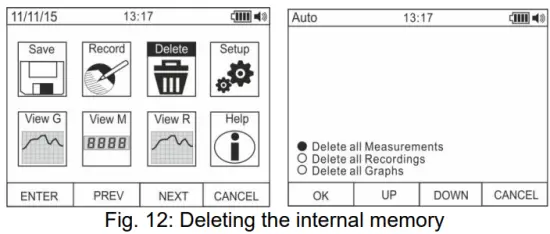
- Use the F2 or F3 key to select the options:
➢ Delete all Measurements → all snapshots (measurements) are deleted
➢ Delete all Recordings → all recordings are deleted
➢ Delete all Graphs → all graphs are deleted. - Press the F1 (OK) key to carry out the selected operation (a confirmation message is shown by the instrument). General settings of the instrument
- Use the F2 or F3 key to select symbol “Setup” and press the F1 key (see Fig. 13 – left side).

- Use the F2 or F3 key to select the options:
➢ Reset → restores the instrument’s default conditions.
➢ Format → allows activating the key tone, setting the format of date/time and of the displayed numbers (decimal comma or point).
➢ General → allows setting the system’s date/time, defining the Auto Power OFF interval, the background colour and the display’s font colour and type, and choosing the system’s language.
➢ Meter Info → provides information on the internal Firmware version and on the memory’s available space. - Press the F1 (ENTER) key to carry out the selected operation or the F4 (CANCEL) key to go back to the measuring screen. General settings of the instrument – Reset

- Press the F1 (OK) key to activate the Reset.
- The Reset operation do not deletes the instrument’s internal memory
General settings of the instrument – Format
- Use the F2 or F3 key to select the options:➢ Key tone → allows activating/deactivating the tone of the function keys.
➢ Numeric Format → allows defining the format of the numbers shown on the display among the options: 0.000 (decimal point) and 0,000 (comma)
➢ Date Format → allows defining the format of the system date between the options: MM/DD/YY and DD/MM/YY
➢ Time Format → allows defining the format of the system time between the options: - OURS and 24 HOURS
- Use the F1 (EDIT) key and the F2 and F3 keys for settings or the F4 key to go back to the previous screen. General settings of the instrument – Display

- Use the F2 or F3 key to select the options:
➢ Set Date → allows setting the system’s date as defined in the Format menu.
➢ Set Time → allows setting the system’s time as defined in the Format menu.
➢ Auto Power OFF → allows defining the instrument’s auto power off interval when idling in the range: 5min 60min with resolution 1min. Set value 00 to disable the function. Press the F3 key to switch on the instrument again after it has automatically switched off.
➢ Foreground → allows defining the display’s background colour and the colour of the font.
➢ Select Font → allows defining the type of font or the display among the available options (0, 1, 2).
➢ Language → allows selecting the system’s language among the options: Italian, English, Spanish, German and French
General settings of the instrument – Instrument Info
- The instrument shows the following information:
➢ Firmware version → internal Firmware version
➢ Free memory → percentage values of the remaining free space in the memory for saving snapshots (SAVE), recordings (REC) and graphs (GRAPH). - Press the F4 key to go back to the previous screen Recalling graphs to the display

- Use the F2 or F3 key to select symbol “View G” and press the F1 key (see Fig. 18 – left side).
- Use the F2 (PREV) or F3 (NEXT) keys to select the desired graph among the ones saved in the instrument’s memory and press key F1 (ENTER) to open the graph (see Fig. 18 – central part).
- Use the F2 (<<) or F3 (>>) keys to move the cursor within the graph in the two directions, observing the corresponding value at the bottom of the display (see Fig. 18 – right side).
- Press the F1 (DELETE) key to delete the selected graph or the F4 (BACK) key to go back to the previous screen. Recalling measured data (snapshots) on the display

- Use the F2 or F3 key to select symbol “View M” and press the F1 key (see Fig. 19 – left side).
- Use the F2 (PREV) or F3 (NEXT) key to select and view the desired measure among the ones saved in the instrument’s memory (see Fig. 19 – right side). The measure reference appears at the bottom of the display on the right side.
- Press the F1 (DELETE) key to delete the selected measure or the F4 (CLOSE) key to go back to main screen Recalling recordings to the display

- Use the F2 or F3 key to select symbol “View R” and press the F1 key (see Fig. 20 – left side).
- Use the F2 (PREV) or F3 (NEXT) key to select the desired recording among the ones saved in the instrument’s memory (see Fig. 20 – central part). The recording reference appears at the bottom of the display.
- Press the F1 (TREND) key to display the trend of recording.
- Press the F3 (>>) key to move the cursor on the graph and observe the corresponding value at the bottom of the display.
- Press the F2 (+) key to activate (if available) the zooming function of the graph.
- Press the F1 (DELETE) key to delete the selected recording or the F4 (BACK) key to go back to the previous screen.
Help on line on the display
- Use the F2 or F3 key to select symbol “Help” and press the F1 key (see Fig. 21).
- Use the F2 (UP) or F3 (DOWN) to browse the pages of the context on-line help.
- Press the F4 (CLOSE) key to go back to the main screen
TREORACHA OIBRIÚCHÁIN
5.1. DC, AC+DC IOMLÁNTAGE TOMHAS
AIRE
An t-uasmhéid ionchur DC voltagTá e 1000V. Ná tomhas voltagsáraíonn sé na teorainneacha a thugtar sa lámhleabhar seo. Níos mó ná voltagD’fhéadfadh suaitheadh leictreach a bheith mar thoradh ar na teorainneacha sin don úsáideoir agus damáiste don uirlis.

- Roghnaigh suíomhanna V Hz% or mV
- Cuir an cábla dearg isteach sa teirminéal ionchuir agus an cábla dubh isteach i gcríochfort ionchuir COM.
- Cuir an luaidhe dhearg agus an luaidhe dhubh faoi seach sna spotaí a bhfuil poitéinseal dearfach agus diúltach ag an gciorcad atá le tomhas (féach Fíor 22). Taispeánann an taispeáint luach toirtetage.
- Má thaispeánann an taispeáint an teachtaireacht “OL”, roghnaigh raon níos airde.
- Nuair a bhíonn siombail “-” le feiceáil ar thaispeántas na hionstraime, ciallaíonn sé go bhfuil imltagtá a mhalairt treo ag e maidir leis an gceangal i bhFíor 22.
- To use the HOLD, RANGE and REL function, see § 4.2.
- For AC+DC measurement, see § 4.3.2 and to use the internal functions, see § 4.3.
5.2. AC VOLTAGE TOMHAS
AIRE
Tá an t-uas-ionchur AC toirttagTá e 1000V. Ná tomhas voltagsáraíonn sé na teorainneacha a thugtar sa lámhleabhar seo. Níos mó ná voltagD’fhéadfadh suaitheadh leictreach a bheith mar thoradh ar na teorainneacha sin don úsáideoir agus damáiste don uirlis.

- Roghnaigh suíomhanna V Hz% or mV
- In position mV, press the F2 (MODE) key to view symbol “~” on the display.
- Cuir an cábla dearg isteach sa teirminéal ionchuir
 agus an cábla dubh isteach i gcríochfort ionchuir COM.
 - Cuir an luaidhe dhearg agus an luaidhe dhubh faoi seach i spotaí an chiorcaid atá le tomhas (féach Fíor 23). Taispeánann an taispeáint luach toirtetage.
- Má thaispeánann an taispeáint an teachtaireacht “OL”, roghnaigh raon níos airde.
- Press the F2 (MODE) key to select measurements “Hz” or “%” in order to display the values of frequency and duty cycle of input voltage. Press the F1(TRIG) key to select the positive or negative half-wave of the function “%”The bargraph is not active in these functions.
- To use the HOLD, RANGE and REL function, see § 4.2.
- To use the internal functions, see § 4.3
5.3. AC/DC VOLTAGE TOMHAS A BHFUIL IMPEDANCE ÍSEAL (LOZ)
AIRE
An t-uasionchur AC/DC toirtetagTá e 600V. Ná tomhas voltagsáraíonn sé na teorainneacha a thugtar sa lámhleabhar seo. Níos mó ná voltagD’fhéadfadh suaitheadh leictreach a bheith mar thoradh ar na teorainneacha sin don úsáideoir agus damáiste don uirlis.

- Roghnaigh suíomh LoZV
 . The “LoZ” and “DC” symbols are shown
 - Press the MODE (F2) key to select possibly the “AC” measurement
- Cuir an cábla dearg isteach sa teirminéal ionchuir agus an cábla dubh isteach i gcríochfort ionchuir COM
- Cuir an luaidhe dhearg agus an luaidhe dhubh faoi seach sna spotaí atá ag teastáil ón gciorcad atá le tomhas (féach Fíor 24) nó sna spotaí le poitéinseal dearfach agus diúltach an chuaird atá le tomhas (féach Fíor. 22). Taispeánann an taispeáint luach toirtetage.
- Léiríonn an teachtaireacht “OL” go bhfuil luach DC toirtetagsáraíonn e an t-uasluach intomhaiste.
- Nuair a bhíonn siombail “-” le feiceáil ar thaispeántas na hionstraime, ciallaíonn sé go bhfuil imltagtá a mhalairt treo ag e maidir leis an gceangal i bhFíor 22
- To use the HOLD, RANGE and REL function, see § 4.2
- To use the internal functions, see § 4.3
5.4. MINICÍOCHT AGUS TOMHAS NA SRAITHE Dleachta
AIRE
Tá an t-uas-ionchur AC toirttagTá e 1000V. Ná tomhas voltagsáraíonn sé na teorainneacha a thugtar sa lámhleabhar seo. Níos mó ná voltagD’fhéadfadh suaitheadh leictreach a bheith mar thoradh ar na teorainneacha sin don úsáideoir agus damáiste don uirlis.

1. Roghnaigh seasamh Hz%.
2. Press the F2 (MODE) key to select measurements “Hz” or “%” in order to display the values of frequency and duty cycle of input voltage.
3. Insert the red cable into input terminal agus an cábla dubh isteach i gcríochfort ionchuir COM.
4. Position the red lead and the black lead respectively in the spots of the circuit to be measured (see Fig. 25). The value of frequency (Hz) or of duty cycle (%) is shown on the display. The bargraph is not active in these functions.
5. To use the HOLD and REL function, see § 4.2.
6. Chun na feidhmeanna inmheánacha a úsáid, féach § 4.3
5.5. TOMHAS Friotaíocht AGUS TÁSTÁIL LEANÚNACHAIS
AIRE
Sula ndéanfaidh tú iarracht aon tomhas friotaíochta, gearr amach an soláthar cumhachta ón gciorcad atá le tomhas agus cinntigh go bhfuil na toilleoirí go léir scaoilte, má tá siad i láthair.

- Roghnaigh seasamh
- Cuir an cábla dearg isteach sa teirminéal ionchuir agus an cábla dubh isteach i gcríochfort ionchuir COM.
- Cuir na treoraí tástála i spotaí inmhianaithe an chiorcaid atá le tomhas (féach Fíor 26). Taispeánann an taispeáint luach na friotaíochta.
- Má thaispeánann an taispeáint an teachtaireacht “OL”, roghnaigh raon níos airde.
- Press the F2 (MODO) key to select measurement )))” relevant to the continuity test, and position the test leads in the desired spots of the circuit to be measured.
- The value of resistance (which is only indicative) is displayed in 2 and the instrument sounds if the value of resistance is <50Ω
- To use the HOLD, RANGE and REL function, see § 4.2.
- To use the internal functions, see § 4.3.
5.6. TÁSTÁIL DIODE
AIRE
Sula ndéanfaidh tú iarracht aon tomhas friotaíochta, gearr amach an soláthar cumhachta ón gciorcad atá le tomhas agus cinntigh go bhfuil na toilleoirí go léir scaoilte, má tá siad i láthair.

- Roghnaigh seasamh
- Press the F2 (MODE) key to select “+” measurement.
- Cuir an cábla dearg isteach sa teirminéal ionchuir agus an cábla dubh isteach i gcríochfort ionchuir COM.
- Suí na luaidhe ag foircinn an dé-óid atá le tástáil (féach Fíor 27), ag urramú na polaraíochta atá léirithe. Luach na tairsí díreach polaraithe toirtetagTaispeántar e ar an taispeáint.
- If threshold value is equal to OmV, the P-N junction of the diode is short-circuited.
- Má thaispeánann an taispeáint an teachtaireacht “OL”, déantar críochfoirt an dé-óid a aisiompú maidir leis an tásc a thugtar i bhFíor 27 nó déantar damáiste d’acomhal PN na dé-óid.
- To use the HOLD and REL function, see § 4.2.
- To use the internal functions, see § 4.3.
5.7. TOMHAS CAPACITANCE
AIRE
Sula ndéanfaidh tú tomhais toilleas ar chiorcaid nó ar thoilleoirí, gearr amach an soláthar cumhachta ón gciorcad atá á thástáil agus lig do gach toilleas atá ann a urscaoileadh. Agus an multimeter agus an toilleas atá le tomhas á nascadh, meas an polaraíocht cheart (nuair is gá).

- Roghnaigh seasamh
- Press the F2 (MODE) key until the symbol “nF” is displayed.
- Cuir an cábla dearg isteach sa teirminéal ionchuir agus an cábla dubh isteach i gcríochfort ionchuir COM.
- Press the REL/A key before carrying out measurements.
- Position the leads at the ends of the capacitor to be tested, respecting, if necessary, the positive (red cable) and negative (black cable) polarity (see Fig. 28). The display shows the value. Depending on the capacitance, the instrument can take about 20s before displaying the correct final value. The bargraph is not active in this function.
- Léiríonn an teachtaireacht “OL” go sáraíonn luach an toilleas an t-uasluach intomhaiste.
- To use the HOLD and REL function, see § 4.2.
- To use the internal functions, see § 4.3.
5.8. TOMHAS teochta LE PROBE K-CINEÁL
AIRE
Sula ndéanfaidh tú iarracht aon tomhas teochta, gearr amach an soláthar cumhachta ón gciorcad atá le tomhas agus cinntigh go bhfuil na toilleoirí go léir scaoilte, má tá siad i láthair.

- Roghnaigh seasamh

- Press the F2 (MODE) key until the symbol “°C” or “F” is displayed.
- Cuir an cuibheoir a chuirtear ar fáil isteach i gcríochfoirt ionchuir (polarity +) agus COM (polarity -) (féach Fíor 29)
- Connect the provided K-type wire probe or the optional K-type thermocouple (see § 7.2.2) to the instrument by means of the adapter, respecting the positive and negative polarity on it. The display shows the value of temperature. The bargraph is not active in this function.
- Léiríonn an teachtaireacht “OL” go sáraíonn luach na teochta an t-uasluach intomhaiste.
- To use the HOLD and REL function, see § 4.2.
- To use the internal functions, see § 4.3.
5.9. DC, AC+DC CURRENT MEASUREMENT AND E 4-20MA% READING
AIRE
Maximum input DC current is 10A (input 10A) or 600mA (input mAuA). Do not measure currents exceeding the limits given in this manual. Exceeding voltagD’fhéadfadh suaitheadh leictreach a bheith mar thoradh ar na teorainneacha sin don úsáideoir agus damáiste don uirlis.

- Gearr amach an soláthar cumhachta ón gciorcad atá le tomhas.
- Select position µA, mA or 10A 20mA for 4-20mA reading. to measure DC current or the same position 4-
- Insert the red cable into input terminal 10A or into input terminal mAµA and the black cable into input terminal COM.
- Ceangail an luaidhe dhearg agus an luaidhe dhubh i sraith leis an gciorcad a bhfuil tú ag iarraidh a sruth a thomhas, ag urramú polaraíocht agus treo an tsrutha (féach Fíor 30).
- Soláthar an ciorcad a thomhas.
- Tá luach an tsrutha DC (féach Fíor 30 – taobh clé) le feiceáil ar an scáileán taispeána.
- The value of reading 4-20mA% (0mA = -25%, 4mA = 0%, 20mA = 100% and 24mA = 125%) (see Fig. 30 right side) appears on the display. The bargraph is not active in this function.
- Má thaispeánann an taispeáint an teachtaireacht “OL”, tá an t-uasluach intomhaiste bainte amach.
- Nuair a bhíonn an tsiombail “-” le feiceáil ar thaispeántas na huirlise, ciallaíonn sé go bhfuil an treo eile ag an sruth maidir leis an nasc i bhFíor 30.
- To use the HOLD, RANGE and REL functions, see § 4.2.
- For AC+DC measurement, see § 4.3.2 and to use the internal functions, see § 4.3
5.10. AC TOMHAS REATHA
AIRE
Maximum input AC current is 10A (input 10A) or 600mA (input mAuA). Do not measure currents exceeding the limits given in this manual. Exceeding voltagD’fhéadfadh suaitheadh leictreach a bheith mar thoradh ar na teorainneacha sin don úsáideoir agus damáiste don uirlis.

- Gearr amach an soláthar cumhachta ón gciorcad atá le tomhas.
- Select positions μΑ, mA or 10A
- Press the F2 (MODE) key to select “AC” measurement.
- Insert the red cable into input terminal 10A or into input terminal mAµA and the black cable into input terminal COM.
- Connect the red lead and the black lead in series to the circuit whose current you want to measure (see Fig. 31).
- Soláthar an ciorcad a thomhas. Taispeánann an taispeáint luach an reatha.
- Má thaispeánann an taispeáint an teachtaireacht “OL”, tá an t-uasluach intomhaiste bainte amach.
- To use the HOLD, RANGE and REL functions, see § 4.2.
- To use the internal functions, see § 4.3
5.11. DC, AC, AC+DC CURRENT MEASUREMENT WITH TRANSDUCER CLAMPS
AIRE
- Is é 3000A AC nó 1000A DC an t-uastomhais reatha sa fheidhm seo. Ná tomhais sruthanna a sháraíonn na teorainneacha a thugtar sa lámhleabhar seo
- Déanann an ionstraim an tomhas trí úsáid a bhaint as an dá trasducer solúbtha clamp (cúlpháirtí roghnach F3000U) agus clamp trasducers an teaghlaigh HT. Le haghaidh trasducer clamps with HT output connector is necessary the NOCANBA optional adapter in order to perform the connection

- Roghnaigh seasamh

- Press F2(MODE) key to select “AC”, “DC” or “AC+DC” measurement
- Brúigh RANGE eochair a roghnú ar an ionstraim an raon céanna atá leagtha ar an trasducer clamp among the options: 1000mA, 10A, 30A, 40A (only for HT4006) 100A, 300A, 400A (only for HT4006), 1000A, 3000A. The selected range appear in the top left part of the display
- Cuir an cábla dearg isteach sa teirminéal ionchuir and the black cable into input terminal COM. For other standard transducers (see §) with HT connector use the NOCANBA optional accessory. For information about the use of transducer clamps tagairt don lámhleabhar úsáideora coibhneasta
- Cuir isteach an cábla taobh istigh den fhód (féach Fíor 32). Tá luach an tsrutha le feiceáil ar an taispeáint
- Má thaispeánann an taispeáint an teachtaireacht “OL”, tá an t-uasluach intomhaiste bainte amach
- Chun na feidhmeanna HOLD, RANGE agus REL a úsáid, féach § 4.2
- To use the internal functions, see § 4.3
COTHABHÁIL
AIRE
- Ba cheart do theicneoirí saineolacha agus oilte amháin oibríochtaí cothabhála a dhéanamh. Sula ndéanfaidh tú oibríochtaí cothabhála, dícheangail na cáblaí go léir ó na críochfoirt ionchuir.
- Ná húsáid an ionstraim i dtimpeallachtaí le leibhéil ard taise nó teocht ard. Ná nochta do sholas díreach.
- Múch an uirlis i gcónaí tar éis é a úsáid. I gcás nach bhfuil an ionstraim le húsáid ar feadh i bhfad, bain an ceallraí chun sceitheadh leachtach a sheachaint a d'fhéadfadh damáiste a dhéanamh do chiorcaid inmheánacha na hionstraime.
6.1. RECHARGING THE INTERNAL BATTERY
Nuair a thaispeánann an LCD siombail " ”, it is necessary to recharge the internal battery.

- Cuir an lasc rothlach OFF agus bain na cáblaí as na críochfoirt ionchuir.
- Insert the adaptor of the battery charger power supply into the instrument, into the four input terminals (see Fig. 33).
- Insert the connector of the power supply into the adapter and connect the power supply to the electric mains.
- A blinking symbol of a green battery appears on the display. The recharging process is complete when the symbol is steady.
- Disconnect the battery charger from the instrument when the operation is complete.
AIRE
If the charging process does not run, check the integrity of the F800mA/1000V protection fuse (see § 7.1.2) and replace it if necessary (see § 6.2)
6.2. ATHSHOLÁTHAR NA FIÚS INMHEÁNACH

- Cuir an lasc rothlach OFF agus bain na cáblaí as na críochfoirt ionchuir.
- Turn the fastening screw of the battery compartment cover from position
 and remove it (see Fig. 34)
 a seasamh
 - Bain an fiús damáiste agus cuir isteach fiús nua den chineál céanna (féach § 7.1.2).
- Restore the battery compartment cover into place and turn the fastening screw from position a seasamh .
6.3. GLANADH AN IONSTRAIM
Bain úsáid as éadach bog agus tirim chun an ionstraim a ghlanadh. Ná húsáid riamh éadaí fliucha, tuaslagóirí, uisce, etc.
6.4. DEIREADH NA BEATHA
 RABHADH: léiríonn an tsiombail ar an uirlis nach mór an fearas agus a chuid gabhálais a bhailiú ar leithligh agus a dhiúscairt i gceart.
SONRAÍOCHTAÍ TEICNIÚLA
7.1. SAINTRÉITHE TEICNIÚLA
Accuracy calculated as [%reading + (num. digits*resolution)] at 18°C 28°C <75%HR
DC Imltage
| Raon | Rún | Cruinneas | Impedance ionchuir | Cosaint i gcoinne rómhuirir |
| 600.0mV | 0.1mV | ±(0.1% ag léamh + 5 dhigit) | >10MW | 1000VDC/ACrms |
| 6.000V | 0.001V | |||
| 60.00V | 0.01V | |||
| 600.0V | 0.1V | ±(0.2% ag léamh + 5 dhigit) | ||
| 1000V | 1V |
AC TRMS Imltage
| Raon | Rún | Cruinneas (*) | Cosaint i gcoinne rómhuirir | |
| (50Hz¸60Hz) | (61Hz¸1kHz) | |||
| 600.0mV | 0.1mV | ±(0.9% ag léamh + 5 dhigit) | ±(3.0% ag léamh + 5dgt) | 1000VDC/ACrms |
| 6.000V | 0.001V | |||
| 60.00V | 0.01V | |||
| 600.0V | 0.1V | |||
| 1000V | 1V | |||
(*) Accuracy specified from 10% to 100% of the measuring range, Input impedance: > 9M ;
Accuracy PEAK function: ±(10%rdg + 30dgt), PEAK response time: 1ms
For not sinusoidal waveforms the accuracy is: (10.0%reading + 10dgt)
AC+ DC TRMS Imltage
| Raon | Rún | Accuracy (*) (50Hz¸1kHz) | Impedance ionchuir | Cosaint i gcoinne rómhuirir |
| 6.000V | 0.001V | ±(3.0% ag léamh + 20dgt) | >10MW | 1000VDC/ACrms |
| 60.00V | 0.01V | |||
| 600.0V | 0.1V | |||
| 1000V | 1V |
(*) Cruinneas sonraithe ó 10% go 100% den raon tomhais
For not sinusoidal waveforms the accuracy is: (10.0%reading + 10dgt)
DC/AC TRMS Imltage le impedance íseal (LoZ)
| Raon | Rún | Accuracy (*) (50Hz¸1kHz) | Impedance ionchuir | Cosaint i gcoinne rómhuirir |
| 6.000V | 0.001V | ±(3.0% ag léamh+40dgt) | thart ar 3kW | 600VDC/ACrms |
| 60.00V | 0.01V | |||
| 600.0V | 0.1V | |||
| 600V | 1V |
(*) Cruinneas sonraithe ó 10% go 100% den raon tomhais
For not sinusoidal waveforms the accuracy is: (10.0%reading + 10dgt)
DC Reatha
| Raon | Rún | Cruinneas | Cosaint in aghaidh rómhuirear |
| 600.0mA | 0.1mA | ±(0.9% ag léamh + 5 dhigit) | Fiús tapa 800mA/1000V |
| 6000mA | 1mA | ||
| 60.00mA | 0.01mA | ||
| 600.0mA | 0.1mA | ±(0.9% ag léamh + 8 dhigit) | |
| 10.00A | 0.01A | ±(1.5% ag léamh + 8 dhigit) | Fiús tapaidh 10A/1000V |
AC TRMS Reatha
| Raon | Rún | Cruinneas (*) (50Hz¸1kHz) | Cosaint in aghaidh rómhuirear |
| 600.0mA | 0.1mA | ±(1.2% ag léamh + 5 dhigit) | Fiús tapa 800mA/1000V |
| 6000mA | 1mA | ||
| 60.00mA | 0.01mA | ||
| 600.0mA | 0.1mA | ||
| 10.00A | 0.01A | ±(1.5% ag léamh + 5 dhigit) | Fiús tapaidh 10A/1000V |
(*) Accuracy specified from 5% to 100% of the measuring range; For not sinusoidal waveforms accuracy is: +(10.0%reading + 10dgt)
Accuracy PEAK function: ±(10%rdg+30dgt) , AC+DC TRMS Current: accuracy (50Hz+1kHz): +(3.0%reading + 20dgt)
DC Reatha le trasduchtóir clamp
| Raon | Cóimheas aschuir | Rún | Cruinneas (*) | Cosaint in aghaidh rómhuirear |
| 1000mA | 1V/1A | 1mA | ±(1.5%rdg+ 6dgt) | 1000VDC/ACrms |
| 10A | 100mV/1A | 0.01A | ||
| 30A | ||||
| 40A (**) | 10mV/1A | ±(1.5%rdg.+26dgt) (***) | ||
| 100A |
0.1A |
±(1.5%rdg+ 6dgt) | ||
| 300A | ||||
| 400A (**) | 1mV/1A | ±(1.5%rdg.+26dgt) (***) | ||
| 1000A | 1mV/1A | 1A | ±(1.5%rdg+6dgt) | |
| 3000A |
(*) Accuracy referred to only instrument without transducer ; (**) With HT4006 transducer clamp ; (***) Accuracy instrument + clamp
AC TRMS Reatha le trasduchtóir clamp
| Raon | Cóimheas aschuir | Rún | Accuracy (*) (50Hz¸1kHz) | Cosaint i gcoinne rómhuirir |
| 1000mA | 1V/1A | 1mA | ±(2.5%rdg + 10dgt) | 1000VDC/ACrms |
| 10A | 100mV/1A | 0.01A | ||
| 30A | ||||
| 40A (**) | 10mV/1A | ±(3.5%rdg.+30dgt) (***) | ||
| 100A | 0.1A | ±(2.5%rdg + 10dgt) | ||
| 300A | ||||
| 400A (**) | 1mV/1A | ±(3.5%rdg+30dgt) (***) | ||
| 1000A | 1A | ±(2.5%rdg + 10dgt) | ||
| 3000A |
(*) Accuracy referred to only instrument without transducer ; Accuracy specified from 5% to 100% of the measuring range;
(**) With HT4006 transducer clamp ; (***) Accuracy instrument + clamp
For not sinusoidal waveforms accuracy is:  (10.0%reading + 10dgt)
Accuracy PEAK function: ±(10%rdg+30dgt) , AC+DC TRMS Current: accuracy (50Hz1kHz): (3.0%reading + 20dgt)
4-20mA% reading
| Raon | Rún | Cruinneas | Comhfhreagras |
| -25% ¸125% | 0.1% | ±50dg | 0mA=-25%, 4mA=0%, 20mA=100%, 24mA=125% |
Tástáil dé-óid
| Feidhm | Tástáil reatha | Max voltage le ciorcad oscailte |
|
|
<1.5mA | 3.2VDC |

Minicíocht (ciorcaid leictreonacha)
| Raon | Rún | Cruinneas | Cosaint in aghaidh rómhuirear |
| 40.00Hz ¸ 10kHz | 0.01Hz ¸ 0.001kHz | ±(0.5% ag léamh) | 1000VDC/ACrms |
Íogaireacht: 2Vrms
Minicíocht (ciorcaid leictreonacha)
| Raon | Rún | Cruinneas | Cosaint i gcoinne rómhuirir |
| 6.000 Hz | 0.001 Hz | ±(0.09%rdg+5 dhigit) | 1000VDC/ACrms |
| 60.00 Hz | 0.01 Hz | ||
| 600.0 Hz | 0.1 Hz | ||
| 6.000kHz | 0.001kHz | ||
| 60.00kHz | 0.01kHz | ||
| 600.0kHz | 0.1kHz | ||
| 1.000MHz | 0.001MHz | ||
| 10.00MHz | 0.01MHz |
Sensitivity: >2Vrms (@ 20% +80% duty cycle) and f<100kHz; >5Vrms (@ 20% + 80% duty cycle) and f>100kHz
Tástáil Friotaíocht agus Leanúnachais
| Raon | Rún | Cruinneas | dordánaí | Cosaint i gcoinne rómhuirir |
| 600.0W | 0.1W | ±(0.8% ag léamh + 10dgt) | <50W | 1000VDC/ACrms |
| 6.000kW | 0.001kW | ±(0.8% ag léamh + 5 dhigit) | ||
| 60.00kW | 0.01kW | |||
| 600.0kW | 0.1kW | |||
| 6.000MW | 0.001MW | |||
| 60.00MW | 0.01MW | ±(2.5% ag léamh + 10dgt) |
Timthriall Dleachta
| Raon | Rún | Cruinneas |
| 0.1% ¸ 99.9% | 0.1% | ±(1.2% ag léamh + 2 dhigit) |
Pulse frequency range: 40Hz + 10kHz, Pulse amplitude: ±5V (100+s + 100ms)
Cumas
| Raon | Rún | Cruinneas | Cosaint in aghaidh rómhuirear |
| 60.00nF | 0.01nF | ±(1.5% ag léamh + 20dgt) | 1000VDC/ACrms |
| 600.0nF | 0.1nF | ±(1.2% ag léamh + 8 dhigit) | |
| 6.000mF | 0.001mF | ±(1.5% ag léamh + 8 dhigit) | |
| 60.00mF | 0.01mF | ±(1.2% ag léamh + 8 dhigit) | |
| 600.0mF | 0.1mF | ±(1.5% ag léamh + 8 dhigit) | |
| 6000mF | 1mF | ±(2.5% ag léamh + 20dgt) |
Teocht le taiscéalaí de chineál K
| Raon | Rún | Cruinneas (*) | Cosaint i gcoinne rómhuirir |
| -40.0°C go 600.0°C | 0.1°C | ±(1.5% ag léamh + 3°C) | 1000VDC/ACrms |
| 600°C go 1350°C | 1°C | ||
| -40.0°F | 0.1°F | ±(1.5%rdg+ 5.4°F) | |
| 600°F: 2462°F | 1°F |
(*) Cruinneas ionstraime gan tóireadóir; Cruinneas sonraithe le teocht chomhshaoil chobhsaí ag ±1°C
Chun tomhais fhadtéarmacha a fháil, méadaíonn an léamh faoi 2°C
7.1.1. Caighdeáin thagartha
Sábháilteacht: IEC/EN61010-1
EMC: IEC/GA 61326-1
Insliú: insliú dúbailte
Leibhéal truaillithe: 2
Overvoltage catagóir: CAT IV 600V, CAT III 1000V
7.1.2. Saintréithe ginearálta
Tréithe meicniúla
Méid (L x W x H): 175 x 85 x 55mm (7 x 3 x 2in)
Meáchan (ceallraí san áireamh): 400g (14 unsa)
Cosaint mheicniúil: IP40
Soláthar cumhachta
Cineál ceallraí: 1 × 7.4V ceallraí Li-ION in-athluchtaithe, 1300mAh
Battery charger power supply: 100/240VAC, 50/60Hz, 10VDC, 1A
Tásc ceallraí íseal: siombail “ ”Ar taispeáint
Saol ceallraí: thart. 15 n-uaire
Auto Power OFF: after 5 60min minutes’ idling (may be disabled)
Fuses: F10A/1000V, 10 x 38mm (input 10A)
F800mA/1000V, 6 x 32mm (input mAuA)
Taispeáin
Comhshó: TRMS
Characteristics: colour TFT, 6000 dots with bargraph
Sampling frequency: 3 times/s
Cuimhne MEASURES → max 2000, GRAPHS → max 50 RECORDINGS → 128 of max 20000 points
7.1.3. Coinníollacha comhshaoil lena n-úsáid
Teocht tagartha: 18°C 28 ° C (64 ° F. 82 ° F)
Operating temperature: 5°C ÷ 40°C (41°F 104 ° F)
Taise choibhneasta incheadaithe: <80% RH
Storage temperature: -20°C ÷ 60°C (-4°F 140 ° F)
Taise stórála: <80% RH
Uasairde oibriúcháin: 2000m (6562ft)
Comhlíonann an ionstraim seo ceanglais Íseal Voltage Treoir 2014/35/AE (LVD) agus Treoir 2014/30/AE ó EMC
Comhlíonann an ionstraim seo ceanglais Threoir Eorpach 2011/65/AE (RoHS) agus 2012/19/AE (WEEE).
7.2. ROCHTAIN
7.2.1. Gabhálais curtha ar fáil
- Péire treoraí tástála le leideanna 2/4mm
- Adaptóir + taiscéalaí sreinge de chineál K
- Li-ION rechargeable battery Code BAT64
- Battery charger power supply multiplug + interface Code A64
- Carrying bag and user manual
7.2.2. Gabhálais roghnacha
- Taiscéalaí cineál K le haghaidh teocht an aeir agus an gháis Cód TK107
- Taiscéalaí de chineál K le haghaidh teocht na substainte leathsoladach Cód TK108
- Taiscéalaí cineál K le haghaidh teocht an tsubstaint leachta Cód TK109
- Taiscéalaí cineál K le haghaidh teocht an dromchla Cód TK110
- Taiscéalaí cineál K le haghaidh teocht an dromchla le barr 90° Cód TK111
- Trasduchtóir solúbtha clamp AC 30/300/3000A Trosc. F3000U
- Trasduchtóir caighdeánach clamp DC/AC 40-400A/1V Cod. HT4006
- Trasduchtóir caighdeánach clamp Trosc AC 1-100-1000A/1V. HT96U
- Trasduchtóir caighdeánach clamp Trosc AC 10-100-1000A/1V. HT97U
- Trasduchtóir caighdeánach clamp Trosc DC 1000A/1V. HT98U
- Adapter for standard transducer clamp with HT connector Cod. NOCANBA
CÚNAMH
8.1. COINNÍOLLACHA BARÁNTA
This instrument is warranted against any material or manufacturing defect, in compliance with the general sales conditions. During the warranty period, defective parts may be replaced. However, the manufacturer reserves the right to repair or replace the product. Should the instrument be returned to the After-sales Service or to a Dealer, transport will be at the Customer’s charge. However, shipment will be agreed in advance. A report will always be enclosed to a shipment, stating the reasons for the product’s return. Only use original packaging for shipment. Any damage due to the use of non-original packaging material will be charged to the Customer. The manufacturer declines any esponsibility for injury to people or damage to property.
Ní bheidh feidhm ag an mbarántas sna cásanna seo a leanas:
- Deisiú agus/nó athsholáthar gabhálas agus ceallraí (nach bhfuil clúdaithe ag baránta).
- Deisiúcháin a d’fhéadfadh a bheith riachtanach mar thoradh ar úsáid mhícheart na hionstraime nó de bharr a húsáide mar aon le fearais neamh-chomhoiriúnacha.
- Deisiúcháin a d’fhéadfadh a bheith riachtanach mar thoradh ar phacáistiú míchuí.
- Deisiúcháin a d’fhéadfadh a bheith riachtanach mar thoradh ar idirghabhálacha arna ndéanamh ag pearsanra neamhúdaraithe.
- Modhnuithe ar an ionstraim a dhéantar gan údarú sainráite an mhonaróra.
- Ní fhoráiltear le haghaidh úsáide i sonraíochtaí na hionstraime ná sa lámhleabhar treoracha.
Ní féidir ábhar an lámhleabhair seo a atáirgeadh i bhfoirm ar bith gan údarú an mhonaróra.
Tá ár gcuid táirgí paitinnithe agus tá ár dtrádmharcanna cláraithe. Forchoimeádann an monaróir an ceart chun athruithe a dhéanamh ar na sonraíochtaí agus na praghsanna má tá sé seo mar gheall ar fheabhsuithe sa teicneolaíocht.
8.2. CÚNAMH
Mura n-oibríonn an ionstraim i gceart, sula dtéann tú i dteagmháil leis an tSeirbhís Tar éis an Díolacháin, seiceáil le do thoil na coinníollacha ceallraí agus cáblaí agus cuir in ionad iad, más gá. Má tá an ionstraim fós ag feidhmiú go míchuí, seiceáil go bhfuil an táirge á oibriú de réir na dtreoracha a thugtar sa lámhleabhar seo. Má chuirtear an ionstraim ar ais chuig an tSeirbhís Tar éis Díolacháin nó chuig Déileálaí, beidh iompar ar mhuirear an Chustaiméara. Mar sin féin, déanfar an loingsiú a chomhaontú roimh ré. Beidh tuarascáil faoi iamh le lastas i gcónaí, ina luafar na cúiseanna atá leis an táirge a chur ar ais. Ná húsáid ach pacáistiú bunaidh le haghaidh loingsiú; déanfar aon damáiste mar gheall ar úsáid ábhar pacáistithe neamhbhunaidh a mhuirearú ar an gCustaiméir.
HT ITALIA SRL
Trí della Boaria, 40
48018 – Faenza (RA) – an Iodáil
T + 39 0546 621002
F+39 0546 621144
M eolas@ht-instrunents.com
www.ht-instruments.it
IONSTRAIMÍ HT SL
C/ Dlíthiúil, 89
08024 Barcelona – An Spáinn
T +34 93 408 17 77
F +34 93 408 36 30
M eolas@htinstruments.es
www.ht-instruments.com/es-es/
IONSTRAIMÍ HT GmbH
Am Waldfriedhof 1b
D-41352 Korschenbroich – An Ghearmáin
T +49 (0) 2161 564 581
F+49 (0) 2161 564 583
M eolas@htinstruments.de
www.ht-instruments.de
CÁ BHFUIL SINN
 https://l.ead.me/bcsxjF
© Cóipcheart HT ITALIA 2024
Eisiúint 3.01 – 04/12/2024
Doiciméid / Acmhainní
 |
HT Instruments HT64 TRMS/AC+DC Digital Multimeter With Colour LCD Display [pdfLámhleabhar Úsáideora HT64, HT64 TRMS AC DC Digital Multimeter With Colour LCD Display, HT64, TRMS AC DC Digital Multimeter With Colour LCD Display, Digital Multimeter With Colour LCD Display, Multimeter With Colour LCD Display, Colour LCD Display, LCD Display, Display |