
1. Réamhrá
Thank you for choosing Monster Persona 6th ANC Active Noise Cancelling Headphones. These headphones are designed to provide a superior audio experience with advanced features such as Active Noise Cancellation, Bluetooth 6.0 connectivity, 60 hours of playtime, and three distinct music modes. This manual will guide you through the setup, operation, and maintenance of your new headphones to ensure optimal performance and longevity.
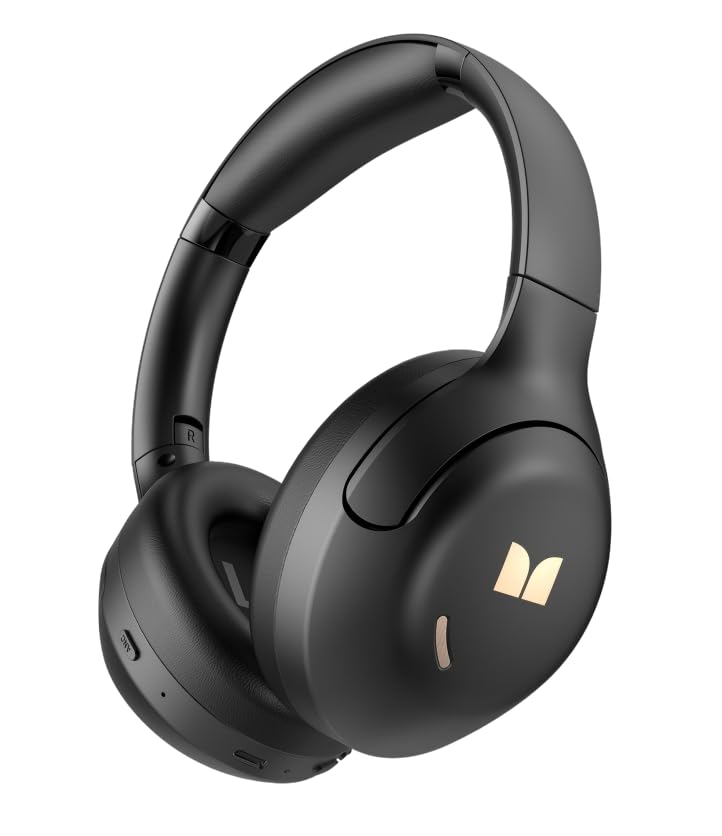
Íomhá 1.1: Tosaigh view of the Monster Persona 6th ANC Active Noise Cancelling Headphones. The headphones feature a sleek, over-ear design with cushioned earcups and an adjustable headband, providing comfort for extended listening sessions.
2. Ábhar Pacáiste
Seiceáil an pacáiste le do thoil le haghaidh na míreanna seo a leanas:
- Monster Persona 6th ANC Headphones × 1
- Cábla Muirir Cineál-C × 1
- Audio Cable × 1 (for wired connection)
- Lámhleabhar Úsáideora × 1
3. Socrú
3.1 Muirearú na gCluasán
Before first use, fully charge your headphones. A full charge takes approximately 2-3 hours.
- Connect the Type-C charging cable to the charging port on the headphones.
- Ceangail an ceann eile den chábla le hoiriúntóir cumhachta USB (nach bhfuil san áireamh) nó le port USB ríomhaire.
- Taispeánfaidh an táscaire LED stádas luchtaithe (m.sh., dearg le haghaidh luchtaithe, gorm le haghaidh lánmhuirearaithe).
Muirear Mear: Soláthraíonn muirear 10 nóiméad thart ar 5 uair an chloig d’athsheinm.
Image 3.1: Location of the Type-C charging port on the Monster Persona 6th ANC Headphones. The port is typically located on the bottom edge of one earcup, alongside other control buttons.
3.2 Cumhachtú Amach/Amach
- Cumhacht ar: Press and hold the Power button for 3 seconds until the LED indicator flashes blue and you hear a power-on prompt.
- Múch: Press and hold the Power button for 3 seconds until the LED indicator flashes red and you hear a power-off prompt.
3.3 Péireáil Bluetooth
Péireáil do chluasáin le do ghléas le haghaidh fuaime gan sreang.
- Cinntigh go bhfuil na cluasáin múchta.
- Press and hold the Power button for 5-7 seconds until the LED indicator flashes blue and red alternately, indicating pairing mode.
- Ar do ghléas (fón cliste, táibléad, ríomhaire), cumasaigh Bluetooth agus déan cuardach ar ghléasanna atá ar fáil.
- Select "Monster Persona 6th ANC" from the list of devices.
- Once connected, the LED indicator will flash blue slowly, and you will hear a connection prompt.
Ceangal Déghléas: These headphones support connecting to two Bluetooth devices simultaneously. After pairing with the first device, disable Bluetooth on the first device, pair with the second, then re-enable Bluetooth on the first device. The headphones should connect to both.
4. Ag Oibriú na gCluasán
4.1 Bunrialuithe
| Feidhm | Gníomh |
|---|---|
| Cumhacht ar / As | Brúigh agus coinnigh an cnaipe Cumhachta ar feadh 3 shoicind. |
| Súgradh/Sos | Press the Multi-function button (often the Power button when not powering on/off). |
| Imleabhar Suas | Short press '+' button. |
| Imleabhar Síos | Short press '-' button. |
| An Chéad Rian Eile | Long press '+' button. |
| Rian Roimhe Seo | Long press '-' button. |
| Freagra/Deireadh Glao | Brúigh an cnaipe Ilfheidhm. |
| Diúltaigh Glao | Brúigh an cnaipe Ilfheidhmeach go fada. |
| Gníomhachtaigh Cúntóir Gutha | Brúigh an cnaipe Ilfheidhm faoi dhó. |
Image 4.1: Diagram illustrating the location and function of control buttons on the Monster Persona 6th ANC Headphones. Buttons typically include Power/Multi-function, Volume Up/Next Track, Volume Down/Previous Track, and an ANC mode button.
4.2 Music Modes (EQ Modes)
Your headphones feature three distinct music modes to optimize your listening experience. Press the dedicated EQ/Mode button to cycle through them:
- Mód Gníomhach Cealaithe Torainn (ANC): Reduces ambient noise for an immersive audio experience. Ideal for travel or noisy environments.
- Mód Trédhearcachta: Ligeann sé duit do thimpeallacht a chloisteáil agus taitneamh a bhaint as do fhuaim fós. Úsáideach le haghaidh feasachta i dtimpeallachtaí uirbeacha nó agus tú ag idirghníomhú le daoine eile.
- Mód Caighdeánach: Provides a balanced, classic sound profile without active noise cancellation or transparency features.
4.3 Ceangal Sreangaithe
You can use the included audio cable to connect your headphones to devices without Bluetooth capability or when the battery is depleted. Simply plug one end into the headphone's audio jack and the other into your device's 3.5mm audio output.
5. Cothabháil
5.1 Glanadh
- Cuimil na cluasáin le héadach bog, tirim, saor ó lint.
- Ná húsáid glantóirí scríobacha, alcól ná tuaslagóirí ceimiceacha.
- Seachain taise a chur isteach in aon oscailtí.
5.2 Stóráil
- Stóráil na cluasáin in áit fhionnuar, thirim, amach ó sholas díreach na gréine agus ó theocht mhór.
- If storing for an extended period, charge the headphones every three months to maintain battery health.
6. Fabhtcheartú
Má bhíonn fadhbanna agat le do chluasáin, féach ar na réitigh choitianta seo a leanas:
| Fadhb | Réiteach |
|---|---|
| Ní lasann na cluasáin. | Cinntigh go bhfuil na cluasáin luchtaithe. Ceangail le foinse cumhachta ag baint úsáide as an gcábla Cineál-C. |
| Ní féidir péireáil leis an ngléas. | Ensure headphones are in pairing mode (flashing blue/red). Turn off and on Bluetooth on your device. Move headphones closer to the device. Clear previous Bluetooth connections on your device. |
| Gan fuaim ná toirt íseal. | Check headphone and device volume levels. Ensure headphones are properly paired. Try playing different audio sources. If using wired connection, ensure cable is fully inserted. |
| Níl an ANC ag obair go héifeachtach. | Ensure ANC mode is activated. ANC is most effective against low-frequency, constant noise. It may not completely eliminate all sounds. |
| Nasc uaineach. | Ensure no obstacles between headphones and device. Move away from strong Wi-Fi signals or other Bluetooth devices that may cause interference. Keep within the 33 feet Bluetooth range. |
7. Sonraíochtaí
| Gné | Sonraigh |
|---|---|
| Branda | Monster |
| Ainm an tSamhail | Monster Persona 6th ANC |
| Socrúchán Cluas | Thar Cluas |
| Rialú Torainn | Cealú Torainn Gníomhach |
| Teicneolaíocht Nascachta | Wireless (Bluetooth), Wired (3.5mm Audio Cable) |
| Leagan Bluetooth | 6.0 |
| Raon Bluetooth | 33 troigh (10 méadar) |
| Saol Battery | Suas le 60 uair an chloig |
| Port Muirearú | Cineál-C |
| Méid fuaime tiománaí | 40 milliméadar |
| Raon Minicíochta | 20Hz - 20,000Hz |
| Cineál Rialaithe | Rialú Cnaipe |
| Ábhar | Plaisteach |
| Gnéithe Breise | 3 Music Modes (ANC, Transparency, Standard), Dual Device Connection, Hands-free Calling |
8. Barántas agus Tacaíocht
8.1 Faisnéis Bharántas
Your Monster Persona 6th ANC Headphones come with a bharántas 180-lá ón dáta ceannaigh. Clúdaíonn an bharántas seo lochtanna déantúsaíochta agus ceardaíocht faoi ghnáthúsáid. Ní chlúdaíonn sé damáiste de dheasca mí-úsáide, timpistí, modhnuithe neamhúdaraithe, nó caitheamh agus cuimilt gnáth.
8.2 Tacaíocht do Chustaiméirí
For technical assistance, warranty claims, or any questions regarding your Monster Persona 6th ANC Headphones, please contact Monster customer support through their official website or the retailer where the product was purchased. Please have your purchase receipt and product model information ready when contacting support.