
1. Réamhrá
Go raibh maith agat as an gceannachasing the Audizio Laredo Bluetooth Turntable. This manual provides essential information for the safe and correct operation of your device. Please read it thoroughly before use and keep it for future reference.
Príomhghnéithe:
- Integrated HiFi speakers with 160W total power output.
- Bidirectional Bluetooth for wireless audio streaming (in and out).
- High-quality Audio Technica cartridge for precise playback.
- Supports 7, 10, and 12-inch vinyl records at 33 and 45 RPM.
- Adjustable counterweight on the aluminum tonearm.
- RCA Line Out for external ampardaitheoirí/cainteoirí.
- AUX Input for connecting external audio sources.
- Elegant bamboo finish.
Cad atá sa Bhosca:
- Audizio Laredo Turntable Unit
- Lámhleabhar Treoraithe
- Cuibheoir Cumhachta
- 45 RPM Adapter for singles
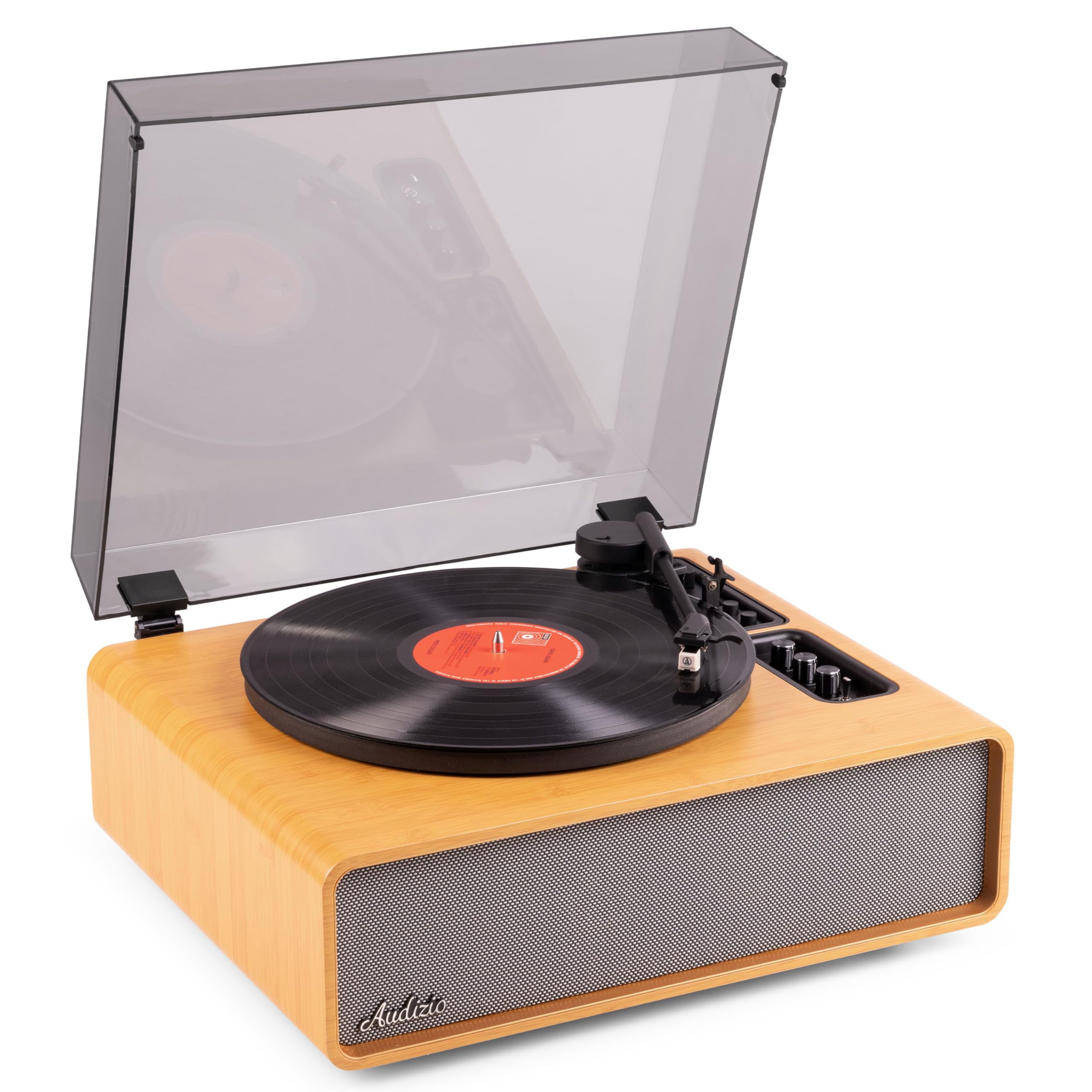
Figure 1.1: Audizio Laredo Turntable, overall view.
2. Treoracha Sábháilteachta
Please read and follow these safety instructions carefully to prevent damage to the unit and ensure your safety.
- Ná nochtaigh an t-aonad don bháisteach ná don taise chun tine nó turraing leictreach a chosc.
- Ná hoscail an casing. Níl aon chodanna istigh ann ar féidir leis an úsáideoir iad a sheirbhísiú. Tabhair aire do phearsanra cáilithe chun gach seirbhísiú a dhéanamh.
- Place the unit on a stable, level surface to prevent it from falling.
- Coinnigh an t-aonad ar shiúl ó sholas díreach na gréine, ó fhoinsí teasa, agus ó dheannach iomarcach.
- Cinntigh go bhfuil aeráil cheart ann timpeall an aonaid. Ná bac na hoscailtí aerála.
- Ná húsáid ach an cuibheoir cumhachta a sholáthraítear.
- Díphlugáil an t-aonad le linn stoirmeacha tintreach nó nuair nach bhfuil sé in úsáid ar feadh tréimhsí fada.
3. Táirge Tharview
Familiarize yourself with the components and controls of your Audizio Laredo turntable.
Príomh-Chomhpháirteanna:
- Platter: Supports the vinyl record.
- Tonearm: Tá an datha agus stylus.
- Cartridge & Stylus: Reads the grooves of the record. (Audio Technica ATN-3600)
- Clúdach deannaigh: Protects the platter and tonearm from dust.
- Cainteoirí Comhtháite: Le haghaidh athsheinm fuaime díreach.
- Painéal Rialaithe: For power, volume, tone, and mode selection.
- Naisc Chúil: RCA Line Out, AUX In, Power Input.

Fíor 3.1: Barr view of the turntable with key components visible.

Figure 3.2: Control Panel for volume, bass, and treble adjustments.

Figure 3.3: Audio Technica ATN-3600 Cartridge and Stylus.

Figure 3.4: Tonearm base with speed and auto-stop controls.

Figure 3.5: Rear connection panel.
4. Socrú
4.1 Díphacáil
- Bain an rothchlár as a phacáistiú go cúramach.
- Remove all protective materials, including the stylus guard.
- Coinnigh an pacáistiú le haghaidh iompair nó stórála sa todhchaí.
4.2 Socrúchán
- Place the turntable on a stable, level surface to prevent vibrations and ensure proper playback.
- Avoid placing the unit near strong magnetic fields, heat sources, or areas with high humidity.
4.3 Dust Cover Installation
- Align the hinges of the dust cover with the slots on the back of the turntable.
- Gently push down until the cover is securely in place.
- The dust cover can be removed for playback if desired.

Figure 4.1: Turntable with dust cover.
4.4 Ceangal Cumhachta
- Connect the power adapter to the DC IN port on the rear of the turntable.
- Plug the adapter into a suitable wall outlet (220V).
4.5 Tonearm and Cartridge Setup
- The Audio Technica cartridge is pre-installed.
- The tonearm features an adjustable counterweight. Refer to the detailed instructions in the included manual for precise counterweight adjustment to optimize tracking force.
5. Treoracha Oibriúcháin
5.1 Taifead a Sheinm
- Place a vinyl record on the platter. If playing a 7-inch single, use the included 45 RPM adapter.
- Select the appropriate speed (33 or 45 RPM) using the speed selector switch near the tonearm base.
- Ardaigh an lámh toin go réidh ag baint úsáide as an luamhán ciú.
- Position the tonearm over the desired track of the record.
- Ísligh an lámh toin go mall ag baint úsáide as an luamhán ciúála. Déanfaidh an stíleas teagmháil leis an taifead, agus tosóidh an athsheinm.
- At the end of the record, the auto-stop function will automatically stop the platter rotation. Lift the tonearm and return it to its rest.

Figure 5.1: Playing a vinyl record.
5.2 Bluetooth Operation (Bidirectional)
The Laredo turntable supports both Bluetooth input (receiving audio from a device) and Bluetooth output (sending audio to a Bluetooth speaker/headphones).
Bluetooth Input (BT IN):
- Press the MODE/POWER button to select Bluetooth mode. The LED indicator will flash.
- On your smartphone or tablet, enable Bluetooth and search for 'Audizio Laredo'.
- Select the turntable to pair. Once connected, the LED will glow solid.
- You can now stream audio from your device to the turntable's integrated speakers.
Bluetooth Output (BT OUT):
- Cinntigh go bhfuil do chluasáin nó do chainteoir Bluetooth i mód péireála.
- Set the BT OUT switch (located near the tonearm base) to 'ON'.
- The turntable will automatically search for and connect to the nearest Bluetooth audio device.
- Once connected, the audio from your vinyl record will be transmitted to your Bluetooth device.

Figure 5.2: Bidirectional Bluetooth functionality.
5.3 AUX Ionchur
- Connect an external audio device (e.g., MP3 player, CD player) to the AUX IN port on the rear of the turntable using a 3.5mm audio cable.
- Press the MODE/POWER button to select AUX mode.
- Audio from the external device will play through the turntable's speakers.
5.4 RCA Line Out
- Chun an seinnteoir rothlach a nascadh le meaisín seachtrach amplifier or powered speakers, use an RCA cable (not included) to connect the LINE OUT ports on the rear of the turntable to the corresponding input on your audio system.
- Ensure the 'Speaker ON/OFF' switch on the rear is set to 'OFF' if you only want sound from external speakers.
5.5 Rialú Toirte agus Ton
- Use the VOLUME knob on the control panel to adjust the overall playback volume.
- Adjust the BASS and TREBLE knobs to fine-tune the audio output to your preference.
6. Cothabháil
6.1 Glanadh an Aonaid
- Wipe the dust cover and cabinet with a soft, dry cloth.
- Ná húsáid glantóirí scríobacha, céirithe ná tuaslagóirí.
- For the platter, use a slightly damp éadach agus tirim go maith.
6.2 Stylus Care and Replacement
- The stylus is a delicate component. Handle it with care.
- Clean the stylus regularly using a soft brush designed for stylus cleaning, brushing from back to front.
- A stylus typically lasts for approximately 300-500 hours of playback. If you notice a decrease in sound quality or increased skipping, it may be time to replace the stylus.
- Replacement styli (e.g., Audio Technica ATN-3600L or compatible) can be purchased from authorized dealers. Refer to the detailed instructions provided with the replacement stylus for installation.
7. Fabhtcheartú
If you encounter issues with your turntable, please consult the following table before contacting support.
| Fadhb | Cúis Féideartha | Réiteach |
|---|---|---|
| Gan chumhacht | Power adapter not connected; Power outlet not working. | Ensure power adapter is securely connected to the unit and a working outlet. |
| Gan fuaim ó chainteoirí | Volume too low; Speaker ON/OFF switch is OFF; Incorrect mode selected. | Increase volume; Set 'Speaker ON/OFF' switch to ON; Select correct input mode (Phono, BT IN, AUX). |
| Skipping records | Record is dirty or damaged; Stylus is worn or dirty; Turntable not level; Tracking force incorrect. | Clean record; Clean or replace stylus; Place turntable on a level surface; Adjust tonearm counterweight. |
| Fadhbanna péireála Bluetooth | Device too far; Turntable not in pairing mode; Interference. | Ensure devices are within range; Re-enter pairing mode; Turn off other Bluetooth devices. |
| Saobhadh fuaime | Volume too high; Stylus worn; Record damaged. | Reduce volume; Replace stylus; Try a different record. |
8. Sonraíochtaí
Technical specifications for the Audizio Laredo Turntable.
| Gné | Sonraíocht |
|---|---|
| Ainm an tSamhail | Laredo (101.537) |
| Toisí (L x W x H) | 43.2 x 43.2 x 21 cm (17 x 17 x 8.3 orlach) |
| Meáchan Táirge | 7.65 kg (16.86 lb) |
| Ábhar | Wood (Bamboo finish) |
| Luasanna Rothlaithe | 33 RPM, 45 RPM |
| Cineál Cartúis | Audio Technica (ATN-3600) |
| Cineál Mótair | Céide Creasa |
| Formáid Chomhartha | Analógach |
| Cainteoirí Comhtháite | Yes, 160W total output |
| Leagan Bluetooth | 5.4 (Bidirectional) |
| Nascacht | Bluetooth (In/Out), RCA Line Out, AUX In |
| Foinse Cumhachta | Wired Leictreach |
| Imltage | 220 Volta |
| Gléasanna Comhoiriúnacha | Speakers, Headphones, Smartphone, Tablet |
9. Barántas agus Tacaíocht
9.1 Faisnéis Bharántas
This Audizio Laredo Turntable comes with a Barántas 2 bhliain from the date of purchase. This warranty covers manufacturing defects and faults under normal use. It does not cover damage caused by misuse, accidents, unauthorized modifications, or normal wear and tear (e.g., stylus wear).
Coinnigh do chruthúnas ceannaigh le haghaidh éilimh bharánta.
9.2 Tacaíocht do Chustaiméirí
If you have any questions, require technical assistance, or need to make a warranty claim, please contact your retailer or visit the official Audizio websuíomh le haghaidh acmhainní tacaíochta agus sonraí teagmhála.
Official Audizio Websuíomh: www.audizio.com