
1. Réamhrá
This manual provides detailed instructions for the installation, operation, and maintenance of your Zebronics DMS200 Monitor Desk Stand. Please read this manual thoroughly before installation and use to ensure proper function and safety. The DMS200 is designed to support monitors from 17 to 32 inches, with a maximum load capacity of 7 kg, offering ergonomic adjustments for an optimized viewtaithí.

Image 1.1: Zebronics DMS200 Monitor Desk Stand overview.
2. Faisnéis Sábháilteachta
Lean na réamhchúraimí sábháilteachta seo a leanas le do thoil chun díobháil nó damáiste don táirge a chosc:
- Ná sáraigh an acmhainn meáchain uasta de 7 kg (15.4 lb).
- Ensure the desk surface is stable and strong enough to support the combined weight of the stand and monitor.
- Always follow the installation instructions carefully. Improper installation can lead to equipment damage or personal injury.
- Keep children and pets away during installation. Small parts may be a choking hazard.
- Ná ró-theannaigh na scriúnna, mar d’fhéadfadh sé seo damáiste a dhéanamh.
- Regularly check all connections to ensure they remain secure.
3. Ábhar Pacáiste
Deimhnigh go bhfuil na comhpháirteanna uile i láthair sula dtosaíonn tú ar an suiteáil:
- Tionól Lámh Monatóireachta
- Deasc Clamp (C-clamp)
- Bonn Gléasta Grommet
- Pláta VESA
- Trealamh Crua-earraí (scriúnna, leicneáin, eochracha Allen)
- Lámhleabhar Treoraithe
4. Socrú agus Suiteáil
The Zebronics DMS200 offers two installation methods: C-clamp and Grommet mount. Choose the method best suited for your desk.
4.1. Choosing a Mounting Method
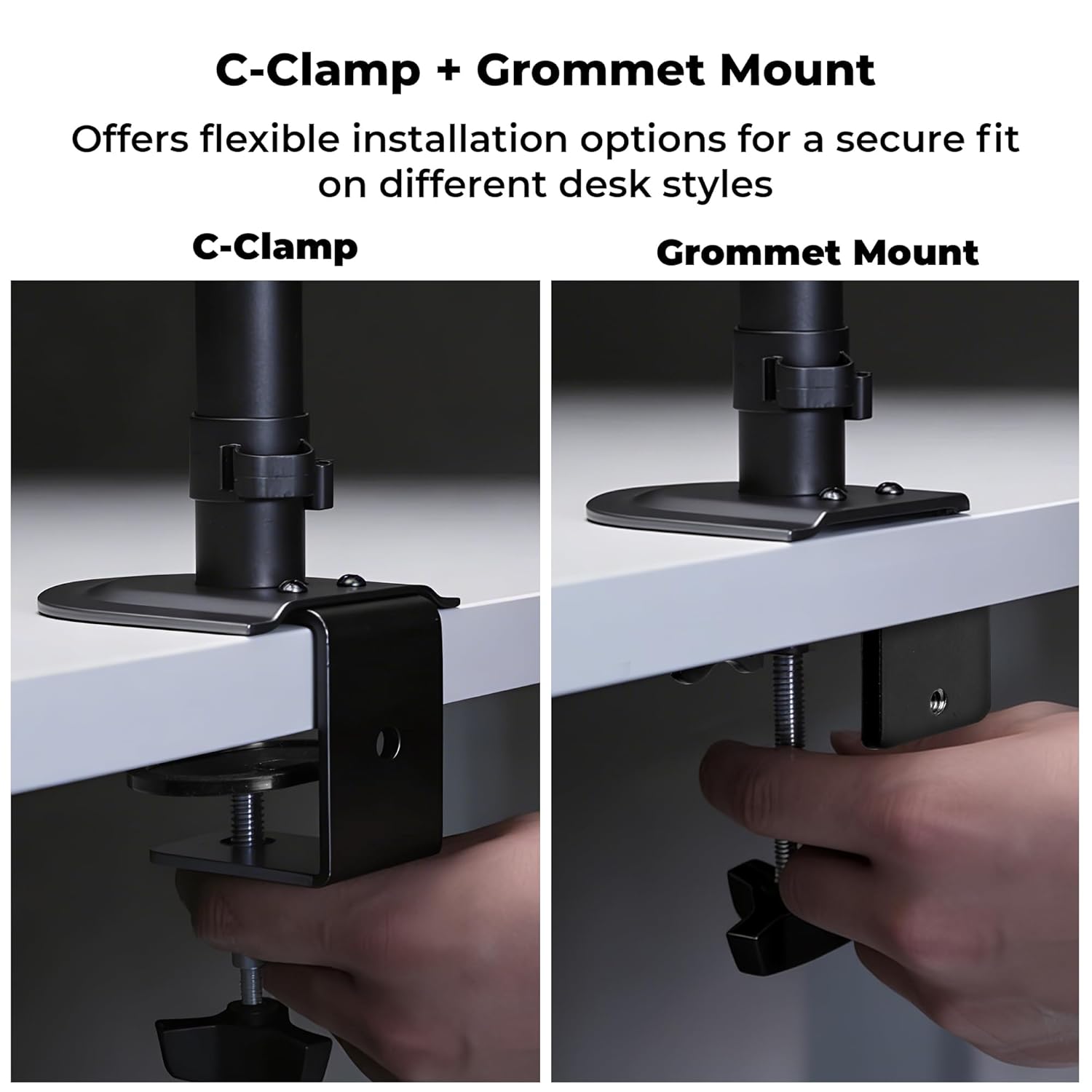
Íomhá 4.1: C-Clamp and Grommet Mount options.
- C-Clamp: Ideal for desks without pre-drilled holes. Clamps to the edge of the desk.
- Gléas Grommet: Requires a pre-drilled hole (or drilling one) in the desk. Provides a more flush installation.
4.2. C-Clamp Suiteáil
- Ceangail an C-clamp go bun an phríomhphoill.
- Position the stand on the edge of your desk.
- Déan an C-clamp screw until the stand is securely fastened to the desk. Ensure it is stable and does not wobble.
4.3. Suiteáil Gléasta Grommet
- Díchóimeáil an C-clamp from the main pole if it was pre-attached.
- Insert the main pole through the grommet hole in your desk.
- Secure the grommet base plate and tighten the nut from underneath the desk until the stand is firm.
4.4. Ensuring Stability
After mounting the stand, verify its stability on the desk. The anti-slip base and robust construction ensure reliable support for monitors up to 7 kg.

Image 4.4: Stand stability and maximum load capacity.
4.5. An Monatóir a Cheangal
The DMS200 supports VESA patterns of 75x75mm and 100x100mm.

Image 4.5: VESA mount plate for monitor attachment.
- Attach the VESA plate to the back of your monitor using the appropriate screws from the hardware kit. Ensure the screws are not overtightened.
- Carefully slide the monitor (with the VESA plate attached) onto the monitor arm's mounting head.
- Secure the monitor to the arm by tightening the locking screw or mechanism on the mounting head.
4.6. Bainistíocht Cábla
Utilize the integrated cable management clips to keep your workspace tidy.

Image 4.6: Integrated cable management.
- Route your monitor's power and display cables through the clips located along the arm and pole.
- Ensure cables have enough slack for full range of motion without being strained.
5. Treoracha Oibriúcháin
The DMS200 monitor arm provides various adjustments for optimal ergonomic positioning.

Image 5.1: Monitor arm adjustment capabilities.
- Coigeartú Airde: Loosen the collar on the main pole, adjust the arm to the desired height, and then re-tighten the collar.
- Coigeartú Tilt: The monitor can be tilted up to ±5°. Adjust the tilt angle by gently pushing or pulling the top or bottom of the monitor. If the monitor does not hold its position, tighten the tilt mechanism screw with an Allen key.
- Coigeartú Sclóine: The arm allows for ±90° swivel. Gently rotate the monitor left or right to achieve the desired viewuillinn ing.
- Rothlú: The VESA plate allows for 360° rotation, enabling portrait or landscape orientation. Rotate the monitor gently to switch orientations.
- Arm Extension: The mechanical arm can extend up to 42 cm. Adjust the arm's position by gently pulling or pushing it to bring the monitor closer or further away.
6. Cothabháil
To ensure the longevity and proper function of your monitor stand:
- Glanadh: Cuimil an seastán le clúdach bog, damp éadach. Seachain glantóirí scríobacha nó tuaslagóirí a d’fhéadfadh damáiste a dhéanamh don chríoch.
- Seiceálacha Tréimhsiúla: Seiceáil na scriúnna agus na naisc go léir go tréimhsiúil lena chinntiú go bhfuil siad daingean agus slán. Aththéann más gá.
- Cumas Luchtaithe: Do not place items on the monitor arm or exceed the maximum weight capacity.
7. Fabhtcheartú
| Fadhb | Cúis Féideartha | Réiteach |
|---|---|---|
| Monitor sags or does not hold tilt position. | Tá scriú an mheicníocht tilt scaoilte. | Tighten the tilt adjustment screw on the VESA head using the provided Allen key. |
| Tá an seastán ag luascadh nó éagobhsaí. | Deasc clamp/grommet mount is not tight enough. | Ath-theannaigh an C-clamp or grommet mount screw/nut. Ensure the desk surface is stable. |
| Monitor cannot be rotated or swiveled smoothly. | Joints may be too tight or require lubrication. | Check for any obstructions. If joints are too stiff, apply a small amount of silicone-based lubricant (avoid oil-based). |
| Cables are strained during adjustment. | Insufficient slack in cable management. | Re-route cables, ensuring enough slack is provided for the full range of arm movement. |
8. Sonraíochtaí
| Gné | Sonraigh |
|---|---|
| Múnla | DMS200 |
| Méid Scáileáin Tacaithe | 17 - 32 orlach |
| Cumas Ualach Uasta | 7 kg (15.4 lb) |
| Comhoiriúnacht VESA | 75x75mm, 100x100mm |
| Cineál Gléasta | C-Clamp, Sliabh Grommet |
| Coigeartuithe | Height, Tilt (±5°), Swivel (±90°), Rotation (360°) |
| Síneadh Lámh | Suas go dtí 42 cm |
| Ábhar | Metal (Rust-Proof) |
| Dath | Dubh |
| Meáchan Mír | 1670 gram |
9. Barántas agus Tacaíocht
Barántas: The Zebronics DMS200 Monitor Desk Stand comes with a 1-year carry-in warranty to the service center from the date of purchase.
tacaíocht: For technical assistance, troubleshooting, or warranty claims, please contact Zebronics customer support. Refer to the official Zebronics websuíomh gréasáin nó i do dhoiciméid cheannaigh le haghaidh sonraí teagmhála.
Manufacturer: Zebronics India Private Limited, 13/7 Smith Road, Royapettah, Chennai, Tamil Nadu - 600 002, India.