
Q37H4-AM2
Generic Q37H4-AM2 Motherboard User Manual
Model: Q37H4-AM2 for M6660G T850 Desktop Systems
1. Réamhrá
This manual provides detailed instructions for the installation, operation, and maintenance of the Generic Q37H4-AM2 Motherboard. Please read this manual thoroughly before proceeding with installation or use to ensure proper functionality and to prevent damage to the product or other components. Keep this manual for future reference.
2. Táirge Tharview
The Generic Q37H4-AM2 Motherboard is designed for optimal performance and compatibility with various computing needs. It features a robust design for longevity and reliability, suitable for M6660G T850 desktop systems.

Fíor 2.1: Barr-síos view of the Q37H4-AM2 motherboard, highlighting the CPU socket, RAM slots, and various expansion slots and connectors. This image provides a general layout of the board's components.
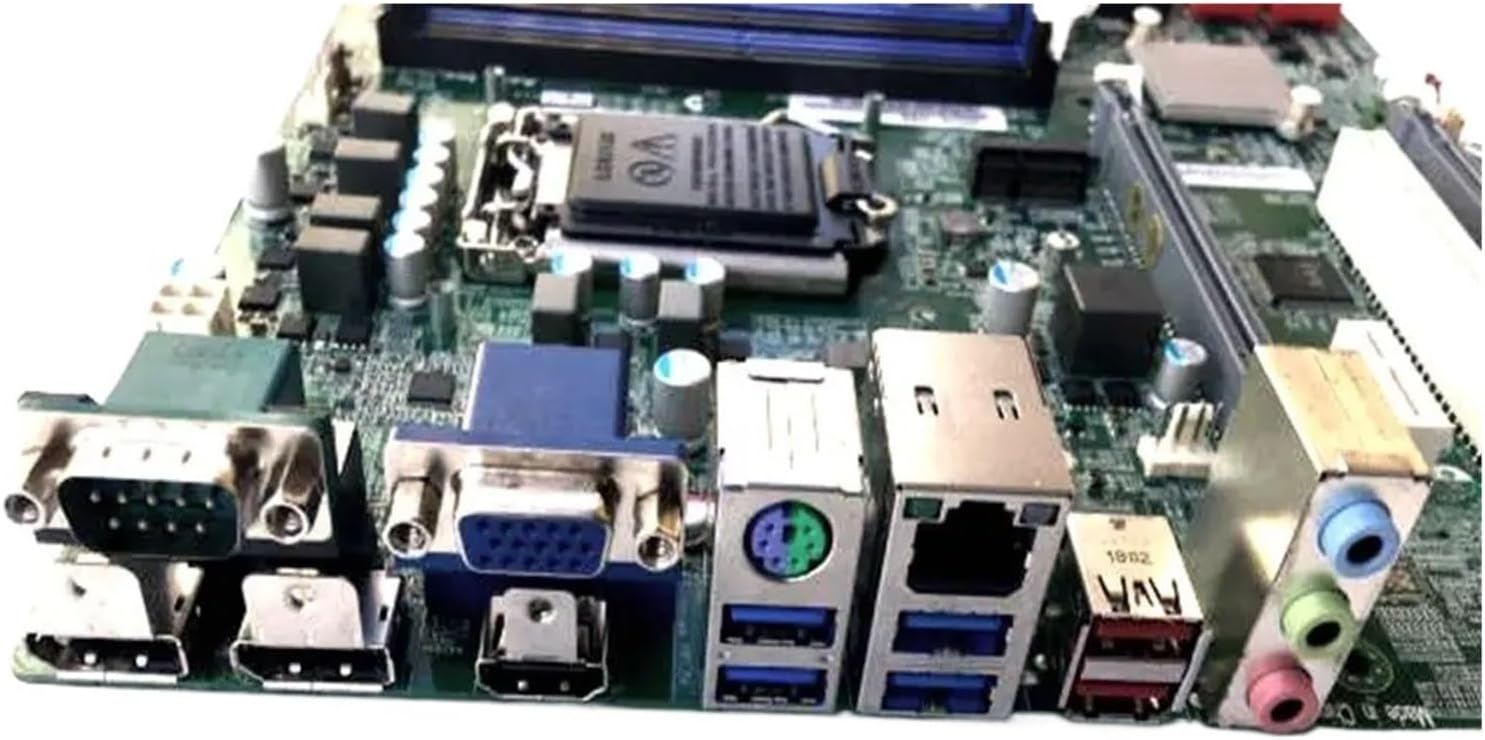
Figure 2.2: Rear I/O panel of the Q37H4-AM2 motherboard, displaying ports such as USB, VGA, HDMI, Ethernet, and audio jacks. This view is crucial for connecting external peripherals.

Fíor 2.3: Gar-suas view of the Q37H4-AM2 motherboard, showing the model number label (Q37H4-AM2) and additional expansion slots. This image helps in identifying the specific model and available expansion options.
3. Socrú agus Suiteáil
Sula dtosaíonn tú ar an suiteáil, cinntigh go bhfuil do spás oibre glan, soilsithe go maith, agus saor ó statach. Moltar strap láimhe frithstatach a chaitheamh.
3.1. Ábhar Pacáiste
Deimhnigh go bhfuil na comhpháirteanna uile i láthair sa phacáiste:
- Generic Q37H4-AM2 Motherboard
- Sciath I / O.
- Cáblaí SATA (d’fhéadfadh an chainníocht a bheith éagsúil)
- Lámhleabhar Úsáideora (an doiciméad seo)
- CD/USB tiománaí (más ann dó)
3.2. Suiteáil an LAP
- Locate the CPU socket (LGA1151) on the motherboard.
- Ardaigh an luamhán ualaigh go réidh agus oscail clúdach soicéad an LAP.
- Ailínigh an LAP leis an soicéad, ag cinntiú go bhfuil an triantán órga ar an LAP ag teacht leis an triantán ar an soicéad.
- Carefully place the CPU into the socket without forcing it.
- Dún clúdach an soicéid agus brúigh an luamhán ualaigh síos go dtí go n-inseoidh sé ina áit.
- Apply thermal paste to the CPU surface and install the CPU cooler.
3.3. RAM a shuiteáil
- Locate the DDR RAM slots on the motherboard.
- Oscail na gearrthóga ag an dá cheann den sliotán RAM.
- Align the notch on the RAM module with the notch in the slot.
- Insert the RAM module firmly into the slot until the clips snap into place.
- Repeat for additional RAM modules, following dual-channel configuration guidelines if applicable.
3.4. Forimeallaigh a nascadh
- Soláthar Cumhachta: Ceangail an cónascaire cumhachta ATX 24-bioráin agus an cónascaire cumhachta LAP 8-bioráin (nó 4-bioráin) ó do sholáthar cumhachta leis an máthairchlár.
- Gléasanna Stórála: Connect SATA data cables from your storage drives (HDD/SSD) to the SATA ports on the motherboard. Connect power cables from the power supply to the drives.
- Nascóirí Painéil Tosaigh: Connect the power button, reset button, HDD LED, power LED, and front USB/audio headers to the corresponding pins on the motherboard. Refer to the motherboard diagram for exact pin locations.
- Cártaí Leathnaithe: Insert graphics cards or other expansion cards into the appropriate PCIe slots.
4. Treoracha Oibriúcháin
4.1. An Chéad Tosaithe
- After all components are installed and connected, ensure all cables are secure.
- Ceangail do mhonatóir, do mhéarchlár agus do luch.
- Plug in the power cord to the power supply and turn on the power switch.
- Brúigh an cnaipe cumhachta ar chás do ríomhaire.
- The system should boot and display the BIOS/UEFI screen.
4.2. Cumraíocht BIOS/UEFI
To enter the BIOS/UEFI setup, press the designated key (usually DEL or F2) le linn an chéad seicheamh tosaithe. Anseo is féidir leat ord tosaithe, am an chórais, agus socruithe crua-earraí eile a chumrú.
4.3. Suiteáil Córas Oibriúcháin
Cuir isteach meán suiteála do chórais oibriúcháin (tiomántán USB nó DVD) agus cumraigh an t-ord tosaithe i BIOS/UEFI chun tosaithe uaidh. Lean na treoracha ar an scáileán chun do chóras oibriúcháin is fearr leat a shuiteáil.
4.4. Suiteáil Tiománaithe
After installing the operating system, install the necessary drivers for the motherboard chipset, audio, network, and any other integrated components. These drivers are typically provided on a CD/USB or can be downloaded from the manufacturer's websuíomh.
5. Cothabháil
Cuidíonn cothabháil rialta le fad saoil agus oibriú cobhsaí do mháthairchláir agus do chórais a chinntiú.
- Baint deannaigh: Glan deannach ón máthairchlár agus ó chomhpháirteanna eile go tréimhsiúil ag baint úsáide as aer comhbhrúite. Cinntigh go bhfuil an córas múchta agus díphlugáilte sula ndéantar é a ghlanadh.
- Nuashonruithe BIOS/UEFI: Seiceáil an monaróir website for BIOS/UEFI updates. Updates can improve stability, compatibility, and performance. Follow update instructions carefully to avoid system damage.
- Nuashonruithe Tiománaithe: Coinnigh do thiománaithe cothrom le dáta chun feidhmíocht agus comhoiriúnacht is fearr le bogearraí agus crua-earraí nua a chinntiú.
- Bainistíocht Cábla: Cinntigh go bhfuil na cáblaí inmheánacha treoraithe go néata chun sreabhadh aeir a fheabhsú agus cur isteach a chosc.
6. Fabhtcheartú
Cuireann an chuid seo réitigh ar fáil ar fhadhbanna coitianta a d’fhéadfadh teacht ort.
6.1. Gan Chumhacht / Gan Taispeántas
- Check all power connections: 24-pin ATX, 8-pin CPU, and power supply cable.
- Cinntigh go bhfuil lasc an tsoláthair chumhachta sa suíomh "AR".
- Verify that the monitor is connected and powered on.
- Athshuigh na modúil RAM agus na cártaí leathnaithe.
- Try booting with minimal components (CPU, one RAM stick, graphics card if no integrated graphics).
6.2. Éagobhsaíocht an Chórais / Tuairteanna
- Seiceáil teochtaí an LAP agus an GPU. Is féidir le róthéamh éagobhsaíocht a chur faoi deara.
- Cinntigh go bhfuil na tiománaithe go léir suiteáilte i gceart agus cothrom le dáta.
- Rith uirlisí diagnóiseacha cuimhne chun a sheiceáil an bhfuil RAM lochtach.
- Fíoraigh cad an tsoláthair chumhachtatagIs leor e do na comhpháirteanna uile.
- Seiceáil le haghaidh naisc scaoilte nó comhpháirteanna atá suite go mícheart.
6.3. Gan Bhraith ar Fhoirmeacha
- Cinntigh go bhfuil an forimeallach ceangailte i gceart leis an gcalafort ceart.
- Seiceáil bainisteoir gléasanna i do chóras oibriúcháin le haghaidh fadhbanna le tiománaithe.
- Bain triail as an ngléas imeallach a nascadh le port difriúil.
- Verify that the peripheral is powered on (if applicable).
7. Sonraíochtaí
| Gné | Sonraíocht |
|---|---|
| Branda | cineálach |
| Múnla | Q37H4-AM2 |
| Soicéad LAP | LGA1151 |
| Gléasanna Comhoiriúnacha | Ríomhairí Deisce |
| Teicneolaíocht Cuimhne RAM | DDR |
| Cineál Sliseanna | Q370 |
| Luas Clog Cuimhne | 1 GHz |
| Uasmhéid Cuimhne RAM | 1 GB |
| Sliotáin Cuimhne Ar Fáil | 2 |
Note: Some specifications provided in the source data appear to be generic placeholders and may not accurately reflect the specific model. Users should consult the official manufacturer's documentation for precise details. For example, 1 GHz memory speed and 1 GB maximum RAM are typically placeholder values for modern motherboards. The image shows 2 memory slots.
8. Barántas agus Tacaíocht
For warranty information, please refer to the documentation provided with your purchase or contact the seller directly. Technical support may be available through the seller or the original equipment manufacturer (OEM) if this is a replacement part for a specific system.
Díoltóir: Er HHh Store
ASIN: B0GG437SW4
Ask a question about this manual
Ask about setup, troubleshooting, compatibility, parts, safety, or missing instructions. Manuals+ will review the question and use this page’s manual context to help answer it.