
1. Réamhrá
The Audizio Desio is a versatile digital radio that combines classic aesthetics with modern audio technology. It features DAB, DAB+, and FM tuning for clear radio reception, along with Bluetooth 5.0 for wireless streaming, a USB port for media playback, and a 3.5mm AUX input for wired connections. The radio is equipped with a 2.4-inch color LCD display and integrated stereo speakers, making it suitable for various environments such as living rooms, kitchens, or bedrooms.
This manual provides detailed instructions for setting up, operating, and maintaining your Audizio Desio radio. Please read it thoroughly before use to ensure proper functionality and to maximize your listening experience.
2. Faisnéis Sábháilteachta
- Cinntigh go bhfuil toirt an oiriúnaitheora cumhachtatage matches your local power supply before connecting.
- Ná nochtaigh an t-aonad do bháisteach, taise ná teochtaí foircneacha.
- Seachain an t-aonad a chur in aice le foinsí teasa nó i solas díreach na gréine.
- Ná hoscail an casing; cuir gach seirbhísiú faoi bhráid phearsanra cáilithe.
- Coinnigh an t-aonad ar shiúl ó réimsí maighnéadacha láidre.
- Glan an t-aonad ach amháin le éadach bog, tirim.
3. Ábhar Pacáiste
Seiceáil le do thoil go bhfuil na hearraí go léir i láthair nuair a dhíphacáiltear iad:
- Audizio Desio DAB/DAB+/FM Radio
- Cuibheoir Cumhachta (DC 5V)
- Cianrialú
- Lámhleabhar Úsáideora
4. Rialuithe agus Naisc
Rialuithe Painéal Tosaigh
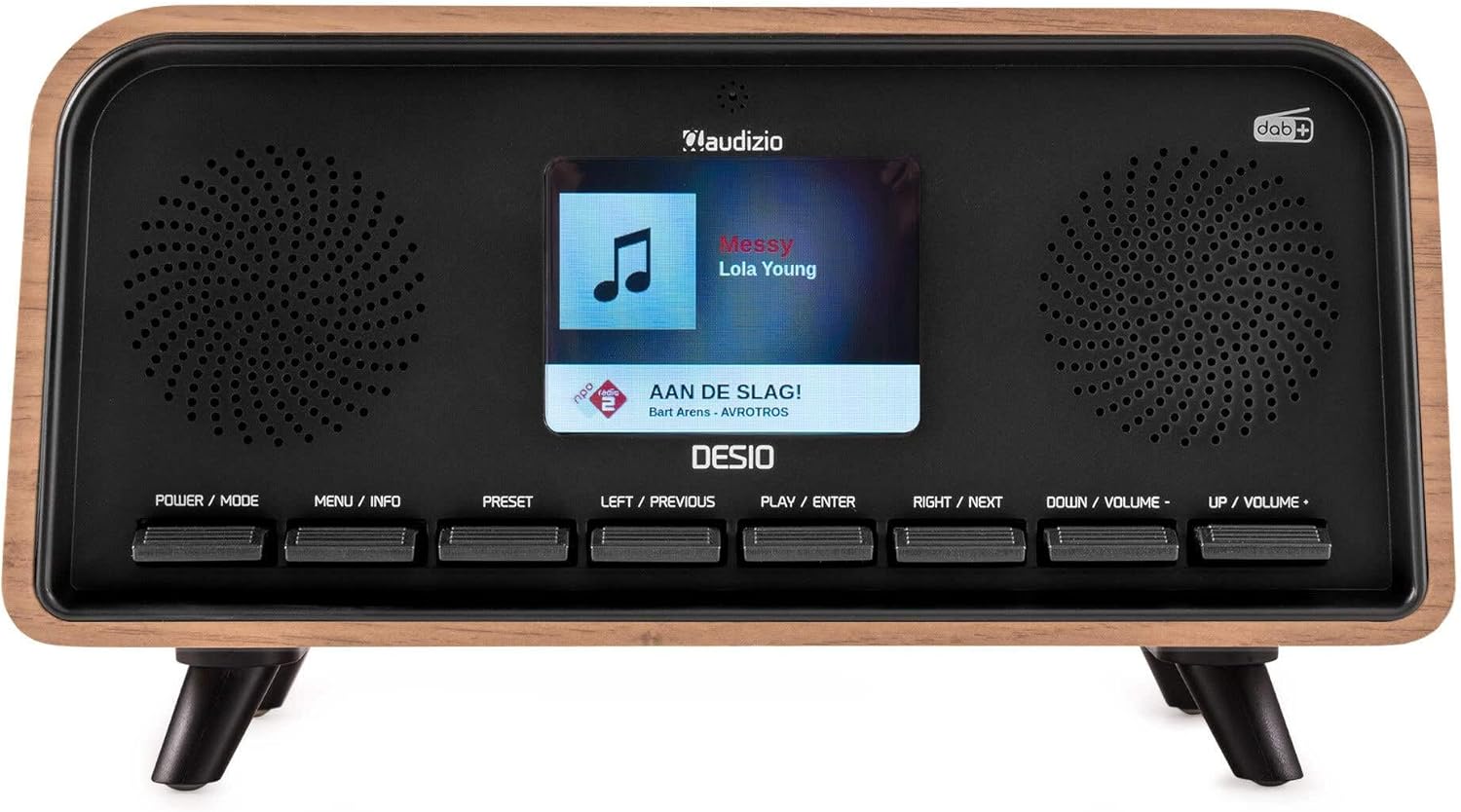
Tosaigh view of the Audizio Desio radio, showing the display playing music with artist and track information. The control buttons are visible below the screen.
- POWER / MODE: Press to turn on/off. Press and hold to switch between DAB, FM, Bluetooth, USB, and AUX modes.
- MENU / INFO: Press to access menu options. In playback mode, press to cycle through information display.
- Réamhshocrú: Press to recall saved stations. Press and hold to save current station.
- LEFT / PREVIOUS: Navigate left in menus, or skip to previous track/station.
- PLAY / ENTER: Confirm selection in menus, or play/pause media.
- RIGHT / NEXT: Navigate right in menus, or skip to next track/station.
- DOWN / VOLUME -: Decrease volume, or navigate down in menus.
- UP / VOLUME +: Increase volume, or navigate up in menus.
Naisc Painéil Cúil
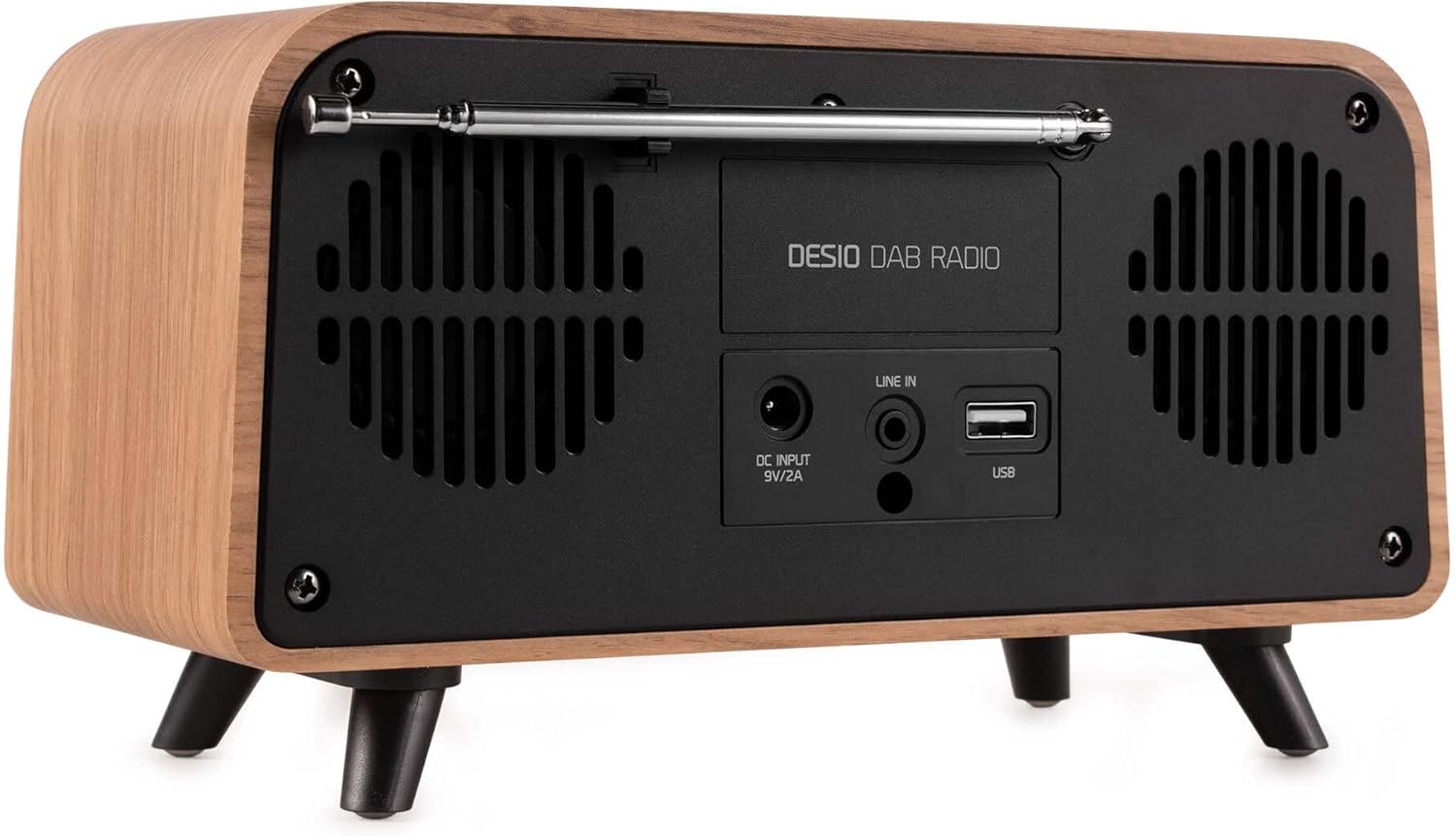
cúil view of the Audizio Desio radio, highlighting the DC INPUT 9V/2A, LINE IN (3.5mm AUX), and USB ports. The telescopic antenna is extended.
- DC INPUT 9V/2A: Ceangail an t-oiriúntóir cumhachta a chuirtear ar fáil anseo.
- LINE IN (3.5mm AUX): Ceangail gléasanna fuaime seachtracha ag baint úsáide as cábla fuaime 3.5mm.
- USB: Cuir isteach tiomántán USB flash le haghaidh athsheinm MP3.
- Antenna teileascópacha: Extend fully for optimal DAB/DAB+ and FM reception.
5. Socrú Tosaigh
- Cumhacht Ceangail: Plug the provided DC 5V power adapter into the DC INPUT port on the rear of the radio, then plug the adapter into a wall outlet.
- Leathnaigh Antenna: Fully extend the telescopic antenna located on the rear of the unit for best reception.
- Cumhacht ar: Brúigh an CUMHACHT / MODE cnaipe chun an raidió a chur ar siúl.
- First-time DAB Scan: Upon first power-on, the radio will automatically perform a full scan for DAB/DAB+ stations. This may take a few minutes. The display will show the scanning progress.
- Socraigh Am/Dáta: The time and date will usually be set automatically via DAB signal. If not, you can manually set them via the menu.
6. Treoracha Oibriúcháin
6.1 Oibriú Raidió DAB/DAB+

Tosaigh view of the Audizio Desio radio, displaying a DAB radio station ('NPO Klassiek') and current time.
- Select DAB Mode: Brúigh an CUMHACHT / MODE button repeatedly until 'DAB' is displayed.
- Scanadh le haghaidh Stáisiúin: If no stations are found or you wish to rescan, press MENU / INFO, ansin bain úsáid as LEFT / PREVIOUS or CEART / Ar Aghaidh to select 'Full Scan' and press PLAY / ENTER.
- Roghnaigh Stáisiún: Bain úsáid as an LEFT / PREVIOUS or CEART / Ar Aghaidh cnaipí chun na stáisiúin atá ar fáil a bhrabhsáil. Brúigh PLAY / ENTER chun stáisiún a roghnú.
- Sábháil Réamhshocrú: Chun stáisiún a shábháil, brúigh agus coinnigh an cnaipe Réamhshocrú cnaipe. Úsáid LEFT / PREVIOUS or CEART / Ar Aghaidh to choose a preset number (1-50), then press PLAY / ENTER a dheimhniú.
- Réamhshocrú Athghairm: Chun stáisiún sábháilte a thabhairt ar ais, brúigh an Réamhshocrú button (do not hold). Use LEFT / PREVIOUS or CEART / Ar Aghaidh chun an réamhshocrú atá uait a roghnú, ansin brúigh PLAY / ENTER.

Tosaigh view of the Audizio Desio radio, showing the 'Preset Recall' menu on the display, indicating empty preset slots.
Oibriú Raidió 6.2 FM
- Roghnaigh Mód FM: Brúigh an CUMHACHT / MODE button repeatedly until 'FM' is displayed.
- Scanadh Auto: Brúigh agus coinnigh PLAY / ENTER to automatically scan for and save available FM stations.
- Tiúnadh Lámhleabhar: Úsáid LEFT / PREVIOUS or CEART / Ar Aghaidh chun an minicíocht a choigeartú go mín.
- Save/Recall Presets: Follow the same procedure as for DAB radio (Section 6.1).
6.3 Bluetooth (BT) Operation

Tosaigh view of the Audizio Desio radio, with the display showing 'BT' (Bluetooth) mode and 'Connected' status.
- Select BT Mode: Brúigh an CUMHACHT / MODE button repeatedly until 'BT' is displayed. The radio will enter pairing mode, indicated by a flashing Bluetooth icon.
- Gléas Péire: On your smartphone, tablet, or laptop, enable Bluetooth and search for available devices. Select 'Audizio Desio' from the list.
- Ceangail: Once paired, the display will show 'Connected'. You can now stream audio from your device to the radio.
- Rialú Athsheinm: Use your connected device or the radio's PLAY / ENTER, LEFT / PREVIOUS, agus CEART / Ar Aghaidh cnaipí chun athsheinm a rialú.
6.4 Athsheinm USB

Tosaigh view of the Audizio Desio radio, with the display showing 'USB' mode, current time, and details of an MP3 file á imirt.
- Cuir Tiomántán USB isteach: Insert a USB flash drive (formatted to FAT32) containing MP3 files into the USB port on the rear of the radio.
- Roghnaigh Mód USB: Brúigh an CUMHACHT / MODE button repeatedly until 'USB' is displayed. The radio will automatically start playing the first compatible audio file.
- Déan nascleanúint Files: Úsáid LEFT / PREVIOUS or CEART / Ar Aghaidh to skip tracks. Press PLAY / ENTER chun athsheinm a stopadh/atosú.
6.5 AUX Ionchur
- Gléas Ceangail: Connect an external audio device (e.g., MP3 player, smartphone) to the 'LINE IN' (3.5mm AUX) port on the rear of the radio using a 3.5mm audio cable (not included).
- Roghnaigh Mód AUX: Brúigh an CUMHACHT / MODE button repeatedly until 'AUX' is displayed.
- Rialú Athsheinm: Playback is controlled directly from your connected external device. Adjust volume using the radio's volume controls.
6.6 Feidhmeanna Aláraim agus Amaire
- Aláraim a Shocrú: Rochtain ar shocruithe an aláraim tríd an MENU / INFO button. You can set multiple alarms with customizable sources (DAB, FM, Buzzer), volume, and recurrence (daily, weekdays, weekends).
- Uaineadóir Codlata: The sleep timer allows the radio to turn off automatically after a set period. Access this function via the MENU / INFO button and select the desired duration.
- Feidhm Snooze: When an alarm sounds, press any button (except Power) to activate the snooze function for a short period.
7. Cothabháil
- Glanadh: Use a soft, dry, lint-free cloth to clean the radio's surface. Do not use abrasive cleaners, waxes, or solvents.
- Cúram Antenna: Láimhseáil an t-antenna teileascópach go cúramach chun lúbadh nó briseadh a sheachaint.
- Stóráil: Má tá an raidió á stóráil ar feadh tréimhse fada, dícheangail é ón soláthar cumhachta agus stóráil é in áit fhionnuar, thirim.
8. Fabhtcheartú
| Fadhb | Cúis Féideartha | Réiteach |
|---|---|---|
| Gan chumhacht | Níl an t-oiriúntóir cumhachta ceangailte nó tá an asraon lochtach. | Seiceáil nasc an oiriúnaitheora cumhachta agus bain triail as asraon eile. |
| Glacadh lag DAB/FM | Antenna not fully extended or poor signal area. | Fully extend the antenna. Try repositioning the radio. Perform a full scan. |
| Bluetooth gan nascadh | Radio not in BT mode, device not in pairing mode, or too far away. | Ensure radio is in BT mode. Put your device in pairing mode. Move device closer to the radio (within 10m). |
| Athsheinm USB nach bhfuil ag obair | USB drive not inserted correctly, unsupported file format, or drive not FAT32. | Cuir an tiomántán USB isteach arís. Cinntigh files are MP3. Check USB drive format (FAT32). |
| Gan aon fhuaim ó AUX | Radio not in AUX mode, cable faulty, or external device volume low. | Select AUX mode. Check 3.5mm cable. Increase volume on both radio and external device. |
9. Sonraíochtaí Teicniúla
- Branda: Audizio
- Múnla: Desio
- Teicneolaíocht Tuner: FM, DAB+
- Bluetooth: Version 5.0 (Range: 10m)
- Roghanna Athsheinm: Bluetooth, USB, 3.5mm AUX input
- Stáisiúin Réamhshocraithe: 50
- Taispeáin: LCD Dath 2.4 orlach
- Feidhmeanna: Alarm, Sleep Timer, Snooze, Dimming, Week/Weekend Alarm
- Max Speaker Power: 30 Bhata
- Soláthar Cumhachta: DC 5V (Power Adapter)
- Toisí Táirge (H x W x D): 32 x 16 x 18 cm
- Meáchan: 1.66 kg
10. Barántas agus Tacaíocht
This product comes with a standard manufacturer's warranty. For detailed warranty terms and conditions, please refer to the documentation provided at the time of purchase or contact your retailer.
For technical support, troubleshooting assistance, or service inquiries, please contact the Audizio customer support team or your local dealer. Please have your product model number (Desio) and purchase information ready when contacting support.