
Réamhrá
Thank you for choosing the LIORQUE Wireless Weather Station YGH6208. This device provides accurate indoor and outdoor temperature and humidity readings, weather forecasts, and features a DCF radio-controlled clock with alarm functions. This manual will guide you through the setup, operation, and maintenance of your weather station.
Ábhar an Phacáiste
- 1 x LIORQUE Wireless Weather Station (Main Unit)
- 1 x Braiteoir Allamuigh
- 3 x AAA Batteries (for Main Unit)
- 2 x AAA Batteries (for Outdoor Sensor)
- 1 x Lámhleabhar Úsáideora (an doiciméad seo)
Táirge Tharview
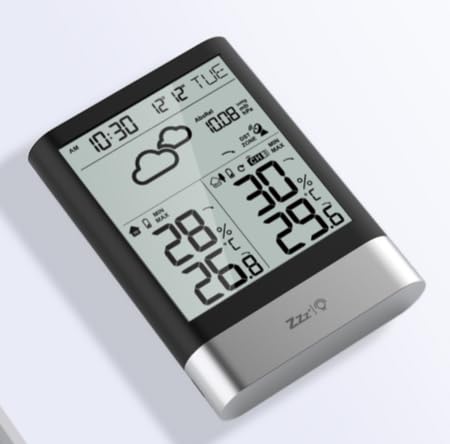
Íomhá 1: LIORQUE Wireless Weather Station Main Unit. This image shows the front view of the main display unit, highlighting its LCD screen and compact design.
Príomhghnéithe an Aonaid:
- 4.3-inch LCD screen with backlight
- Taispeántas teocht agus taise faoi dhíon
- Taispeántas teochta agus taise lasmuigh
- Deilbhíní réamhaisnéis na haimsire
- DCF radio-controlled clock with manual setting option
- Double alarm clock with snooze function
- Calendar and day of the week display (7 languages)
- Max/Min temperature and humidity records
- Air pressure display and weather trend
- Taispeántas ama 12/24 uair an chloig
Outdoor Sensor Features:
- Wireless transmission up to 100m (open area)
- Tomhas teochta agus taise
- Supports hanging or standing placement
- Data updated every 30 seconds
- Supports up to 3 sensors (one included)
Socrú
1. Suiteáil Battery
- Braiteoir Lasmuigh: Open the battery compartment cover on the back of the outdoor sensor. Insert 2 x AAA batteries, ensuring correct polarity (+/-). Close the cover.
- Príomhaonad: Open the battery compartment cover on the back of the main unit. Insert 3 x AAA batteries, ensuring correct polarity (+/-). Close the cover.
- The main unit will power on and display indoor readings.
2. Péireáil Braiteoirí
After installing batteries in both units, the main unit will automatically search for the outdoor sensor. The outdoor temperature and humidity should appear on the main unit's display within a few minutes. If the outdoor readings do not appear:
- Ensure both units are within range (up to 100m in open air).
- Press the "TX" button inside the outdoor sensor's battery compartment to manually send a signal.
- On the main unit, press and hold the "CHANNEL" button to initiate a manual search for the sensor.
3. Initial Settings (Time, Date, Units)
The weather station will attempt to synchronize with the DCF radio signal for automatic time setting. This may take several hours, especially in areas with weak signals. You can manually set the time and date if needed.
- Socrú Ama de Láimh: Press and hold the "MODE" button to enter time setting mode. Use the "UP" and "DOWN" buttons to adjust values and "MODE" to confirm and move to the next setting (e.g., 12/24 hour format, hour, minute, year, month, day, language for day of week).
- Aonaid Teochta: Brúigh an cnaipe "°C/°F" chun aistriú idir Celsius agus Fahrenheit.
- Air Pressure Units: Press the "BARO" button to cycle through air pressure units (e.g., hPa, inHg).
Treoracha Oibriúcháin
Taispeáin Faisnéise
The 4.3-inch LCD screen displays various information:
- Am agus Dáta: Current time, date, and day of the week.
- Léamha Laistigh: Teocht agus taise faoi dhíon faoi láthair.
- Léamha Allamuigh: Current outdoor temperature and humidity from the connected sensor.
- Réamhaisnéis na haimsire: Deilbhíní a léiríonn dálaí aimsire réamh-mheasta (m.sh., grianmhar, scamallach, báisteach).
- Brú Aeir: Current atmospheric pressure and trend.
- Cúlsolas: The screen backlight activates with a light touch and returns to normal brightness after 10 seconds to conserve battery.
Feidhm Clog Aláraim
The weather station features a double alarm clock with snooze.
- Aláraim a Shocrú: Press the "ALARM" button to view Alarm 1. Press "ALARM" again to view Alarm 2. Hold "ALARM" to enter alarm setting mode. Use "UP" and "DOWN" to adjust the hour and minute, and "ALARM" to confirm.
- Aláraim a Ghníomhachtú/a Dhíghníomhachtú: Cé go viewing an alarm, press "UP" to toggle it on or off. An alarm icon will appear when active.
- Feidhm Snooze: When an alarm sounds, press any button (except "ALARM OFF") to activate snooze. The alarm will sound again after a set interval. Press "ALARM OFF" to stop the alarm completely.
Taifid Uasmhéid agus Íosta
The weather station records the maximum and minimum indoor/outdoor temperature and humidity values.
- Press the "MAX/MIN" button once to display maximum recorded values.
- Press "MAX/MIN" again to display minimum recorded values.
- Press "MAX/MIN" a third time to return to current readings.
- To clear records, hold the "MAX/MIN" button while viewna taifid a áireamh.
Cothabháil
- Athsholáthar Ceallra: Replace batteries in both the main unit and outdoor sensor when the low battery indicator appears on the display. Always replace all batteries at the same time.
- Glanadh: Clean the display and unit surfaces with a soft, damp éadach. Ná húsáid glantóirí nó tuaslagóirí scríobach.
- Socrúchán Braiteoir Allamuigh: For optimal performance and longevity, install the outdoor sensor in a shaded area, protected from direct sunlight and rain. Ensure it is within the 100m wireless range of the main unit.
Fabhtcheartú
| Fadhb | Réiteach Féideartha |
|---|---|
| No outdoor temperature/humidity display. |
|
| Taispeántas ama mícheart. |
|
| Tá an taispeáint doiléir nó bán. |
|
| Is cosúil go bhfuil réamhaisnéis na haimsire mícheart. |
|
Sonraíochtaí
- Múnla: YGH6208
- Branda: LIORQUE
- Cineál Taispeána: LCD
- Foinse Cumhachta (Príomh-Aonad): 3 x cadhnraí AAA (san áireamh)
- Foinse Cumhachta (Braiteoir Allamuigh): 2 x cadhnraí AAA (san áireamh)
- Raon Gan Sreang: Suas le 100m (limistéar oscailte)
- Cruinneas Teochta: ±0.5 °C
- Teicneolaíocht Braiteora: Funk (Wireless)
- Gnéithe Speisialta: DCF Radio Clock, Alarm, Snooze, Weather Forecast, Max/Min Records, Backlight
- Comhpháirteanna san áireamh: Weather Station Main Unit, Outdoor Sensor
Barántas agus Tacaíocht
LIORQUE products are designed for reliability and performance. For warranty information or technical support, please refer to the contact details provided with your purchase or visit the official LIORQUE websuíomh. Coinnigh do chruthúnas ceannaigh le haghaidh éilimh bharántais.