
1. Táirge Tharview
The Baseus Nomos 245W Charging Station is a versatile 6-in-1 desktop power solution designed to efficiently charge multiple devices simultaneously. It features dual retractable USB-C cables, multiple USB-C and USB-A ports, and a Qi2 certified magnetic wireless charger. Powered by advanced GaN technology and BPS3.0 smart power allocation, this station provides high-speed charging while maintaining a compact form factor and ensuring device safety.

Image 1.1: The Baseus Nomos 245W Charging Station showcasing its various ports and the integrated wireless charging pad.
2. Cad atá sa Bhosca
- 1 x Baseus Nomos Charging Station 245W
- 1 x 245W Power Adapter with 5ft Power Cord
- 1 x lámhleabhar úsáideora
3. Gnéithe Táirgí
- Aschur Cumhachta Iomlán 245W: Delivers a combined 245W across all ports for simultaneous charging of up to 6 devices.
- Dual Retractable USB-C Cables: Two built-in 80 cm (31.5 inches) braided USB-C cables with 100W max output each, designed for neat cable management and durability.
- Qi2 Certified 15W Magnetic Wireless Charger: Provides 15W fast wireless charging for compatible devices, ensuring precise alignment.
- Calafoirt Il: Includes 4 USB-C ports (two retractable, two fixed) and 1 USB-A port for broad device compatibility.
- BPS3.0 Smart Power Allocation: Intelligently distributes power to connected devices for optimal charging speed and safety.
- GaN Chip Technology: Utilizes advanced Gallium Nitride (GaN) technology for a compact and efficient design.
- Visualized LCD Display: A 3-inch LCD screen shows real-time charging data, including total output, individual port power, and overall performance.
- Cosaintí Sábháilteachta: Features protection against short circuits, over-voltage, and overheating, with a modular internal design for enhanced heat dissipation.

Image 3.1: Illustration of the BPS3.0 Smart Power Allocation system distributing power to various devices.
4. Treoracha Socraithe
- Díphacáil an Gléas: Carefully remove the charging station, power adapter, and power cord from the packaging.
- Cumhacht Ceangail: Insert the 245W power adapter into the designated power input port on the charging station. Connect the power cord to the adapter and then plug it into a standard wall outlet.
- Socrúchán: Place the charging station on a stable, flat surface, ensuring adequate ventilation around the unit. The hollow base design aids in passive cooling.
- Cumhacht Tosaigh Ar: The LCD display will automatically activate when powered on, showing real-time charging data.
Video 4.1: An official product video demonstrating the Baseus Nomos 245W Charging Station in use, highlighting its features and clean desk setup.
5. Treoracha Oibriúcháin
5.1 Muirearú Sreangaithe
- Using Retractable USB-C Cables: Gently pull the braided USB-C cables from their slots to extend them. Connect the USB-C end to your device. To retract, press the button next to the cable and guide it back into the station. Avoid forcing the cables.
- Using Fixed USB-C/USB-A Ports: Connect your device's charging cable to the appropriate USB-C (C3/C4) or USB-A port on the charging station.
- Seachadadh Cumhachta: The USB-C3/C4 ports can deliver up to 140W individually. The station's BPS3.0 system will automatically adjust power output based on the number and type of connected devices.
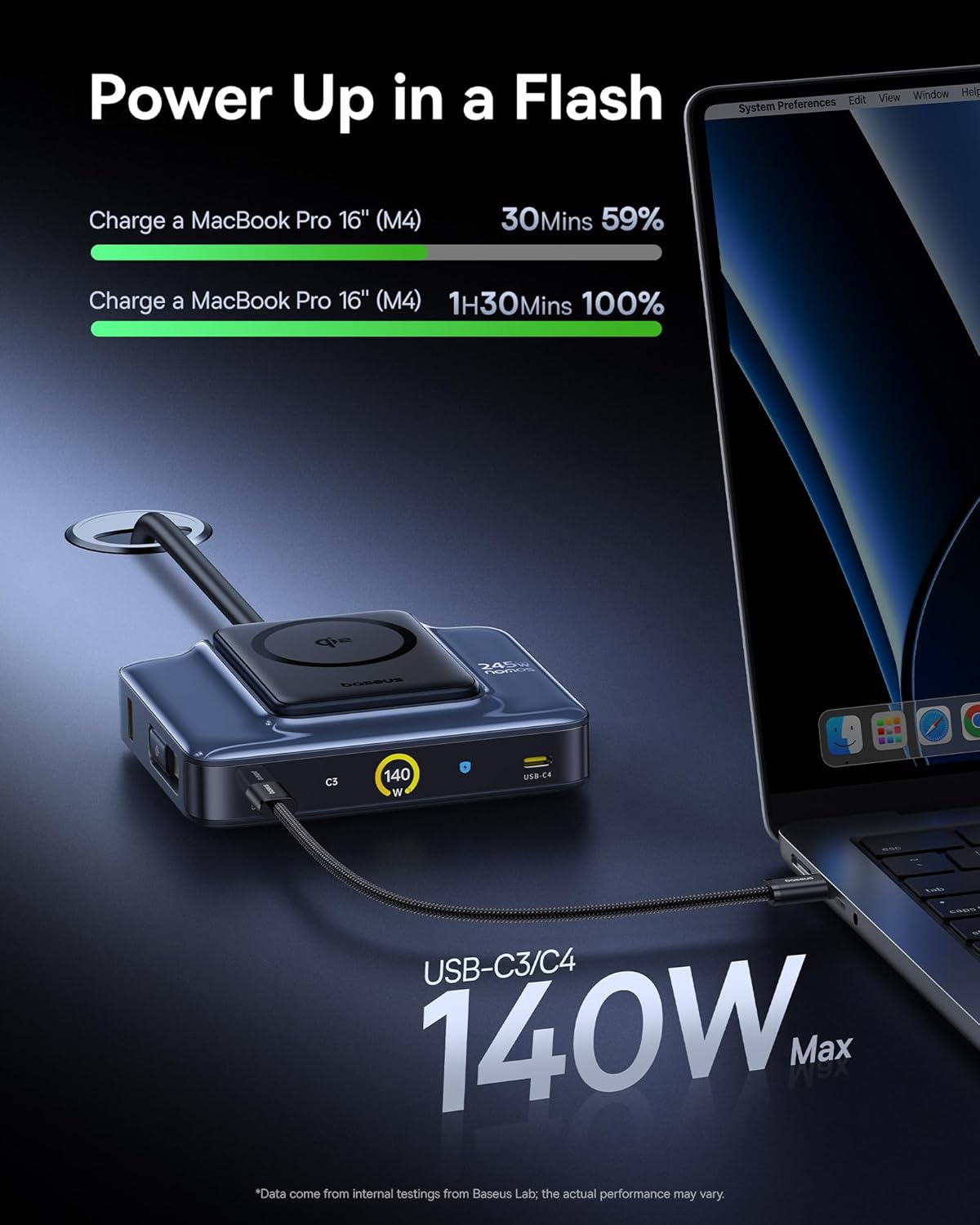
Image 5.1: The charging station providing 140W fast charging to a MacBook Pro 16 inch via a USB-C port.
5.2 Wireless Charging (Qi2)
- Suíomh: Place your Qi2-compatible device (e.g., iPhone 12-17 series) onto the magnetic wireless charging pad. The magnets will ensure proper alignment.
- Stádas Muirir: The LCD display will show the wireless charging status and power output (up to 15W).
- Comhoiriúnacht Cás: The wireless charger supports charging through cases up to 3mm thick.

Image 5.2: An iPhone 17 Pro being wirelessly charged on the Qi2 magnetic pad of the Baseus Nomos station.
5.3 Taispeántas LCD
The 3-inch LCD digital display provides real-time charging information. Press the button on the station to toggle between different display modes:
- Aschur Iomlán: Shows the combined wattage being delivered by the station.
- Individual Port Power: Taispeánann an wattage for each active port.
- Feidhmíocht Foriomlán: May indicate charging modes (e.g., Balanced, High Performance, Smart Cooling).
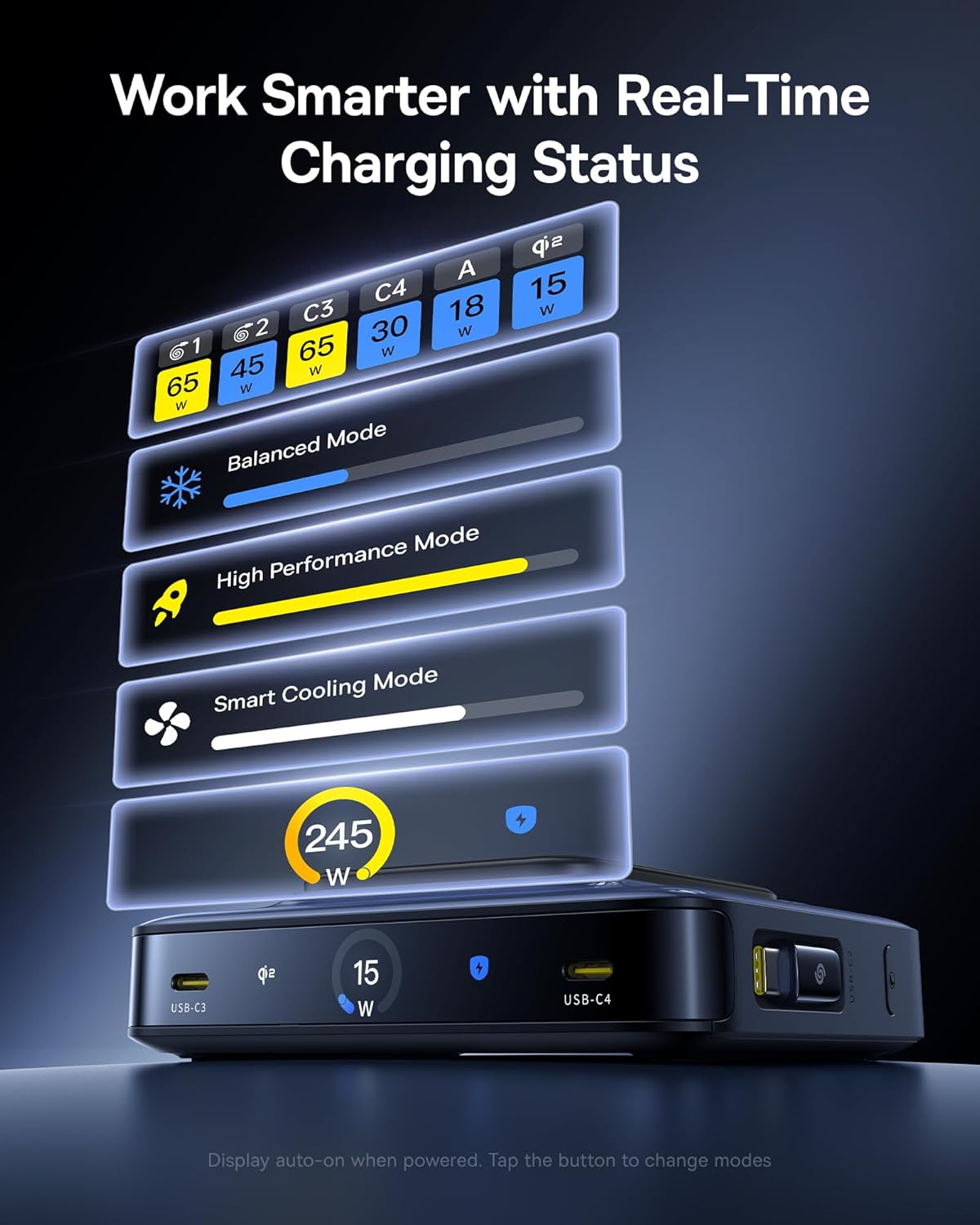
Image 5.3: The LCD display on the charging station showing real-time power output for each port and various operational modes.
6. Sonraíochtaí
| Gné | Sonraigh |
|---|---|
| Branda | Baseus |
| Múnla | Nomos 245W |
| Aschur Iomlán Cumhachta | 245W Uas |
| Ionchur Voltage | 240 Volta |
| Aschur Reatha | 13 Amps |
| Aschur Voltage | 120 Volta |
| Calafoirt USB-C | 4 (2 retractable, 2 fixed) |
| Calafoirt USB-A | 1 |
| Fad Cábla Intarraingthe | 80 cm (31.5 orlach) |
| Muirearú Gan Sreang | Qi2 Certified, 15W Max |
| Gnéithe Speisialta | GaN Technology, BPS3.0 Smart Power Allocation, LCD Display |
| Dath | Dubh |
| Gléasanna Comhoiriúnacha | iPhone 12-17 series, Galaxy S20-24, OnePlus 8 Pro, Google Pixel 6-8, Sony Xperia 5, iPad, Air Pods 2-3, MacBook Pro 2023, Lenovo ThinkPad T14, Dell XPS 13, and more. |
7. Fabhtcheartú
7.1 Gléas Gan Muirearú
- Seiceáil Ceangal Cumhachta: Ensure the charging station is securely plugged into a working wall outlet.
- Ceangal Cábla: Verify that the charging cables are firmly connected to both the charging station and your device.
- Sláine Cábla: Inspect cables for any visible damage. Try a different cable if available.
- Wireless Charging Alignment: For wireless charging, ensure your device is correctly centered on the magnetic pad. Remove thick cases if necessary.
- Comhoiriúnacht an Ghléis: Confirm your device is compatible with the charging station's output specifications (USB-C PD, Qi2, etc.).
7.2 Muirearú Mall
- Cáilíocht Cábla: Bain úsáid as cáblaí luchtaithe ardchaighdeáin, deimhnithe a thacaíonn le prótacail luchtaithe tapa.
- Leithdháileadh Cumhachta: When multiple devices are connected, the BPS3.0 system distributes power. Charging speeds may vary depending on the total load. Refer to the LCD display for individual port output.
- Device Input Limits: Ensure your device supports the higher wattage output from the charging station. Some devices have maximum input limits.
- Feidhmchláir Chúlra: Close power-intensive applications on your device during charging.
7.3 Róthéamh
- Aeráil: Ensure the charging station is placed in a well-ventilated area and its vents are not obstructed.
- Teocht Timpeallachta: Seachain an luchtaire a úsáid in timpeallachtaí atá thar a bheith te.
- Laghdaigh an t-Ualach: If the station feels excessively hot, temporarily disconnect some devices to reduce the load. The smart cooling mode will activate to manage temperature.
8. Faisnéis Sábháilteachta
- Ná nochtaigh an gléas d'uisce, taise, ná teochtaí foircneacha.
- Seachain an gléas a ligean titim, a dhíchóimeáil, agus iarracht a dhéanamh é a dheisiú leat féin.
- Coinnigh as teacht leanaí.
- Use only the provided power adapter and cord.
- A chinntiú aeráil chuí chun róthéamh a chosc.
- Disconnect the power when not in use for extended periods.
9. Cothabháil
- Clean the charging station with a soft, dry cloth. Do not use liquid cleaners or aerosols.
- Regularly check cables for wear and tear. Replace damaged cables immediately.
- Coinnigh na calafoirt saor ó dheannach agus smionagar.
10. Barántas agus Tacaíocht
The Baseus Nomos 245W Charging Station comes with a Barántas 2 bhliain from the date of purchase, covering manufacturing defects. For warranty claims, technical support, or further assistance, please contact Baseus customer service through their official websuíomh nó an miondíoltóir inar ceannaíodh an táirge.
For more information, visit the official Baseus websuíomh: Siopa Oifigiúil Baseus