
1. Réamhrá
Thank you for choosing the Lefant M3L Robot Vacuum and Mop. This intelligent cleaning device is designed to simplify your home cleaning routine by efficiently vacuuming and mopping various floor types. Please read this manual thoroughly before using the product to ensure proper operation, maintenance, and safety.
For optimal performance, follow the instructions carefully and keep this manual for future reference.
2. Eolas Tábhachtach Sábháilteachta
Before using the Lefant M3L, please observe the following safety precautions:
- Is féidir le leanaí 8 mbliana d’aois agus os a chionn an fearas seo a úsáid agus daoine a bhfuil cumais choirp, céadfacha nó mheabhrach laghdaithe acu nó a bhfuil easpa taithí agus eolais tugtha dóibh má thugtar maoirseacht nó treoir dóibh maidir le húsáid an fhearais ar bhealach sábháilte agus má thuigeann siad na guaiseacha atá i gceist. .
- Ba chóir go ndéanfaí maoirseacht ar leanaí lena chinntiú nach mbíonn siad ag súgradh leis an bhfearas.
- Ní dhéanfaidh leanaí glanadh agus cothabháil úsáideora gan mhaoirseacht.
- Do not use the robot in environments with open flames, flammable materials, or explosive substances.
- Ensure the charging dock is placed on a level surface against a wall, with no obstacles within 1 meter in front and 0.5 meters on either side.
- Do not immerse the robot or its electronic components in water.
- Ná húsáid ach an t-oiriúntóir cumhachta agus an duga luchtaithe bunaidh a chuir an monaróir ar fáil.
- Remove any loose cables, small objects, or fragile items from the floor before operation to prevent entanglement or damage.
- Do not use the robot to clean liquids, burning objects, or sharp objects.
- Má dhéantar damáiste don chorda cumhachta, ní mór don mhonaróir, a ghníomhaire seirbhíse, nó daoine atá cáilithe den chineál céanna a chur ina ionad chun guais a sheachaint.
3. Ábhar Pacáiste
Please check if all accessories are present and in good condition:
- Lefant M3L Robot Vacuum and Mop
- Duga luchtaithe
- Cuibheoir Cumhachta
- bosca bruscair
- Water Tank with Mop Pad
- Scuaba Taobh (2 phéire)
- HEPA Filter (1 installed, 1 spare)
- Uirlis Glantacháin
- Lámhleabhar Úsáideora
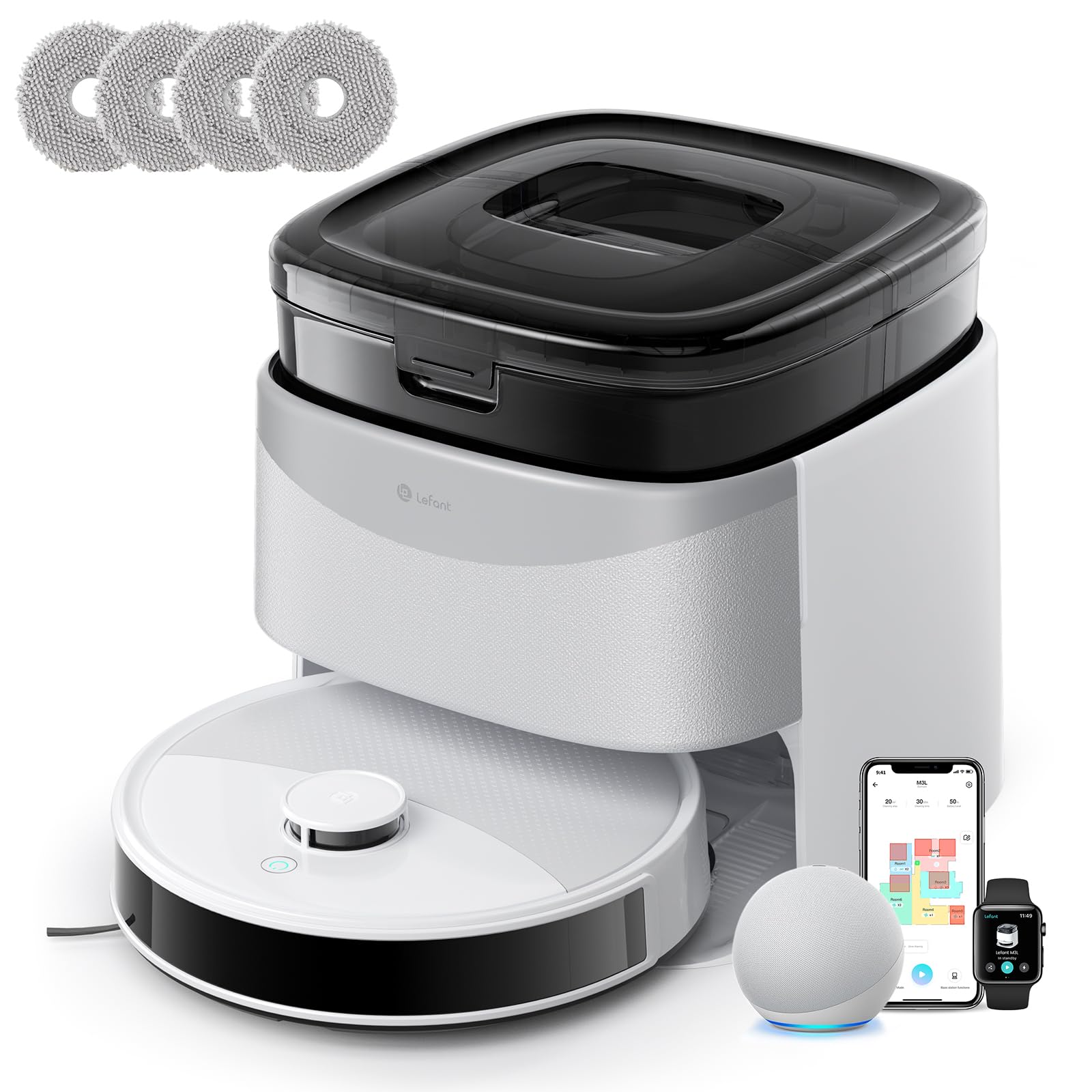
Image 1: Lefant M3L Robot Vacuum and Mop with its included accessories. This image shows the main unit, charging dock, power adapter, dustbin, water tank, mop pad, side brushes, and cleaning tool.
4. Táirge Tharview
4.1 Barr an Róbait View
- Cnaipe Cumhachta/Glan: Press to start/pause cleaning. Hold to power on/off.
- Táscaire Solas: Shows battery status and working mode.
- Cnaipe Scaoilte Bruscair: Brúigh chun an bosca bruscair a bhaint.
4.2 Bun an Róbait View
- Scuaba Taobh: Bailigh deannach agus smionagar ó imill agus coirnéil.
- Rothaí Tiomána: Lig don róbat bogadh trasna dhromchlaí éagsúla.
- Roth Uilíoch: Provides 360-degree movement.
- Teagmhálaithe á Muirearú: Connect with the charging dock for power.
- Braiteoirí Titim: Braith imill agus cosc a chur ar thitim.
- Príomh-Scuab: Scuab lárnach le haghaidh glanadh domhain.
- Water Tank/Mop Pad Slot: Area for attaching the water tank and mop pad.
4.3 Duga Muirir
- Táscaire Muirir: Taispeánann sé stádas muirir.
- Teagmhálaithe á Muirearú: Connect with the robot for power.
- Port Cumhachta: Nascann sé leis an adapter cumhachta.
5. Treoir Socraithe
5.1 Preparing the Robot
- Bain Scannáin Chosanta: Remove all protective films from the robot and charging dock.
- Suiteáil Scuaba Taobh: Press the side brushes onto the square posts at the bottom of the robot until they click into place. Ensure the 'L' and 'R' marks match.
- Install Dustbin: Open the top cover of the robot and insert the dustbin until it locks securely.

Image 2: Illustration of attaching the side brushes to the underside of the robot. Align the brush with the corresponding post and push until it clicks.
5.2 Positioning the Charging Dock
- Place the charging dock on a hard, level surface against a wall.
- Ensure there are no obstacles within 1 meter (3 feet) in front of the dock and 0.5 meters (1.5 feet) on either side.
- Connect the power adapter to the charging dock and plug it into a wall outlet. The indicator light on the dock will illuminate.

Image 3: Diagram showing the recommended clear space around the charging dock for optimal robot navigation.
5.3 Muirearú Tosaigh
Place the robot onto the charging dock, ensuring the charging contacts on the robot align with those on the dock. The robot's indicator light will pulse during charging and turn solid when fully charged. For first-time use, charge the robot for at least 6 hours.
5.4 Connecting to the Lefant App
- Download the "Lefant" app from the App Store (iOS) or Google Play Store (Android).
- Cláraigh cuntas agus logáil isteach.
- Tap "+" to add a device and select your Lefant M3L model.
- Follow the in-app instructions to connect the robot to your home Wi-Fi network (2.4GHz only).
- Once connected, you can control the robot, set schedules, and monitor cleaning status via the app.
6. Treoracha Oibriúcháin
6.1 Timthriall Glantacháin a Thosú
- Tús Lámhleabhar: Press the Power/Clean button on the robot once. The robot will automatically start cleaning in Auto mode.
- Rialú Aipe: Open the Lefant app, select your M3L robot, and tap "Start Cleaning".
- Rialú Gutha: If integrated with a smart assistant (e.g., Alexa, Google Assistant), use voice commands like "Alexa, ask Lefant to start cleaning."
6.2 Glanadh a Chur ar Sos/Atosú
Press the Power/Clean button on the robot or use the app to pause a cleaning cycle. Press again to resume.
6.3 Ag Filleadh ar an Duga Muirir
The robot will automatically return to the charging dock when its battery is low or when a cleaning cycle is complete. You can also send it back manually via the app.
6.4 Ag Úsáid na Feidhme Glantacháin
- Umar Uisce Líonta: Open the water tank cover and fill it with clean water. Do not use cleaning solutions that are not approved by Lefant.
- Ceangail Mopa Pad: Securely attach the mop pad to the bottom of the water tank.
- Suiteáil Umar Uisce: Slide the filled water tank into the designated slot at the back of the robot until it clicks.
- Start a cleaning cycle. The robot will now vacuum and mop simultaneously.

Image 4: Steps for filling the water tank and attaching the mop pad before inserting it into the robot.
Nóta: Remove the water tank before charging the robot or if it will be inactive for an extended period.
6.5 Cleaning Modes (via App)
- Glanadh Uathoibríoch: The robot intelligently navigates and cleans your entire home.
- Glanadh Spota: Glanann sé limistéar ar leith níos déine.
- Glanadh Imeall: Glanann sé feadh ballaí agus imill troscáin.
- Glanadh Sceidealaithe: Socraigh amanna sonracha don róbat glanadh go huathoibríoch.
7. Cothabháil
Cinntíonn cothabháil rialta feidhmíocht is fearr agus síneann sí saolré do fholúsghlantóir róbait.
7.1 Cleaning the Dustbin and Filter (After each use)
- Brúigh an cnaipe scaoilte bosca bruscair agus tarraing an bosca bruscair amach.
- Oscail clúdach an bhosca bruscair agus folmhaigh a bhfuil ann isteach i mbosca bruscair.
- Remove the HEPA filter and sponge filter. Tap them gently to remove dust. Do not wash the HEPA filter with water.
- Rinse the dustbin with water (ensure it's completely dry before reinstallation).
- Reassemble the filters and dustbin, then reinsert into the robot.

Image 5: Visual guide on how to remove, empty, and clean the dustbin and its filters.
7.2 Cleaning the Side Brushes (Weekly)
Remove the side brushes by pulling them upwards. Use the cleaning tool to remove any hair or debris tangled around them. Rinse with water if necessary and allow to air dry completely before reattaching.
7.3 Cleaning the Water Tank and Mop Pad (After each mopping session)
Empty any remaining water from the tank. Remove the mop pad and wash it by hand or machine. Allow both to air dry completely before storage or next use.
7.4 Cleaning Sensors and Charging Contacts (Monthly)
Wipe the drop sensors (on the bottom of the robot) and the charging contacts (on the robot and charging dock) with a clean, dry cloth. This ensures proper navigation and charging.

Íomhá 6: Dlúth-amharc view of the robot's underside, highlighting the locations of the drop sensors and charging contacts for cleaning.
8. Fabhtcheartú
| Fadhb | Cúis Féideartha | Réiteach |
|---|---|---|
| Ní lasann an róbat. | Ceallraí íseal; Múch an chumhacht. | Muirearaigh an róbat; Cinntigh go bhfuil an príomhlasc cumhachta (ar an taobh/bun de ghnáth) AR. |
| Ní féidir leis an róbat muirearú. | Charging contacts dirty; Dock not powered; Robot not properly aligned. | Clean charging contacts; Check power adapter connection; Manually place robot on dock. |
| Bíonn róbat sáinnithe go minic. | Too many obstacles; Loose cables; High thresholds. | Clear the cleaning area; Use virtual boundaries if available; Block off problematic areas. |
| Drochfheidhmíocht ghlantacháin. | Dustbin full; Filters clogged; Side brushes worn. | Empty dustbin; Clean/replace filters; Clean/replace side brushes. |
| Níl an fheidhm mopála ag obair. | Water tank empty; Mop pad dirty/dry; Water outlet clogged. | Fill water tank; Clean/wet mop pad; Check water tank for blockages. |
| Fadhbanna le nasc an aip. | Incorrect Wi-Fi password; Router too far; 5GHz Wi-Fi used. | Ensure 2.4GHz Wi-Fi; Re-enter password; Move robot closer to router; Restart router/robot. |
9. Sonraíochtaí
| Gné | Sonraigh |
|---|---|
| Ainm an tSamhail | M3L |
| Branda | Clé |
| Toisí (L x W x H) | 32L x 32l x 9.7H centimeters |
| Meáchan Mír | 9.7 cileagram |
| Cineál Battery | Litiam-ian |
| Cineál Scagaire | HEPA |
| Cineál Rialaithe | Rialú App, Rialú Gutha |
| Gnéithe Speisialta | Dry and Wet Cleaning, Carpet Cleaning |
| Dromchla Molta | Hard floors, Wood floors, Tiles, Carpets |
| Fachtóir Foirme | Babhta |
| Foinse Cumhachta | Ceallraí Powered |
| Comhpháirteanna San áireamh | Mop head, Water tank |
10. Barántas agus Tacaíocht do Chustaiméirí
Lefant products come with a standard manufacturer's warranty. For detailed warranty terms and conditions, please refer to the warranty card included in your package or visit the official Lefant websuíomh.
If you encounter any issues or have questions regarding your Lefant M3L Robot Vacuum and Mop, please contact Lefant Customer Support. You can usually find contact information (email, phone, or online chat) on the official Lefant website or through the Lefant app.
Please have your model number (M3L) and purchase information ready when contacting support.