
1. Réamhrá
Thank you for choosing the THOMSON WS902DUO Cosy Bookshelf Speakers. These active stereo speakers deliver a powerful 150W audio experience with deep bass from two 10 cm woofers. They offer versatile connectivity options including Bluetooth 5.3, Optical, HDMI (ARC), RCA, and USB playback. The included remote control and side panel adjustments provide precise control over your audio. Please read this manual carefully before use to ensure proper operation and to maximize your listening experience.

Image 1.1: THOMSON WS902DUO Bookshelf Speakers in a living space, showcasing their elegant wood finish.
2. Treoracha Tábhachtacha Sábháilteachta
- Read these instructions thoroughly before operating the product.
- Coinnigh na treoracha seo le haghaidh tagartha sa todhchaí.
- Tabhair aird ar gach rabhadh ar an táirge agus sna treoracha oibriúcháin.
- Lean na treoracha go léir.
- Ná húsáid an gaireas seo in aice le huisce.
- Glan ach amháin le éadach tirim.
- Ná bac aon oscailtí aerála. Suiteáil de réir threoracha an mhonaróra.
- Ná suiteáil in aice le haon fhoinsí teasa cosúil le radaitheoirí, cláir teasa, soirn, nó gaireas eile (lena n-áirítear ampleachtaitheoirí) a tháirgeann teas.
- Ná scrios an cuspóir sábháilteachta atá ag an breiseán polaraithe nó cineál talaimh. Tá dhá lann ag breiseán polaraithe le ceann amháin níos leithne ná an ceann eile. Tá dhá lann agus an tríú bonn talaimh ag breiseán talún. Soláthraítear an lann leathan nó an tríú prong ar mhaithe le do shábháilteacht. Mura bhfuil an breiseán a cuireadh ar fáil oiriúnach do do asraon, téigh i gcomhairle le leictreoir chun an t-asraon seanchaite a athsholáthar.
- Cosain an téad cumhachta ó bheith ag siúl air nó á phionnadh, go háirithe ag plocóidí, gabhdáin áise, agus an pointe a dtéann siad amach as an ngaireas.
- Ná húsáid ach ceangaltáin/gabhálais atá sonraithe ag an monaróir.
- Bain úsáid as ach leis an gcairt, an seastán, an tríchosach, an lúibín, nó an tábla atá sonraithe ag an monaróir, nó a dhíoltar leis an ngaireas. Nuair a úsáidtear tralaí, bí cúramach agus tú ag bogadh an chomhcheangail tralaí/ghairis chun gortú a sheachaint.
- Díphlug an gaireas seo le linn stoirmeacha tintreach nó nuair nach bhfuil sé in úsáid ar feadh tréimhsí fada ama.
- Déan gach seirbhísiú a tharchur chuig pearsanra seirbhíse cáilithe. Tá gá le seirbhísiú nuair a dhéantar damáiste don ghaireas ar bhealach ar bith, amhail corda soláthair cumhachta nó breiseán damáiste, doirteadh leacht nó rudaí tar éis titim isteach sa ghaireas, bhí an gaireas faoi lé báisteach nó taise, ní oibríonn sé de ghnáth. , nó gur thit.
3. Ábhar Pacáiste
Seiceáil le do thoil go bhfuil na míreanna go léir atá liostaithe thíos san áireamh i do phacáiste:
- THOMSON WS902DUO Bookshelf Speakers (2 units)
- Cianrialú
- Cábla Cumhachta
- Cábla Ceangal Cainteoir
- 3.5mm Jack to RCA Adapter Cable
- Lámhleabhar Úsáideora (an doiciméad seo)

Image 3.1: Packaging of the THOMSON WS902DUO Bookshelf Speakers.
4. Táirge Tharview
4.1. Side Control Panel (Active Speaker)
The active speaker features a side control panel for easy access to essential functions.

Image 4.1: Side control panel.
- Rialú Dord: Adjusts the low-frequency output.
- Rialú Treble: Adjusts the high-frequency output.
- Rialú Toirte: Coigeartaíonn sé an toirt fuaime iomlán.
- Athraigh Cumhacht: Casann sé na cainteoirí air nó as.
- Táscaire LED: Shows the current status or selected input.
4.2. Rear Panel (Active Speaker)
The rear panel of the active speaker provides all necessary input and output connections.
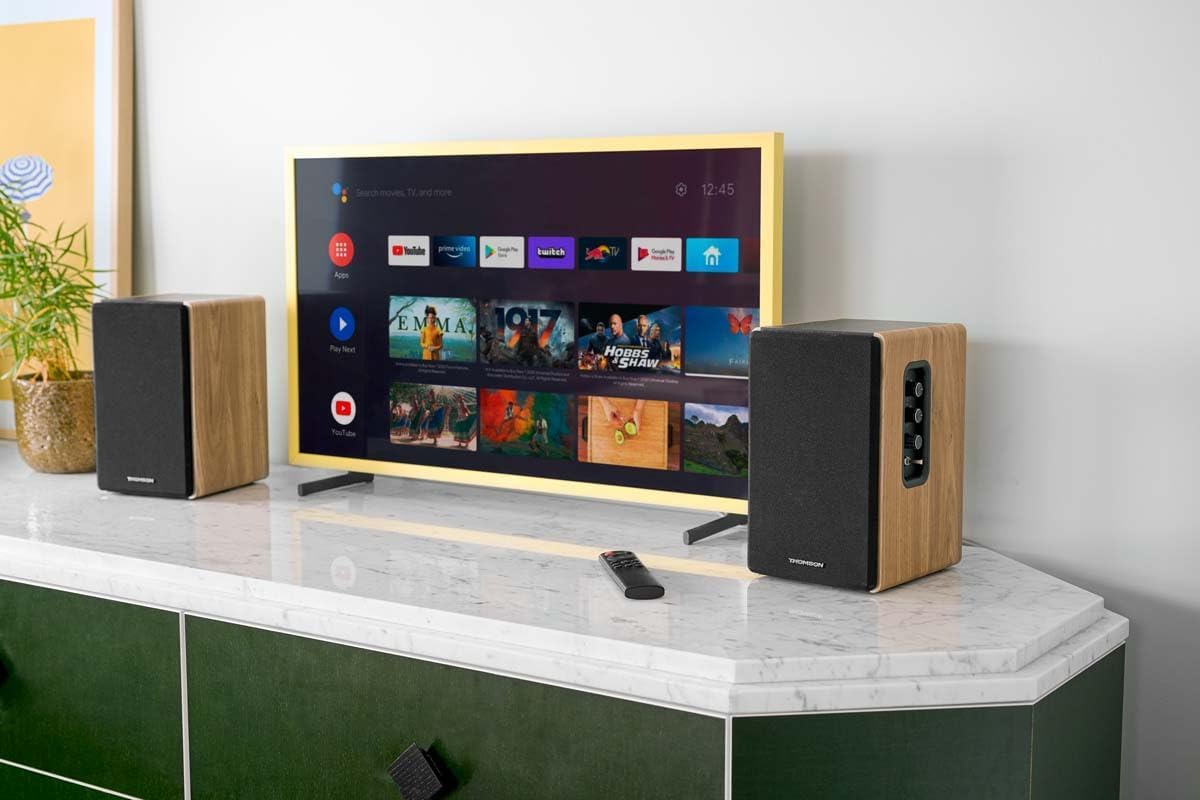
Image 4.2: Rear panel connections.
- Ionchur Optúil: For connecting digital audio sources like TVs, game consoles, or Blu-ray players.
- Cúntóir Isteach (RCA): For connecting analog audio sources such as turntables, CD players, or PCs. A 3.5mm jack adapter is provided.
- TV Audio (HDMI ARC): For connecting to a TV's HDMI ARC port, allowing TV remote control of the speaker volume.
- Seinn USB: Chun MP3 a sheinm files go díreach ó tiomáint USB flash.
- Fo Amach: For connecting an external active subwoofer for enhanced bass.
- Aschur Cainteoir: Connects to the passive speaker.
- Ionchur Cumhachta: Ceanglaíonn leis an bpríomhsholáthar cumhachta.
4.3. Cianrialú
The remote control provides convenient access to all speaker functions from a distance.

Image 4.3: Remote control.
- Cnaipe Cumhachta: Casann sé na cainteoirí air/as.
- Cnaipe Mute: Balbhaíonn/díbhalbhaíonn an fhuaim.
- Imleabhar +/-: Coigeartaíonn an leibhéal toirte.
- Playback Controls (Play/Pause, Skip): Le haghaidh athsheinm USB.
- Source Selection Buttons (OPT, BT, ARC, USB, LINE): Selects the audio input source.
- EQ Mode Buttons (MOVIE, MUSIC, DIALOG): Selects preset equalization modes.
5. Socrú
5.1. Socrúchán Cainteoir
Place the speakers on a stable, flat surface such as a bookshelf, desk, or speaker stands. For optimal stereo imaging, position the speakers equidistant from your listening position and at ear level. Ensure there is adequate space around the speakers for ventilation.
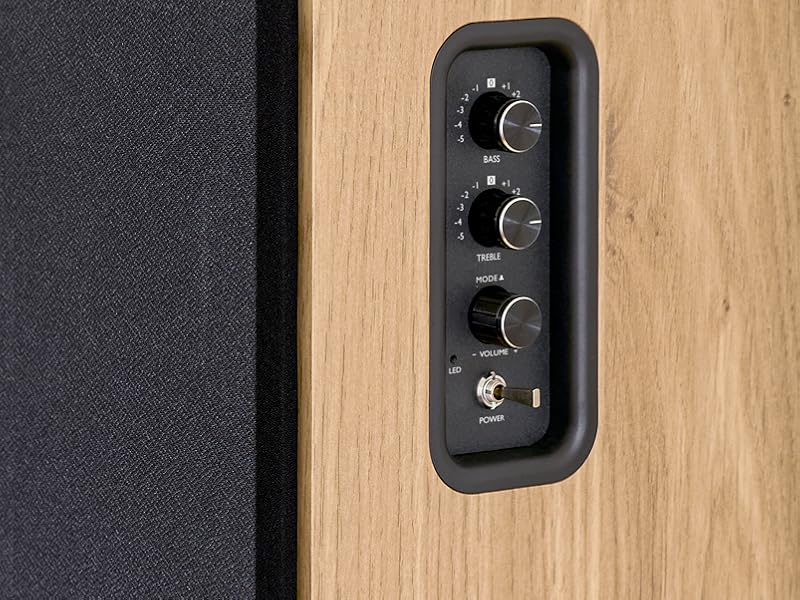
Image 5.1: Recommended speaker placement on a desk.
5.2. Na Cainteoirí a nascadh
- Identify the active speaker (with controls and inputs) and the passive speaker.
- Connect the included speaker cable from the speaker output terminals on the active speaker to the input terminals on the passive speaker. Ensure correct polarity (+ to + and - to -).
5.3. Foinsí Fuaime a Cheangal
Connect your desired audio sources to the active speaker using the appropriate cables.
- Ionchur Optúil: Use an optical cable to connect your TV, game console, or Blu-ray player to the OPTICAL IN port.
- HDMI (ARC) Input: Use an HDMI cable to connect your TV's HDMI ARC port to the TV AUDIO (HDMI) port on the speaker. This allows your TV remote to control the speaker volume.
- Ionchur RCA (AUX): Use an RCA cable (or the provided 3.5mm jack to RCA adapter) to connect devices like a turntable, CD player, or PC to the AUX IN (RCA) ports.
- Ionchur USB: Cuir isteach tiomántán USB flash a bhfuil MP3 ann files into the USB PLAY port.

Image 5.2: Speakers connected to a television via HDMI ARC.
5.4. Péireáil Bluetooth
- Cinntigh go bhfuil na cainteoirí ar siúl.
- Press the 'BT' button on the remote control or the side panel to select Bluetooth input. The LED indicator will flash, indicating pairing mode.
- Ar do ghuthán cliste, taibléad, nó ríomhaire, cumasaigh Bluetooth agus déan cuardach ar ghléasanna atá ar fáil.
- Select "THOMSON WS902DUO" from the list of devices.
- Once paired, the LED indicator will stop flashing and remain solid. You can now stream audio wirelessly.
5.5. Subwoofer Connection (Optional)
If you wish to enhance bass further, connect an active subwoofer to the 'Sub Out' port on the rear panel of the active speaker using an RCA cable.
6. Treoracha Oibriúcháin
6.1. Cumhacht Ar / As
Use the power switch on the side control panel or the power button on the remote control to turn the speakers on or off.
6.2. Roghnú Foinse
Press the corresponding source button on the remote control (OPT, BT, ARC, USB, LINE) to switch between connected audio inputs. The LED indicator will change to reflect the selected source.
6.3. Rialú Imleabhar
Adjust the volume using the 'Volume' knob on the side control panel or the 'VOL+/-' buttons on the remote control.
6.4. Coigeartuithe Fuaime
Fine-tune the sound to your preference:
- Dord/ Treble: Use the 'Bass' and 'Treble' knobs on the side control panel to adjust the low and high frequencies.
- Modhanna EQ: Press the 'MOVIE', 'MUSIC', or 'DIALOG' buttons on the remote control to select preset equalization settings optimized for different content types.
6.5. Athsheinm USB
When a USB flash drive with MP3 files is inserted and USB source is selected, the speakers will automatically begin playing. Use the playback control buttons on the remote control (Play/Pause, Skip) to manage your music.
6.6. Oibríocht Bluetooth
After successful pairing (see Section 5.4), you can stream audio from your Bluetooth device. Use your device's controls or the speaker's remote control for playback and volume adjustments.
7. Cothabháil
Cinntíonn cothabháil cheart fad saoil agus feidhmíocht do chainteoirí.
- Glanadh: Wipe the speaker surfaces with a soft, dry cloth. Do not use liquid cleaners or abrasive materials.
- Aeráil: Cinntigh nach gcuirtear bac ar na hoscailtí aerála chun róthéamh a chosc.
- Stóráil: If storing the speakers for an extended period, unplug them from the power outlet and store them in a cool, dry place.
- Seachain Taise: Keep the speakers away from water and high humidity.
8. Fabhtcheartú
Má thagann aon fhadhb ort, féach ar an treoir fabhtcheartaithe seo a leanas:
| Fadhb | Cúis Féideartha | Réiteach |
|---|---|---|
| Gan chumhacht | Power cable not connected; Power switch off; Wall outlet not working. | Ensure power cable is securely connected. Turn on the power switch. Test the wall outlet with another device. |
| Gan fuaim | Incorrect input source selected; Volume too low; Mute function active; Audio cable not connected properly. | Select the correct input source. Increase volume. Press Mute button on remote. Check all audio cable connections. |
| Theipeann ar phéireáil Bluetooth | Speakers not in pairing mode; Device too far; Bluetooth disabled on source device. | Ensure speakers are in Bluetooth pairing mode (flashing LED). Move device closer to speakers. Enable Bluetooth on your source device. |
| Athsheinm USB nach bhfuil ag obair | USB drive not formatted correctly; Files not MP3; USB drive not inserted properly. | Ensure USB drive is FAT32 formatted. Verify files are in MP3 format. Re-insert USB drive firmly. |
| Saobhadh fuaime | An toirt ró-ard; Droch-chaighdeán fuaime an fhoinse; Socruithe Dord/Treble ró-mhór. | Lower the volume. Test with a different audio source. Adjust Bass and Treble controls. |
9. Sonraíochtaí
| Gné | Sonraíocht |
|---|---|
| Branda | TOMSON |
| Uimhir Mhúnla | WS902DUO |
| Uasmhéid Cumhacht Aschuir Cainteoir | 150 Watts |
| Freagra Minicíochta | 60 Hz |
| Teicneolaíocht Nascachta | Bluetooth, HDMI (ARC), Optical, RCA, USB |
| Leagan Bluetooth | 5.3 |
| Modh Aschuir Fuaime | Stereo (2.0 channels) |
| Ionchur Voltage | 230 Volta (AC) |
| Cineál Gléasta | Sliabh Scairbh |
| Cineál Cainteoir | Multimedia Bookshelf |
| Gnéithe Speisialta | Stereo Pairing, USB Port, Sub-Out, Remote Control, EQ Modes |
| Úsáidí Molta | Smartphone, Tablet, PC, TV, Game Console, DVD Player, Turntable |
| Dath | Críochnaigh Adhmad Nádúrtha |
| Modh Rialaithe | Remote Control, Side Panel Knobs |
| Méid Woofer | 10 Ceintiméadar |
| Toisí (H x W x D) | 28 cm x 24 cm x 47 cm (approximate, per speaker) |
| Meáchan | 5048 Grams (total for pair) |
| Líon Míreanna | 2 |
| Tír Bhunaidh | tSín |
10. Faisnéis Bharántas
This THOMSON WS902DUO product comes with a Barántas teoranta 1 bliana ón dáta ceannaigh. Clúdaíonn an bharántas seo lochtanna déantúsaíochta agus ceardaíocht faoi ghnáthúsáid. Ní chlúdaíonn sé damáiste de dheasca mí-úsáide, timpistí, modhnuithe neamhúdaraithe, nó caitheamh agus cuimilt gnáth. Coinnigh do chruthúnas ceannaigh le haghaidh éileamh bharántais.
11. Tacaíocht do Chustaiméirí
For technical assistance, warranty claims, or any questions regarding your THOMSON WS902DUO speakers, please contact your retailer or visit the official THOMSON support website. Please have your model number (WS902DUO) and proof of purchase ready when contacting support.
Tacaíocht Ar Líne: www.thomsonconsumer.com (Seiceáil le do thoil le haghaidh teagmhálacha tacaíochta réigiúnacha)