
1. Réamhrá
This manual provides essential information for the proper setup, operation, and maintenance of your SANSUI ES-22X3AH 22-inch FHD 120Hz Monitor. This monitor is designed to deliver clear visuals for professional work, home use, and entertainment, featuring a 1920x1080 resolution, 120Hz refresh rate, and Adaptive Sync technology.
I measc na bpríomhghnéithe tá:
- Soiléire HD Iomlán: 1920x1080 resolution with 100% sRGB color accuracy and HDR mode for detailed visuals.
- Smooth Visual Performance: 120Hz refresh rate and Adaptive Sync technology for reduced motion blur.
- chompord súl: Anti-flicker technology, low blue light emission, and anti-glare coating to minimize eye strain.
- Nascacht Solúbtha: Dual HDMI 1.4 ports and VESA mount compatibility.
2. Ábhar Pacáiste
Deimhnigh le do thoil go bhfuil na hearraí uile i láthair sa phacáiste:
- SANSUI ES-22X3AH 22-inch Monitor
- Seasamh Monatóra (Bonn agus Muineál)
- Cuibheoir Cumhachta
- Corda Cumhachta
- Cábla HDMI
- Lámhleabhar Úsáideora (an doiciméad seo)
Nóta: D’fhéadfadh an t-ábhar a bheith beagán difriúil ag brath ar an réigiún nó ar an miondíoltóir.
3. Treoracha Socraithe
3.1 An Seastán a Chruinniú
- Bain comhpháirteanna an mhonatóra agus an tseastáin go cúramach as an bpacáistiú.
- Ceangail muineál an tseastáin leis an bpainéal monatóireachta. Cinntigh go gcliceálann sé go daingean ina áit nó go bhfuil sé daingnithe le scriúnna más ann dóibh.
- Connect the stand base to the stand neck, securing it with the thumb screw or other fasteners.
- Cuir an monatóir cóimeáilte ar dhromchla cobhsaí, cothrom.
Image: Monitor with Stand Assembly

The SANSUI ES-22X3AH monitor fully assembled with its stand, ready for use.
3.2 Suiteáil Gléasta VESA (Roghnach)
The monitor supports a 75x75 mm VESA mount for wall or arm installation. To use a VESA mount:
- Remove the pre-assembled stand from the monitor.
- Attach your VESA-compatible mount to the four screw holes on the back of the monitor.
- Ensure the mount is securely fastened according to the mount manufacturer's instructions.
Image: Monitor Rear with VESA Mount Points and Dimensions

mionsonraithe view of the monitor's rear panel, highlighting the VESA mounting pattern and tilt capabilities.
3.3 Ag Ceangal le Gléas
The monitor features dual HDMI 1.4 ports and a DC power input.
- Connect the power adapter to the DC input port on the monitor, then plug the power cord into an electrical outlet.
- Connect one end of the included HDMI cable to an HDMI port on your computer or other video source.
- Connect the other end of the HDMI cable to one of the HDMI input ports on the monitor.
- Power on your computer and the monitor. The monitor should automatically detect the input signal.
Image: Monitor Connectivity Ports
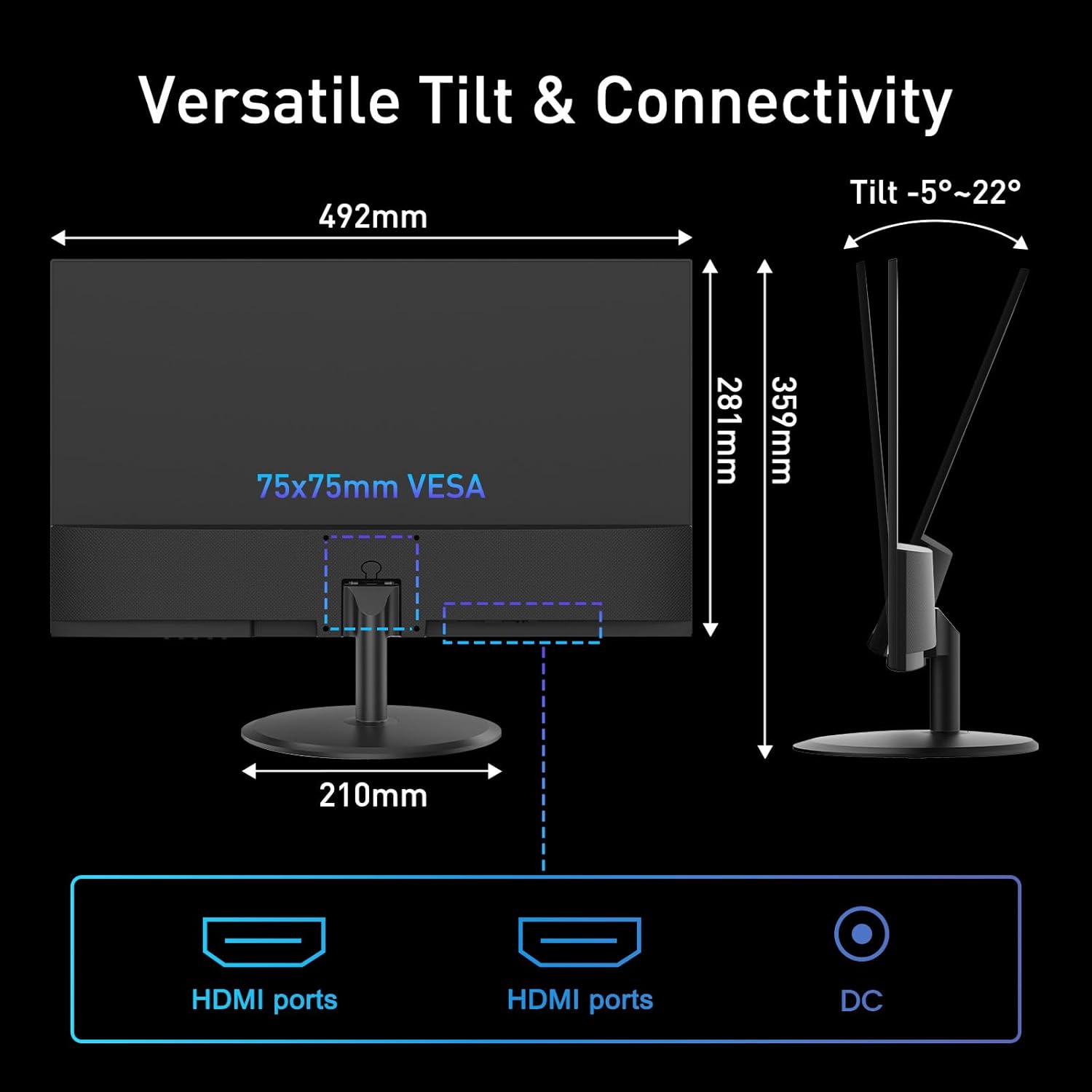
Illustration of the monitor's connectivity options, including HDMI and DC power ports.
4. Treoracha Oibriúcháin
4.1 Cumhacht ar siúl / as
Brúigh an cnaipe cumhachta, atá suite de ghnáth ag bun na láimhe deise nó ar chúl an mhonatóra, chun an monatóir a chasadh air nó as. Lasfaidh an solas táscaire cumhachta nuair a bhíonn an monatóir ar siúl.
4.2 Roghchlár Taispeána Ar-Scáileán (OSD).
The OSD menu allows you to adjust various monitor settings. Use the control buttons (joystick or individual buttons) typically found on the back or bottom of the monitor to navigate the menu.
- Gile/Codarsnacht: Adjust image luminance and distinction.
- Socruithe Datha: Modhnaigh teocht an datha, an lí agus an sháithiúlacht.
- Roghnaigh Ionchur: Manually switch between HDMI inputs.
- Mód Pictiúir: Select preset display modes (e.g., Standard, Game, Movie).
- Sync Oiriúnaitheach: Enable or disable Adaptive Sync for smoother visuals.
- Mód HDR: Gníomhachtaigh Raon Dinimiciúil Ard le haghaidh codarsnacht agus dath feabhsaithe.
4.3 Príomhghnéithe
4.3.1 120Hz Refresh Rate
The 120Hz refresh rate provides smoother motion and reduced input lag, beneficial for fast-paced content and general desktop use. Ensure your connected device is configured to output at 120Hz for optimal performance.
Image: High Refresh Rate Visual

Visual representation of the monitor's 120Hz refresh rate, ensuring ultra-fluid visuals.
4.3.2 Sync Oiriúnaitheach
Adaptive Sync technology synchronizes the monitor's refresh rate with your graphics card's frame rate, eliminating screen tearing and stuttering for a more fluid visual experience. This feature is automatically enabled when supported by your graphics card and enabled in the OSD.
Image: Adaptive Sync vs. Conventional Display

Demonstration of Adaptive Sync technology providing tear-free and smooth visuals compared to a conventional display.
4.3.3 HDR (High Dynamic Range)
HDR mode enhances the contrast and color accuracy of compatible content, providing deeper blacks, brighter whites, and a wider range of colors. Enable HDR through the OSD menu or your operating system settings for supported media.
Image: HDR Clarity Comparison
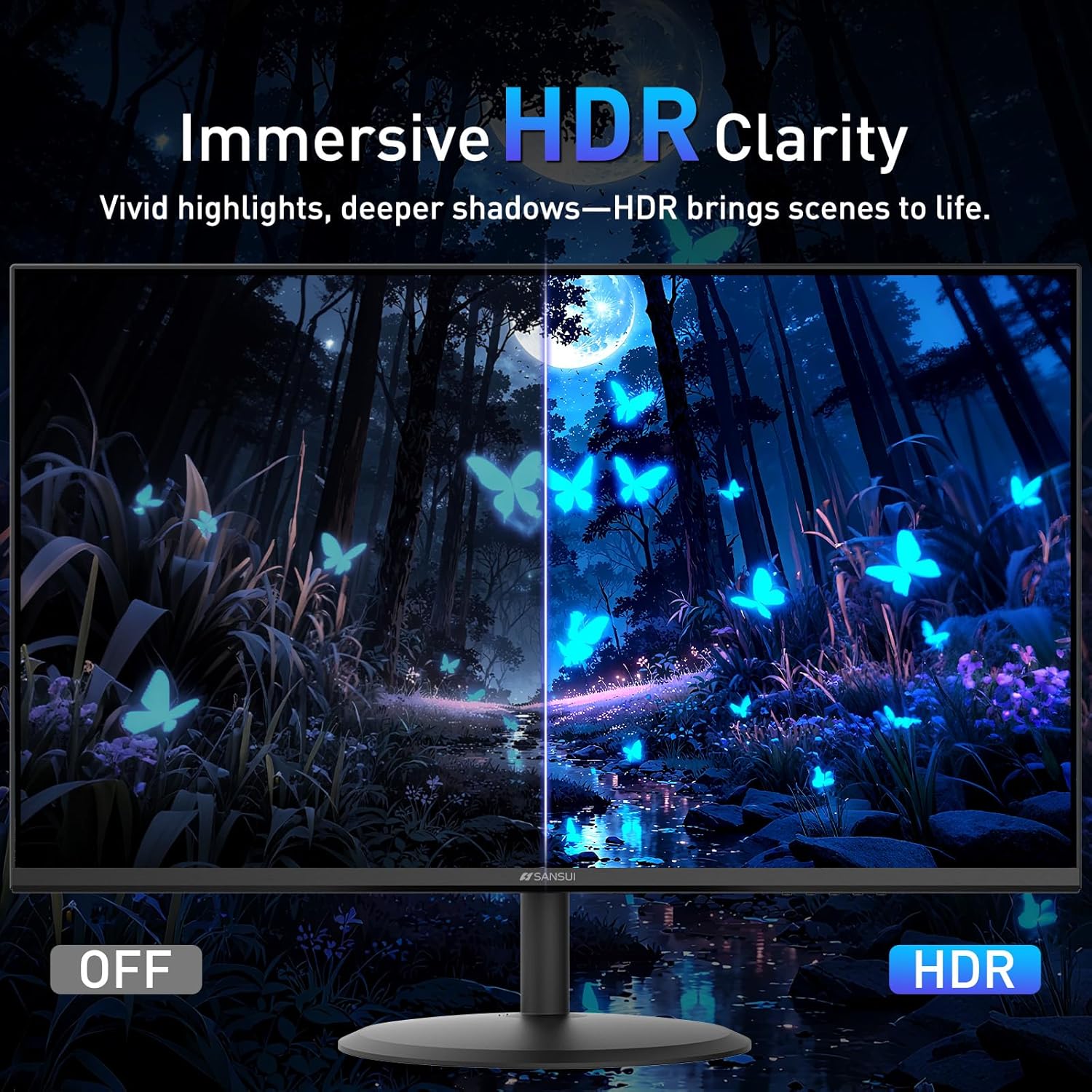
Visual comparison demonstrating the enhanced clarity and color depth provided by HDR mode.
4.3.4 Gnéithe Cúraim Súile
Tá roinnt gnéithe sa mhonatóir chun strus súl a laghdú le linn úsáide fada:
- Frith-Flicker: Reduces screen flickering that can cause eye fatigue.
- Solas Gorm Íseal: Filters harmful blue light emissions.
- Cumhdach Frithgheallta: Minimizes reflections on the screen surface.
Image: Eye Care & Comfort Viewing
Depiction of the monitor's eye care features contributing to comfortable viewle linn úsáide fada.
5. Cothabháil
5.1 An Monatóir a Ghlanadh
Chun fad saoil agus feidhmíocht is fearr is féidir do mhonatóra a chinntiú, lean na treoirlínte glantacháin seo:
- Múch an monatóir i gcónaí agus díphlugáil ón asraon cumhachta é sula ndéantar é a ghlanadh.
- Bain úsáid as éadach bog, saor ó lint beagán dample huisce nó le tuaslagán speisialaithe glantacháin scáileáin.
- Gently wipe the screen surface and the monitor casing. Avoid applying excessive pressure.
- Do not use abrasive cleaners, alcohol, ammonia, or petroleum-based solvents, as these can damage the screen or casing.
- Never spray cleaning solution directly onto the screen.
5.2 Stóráil
If storing the monitor for an extended period, ensure it is powered off, unplugged, and stored in a cool, dry place away from direct sunlight and extreme temperatures. Use the original packaging if available for best protection.
6. Fabhtcheartú
If you encounter issues with your SANSUI ES-22X3AH monitor, refer to the following common problems and solutions:
| Fadhb | Cúis Féideartha | Réiteach |
|---|---|---|
| Gan íomhá ar an scáileán | Monitor not powered on; Incorrect input selected; Loose video cable. | Ensure power cable is connected and monitor is on. Select correct input source via OSD. Check HDMI cable connection. |
| Tá an íomhá doiléir nó saobtha | Taifeach mícheart; Fadhbanna le tiománaí grafaicí. | Set display resolution to 1920x1080. Update graphics drivers on your computer. |
| Scáileán flickering | Mí-oiriúnacht ráta athnuachana; Cábla lochtach. | Cinntigh go bhfuil an ráta athnuachana socraithe go 120Hz i socruithe taispeána do ríomhaire. Bain triail as cábla HDMI difriúil. |
| No sound (if external speakers are connected) | Monitor does not have built-in speakers; Audio output not configured. | This monitor does not have built-in speakers. Ensure your external speakers are properly connected and selected as the audio output device on your computer. |
| Adaptive Sync not working | Feature not enabled; Incompatible graphics card. | Enable Adaptive Sync in the monitor's OSD menu and your graphics card control panel. Ensure your graphics card supports Adaptive Sync. |
If the problem persists after trying these solutions, please contact SANSUI customer support.
7. Sonraíochtaí
Below are the technical specifications for the SANSUI ES-22X3AH monitor:
- Uimhir Mhúnla: ES-22X3AH
- Méid an Scáileáin: 22 Orlach
- Cineál Painéil: Not specified (typically VA or IPS for 4000:1 contrast)
- Taifeach: 1920 x 1080 (FHD 1080p)
- Cóimheas Gné: 16:9
- Ráta Athnuachana: 120 Hz
- Cóimheas Codarsnachta: 4000:1
- Gile Íomhá: 250 Candela per Square Meter (nits)
- Gamut Dath: 100% sRGB
- Nascacht: 2 x HDMI 1.4 ports (up to 120Hz), DC Power Input
- Sliabh VESA: 75 x 75 mm
- Coigeartú Tilt: -5° go 22°
- Toisí Táirge: 8.27 x 19.37 x 14.13 orlach
- Meáchan Mír: 6.64 punt
- Gnéithe Cúraim Súile: Anti-flicker, Low Blue Light, Anti-glare coating
- Sync Oiriúnaitheach: Tacaithe
- HDR: Tacaithe
- Monaróir: EXPRESS LUCK INDUSTRIAL(ZHONGSHAN)LIMITED
8. Barántas agus Tacaíocht
8.1 Faisnéis Bharántas
SANSUI provides a money-back and free replacement warranty for your monitor within 30 days from the order date. Please retain your proof of purchase for warranty claims.
8.2 Tacaíocht Theicniúil
Lifetime technical support is available for your SANSUI monitor. For assistance with setup, troubleshooting, or any other inquiries, please contact SANSUI customer service. You can typically find contact information on the SANSUI official websuíomh nó trí do mhiondíoltóir.
Image: Lifetime Technical Support

Tharview of SANSUI's commitment to customer satisfaction, including warranty and support services.