
1. Réamhrá
This manual provides essential information for setting up, operating, maintaining, and troubleshooting your realme Note 70T smartphone. Please read this guide thoroughly to ensure optimal performance and longevity of your device.
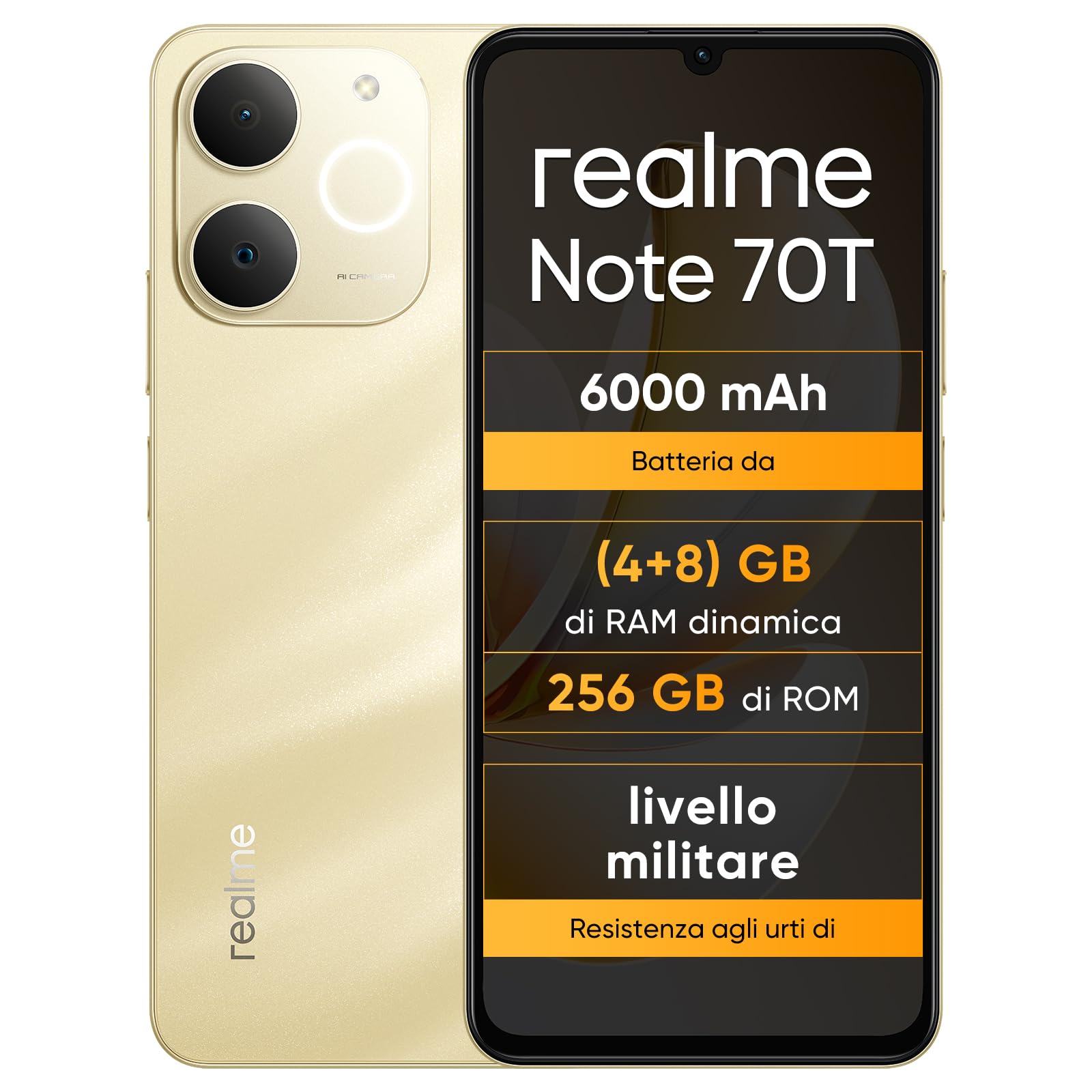
Íomhá: Tosaigh agus cúl view of the realme Note 70T smartphone.
2. Treoir Socraithe
2.1 Ábhar an Phacáiste
Deimhnigh go bhfuil na míreanna seo a leanas i do phacáiste:
- realme Note 70T Smartphone
- Cábla USB
- Cás Fón
- Scannán cosanta
2.2 Cárta SIM a Chur Isteach agus é a Chur Ar Ais
- Locate the SIM card tray on the side of the device. Use the provided SIM ejector tool to open the tray.
- Carefully place your Nano-SIM card(s) and/or microSD card into the tray, ensuring correct orientation. The realme Note 70T supports Dual SIM.
- Brúigh an tráidire ar ais isteach sa sliotán go réidh go dtí go mbeidh sé comhréidh le corp an ghutháin.
- Press and hold the Power button (located on the right side) until the realme logo appears on the screen.

Íomhá: Taobh view of the realme Note 70T, illustrating the location of the SIM card tray.
2.3 Muirearú Tosaigh
Sula n-úsáidtear é den chéad uair, moltar do ghléas a mhuirearú go hiomlán. Ceangail an cábla USB le calafort USB-C an ghutháin agus an ceann eile le hoiriúntóir cumhachta comhoiriúnach (nach bhfuil san áireamh) nó le calafort USB ríomhaire.

Íomhá: Bun view of the realme Note 70T, highlighting the USB-C charging port.
3. Treoracha Oibriúcháin
3.1 Feidhmeanna Bunúsacha
- Cumhacht ar siúl / as: Brúigh agus coinnigh an cnaipe Cumhachta. Roghnaigh 'Múch' nó 'Atosaigh'.
- Rialú Toirte: Bain úsáid as na cnaipí Imleabhar Suas agus Imleabhar Síos ar thaobh na feiste.
- Glasáil/Díghlasáil Scáileáin: Brúigh an cnaipe Cumhachta go hachomair chun an scáileán a ghlasáil nó a dhíghlasáil.
- Aitheantas Aghaidhe: Configure facial recognition in Settings for quick and secure unlocking.

Íomhá: Taobh view of the realme Note 70T, showing the power and volume buttons.
3.2 Gnéithe Taispeána
The realme Note 70T features a 6.75-inch Eye Comfort Display with a 90Hz refresh rate. This provides smooth visuals and reduces eye strain. The display offers vivid clarity and comfortable viewing.

Image: The realme Note 70T display showcasing its 90Hz refresh rate and eye comfort features with a vibrant beach scene.
3.3 Feidhmeanna Ceamara
Capture every moment with the 13MP rear camera and 5MP front camera. The device includes advanced AI features to enhance your photography:
- AI Clear Face: Improves blurry portraits for sharper results.
- Scriosán AI: Removes unwanted elements from photos.
- AI Image Matting: Allows you to easily remove subjects from backgrounds.

Image: Demonstration of the AI Clear Face feature, showing a blurry portrait before and after AI enhancement.

Image: Demonstration of the AI Eraser feature, showing an object removed from a photo.

Image: Demonstration of the AI Image Matting feature, showing a person isolated from the background.
3.4 Bainistíocht Ceallraí
The 6000mAh battery provides up to two days of usage on a single charge. It supports extended standby and includes 38 levels of charging protection for long-term battery health.

Image: Illustration of the realme Note 70T's 6000mAh battery capacity and estimated usage times for various activities.
3.5 Performance and Audio
Powered by an octa-core chipset with speeds up to 1.8 GHz, the realme Note 70T ensures smooth performance for gaming and applications. It supports fast app launch times and keeps up to 16 apps active in the background.
Experience enhanced audio with 300% ultra volume and AI Call 2.0, which provides intelligent noise reduction for clear calls.

Image: Visual representation of the realme Note 70T's octa-core processor.

Image: Illustration of the AI Call 2.0 feature, demonstrating noise reduction during calls.
4. Cothabháil
4.1 Friotaíocht Uisce agus Deannaigh (IP54)
The realme Note 70T is rated IP54 for water and dust resistance, protecting against splashes and dust ingress. The speaker vibrates at a specific frequency to expel accumulated water. This feature ensures the device remains functional in various daily situations.

Image: The realme Note 70T being splashed with water, demonstrating its IP54 water resistance.
4.2 ArmorShell Protection
The device features ArmorShell protection, having passed the MIL-STD 810H military-grade shock resistance test. This includes multi-angle drop tests and high-intensity impact tests, ensuring durability against accidental drops from up to 1.8 meters.

Image: The realme Note 70T being dropped onto a rocky surface, illustrating its military-grade resistance.
4.3 Cúram Ginearálta
- Keep the device clean using a soft, dry cloth. Avoid abrasive materials.
- Seachain an fón a nochtadh do theocht mhór nó do sholas díreach na gréine ar feadh tréimhsí fada.
- Ná déan iarracht an gléas a dhíchóimeáil ná a dheisiú leat féin, mar d’fhéadfadh sé seo an bharántas a chur ar neamhní agus damáiste a dhéanamh.
5. Fabhtcheartú
5.1 Ceisteanna Coitianta agus Réitigh
- Gléas gan casadh air: Cinntigh go bhfuil an ceallraí luchtaithe. Ceangail le luchtaire agus déan iarracht arís.
- Scáileán neamhfhreagrach: Restart the device by holding the Power button for an extended period (usually 10-15 seconds).
- Aipeanna ag tuairteáil nó feidhmíocht mhall: Close background applications. Utilize the AI Optimization feature to improve app smoothness.

Image: Screenshot of the AI Optimization feature on the realme Note 70T, showing options to improve app smoothness.
5.2 Athshocrú Monarcha
If issues persist, you may consider a factory reset. Rabhadh: This will erase all data on your device. Back up important information before proceeding. Navigate to Socruithe > Córas > Roghanna athshocraigh > Scrios na sonraí go léir (athshocrú monarchan).
6. Sonraíochtaí
| Gné | Sonraíocht |
|---|---|
| Branda | ríocht |
| Ainm an tSamhail | realme Note 70T |
| Córas Oibriúcháin | Android 15 |
| Méid RAM | 4 GB |
| Cumas Stórála | 256 GB |
| Méid an Scáileáin | 6.75 Orlach |
| Rún | 720×1600 |
| Ráta Athnuachana | 90 Hz |
| Teicneolaíocht Ceallach | 4G |
| Teicneolaíocht Nascachta | Bluetooth |
| Dath | Óir Gainmheach |
| Number of SIM Card Slots | SIM dé |
| Cineál Port á Muirearú | USB-C |
| Biometric Identification Features | Aitheantas Aghaidhe |
| Leibhéal Friotaíocht Uisce | Frithsheasmhach in Uisce (IP54) |
| Jack cluasáin | No 3.5 mm Jack |
| Maximum Supported Flash Memory Size | 256 GB |
| Front Camera Sensor Resolution | 5 MP |
| Rear Camera Sensor Resolution | 13 MP |
| Number of Rear Cameras | 1 |
| Number of Front Cameras | 1 |
| Uasmhéid Cumhacht Ceallraí | 6000 Milliamper-hour (mAh) |
| Toisí Mír | 15.7 x 7.4 x 0.9 cm |
| Meán Saol Battery | 2 Lá |
| Rún Gabhála Físeáin | 1080p |
| Ráta Fráma | 30 fss |
| GPS and Georeferencing Features | Fíor |
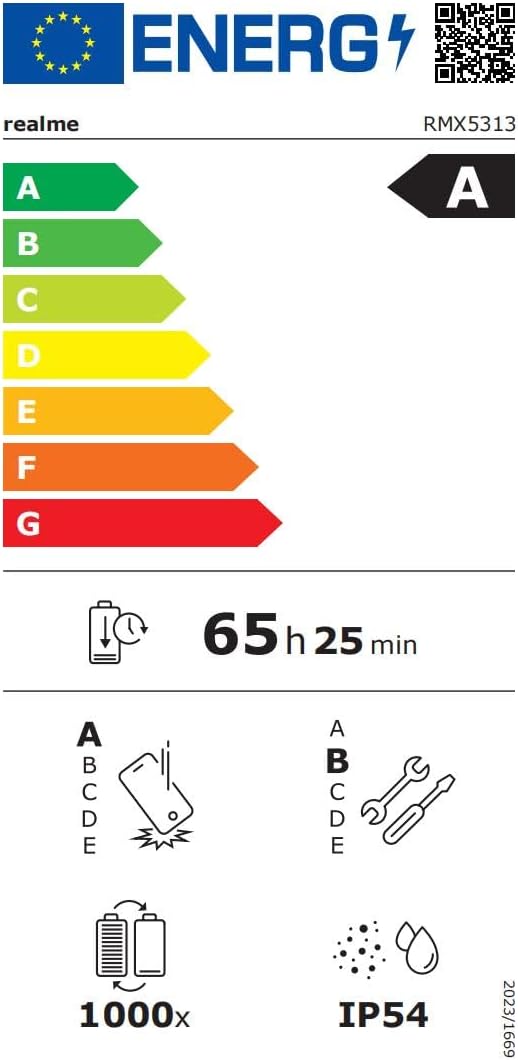
Image: EU Energy Label for realme Note 70T, showing energy efficiency, battery life, and IP54 rating. For more details, visit eprel.ec.europa.eu/qr/2361473.
7. Faisnéis Bharántas
Your realme Note 70T smartphone comes with a limited manufacturer's warranty. Please refer to the warranty card included in your package or visit the official realme websuíomh gréasáin le haghaidh téarmaí agus coinníollacha mionsonraithe maidir le clúdach barántais, fad, agus nósanna imeachta seirbhíse.
8. Tacaíocht do Chustaiméirí
For further assistance, technical support, or service inquiries, please contact realme customer support through their official website or the contact information provided in your product documentation. You can also find FAQs and troubleshooting tips on the realme support portal.
Additional resources, including a Data Transparency Declaration, can be found anseo.


