
1. Réamhrá
This manual provides instructions for the Ceybo EN2D36H ZDA1221216 Replacement Remote Control. This remote is designed to be fully compatible with various Hisense VIDAA Smart TV models, offering a direct replacement without the need for complex programming. Simply insert batteries, and the remote is ready for use.
The remote features dedicated shortcut buttons for popular streaming services, allowing quick access to your favorite entertainment platforms.
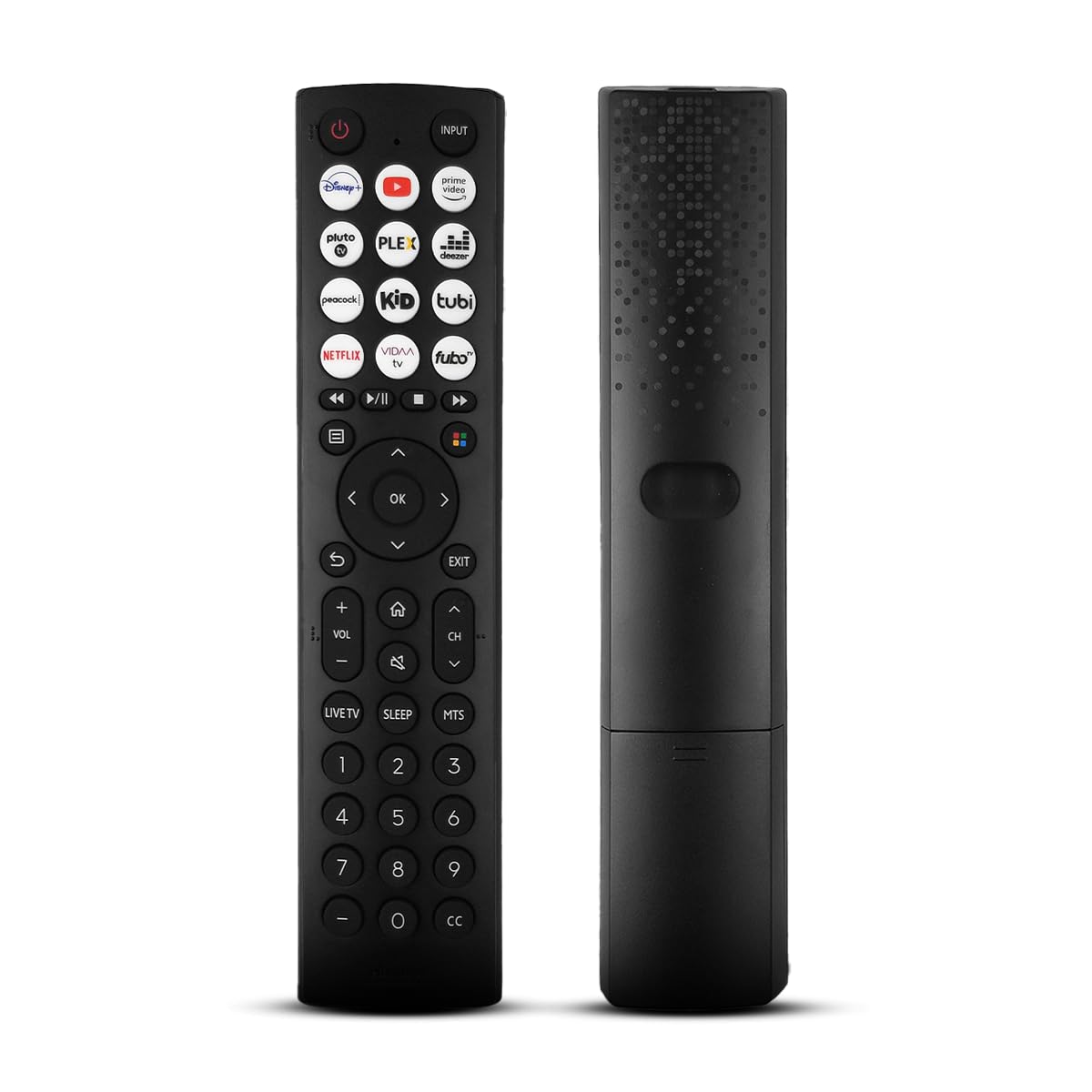
A tosaigh view of the Ceybo EN2D36H ZDA1221216 replacement remote control, designed for Hisense televisions.
2. Gnéithe
- Comhoiriúnacht Leathan: Works with Hisense A4 Series UHD TVs and A6 Series UHD Smart TVs, including models such as 32A35HUV, 32A45GV, 40A35HUV, 40A45GV, 43A6GV, 43A35HUV, 43A45GV, 50A6GV, 55A6GV, and 65A6GV.
- Instant Streaming Access: Dedicated shortcut buttons for Disney+, YouTube, Prime Video, Pluto TV, Plex, Deezer, Peacock, Kidoodle, Tubi, Netflix, Vida, and Fubo.
- Plug & Play Functionality: No setup or programming required. The remote is ready to use immediately after battery installation.
- Full TV Control: Provides comprehensive control over TV functions including power, volume, input selection, channel navigation, and menu access.
- Dearadh eirgeanamaíochta: Éadrom agus deartha le haghaidh láimhseála compordach.

This image displays the Ceybo EN2D36H ZDA1221216 remote control alongside several Hisense televisions, illustrating its compatibility with Hisense A4 and A6 Series UHD Smart TVs.
3. Socrú
The Ceybo EN2D36H ZDA1221216 remote control is designed for immediate use without any programming steps.
3.1 Suiteáil Battery
- Aimsigh an urrann ceallraí ar chúl an chianrialtáin.
- Sleamhnaigh clúdach na ceallraí síos nó brúigh an laiste agus ardaigh chun é a oscailt.
- Cuir isteach dhá (2) chadhnraí AAA, ag cinntiú go bhfuil na críochfoirt dhearfacha (+) agus dhiúltacha (-) ailínithe i gceart leis na marcanna taobh istigh den urrann.
- Cuir clúdach na ceallraí ar ais ina áit trína shleamhnú ar ais go dtí go gcliceálann sé go daingean.
Once batteries are installed, the remote is ready to operate your compatible Hisense TV.

This image illustrates the battery compartment of the remote control, indicating that it is powered by two AAA batteries for lasting performance.

This image emphasizes the effortless setup of the remote control, stating that it requires no pairing and is ready to use immediately after battery insertion.
4. Treoracha Oibriúcháin
Point the remote control directly at your Hisense TV's infrared receiver for optimal performance.
4.1 Feidhmeanna Bunúsacha
- Cnaipe Cumhachta (⏻): Brúigh chun an teilifís a chasadh air nó as.
- Cnaipe Ionchuir: Press to cycle through available input sources (HDMI, AV, etc.).
- Imleabhar Suas / Síos (VOL +/-): Coigeartaíonn sé leibhéal toirte an teilifíse.
- Cainéal Suas/Síos (CH +/-): Athraítear an cainéal teilifíse.
- Cnaipe Balbhaigh (🔇): Balbhaíonn nó díbhalbhaíonn fuaim na teilifíse.
4.2 Navigation and Menu
- Ceap Treorach (Suas, Síos, Ar Chlé, Ar Dheis): Navigates through menus and on-screen options.
- Cnaipe OK: Deimhníonn sé roghanna nó osclaíonn sé biachláir.
- Cnaipe Ar Ais (↩): Filleann sé ar an scáileán nó roghchlár roimhe seo.
- Cnaipe Scoir: Fágann sé an roghchlár nó an feidhmchlár reatha.
- Cnaipe Baile (🏠): Accesses the TV's main smart hub or home screen.
4.3 Streaming Shortcut Buttons
Press any of the dedicated shortcut buttons to directly launch the corresponding streaming application:
- Disney+
- YouTube
- Físeán Príomh
- Teilifís Plútón
- Plex
- Deezer
- péacóg
- Kidoodle
- tubi
- Netflix
- Vida
- Fubo

The remote control is shown with a magnified view of its dedicated shortcut buttons for popular streaming services like Disney+, YouTube, Prime Video, Pluto TV, Plex, Deezer, Peacock, Kidoodle, Tubi, Netflix, Vida, and Fubo.

The remote control is presented to highlight its user-friendly design, featuring large and clearly labeled buttons for intuitive navigation and access to all functions.
5. Cothabháil
5.1 Glanadh
Chun an cianrialtán a ghlanadh, bain úsáid as éadach bog, tirim. Chun salachar righin a fháil, déan é a ghlanadh go héadrom.ampen the cloth with water. Avoid using harsh chemicals, abrasive cleaners, or solvents, as these can damage the remote's surface or internal components.
5.2 Athsholáthar Ceallra
Replace batteries when the remote's response becomes sluggish or it stops functioning. Always replace both AAA batteries at the same time with new ones. Do not mix old and new batteries, or different types of batteries, as this can lead to leakage or improper operation. Dispose of used batteries according to local regulations.
6. Fabhtcheartú
If you experience issues with your Ceybo EN2D36H ZDA1221216 remote control, refer to the following common solutions:
| Fadhb | Cúis Féideartha | Réiteach |
|---|---|---|
| Níl an cianrialtán ag obair. | Cadhnraí marbha nó curtha isteach go mícheart. | Cuir cadhnraí AAA nua in ionad na gcadhnraí, agus cinntigh go bhfuil an polaraíocht cheart (+/-). |
| Níl an cianrialtán ag freagairt. | Obstruction between remote and TV, or remote is too far. | Ensure a clear line of sight to the TV's IR receiver. Move closer to the TV. |
| Specific buttons are not working. | Dirt or debris under the button, or internal malfunction. | Clean the remote. If the issue persists, the remote may require replacement. |
| TV does not respond to remote. | TV's IR receiver is blocked or malfunctioning. | Check the TV's IR receiver for obstructions. Test with another remote if available to confirm TV functionality. |
7. Sonraíochtaí
- Branda: Ceybo
- Ainm an tSamhail: EN2D36H ZDA1221216
- Teicneolaíocht Nascachta: Infridhearg (IR)
- Cineál Rialaitheora: Rialú Cnaipe
- Gléasanna Comhoiriúnacha: Television (Hisense VIDAA Smart TVs)
- Foinse Cumhachta: 2 x Cadhnraí AAA (gan a bheith san áireamh)
- Raon uasta: 30 Troigh (thart ar 9 méadar)
- Gnéithe Speisialta: Ergonomic, Lightweight, No Programming Required
- Dath: Dubh
8. Barántas agus Tacaíocht
For warranty information or technical support, please refer to the product packaging or contact Ceybo customer service through the retailer where the product was purchased. Keep your purchase receipt as proof of purchase.