
SatelliteSale SS-RC-NOTUS-M2
SatelliteSale Notus M2 Remote Control User Manual
Model: SS-RC-NOTUS-M2 | Brand: SatelliteSale
1. Réamhrá
This manual provides detailed instructions for the SatelliteSale Notus M2 Remote Control, a voice-activated Bluetooth replacement designed for Optimum Stream Devices. It covers setup, operation, maintenance, and troubleshooting to ensure optimal performance and user experience.

Íomhá: Tosaigh view of the SatelliteSale Notus M2 Remote Control.
2. Ábhar Pacáiste
Deimhnigh go bhfuil na míreanna uile i láthair sa phacáiste:
- 1 x SatelliteSale Notus M2 Remote Control
- 2 x Ceallraí AAA (réamhshuiteáilte nó san áireamh ar leithligh)
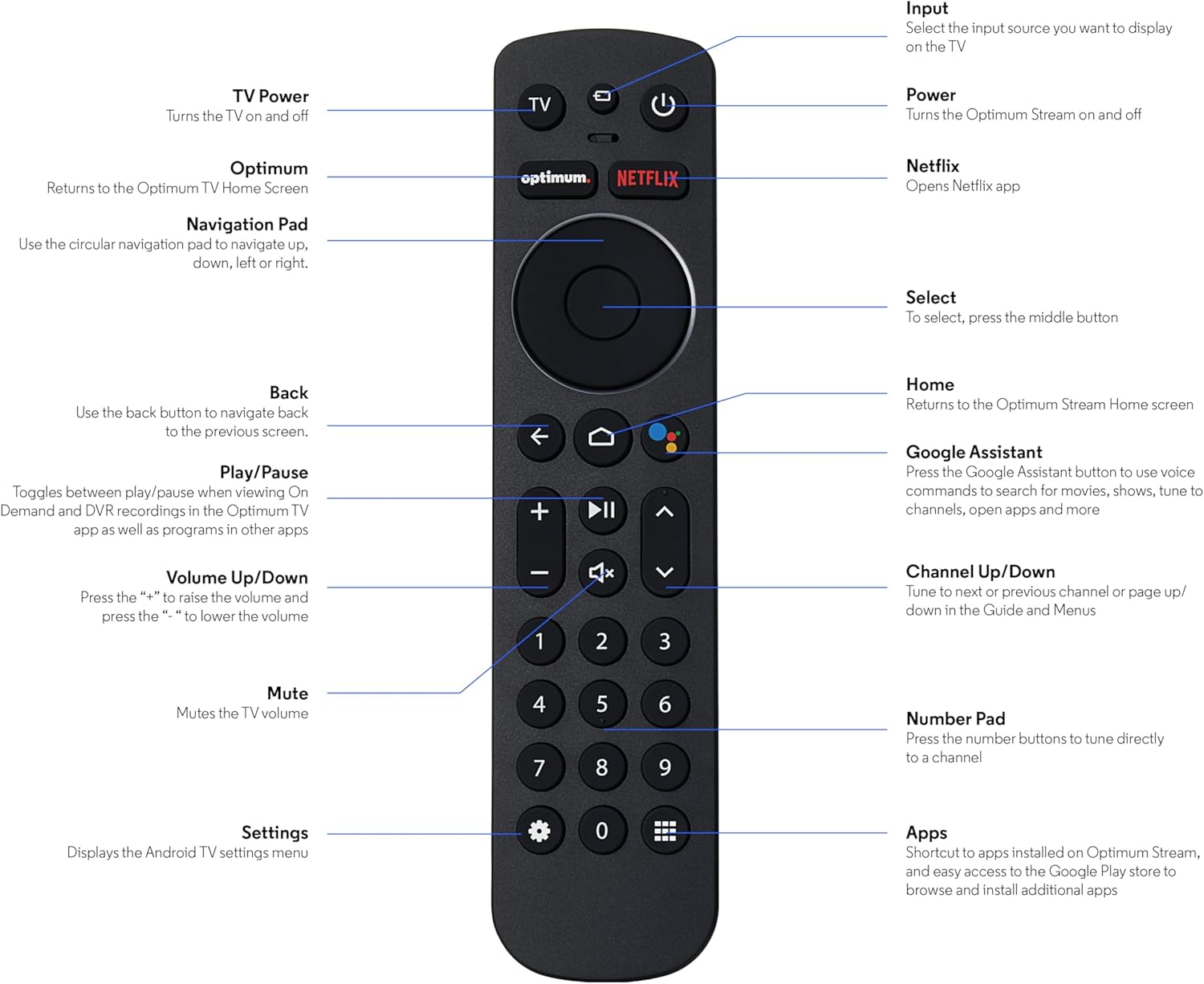
Image: The SatelliteSale Notus M2 Remote Control shown alongside two AAA batteries.
3. Remote Control Layout and Functions
Familiarize yourself with the buttons and their functions on your SatelliteSale Notus M2 Remote Control.

Image: Detailed diagram of the SatelliteSale Notus M2 Remote Control with labels for each button and its corresponding function.
- Cumhacht teilifíse: Casadh an teilifís air agus as.
- Ionchur: Selects the input source to display on the TV.
- Cumhacht: Turns the Optimum Stream device on and off.
- Uasmhéid: Returns to the Optimum TV Home Screen.
- Netflix: Opens the Netflix application directly.
- Ceap Loingseoireachta (Ciorclach): Use to navigate up, down, left, or right within menus.
- Select (Middle Button of Nav Pad): Deimhníonn rogha.
- Ar ais: Filleann sé ar an scáileán roimhe seo.
- Baile: Returns to the Optimum Stream Home screen.
- Google Assistant (Microphone Icon): Activates voice commands for search, playback control, and hands-free assistance.
- Seinn/Sos: Toggles between play and pause for content.
- Imleabhar Suas/Síos (+/-): Coigeartaíonn an méid teilifíse.
- Balbhaigh: Mutes the TV volume.
- Cainéal Suas/Síos (Saigheada): Tunes to the next or previous channel, or navigates pages in guides and menus.
- Ceap Uimhreacha (0-9): Directly tunes to a channel or enters numerical input.
- Socruithe (Deilbhín Gear): Displays the Android TV settings menu.
- Apps (Grid Icon): Provides shortcuts to installed apps on Optimum Stream and access to the Google Play Store.
4. Socrú
4.1 Suiteáil Battery
The remote requires two AAA batteries. Ensure correct polarity when inserting.
- Aimsigh an urrann ceallraí ar chúl an chianrialtáin.
- Sleamhnaigh clúdach na ceallraí síos le hoscailt.
- Cuir isteach dhá chadhnraí AAA, ag meaitseáil na críochfoirt (+) agus (-) mar a léirítear taobh istigh den urrann.
- Replace the battery cover by sliding it back into place until it clicks.

Íomhá: View of the remote control with the battery compartment open, showing the correct orientation for AAA battery insertion.
4.2 Pairing Your Remote with Optimum Stream Device
Your remote is designed to be paired with your Optimum Stream device for full functionality, including Bluetooth connectivity and voice control. If your remote becomes unpaired or if you are setting up a new remote, follow these steps:

Image: An illustration explaining the importance of direct line of sight for initial pairing and the flexibility of remote placement after pairing.
Nóta Tábhachtach: For initial pairing, the Optimum Stream box needs to be in direct line of sight of the remote. If your box is behind a TV or in a cabinet, you may need to temporarily relocate it so the remote can be directly pointed at the Stream box. Once pairing is complete, the Stream box can be moved out of sight as the remote uses Bluetooth.
- Ensure batteries are correctly installed in your remote.
- Turn on your TV and your Optimum Stream cable box.
- Press any button on the Stream remote to ensure you are on the Home Screen.
- Ón Scáileán Baile, roghnaigh Socruithe (gear icon).
- Roghnaigh Device and Remote Settings > Remotes & Accessories.
- Roghnaigh Add Stream Remote.
- Lean na treoracha ar an scáileán chun an próiseas péireála a chríochnú.
- You will see an on-screen confirmation once the remote is successfully paired.

Image: Visual representation of pairing steps 1 through 5, showing the remote and on-screen prompts.

Image: Visual representation of pairing steps 6 through 9, detailing the final stages of the pairing process.
5. Treoracha Oibriúcháin
5.1 Rialú Gutha
The SatelliteSale Notus M2 remote features voice control for convenient operation. Press the microphone button (Google Assistant icon) and speak your command clearly. You can use voice commands to:
- Cuardaigh le haghaidh content (movies, TV shows, actors).
- Control playback (play, pause, fast forward, rewind).
- Feidhmchláir oscailte.
- Tune to specific channels.
- Get information (weather, sports scores).

Image: A person using the voice control feature of the remote, with sound waves emanating from the remote towards the TV screen.

Íomhá: Iar-dhuineample of a voice command, "Hey Google, turn on the Spider-Man movie," displayed on screen with the remote.
5.2 Bluetooth Wireless Connectivity
Once paired, the remote utilizes Bluetooth for communication with your Optimum Stream device. This means you do not need a direct line of sight to operate the device, allowing for greater flexibility in remote usage and device placement.
5.3 Dedicated Streaming App Buttons
The remote includes dedicated buttons for popular streaming applications, such as Netflix. Pressing these buttons provides one-touch access to your favorite entertainment platforms.
6. Cothabháil
- Glanadh: Bain úsáid as éadach bog, tirim chun an cianrialtán a ghlanadh. Ná húsáid glantóirí leachtacha ná aerasóil.
- Athsholáthar Ceallra: Replace batteries when the remote's response becomes sluggish or it stops functioning. Always replace both batteries at the same time with new AAA batteries.
- Stóráil: Stóráil an cianrialtán in áit fhionnuar tirim amach ó sholas díreach na gréine agus ó theocht mhór.
7. Fabhtcheartú
| Fadhb | Cúis Féideartha | Réiteach |
|---|---|---|
| Níl an cianrialtán ag freagairt. | Cadhnraí marbh nó íseal. | Cuir cinn nua in ionad an dá chadhnra AAA. |
| Remote not controlling Optimum Stream device. | Remote is unpaired or pairing failed. | Follow the pairing instructions in Section 4.2. Ensure direct line of sight during initial pairing. |
| Níl an rialú gutha ag obair. | Remote not paired via Bluetooth, or microphone issue. | Ensure the remote is properly paired via Bluetooth (Section 4.2). Speak clearly and close to the microphone. |
| Tá na cnaipí greamaitheach nó neamhfhreagrach. | Salachar nó smionagar faoi na cnaipí. | Glan an cianrialtán le héadach bog tirim. Seachain doirteadh. |
8. Sonraíochtaí
| Gné | Sonraigh |
|---|---|
| Uimhir Mhúnla | SS-RC-NOTUS-M2 |
| Nascacht | Gan sreang Bluetooth |
| Gnéithe Speisialta | Voice Activated (Google Assistant), Dedicated App Buttons, Ergonomic Design |
| Gléasanna Comhoiriúnacha | Optimum Stream Box (powered by Android TV) |
| Foinse Cumhachta | 2 x Cadhnraí AAA (san áireamh) |
| Dath | Neamhlonrach Dubh |
| Meáchan Mír | 3.66 unsa |
| Toisí Pacáiste | 7.28 x 1.89 x 1.22 orlach |
9. Barántas agus Tacaíocht
For warranty information or technical support, please refer to the official SatelliteSale websuíomh gréasáin nó déan teagmháil dhíreach lena seirbhís do chustaiméirí. Coinnigh d’admháil ceannaigh le haghaidh éilimh bharántais.
Monaróir: Díol Satailíte
Websuíomh: Visit the SatelliteSale Store on Amazon
Ask a question about this manual
Ask about setup, troubleshooting, compatibility, parts, safety, or missing instructions. Manuals+ will review the question and use this page’s manual context to help answer it.