
Eolas Tábhachtach Sábháilteachta
Please read all safety instructions before using this product to ensure proper and safe operation.
- Ná nochtaigh na cluasáin ná an cás luchtaithe do theocht mhór.
- Seachain titim nó fórsa iomarcach a chur i bhfeidhm ar an bhfeiste.
- Coinnigh as teacht leanaí agus peataí.
- Use only a 5V adapter to charge the charging case to prevent battery damage.
- Do not use the earbuds in the bath or while swimming.
Ábhar an Phacáiste
Deimhnigh go bhfuil na hearraí go léir i do phacáiste:
- ZIUTY A1 Wireless Earbuds (x1 pair)
- Portable Charging Case (x1)
- Cábla Luchtaithe USB-C (x1)
- Eartips (pre-installed size M, plus 2 extra pairs in sizes S & L)
- Lámhleabhar Úsáideora (an doiciméad seo)
Táirge Tharview
Familiarize yourself with the components of your ZIUTY A1 Wireless Earbuds.
Earbuds agus Cás Muirir
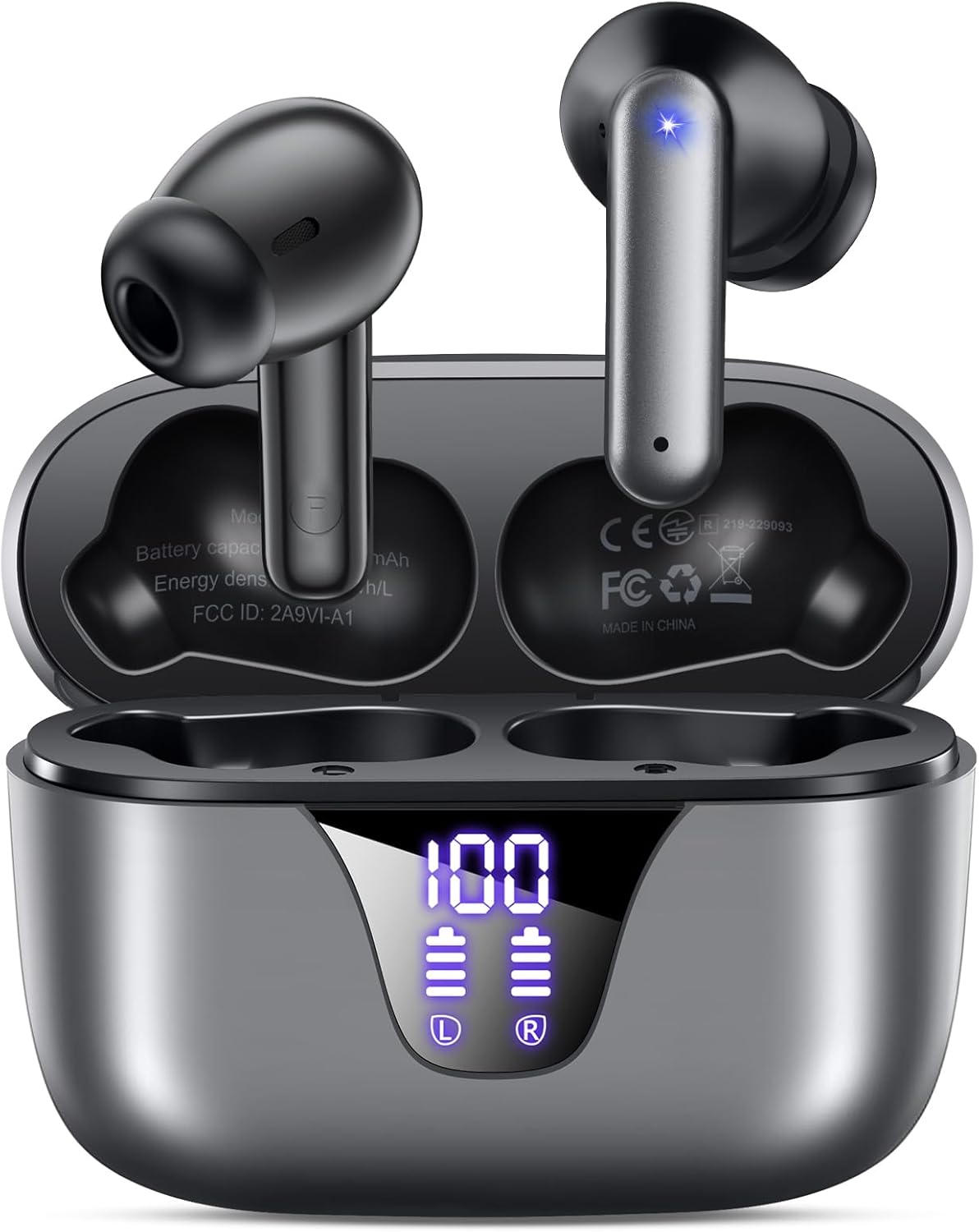
Image: ZIUTY A1 Wireless Earbuds shown inside their open charging case. The case features an LED digital display indicating battery levels for both the case and individual earbuds.
Taispeántas Cumhachta LED

Image: Close-up of the ZIUTY A1 charging case's LED display, showing '100' for the case battery and individual battery icons for the left (L) and right (R) earbuds.
The charging case features an LED digital display that shows the exact remaining power percentage (0-100%) for the case and individual battery levels for each earbud.
Socrú
1. Muirearú na gCluasán agus an Chás
Sula n-úsáidtear iad den chéad uair, luchtaigh na cluasáin agus an cás luchtaithe go hiomlán.
- Cuir na cluasáin isteach sa chás luchtaithe. Cinntigh go bhfuil siad suite i gceart ina sliotáin faoi seach (C don chlé, D don dheis).
- Connect the USB-C charging cable to the charging port on the case and the other end to a 5V USB power adapter (not included).
- The LED display on the case will show the charging status. A full charge typically takes approximately 2 hours.

Image: ZIUTY A1 earbuds resting in their charging case, with the LED display showing battery levels.

Image: Diagram illustrating how to connect the USB-C cable to the charging case and a 5V power adapter for charging.
2. Ag Caitheamh na gCluasán
For optimal sound quality and comfort, select the correct ear tip size and ensure a secure fit.
- Choose the ear tips (S, M, L) that provide the best seal and comfort for your ears.
- Insert the earbuds into your ears, gently twisting them to find a snug and stable position.
- The ergonomic semi-in-ear design is intended for a comfortable fit during various activities.

Image: Diagram showing the ergonomic design of the earbuds and the three available ear tip sizes (S, M, L) for a customized fit.

Image: Step-by-step visual guide on how to correctly insert and adjust the earbuds for a secure fit.
3. Péireáil le Gléas Bluetooth
Rachaidh na cluasáin isteach sa mhodh péireála go huathoibríoch nuair a bhaintear as an gcás luchtaithe iad.
- Oscail an cás luchtaithe agus bain an dá chluasán. Cuirfidh siad ar siúl go huathoibríoch agus déanfaidh siad iarracht péireáil lena chéile.
- Ar do ghléas (fón cliste, táibléad, ríomhaire glúine), cumasaigh Bluetooth agus déan cuardach ar ghléasanna atá ar fáil.
- Select "A1" from the list of found devices.
- Nuair a bheidh siad ceangailte, cloisfidh tú dearbhú inchloiste, agus beidh na cluasáin réidh le húsáid.
- The earbuds will automatically reconnect to the last paired device when removed from the case.

Image: Illustration showing the ZIUTY A1 earbuds connecting via Bluetooth 5.3 to a smartphone, indicating a stable and fast connection.

Image: Diagram demonstrating the one-step auto-pairing process when the earbuds are removed from the charging case.
Treoracha Oibriúcháin
Rialuithe Tadhaill
The ZIUTY A1 earbuds feature intuitive touch controls for managing audio playback and calls.

Image: Diagram illustrating the touch control area on the earbuds and various functions like Play/Pause, Voice Assistant, Answer/Hang up, Previous/Next Track, and Volume adjustment.

Image: A more detailed visual guide to the touch controls, showing specific tap and hold gestures for different commands.
| Gníomh | Feidhm |
|---|---|
| Tapáil Aonair (Clé/Deas) | Seinn/Sos Ceol, Freagair/Deireadh Glao |
| Tapáil Dhúbailte (L) | Rian Roimhe Seo |
| Tapáil Dhúbailte (R) | An Chéad Rian Eile |
| Tapáil Thrífhillte (Clé/Deas) | Gníomhaigh Cúntóir Gutha (Siri, Cúntóir Google) |
| Press and Hold (L) | Imleabhar Síos |
| Press and Hold (R) | Imleabhar Suas |
| Press and Hold (L/R) during incoming call | Diúltaigh Glao |
Glaonna a Dhéanamh agus a Fháil
Use the touch controls to manage your phone calls:
- Freagra/Deireadh Glao: Tapáil amháin ar cheachtar cluasán.
- Diúltaigh Glao: Press and hold either earbud during an incoming call.

Image: Illustration showing a user interacting with a voice assistant (Siri) via the earbuds for clear call support.
Cúntóir Gutha
Activate your device's voice assistant by triple-tapping either earbud. This allows you to issue commands such as making calls or checking information hands-free.
Cothabháil
Glanadh
Cuidíonn glanadh rialta le feidhmíocht agus sláinteachas is fearr a choinneáil.
- Clean the charging contacts on both the earbuds and inside the charging case with a dry cotton swab or alcohol pad.
- Gently clean the mesh of the ear tips to remove any dust or earwax that might affect sound volume.
- Wipe the exterior of the earbuds and case with a soft, dry cloth.

Image: Visual guide demonstrating how to clean the earbud charging contacts and ear tip mesh to resolve potential volume or charging issues.
Stóráil
Nuair nach bhfuil siad in úsáid, stóráil na cluasáin ina gcás luchtaithe chun iad a chosaint agus a chinntiú go bhfanfaidh siad luchtaithe.
Fabhtcheartú
If you encounter issues with your ZIUTY A1 earbuds, refer to the following common solutions:
- Cluasáin nach bhfuil ag péireáil lena chéile: Place both earbuds back into the charging case, close the lid, wait a few seconds, then open the lid and remove them again. They should automatically pair.
- Níl na cluasáin ag ceangal leis an ngléas: Ensure Bluetooth is enabled on your device and the earbuds are in pairing mode. Forget the device from your Bluetooth list and attempt to re-pair.
- Gan fuaim nó toirt íseal: Check the volume levels on both your device and the earbuds. Ensure the ear tips are clean and properly seated in your ears. Refer to the cleaning instructions in the Maintenance section.
- Saincheisteanna muirir: Ensure the charging cable is securely connected and the power adapter is 5V. Clean the charging contacts on both the earbuds and the case.
- Accidental touch control activation: When adjusting the earbuds in your ear, grasp them by the sides to avoid touching the control area.
Sonraíochtaí
Key technical specifications for the ZIUTY A1 Wireless Earbuds:
| Gné | Sonraíocht |
|---|---|
| Ainm an tSamhail | A1 |
| Teicneolaíocht Nascachta | Gan Sreang (Bluetooth 5.3) |
| Raon Bluetooth | Suas le 15 méadar (49 troigh) |
| Saol Battery Earbud | Suas le 8 uair an chloig |
| Am Súgartha Iomlán (le cás) | Suas le 50 uair an chloig |
| Cumas Battery Cás Muirir | 500 mAh |
| Am Muirir | Thart ar 2 uair an chloig |
| Méid fuaime tiománaí | Tiománaí Dinimiciúla 14.5 mm |
| Raon Minicíochta | 20 Hz - 20,000 Hz |
| Leibhéal Friotaíocht Uisce | IPX7 ( frithsheasmhach in uisce) |
| Cineál Rialaithe | Rialú Dteagmhála |
| Meáchan Earbud | Approximately 0.14 oz (3.9g) per earbud |
| Comhpháirteanna San áireamh | Earbuds, Charging Case, USB-C Cable, Eartips, User Manual |
Barántas agus Tacaíocht
Faisnéis Bharántas
ZIUTY provides an 18-month battery promise for this product. This warranty covers defects in materials and workmanship under normal use.
Tacaíocht do Chustaiméirí
For any questions, technical assistance, or warranty claims, please contact ZIUTY customer service. Refer to the product packaging or the official ZIUTY websuíomh gréasáin le haghaidh sonraí teagmhála reatha.