
Réamhrá
Thank you for choosing the Philips Solar Security Light. This manual provides essential information for the safe and efficient operation of your solar-powered, wall-mounted flood light with PIR motion sensor. Please read these instructions carefully before installation and use, and retain them for future reference.
Eolas Sábháilteachta
- Cinntigh go bhfuil an dromchla gléasta cobhsaí agus gur féidir leis meáchan an daingneáin solais a sheasamh.
- Ná déan iarracht an táirge a dhíchóimeáil ná a mhodhnú. D’fhéadfadh sé seo an bharántas a chur ar neamhní agus rioscaí sábháilteachta a chruthú.
- Keep the solar panel clean to ensure optimal charging performance.
- Avoid looking directly into the light source when it is active, as it may cause eye strain.
- Déan an táirge agus a chomhpháirteanna a dhiúscairt go freagrach de réir rialacháin áitiúla ag deireadh a shaoilré.
Ábhar an Phacáiste
Deimhnigh go bhfuil na comhpháirteanna uile i láthair roimh an suiteáil:
- Philips Solar Security Light (1 unit)
- Cianrialtán (1 aonad)
- Lúibín Gléasta (1 aonad)
- Scriúnna (2 aonad)
- Wall Plugs (2 units)
Táirge Tharview
The Philips Solar Security Light is an outdoor, solar-powered flood light designed for enhanced security and illumination. It features a PIR motion sensor, high-brightness LEDs, and multiple lighting modes.

Íomhá: Tharview of the Philips Solar Security Light, highlighting its durable design with a solar panel, three LED light heads, and an integrated motion sensor.
Príomhghnéithe:
- Ard Gile: 800 lumens with 6500K cool daylight color temperature.
- Braiteoir Tairisceana PIR: Detects motion up to 49.2 feet with a 180-degree detection angle.
- 3 Modh Soilsithe: Customizable illumination settings for various needs.
- Cumhachtaithe Gréine: Equipped with an upgraded polycrystalline solar panel and a 2000 mAh high-capacity battery for efficient charging and extended use.
- uiscedhíonach: IP65 rated for resistance against heavy rain, humidity, and extreme temperatures.
- Cianrialú: Allows convenient adjustment of light modes without manual interaction.
Socrú agus Suiteáil
The Philips Solar Security Light is designed for easy wall-mounted installation with no wiring required. It comes pre-assembled.
Céimeanna Suiteála:
- Roghnaigh Suíomh: Select an outdoor location that receives direct sunlight for most of the day to ensure optimal charging of the solar panel. The light should be mounted on a wall.
- Marcáil Pointí Druileála: Hold the mounting bracket against the desired wall location and mark the positions for the two screws.
- Poill Druileála: Drill two holes at the marked points. Insert the wall plugs into the drilled holes.
- Ceangail Lúibín Gléasta: Daingnigh an lúibín gléasta leis an mballa ag baint úsáide as na scriúnna a chuirtear ar fáil.
- Mount the Light: Slide the solar security light onto the mounting bracket until it clicks securely into place.
- Coigeartaigh Ceann Solais agus Braiteoir: Adjust the three light heads and the PIR motion sensor to cover the desired area. The motion sensor has an adjustable angle of 180 degrees.
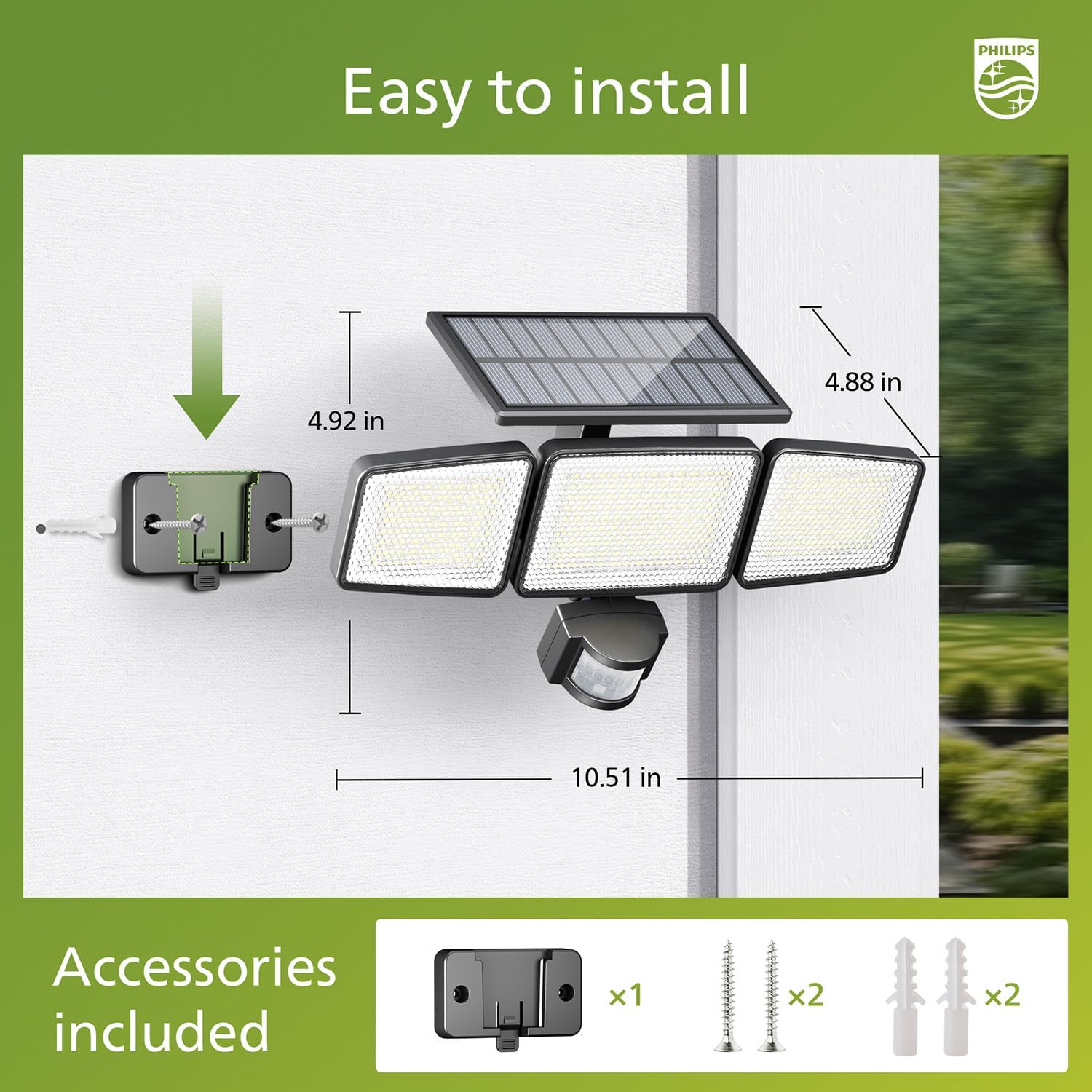
Image: Visual guide for installing the Philips Solar Security Light, including dimensions and the accessories provided for wall mounting.
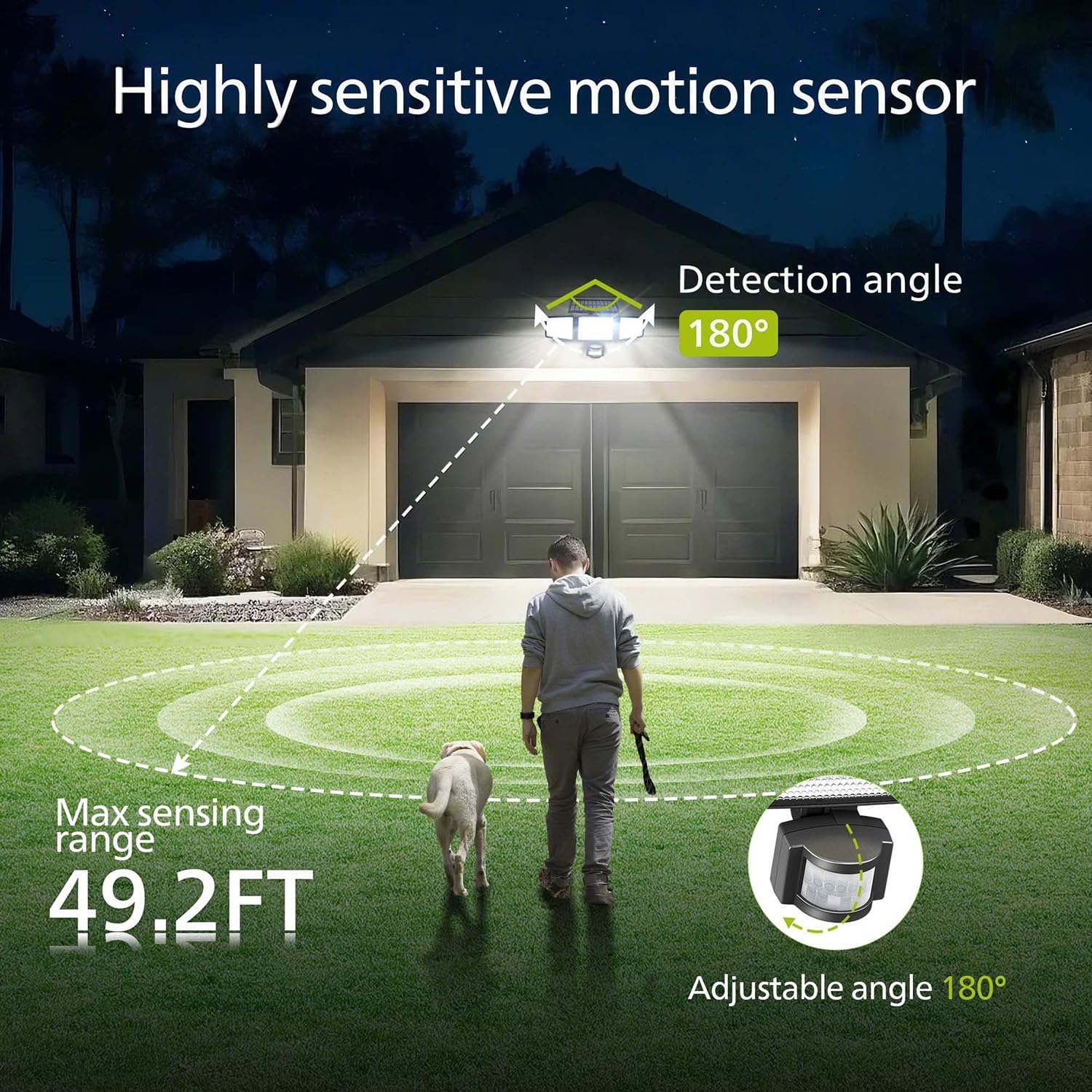
Image: Illustration of the motion sensor's coverage, showing a 180-degree detection angle and a maximum sensing range of 49.2 feet.
Treoracha Oibriúcháin
The Philips Solar Security Light features three distinct lighting modes, controllable via the included remote control.
Modhanna Soilsithe:
- Mód Braiteora: The light remains off until motion is detected. Upon detection, it illuminates at 100% brightness (800 lumens) for approximately 25 seconds, then turns off.
- Mód Dim: The light stays on continuously at a low brightness of 10% (80 lumens) throughout the night.
- Dim + Sensor Mode: The light stays on continuously at a very low brightness of 2-3% (16-24 lumens). When motion is detected, it brightens to 100% (800 lumens) for approximately 25 seconds, then returns to the dim state.

Image: Detailed explanation of the three operational modes, showing how the light behaves in Sensor, Dim, and Dim + Sensor modes based on motion detection and ambient light.
Use the remote control to switch between these modes as needed. Ensure the remote control has a clear line of sight to the light fixture for proper function.
Cothabháil
Regular maintenance ensures optimal performance and longevity of your Philips Solar Security Light.
- Glanadh Painéil Gréine: Glan an painéal gréine go tréimhsiúil le clúdach bog, damp cloth to remove dust, dirt, or debris. A clean solar panel ensures maximum sunlight absorption and charging efficiency.
- Glanadh Daingneáin: Clean the light fixture with a soft, dry cloth. Avoid using abrasive cleaners or solvents that could damage the finish or electronic components.
- Battery: The integrated high-capacity 2000 mAh battery is designed for long-term use. No user maintenance or replacement is required for the battery.
- Friotaíocht Aimsire: The IP65 rating ensures the light is protected against dust and water jets. However, avoid submerging the unit in water.

Image: Focus on the high-quality solar panel, illustrating its role in providing power for 8-10 hours of operation and its 1800mAh high-capacity battery.
Fabhtcheartú
If you encounter issues with your Philips Solar Security Light, refer to the following common problems and solutions:
- Ní lasann an solas san oíche:
- Cinntigh go bhfuil dóthain solas díreach na gréine ag teacht chuig an bpainéal gréine i rith an lae.
- Check if the light is in the correct operating mode (e.g., not in 'off' state if the remote has an off button).
- Verify that the remote control battery is functional.
- Tá an solas lag nó ní fhanann sé air ach ar feadh tréimhse ghearr:
- The solar panel may not be fully charged. Ensure it is clean and exposed to direct sunlight for at least 6-8 hours.
- Ambient temperature can affect battery performance; extreme cold may reduce operating time.
- Ní bhraitheann an braiteoir gluaisne gluaiseacht:
- Cinntigh go bhfuil lionsa an braiteora glan agus gan bhac.
- Verify the light is in a motion-activated mode (Sensor Mode or Dim + Sensor Mode).
- Adjust the angle of the motion sensor to cover the desired detection area.
If problems persist, please contact Philips customer support for further assistance.
Sonraíochtaí
| Gné | Sonraíocht |
|---|---|
| Branda | Philips |
| Múnla | 929004621403 |
| Dath | Dubh |
| Ábhar | Alúmanam |
| Foirm Daingneáin Solais | Tuilsoilse |
| Úsáid Laistigh / Lasmuigh | Amuigh faoin aer |
| Foinse Cumhachta | Cumhachtaithe Gréine |
| Modh Rialaithe | cianda |
| Foinse Solais | stiúir |
| Líon Foinsí Solais | 4 |
| Imltage | 3.7 volta DC |
| Dath Éadrom | Bán Fuar (6500K) |
| Gile | 800 lumens (max) |
| Leibhéal Friotaíocht Uisce | IP65 uiscedhíonach |
| Cineál Gléasta | Wall Mount |
| Cumas Battery | 2000 mAh |
| Uillinn Braite | 180 céim |
| Raon Braite | Suas le 49.2 troigh ar fad |

Image: A comparison table highlighting key specifications of the Philips solar security light, such as brightness, lighting modes, battery capacity, and waterproof rating.
Barántas agus Tacaíocht
Chun eolas faoi bharántas agus tacaíocht do chustaiméirí a fháil, féach ar shuíomh oifigiúil Philips. websuíomh gréasáin nó déan teagmháil lena roinn seirbhíse do chustaiméirí. Coinnigh d’admháil ceannaigh mar chruthúnas ceannaigh.
Le haghaidh tuilleadh cúnaimh, tabhair cuairt ar: www.philips.com/support


