
1. Réamhrá agus Córas Thar Learview
This manual provides detailed instructions for the Fuers 8CH 4K PoE Security Camera System. This system includes an 8-channel Network Video Recorder (NVR) with a pre-installed 500GB hard drive and two wired 6MP PoE dual-lens security cameras. The system is designed for 24/7 surveillance, offering features such as smart person detection, two-way audio, and remote access via mobile application or PC client.
The NVR supports up to 8 cameras, allowing for future expansion with additional Fuers IP cameras. Its Power over Ethernet (PoE) capability simplifies installation by providing both power and data transmission through a single network cable.
2. Cad atá sa Bhosca
Deimhnigh le do thoil go bhfuil na míreanna go léir atá liostaithe thíos san áireamh i do phacáiste:
- 1x 8CH NVR with 500G Hard Drive Pre-installed
- 1x NVR Power Adapter
- 2x 6MP PoE Dual-Lens Cameras
- 2x 18m Network Cable
- 1x Cábla HDMI
- 1 x Luch USB
- 2x Mounting Screw Kits
- 1x Lámhleabhar Úsáideora (an doiciméad seo)
Fíor 2.1: Ábhar Pacáiste
3. Comhpháirteanna an Chórais
3.1 Network Video Recorder (NVR)
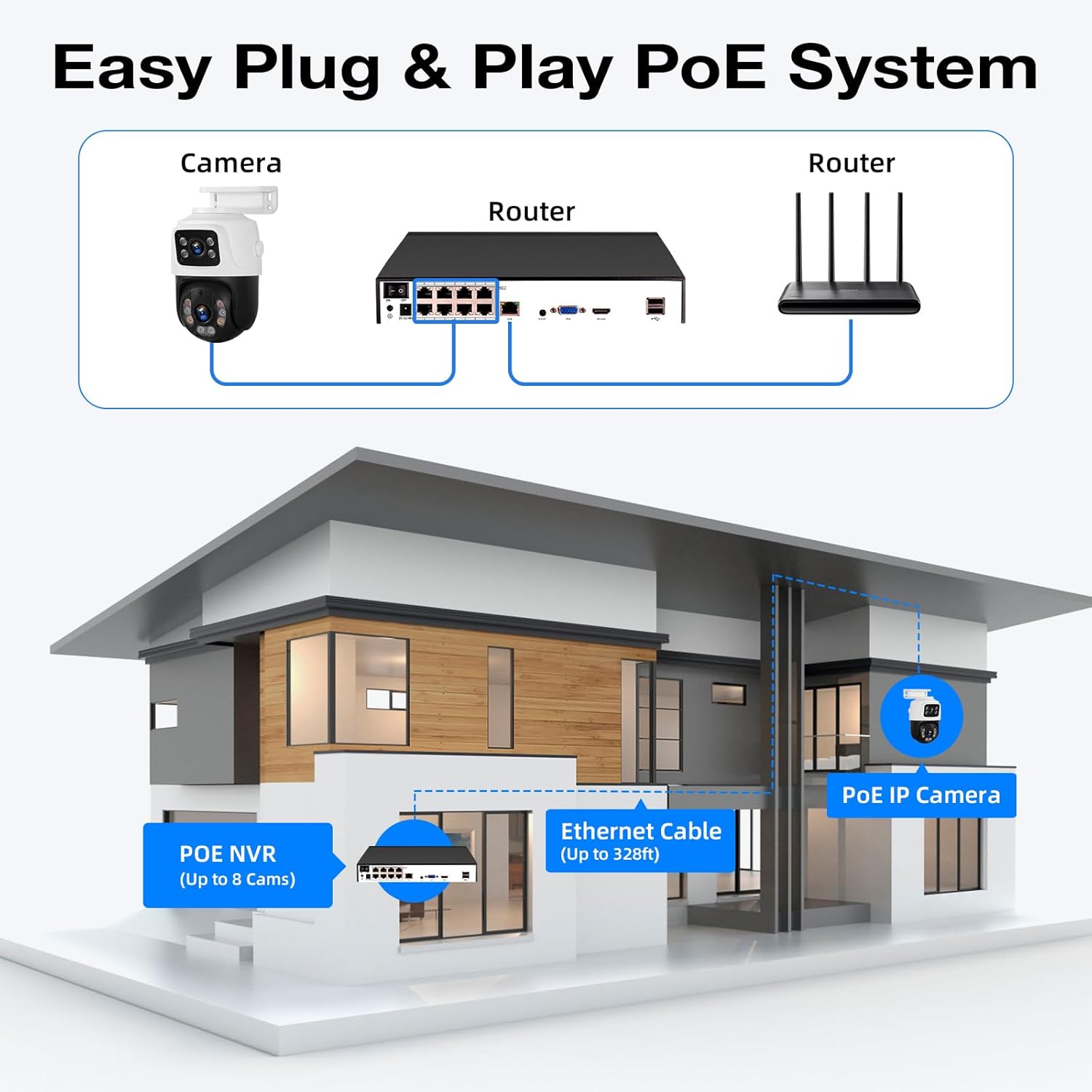
The NVR is the central unit for recording, storing, and managing video footage from your cameras. It features 8 PoE ports for direct camera connection, eliminating the need for separate power adapters for each camera.

Figure 3.1: NVR Rear Panel Ports
- Poirt PoE (1-8): Connect PoE cameras directly.
- Port LAN: Connect to your router for internet access and remote viewing.
- VGA/HDMI Ports: Connect to a monitor for local viewing.
- Poirt USB: Connect the included USB mouse for control and for external storage/backup.
- Ionchur Cumhachta: Ceangail an t-oiriúntóir cumhachta NVR.
- Lasc ar/As: Power control for the NVR.
3.2 6MP PoE Dual-Lens Cameras
The included cameras are 6-megapixel (6MP) dual-lens units, providing high-resolution video. They are designed for outdoor use with IP66 waterproofing and support both ceiling and wall mounting.
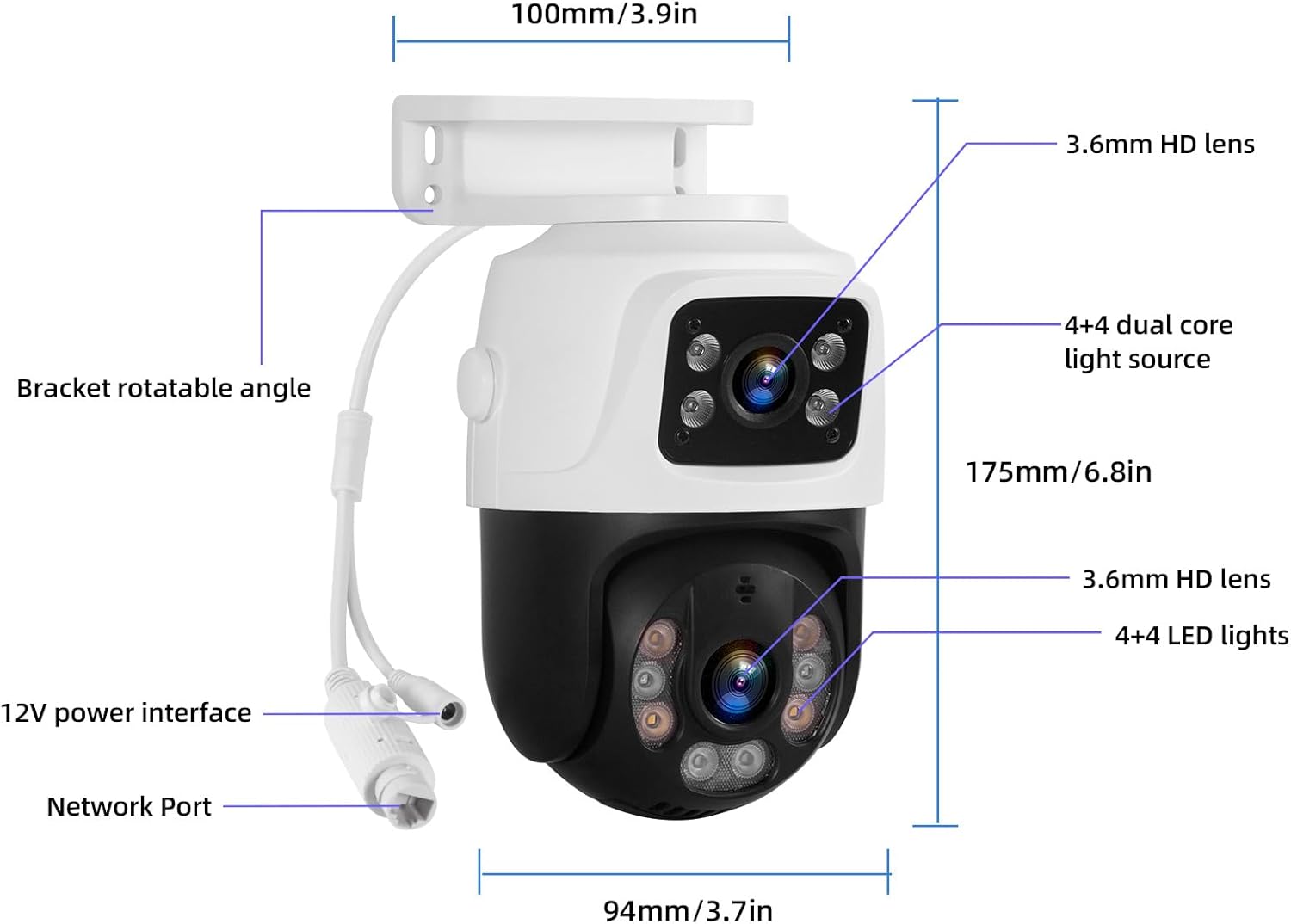
Fíor 3.2: Comhpháirteanna agus Toisí an Cheamara
- Dé-lionsaí: Provide a wider field of view or simultaneous views.
- Nascacht PoE: Receives power and data via a single Ethernet cable.
- Micreafón Insuite: Cumasaíonn sé cumarsáid fuaime dhá bhealach.
- Fís Oíche: Supports both infrared (black & white) and full-color night vision.
- IP66 Uiscedhíonach: Suitable for outdoor installation in various weather conditions.
4. Socrú agus Suiteáil
4.1 Initial NVR Connection
- Connect the USB mouse to a USB port on the NVR.
- Connect your monitor to the NVR using either the VGA or HDMI cable.
- Connect the NVR power adapter to the NVR's DC input and plug it into a power outlet.
- Turn on the NVR using the power switch on the rear panel. The system will boot up and display on the connected monitor.
4.2 Camera Connection (PoE Plug & Play)
The PoE feature allows for a straightforward connection:
- Connect one end of the provided network cable to a PoE port on the NVR.
- Connect the other end of the network cable to the camera's network port.
- Repeat for all cameras. The cameras will automatically power on and connect to the NVR.

Figure 4.1: PoE System Connection Diagram
4.3 Network Connection for Remote Access
Chun cianda a chumasú viewing and alerts, connect the NVR to your home network:
- Connect one end of a network cable to the NVR's LAN port.
- Connect the other end of the network cable to an available LAN port on your router.
- Cinntigh go bhfuil nasc idirlín gníomhach ag do ródaire.

Figure 4.2: Remote Access Connection
4.4 Mobile App & PC Client Setup
Download the free 'xmeye pro' app from your device's app store (iOS or Android) or the PC client for Windows/Mac. Follow the in-app instructions to add your device by scanning the QR code displayed on the NVR monitor or manually entering the device ID. This will allow you to view beo footage, playback recordings, and receive alerts remotely.
4.5 Gléasta Ceamara
The cameras can be mounted on ceilings or walls. Choose a location that provides the desired viewing angle and is within reach of the network cables. Ensure the mounting surface is stable and secure.

Figure 4.3: Ceiling and Wall Mounting Options
Video 4.1: Step-by-step guide on connecting the NVR, cameras, and setting up the mobile application for live viewing.
5. Oibríocht
5.1 Beo View agus Athsheinm
Nuair a bheidh an córas socraithe, is féidir leat view live camera feeds on your connected monitor, mobile app, or PC client. Use the USB mouse to navigate the NVR interface for playback of recorded footage, system settings, and other functions.
5.2 Brath Cliste Daoine
The cameras are equipped with smart person detection, which accurately identifies human figures and reduces false alarms from other movements. When a person is detected, the system can send instant alerts to your mobile device.
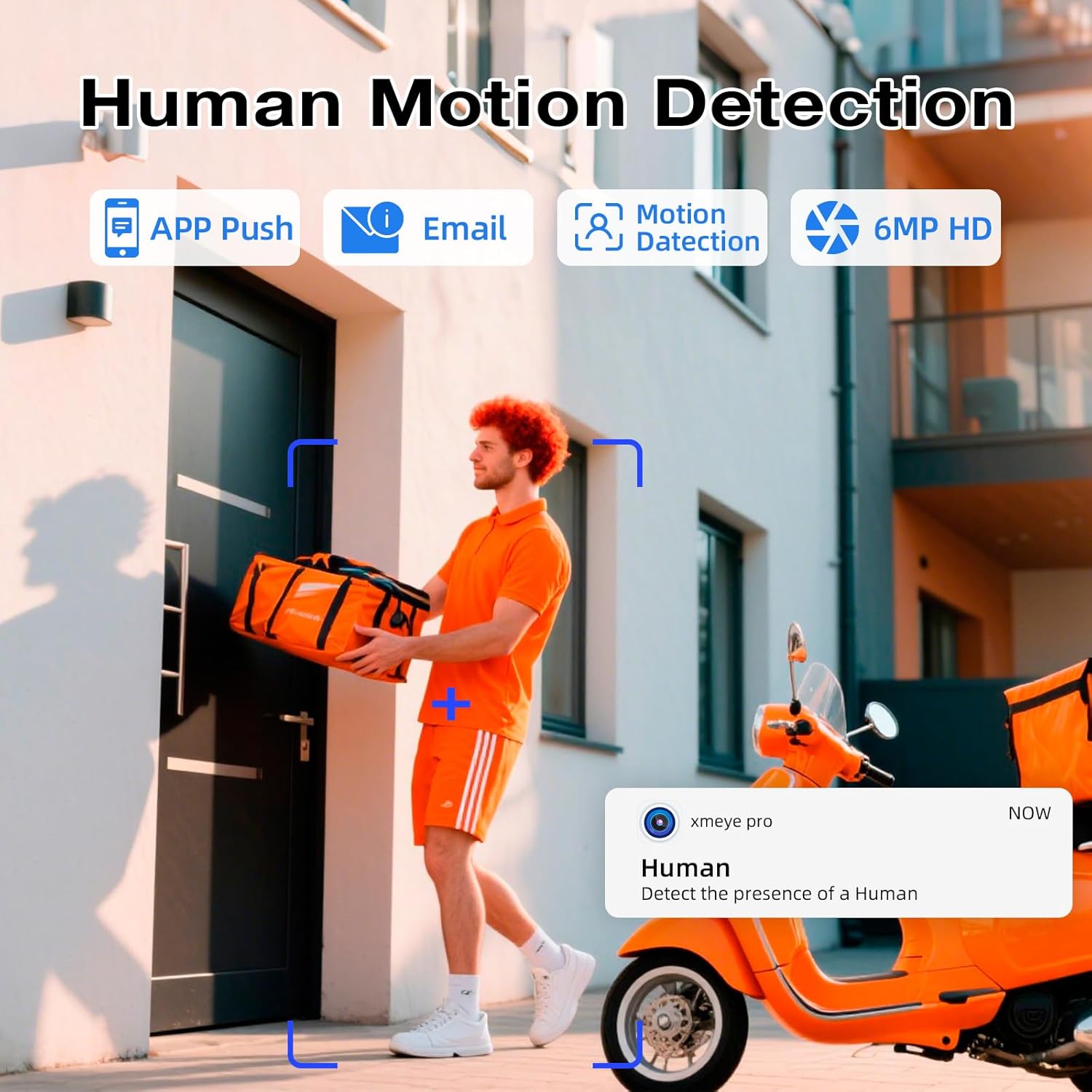
Figure 5.1: Smart Person Detection in Action
5.3 Fuaim Dhá Bhealach
The built-in microphone and speaker in the cameras allow for two-way audio communication. You can listen to audio from the camera's location and speak through your mobile app or NVR to communicate with individuals near the camera.

Fíor 5.2: Cumarsáid Fuaime Dhá Bhealach
5.4 Fís Oíche
The cameras offer both infrared (IR) night vision for clear black and white images in low light, and full-color night vision when ambient light is available or the camera's light alarm is activated. This ensures comprehensive surveillance around the clock.

Figure 5.3: Infrared vs. Full-Color Night Vision
5.5 Dual Lens & Auto Lock Motion
The dual-lens design allows for broader coverage or specific area focus. Some camera models may feature auto-tracking and auto-lock motion, where the camera automatically follows detected movement within its field of view, ensuring critical events are captured.

Figure 5.4: Dual Lens and Auto Lock Motion
6. Cothabháil
6.1 24/7 Recording and Storage Management
The NVR records continuously to the pre-installed 500GB hard drive. For extended recording capacity, an additional hard drive up to 8TB can be connected via the eSATA port. Regularly check the NVR's storage status to ensure continuous recording.

Figure 6.1: 24/7 Recording and Storage Options

Figure 6.2: Maximize Storage Capacity up to 8TB
6.2 Glanadh
Periodically clean the camera lenses with a soft, dry cloth to ensure clear image quality. For outdoor cameras, remove any accumulated dirt or debris from the housing.
6.3 Nuashonrú Firmware
Seiceáil an monaróir website or your mobile app for available firmware updates. Keeping your system's firmware updated ensures optimal performance, security, and access to new features.
7. Fabhtcheartú
- Gan Taispeántas Físe:
- Check all cable connections (power, HDMI/VGA, network).
- Ensure the NVR and monitor are powered on.
- Verify that cameras are properly connected to PoE ports and their indicator lights are active. - Gan Rochtain Chianda:
- Confirm the NVR is connected to your router and has internet access.
- Check your router's internet connection.
- Ensure the 'xmeye pro' app is correctly configured with your device ID and network settings. - Brath Gluaiseachta Gan Obair / Aláraim Bhréagacha:
- Adjust the motion detection sensitivity settings in the NVR or app.
- Ensure the detection area is correctly configured, avoiding areas with constant movement (e.g., trees swaying).
- Verify that smart person detection is enabled if you wish to filter out non-human movements. - Drochchaighdeán Íomhá:
- Clean the camera lens.
- Check for obstructions in the camera's field of view.
- Ensure the camera is securely mounted and not vibrating. - Gan Fuaim / Droch-Cháilíocht Fuaime:
- Check audio settings on the NVR and in the app.
- Ensure the camera's microphone is not obstructed.
8. Sonraíochtaí
| Gné | Sonraigh |
|---|---|
| Branda | Breoslaí |
| Uimhir Mhúnla | N6708-3 |
| Cainéil NVR | 8-Cainéal |
| Taifeach Ceamara | 6MP |
| Cineál ceamara | Wired PoE Dual-Lens |
| NVR Storage Capacity | 500GB HDD (pre-installed), expandable up to 8TB via eSATA |
| Teicneolaíocht Nascachta | Sreangaithe (PoE) |
| Gnéithe Speisialta | Smart Person Detection, Two-Way Audio, Color/IR Night Vision, IP66 Weatherproof |
| Toisí Táirge (NVR) | 10.08 x 9.45 x 1.73 orlach (256 x 240 x 44 mm) |
| Meáchan Mír | 8.64 punt |
9. Barántas agus Tacaíocht
For warranty information and technical support, please refer to the documentation provided with your purchase or contact Fuers customer service directly. You can often find support contact details on the manufacturer's official websuíomh.