
1. Táirge Tharview
The Attoe AK680 is a wired mechanical gaming keyboard designed for performance and customization. It features a compact 60% layout, RGB backlighting, hot-swappable switches, and durable double-shot PBT keycaps. This manual provides essential information for setting up, operating, and maintaining your keyboard.

Figure 1: Attoe AK680 Mechanical Gaming Keyboard.
2. Ábhar Pacáiste
Deimhnigh go bhfuil na míreanna uile i láthair sa phacáiste:
- Attoe AK680 Mechanical Gaming Keyboard
- Cábla USB-C
- Puller Keycap
- Switch Puller (often integrated with keycap puller or separate)
- Lámhleabhar Úsáideora (an doiciméad seo)
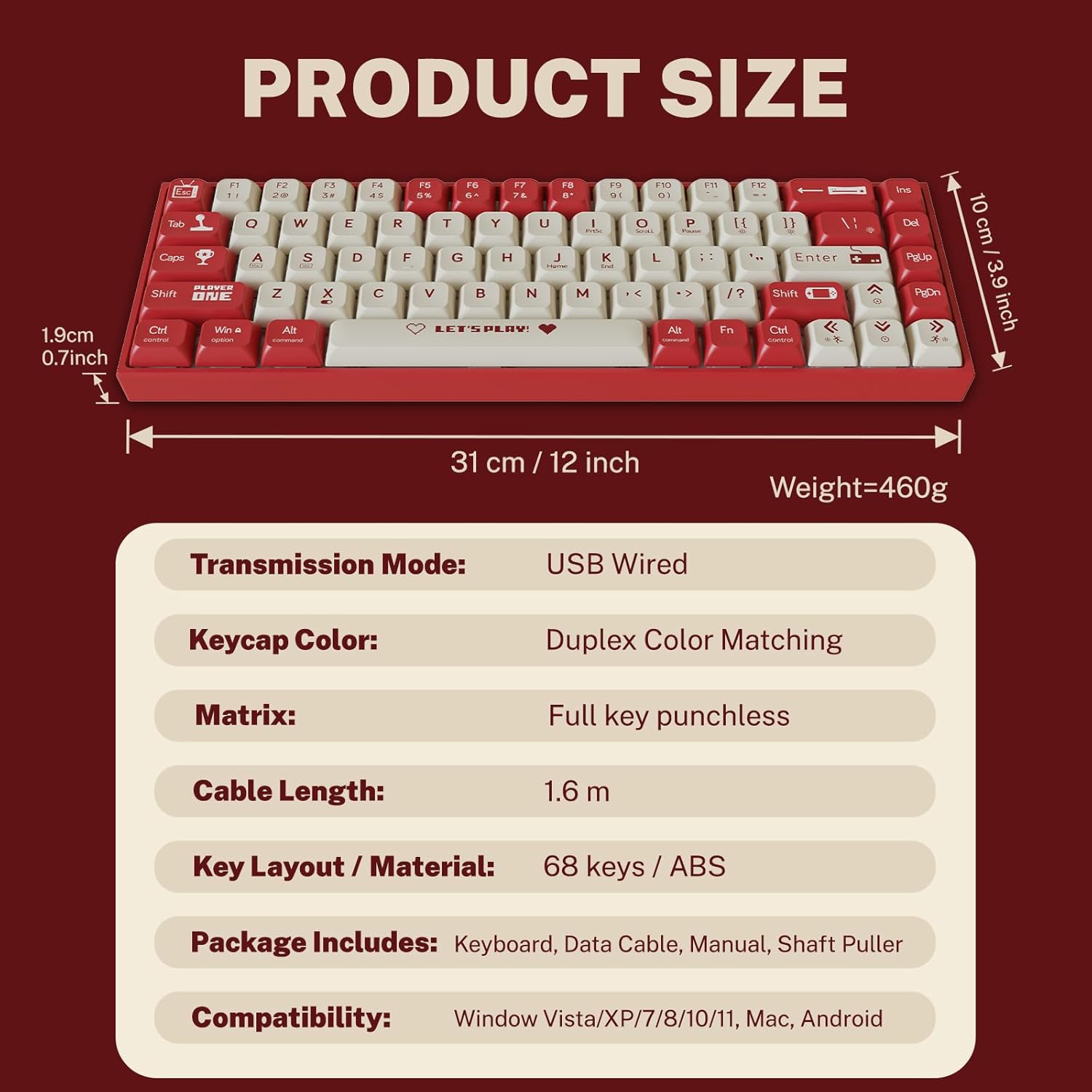
Figure 2: Package contents and product dimensions.
3. Treoracha Socraithe
3.1 An Méarchlár a Cheangal
- Aimsigh an port USB-C ar chúl nó ar thaobh an mhéarchláir.
- Ceangail ceann amháin den chábla USB-C a chuirtear ar fáil le port USB-C an mhéarchláir.
- Connect the other end of the USB-A connector to an available USB port on your computer.
- Aithneoidh do chóras oibriúcháin an méarchlár go huathoibríoch. De ghnáth ní bhíonn aon tiománaithe breise ag teastáil le haghaidh feidhmiúlacht bhunúsach.
3.2 Comhoiriúnacht an Chórais
The Attoe AK680 keyboard is compatible with the following operating systems:
- Windows Vista / XP / 7 / 8 / 10 / 11
- macOS
- Android

Figure 3: Multi-system compatibility of the keyboard.
4. Treoracha Oibriúcháin
4.1 Feidhmeanna Bunúsacha an Mhéarchláir
The AK680 features a 68-key layout, providing essential keys while maintaining a compact form factor. All keys support anti-ghosting, ensuring accurate input even during rapid key presses.

Figure 4: The 68-key layout for efficient use.
4.2 Soilsiú RGB
The keyboard features 16.8 million color RGB backlighting with various effects. Specific key combinations (often involving the Fn key) are used to cycle through lighting modes, adjust brightness, and change colors. Refer to the quick start guide or product page for detailed key combinations for lighting control.

Figure 5: RGB Backlighting in operation.
4.3 Lasca In-Mhalartaithe Te
The AK680 supports hot-swappable 3-pin and 5-pin mechanical switches. This allows you to easily change switches without soldering, customizing the typing feel to your preference. Use the included switch puller for safe removal and installation.
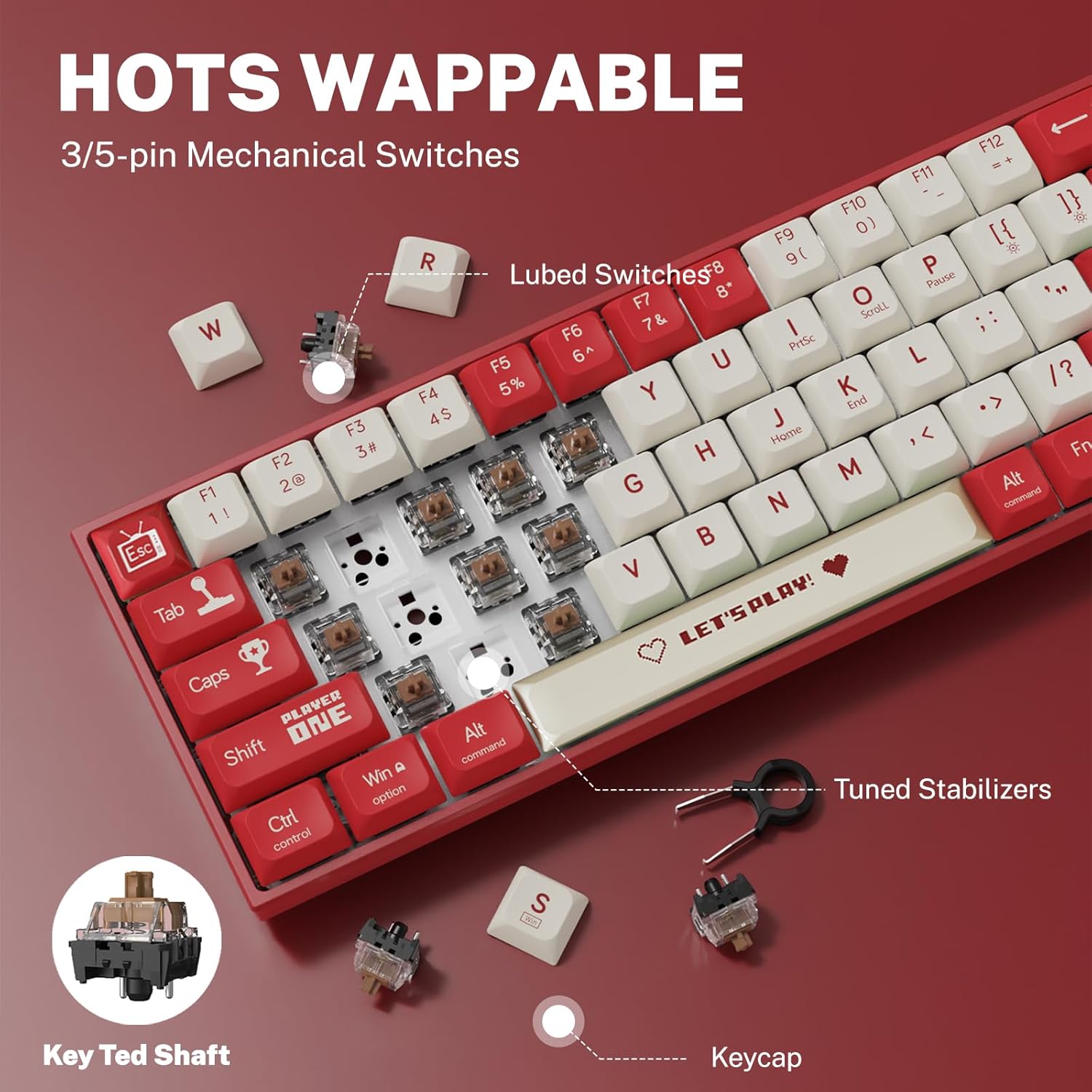
Figure 6: Hot-swappable switch mechanism.
5. Cothabháil
5.1 Glanadh an Mhéarchláir
- Glanadh Ginearálta: Bain úsáid as éadach bog, tirim chun dromchla an mhéarchláir a ghlanadh. I gcás salachar righin, déan beagán díghalrúcháin.ampEurLex-2 ga an éadach le huisce nó le glantóir éadrom neamh-scríobach.
- Between Keycaps: Bain úsáid as aer comhbhrúite chun deannach agus smionagar a bhaint idir na caipíní eochracha.
- Glanadh Eochracha: For thorough cleaning, remove keycaps using the provided keycap puller. Wash keycaps with mild soap and water, rinse thoroughly, and ensure they are completely dry before reattaching.
5.2 Caidhpeanna Eochracha agus Lasca a Athsholáthar
The AK680's hot-swappable design allows for easy replacement of keycaps and switches.
- Ag Baint Eochracha: Use the keycap puller to gently grip and lift keycaps straight up.
- Lasca á mbaint: After removing the keycap, use the switch puller to carefully grip the top and bottom clips of the switch and pull it straight out.
- Suiteáil Lasca: Align the new switch's pins with the holes on the PCB. Press down firmly until the switch clicks into place. Ensure pins are not bent.
- Ag Suiteáil Eochracha: Align the keycap with the switch stem and press down gently until it is seated securely.

Figure 7: Components of a mechanical switch and tools for maintenance.
6. Fabhtcheartú
- Níl an méarchlár ag freagairt:
- Cinntigh go bhfuil an cábla USB-C ceangailte go daingean leis an méarchlár agus leis an ríomhaire araon.
- Bain triail as an méarchlár a nascadh le port USB difriúil ar do ríomhaire.
- Déan tástáil ar an méarchlár ar ríomhaire eile chun fadhbanna sonracha don chóras a chur as an áireamh.
- Eochracha nach bhfuil ag Clárú:
- Remove the keycap and switch for the affected key. Reinstall the switch, ensuring it is properly seated and its pins are not bent.
- Clean any debris that might be obstructing the switch mechanism.
- Níl Soilsiú Cúltaca RGB ag Obair:
- Check if the backlighting is turned off or set to minimum brightness using the keyboard's function keys.
- Cinntigh go bhfuil dóthain cumhachta á fháil ag an méarchlár ón gcalafort USB.
7. Sonraíochtaí
| Gné | Sonraigh |
|---|---|
| Uimhir Mhúnla | AK680 |
| Branda | Attoe |
| Cineál Ceangail | Sreangaithe (USB-C) |
| Líon na nEochracha | 68 eochracha |
| Príomhtheicneolaíocht | Mechanical Shaft (Red/Teal Shaft), Hot-Swappable (3-pin/5-pin) |
| Ábhar Keycap | PBT Dúbailte-Urchar |
| Cúlsoilsiú | RGB (16.8 milliún dathanna) |
| Frith-Ghosting | Full Keys Anti-Ghosting |
| Fad Cábla | 1.6 méadar |
| Toisí Táirge | 12 x 3.9 x 0.7 orlach (31 x 10 x 1.9 cm) |
| Meáchan Mír | 1.01 punt (460g) |
| Comhoiriúnacht | Windows Vista/XP/7/8/10/11, macOS, Android |
| Feidhm Uiscedhíonach | IPX4 rated protection (splash resistant) |
8. Barántas agus Tacaíocht
Attoe provides a Barántas 12 mhí for the AK680 Mechanical Gaming Keyboard from the date of purchase.
If you encounter any problems or have questions regarding your product, please contact Attoe customer service. We are committed to providing the best service and will respond within 24 hours to assist you.
For support, please refer to the contact information provided with your purchase or visit the official Attoe websuíomh.