
1. Réamhrá
This manual provides essential information for setting up, operating, and maintaining your TCL 32V5C Smart QLED Full HD Android TV. Please read this manual thoroughly before using your television to ensure proper functionality and safety.
The TCL 32V5C series combines a sleek design with QLED and HDR image quality, powered by the advanced Android TV system. It offers a smart visual experience, allowing you to enjoy movies, streaming applications, and multiplayer games with ease.
2. Eolas Tábhachtach Sábháilteachta
Lean réamhchúraimí sábháilteachta bunúsacha i gcónaí agus an teilifís seo á úsáid agat chun an baol tine, turraing leictrigh agus díobhála a laghdú.
- Ná nochtaigh an teilifís don bháisteach nó don taise.
- Ná hoscail an comh-aireachta; cuir gach seirbhísiú faoi bhráid phearsanra cáilithe.
- Cinntigh aeráil cheart timpeall na teilifíse.
- Use only the power cord supplied by the manufacturer.
- Coinnigh an teilifís ar shiúl ó sholas díreach na gréine agus ó fhoinsí teasa.
- Clean the TV with a soft, dry cloth only.
3. Cad atá sa Bhosca
Deimhnigh go bhfuil na comhpháirteanna uile i láthair sula dtéann tú ar aghaidh leis an socrú:
- TCL 32V5C Smart QLED TV
- Cianrialú
- Cábla Cumhachta
- Lámhleabhar Úsáideora (an doiciméad seo)
- TV Stand and Support Screws
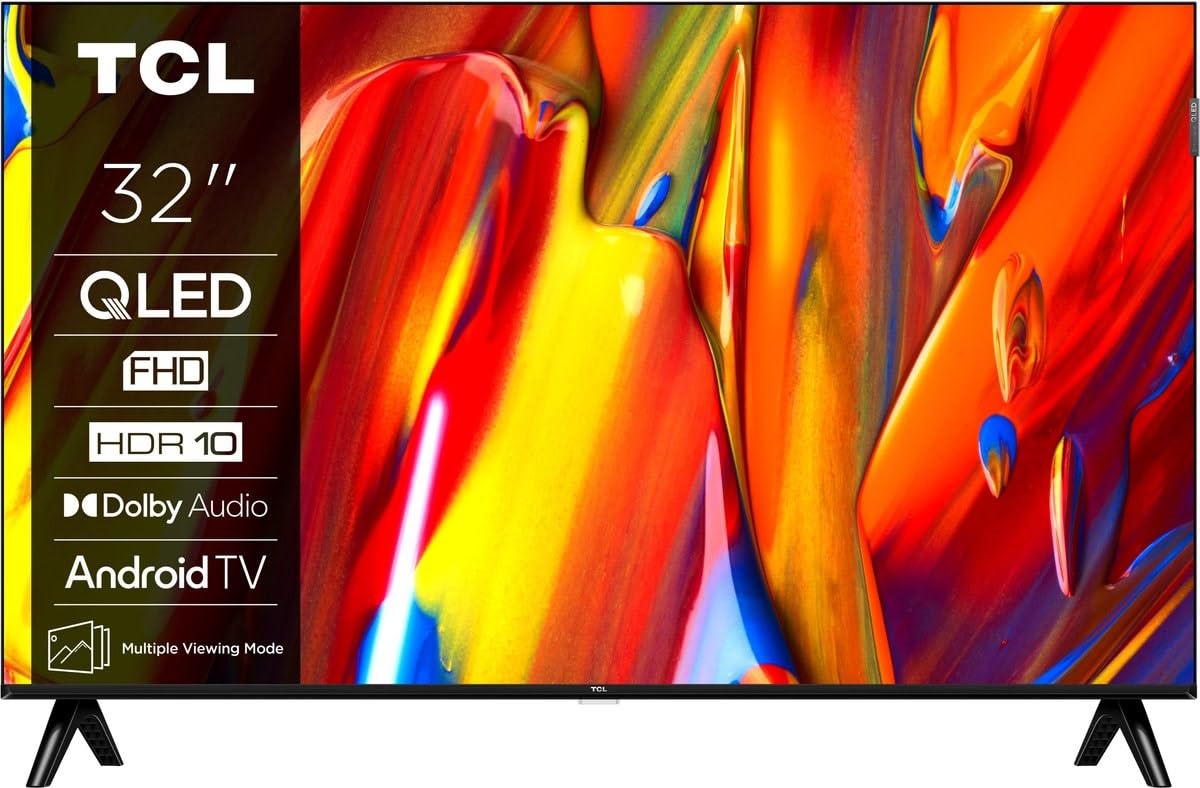
Íomhá: Tosaigh view of the TCL 32V5C Smart QLED Full HD Android TV, showcasing its slim design and display features.
4. Treoir Socraithe
4.1 An Seastán Teilifíse a Cheangail
Chun an seastán atá san áireamh a cheangal:
- Cuir an teilifís aghaidh síos ar dhromchla bog, cothrom chun damáiste don scáileán a chosc.
- Ailínigh comhpháirteanna an tseastáin leis na poill gléasta ag bun an teilifíse.
- Daingnigh an seastán ag baint úsáide as na scriúnna atá ar fáil. Cinntigh go bhfuil na scriúnna go léir teannta go daingean.

Image: Diagram showing the dimensions of the TCL 32V5C TV and the included remote control (RC733A).
4.2 Gléasadh Balla (Roghnach)
If you choose to wall mount your TV, ensure you use a VESA-compatible wall mount (100 x 100 mm). Consult a professional for installation to prevent damage or injury.
4.3 Cumhacht a nascadh
Connect the power cable to the TV's power input and then plug it into a wall outlet. The TV is designed for 220-240V AC, 50/60Hz power supply.
4.4 Gléasanna Seachtracha a Cheangal
Your TCL 32V5C TV offers various connectivity options:
- HDMI: Connect Blu-ray players, game consoles, or set-top boxes using one of the two HDMI ports.
- USB: Use the single USB port for media playback from USB drives.
- Ethernet: Chun nasc idirlín sreangaithe cobhsaí a bheith agat, ceangail cábla Eitirnéad leis an gcalafort LAN.
- Wi-Fi: Ceangail le do líonra gan sreang baile le haghaidh rochtain idirlín.
- Bluetooth: Pair wireless headphones, soundbars, or other Bluetooth-enabled devices.
5. Do Theilifíseán a Oibriú
5.1 First-Time Setup and Android TV
Upon first power-on, the TV will guide you through the initial setup process. This includes selecting your language, connecting to Wi-Fi, and logging into your Google account to activate Android TV features.
Android TV provides access to over 400,000 movies and shows from various streaming services. Utilize Google Cast to transfer photos, videos, and music from your smart devices directly to your TV.
5.2 Feidhmeanna Cianrialtáin
Use the provided remote control to navigate menus, adjust volume, change channels, and access smart features. Refer to the remote control diagram for specific button functions.
5.3 Cáilíocht Pictiúr agus Fuaime
Your TV features QLED technology, which uses quantum dot materials to deliver exceptional colors and optical properties, enhancing brightness and fine details for a realistic viewing experience. Direct LED backlighting further improves image quality and energy efficiency.
With HDR10 support, the TV displays a wider range of colors and contrasts, bringing more depth to compatible content. Dolby Audio processing ensures clear and immersive sound quality through the integrated speakers.
6. Cothabháil
Chun fad saoil agus feidhmíocht is fearr is féidir do theilifíse a chinntiú:
- Glanadh an Scáileáin: Cuimil an scáileán go réidh le héadach bog, saor ó lint. I gcás marcanna righne, glan go héadrom é.ampNigh an t-éadach le huisce nó le glantóir scáileáin speisialaithe (ná spraeáil go díreach ar an scáileán).
- Glanadh na Comh-Aireachta: Bain úsáid as éadach bog, tirim chun caibinéad an teilifíse a ghlanadh. Seachain glantóirí scríobacha nó tuaslagóirí.
- Aeráil: Cinntigh nach bhfuil na hoscailtí aerála ar chúl an teilifíse blocáilte.
- Corda Cumhachta: Seiceáil an corda cumhachta go rialta le haghaidh aon damáiste.
7. Fabhtcheartú
Má bhíonn fadhbanna agat le do theilifís, féach ar na réitigh choitianta seo a leanas:
| Fadhb | Réiteach Féideartha |
|---|---|
| Gan Cumhacht | Seiceáil an bhfuil an cábla cumhachta ceangailte go daingean leis an teilifís agus leis an asraon balla araon. Cinntigh go bhfuil an t-asraon ag feidhmiú go maith. |
| Gan Pictiúr, Ach Tá Fuaim i Láthair | Verify the correct input source is selected. Check external device connections (HDMI, etc.). |
| Gan Fuaim, Ach Tá Pictiúr i Láthair | Check the volume level and mute settings. Ensure external audio devices are properly connected and selected. |
| Cianrialtán Gan Obair | Cuir na cadhnraí ina n-áit. Cinntigh nach bhfuil aon bhacainní idir an cianrialtán agus braiteoir infridhearg an teilifíseáin. |
| Saincheisteanna Ceangal Wi-Fi | Restart your router and modem. Reconnect the TV to the Wi-Fi network in the settings menu. |
For further assistance, please contact TCL customer support.
8. Sonraíochtaí
| Gné | Sonraigh |
|---|---|
| Branda | TCL |
| Uimhir Mhúnla | 32V5C |
| Méid an Scáileáin | 32 Orlach |
| Teicneolaíocht Taispeána | QLED |
| Rún | 1080p (Lán-HD) |
| Ráta Athnuachana | 60 Hz |
| Gnéithe Speisialta | QLED & Android TV, HDR10, Google Cast |
| Teicneolaíocht Nascachta | Bluetooth, Eitirnéad, HDMI, USB, Wi-Fi |
| Poirt HDMI | 2 |
| Calafoirt USB | 1 |
| Cóimheas Gné | 16:9 |
| Toisí Táirge (D x W x H) | 18P x 71.5l x 46.5H cm (with stand) |
| Item Weight (without stand) | 3.1 cileagram |
| Caighdeán Gléasta VESA | 100 x 100 mm |
| Formáid Fuaime | Fuaime Dolby |
| Cineál Tuner | DVB-T2 |
| Dath | Dubh |
9. Barántas agus Tacaíocht
9.1 Faisnéis Bharántas
This product comes with a Limited Warranty. Please refer to the warranty card included in the packaging or visit the official TCL websuíomh gréasáin le haghaidh téarmaí agus coinníollacha mionsonraithe maidir le do réigiún ar leith.
9.2 Tacaíocht do Chustaiméirí
For technical assistance, troubleshooting not covered in this manual, or service inquiries, please contact TCL customer support through their official websuíomh nó an fhaisnéis teagmhála a chuirtear ar fáil i do dhoiciméid bharántais.
You can often find additional resources, FAQs, and software updates on the Oifigiúil TCL Websuíomh.