
Réamhrá
Thank you for choosing the zelotes T80 Ergonomic Gaming Mouse. This wired optical mouse is designed for both gaming and office use, offering adjustable DPI, customizable LED lighting, and a comfortable ergonomic design for extended use. Please read this manual carefully to ensure proper setup and operation of your new mouse.
Gnéithe Táirge
- 7 Buttons & Quick Fire Button: Includes forward, backward, and a rapid fire (double click) button for enhanced control in gaming and productivity.
- 5 Leibhéal DPI Inchoigeartaithe: Easily switch between 1000/1600/2400/3200/7200 DPI to match your speed and precision needs.
- 7 LED Backlit Modes: Personalize your setup with various lighting effects.
- Dearadh eirgeanamaíochta: Crafted for comfort with skin-friendly material, sweat-resistant, and anti-slip features to prevent fatigue during long sessions.
- Comhoiriúnacht Leathan: Compatible with Windows 11/10/8/7 and Mac OS, suitable for various applications including MMD, FPS games, and office tasks.
Ábhar an Phacáiste
- 1 x zelotes T80 Wired Gaming Mouse
- 1 x Lámhleabhar Treorach
Socrú
- Díphacáil: Carefully remove the mouse and its accessories from the packaging.
- Bain Scannán Cosanta: Before use, please remove the protective film from the mouse's foot pads.
- Ceangail: Plug the USB cable of the zelotes T80 Gaming Mouse into an available USB port on your computer (PC or Laptop).
- Suiteáil Tiománaí: The mouse is plug-and-play. Your operating system will automatically detect and install the necessary drivers. No additional software installation is typically required for basic functionality.
Treoracha Oibriúcháin
Mínithe Cnaipe
The zelotes T80 mouse features 7 buttons for versatile control:
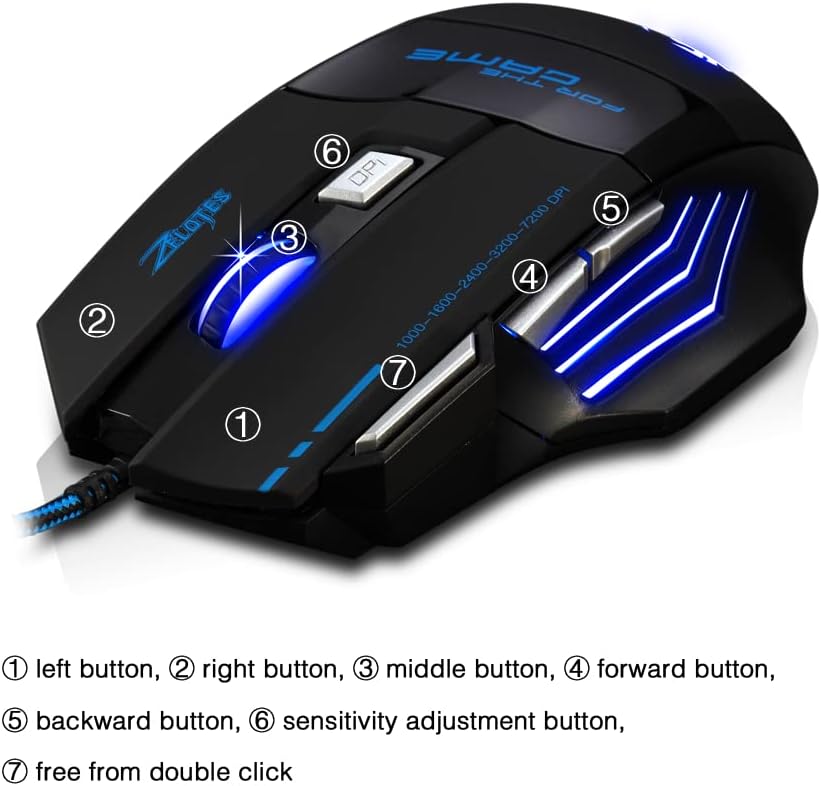
- Cnaipe Clé (1): Feidhm chaighdeánach cliceáil ar chlé.
- Cnaipe Deas (2): Feidhm chaighdeánach cliceáil ar dheis.
- Middle Button / Scroll Wheel (3): Scrolls up/down. Pressing it acts as a middle-click.
- Forward Button (4): Nascleanúint ar aghaidh i web brabhsálaithe nó file taiscéalaithe.
- Backward Button (5): Nascleanúint siar isteach web brabhsálaithe nó file taiscéalaithe.
- Cnaipe PSO (6): Adjusts mouse sensitivity (DPI) and changes LED colors.
- Rapid Fire Button (7): Functions as a double-click of the left button, useful for continuous firing in games.
Coigeartú DPI
The mouse offers 5 adjustable DPI levels to suit different tasks and preferences:
- 1000 pso
- 1600 pso
- 2400 pso
- 3200 pso
- 7200 pso
Brúigh an Cnaipe PSO (6) to cycle through these sensitivity levels. Each change will be indicated by a corresponding LED color change.
Rialú Soilsiú faoi stiúir
The mouse features 7 LED lighting modes. To change the LED color, long press the DPI button (6). The LED will flash rapidly 7 times and then remain constant on the selected color.

Cothabháil
- Glanadh: Bain úsáid as éadach bog, tirim chun dromchla na luiche a ghlanadh. Chun salachar righin a fháil, bain úsáid as éadach atá beagán tirim.amp Is féidir éadach a úsáid, ag cinntiú nach dtéann aon leacht isteach sa luch.
- Cúram Cábla: Seachain lúbadh géar nó tarraingt iomarcach ar an gcábla USB chun damáiste a chosc.
- Stóráil: Store the mouse in a dry, cool place away from direct sunlight and extreme temperatures.
Fabhtcheartú
Luch Gan Freagairt
- Cinntigh go bhfuil an cábla USB plugáilte go daingean i gcalafort USB atá ag obair.
- Try plugging the mouse into a different USB port on your computer.
- Déan tástáil ar an luch ar ríomhaire eile chun a fháil amach an leis an luch nó leis an ríomhaire atá an fhadhb.
LED Lights Not Working/Changing
- Verify the mouse is properly connected to the computer.
- Ensure you are long-pressing the DPI button to cycle through colors. A short press changes DPI.
DPI Gan Athrú
- Ensure you are short-pressing the DPI button to cycle through DPI levels.
- If the issue persists, try reconnecting the mouse.
Sonraíochtaí
| Gné | Sonraigh |
|---|---|
| Uimhir Mhúnla | T80 |
| Cnaipí | 7 (with scroll wheel) |
| DPI inchoigeartaithe | 1000/1600/2400/3200/7200 DPI |
| Soilsiú LED | 7 modhanna soilsithe |
| Nascacht | USB Wired |
| Córas Rianaithe | Optúil |
| Dearadh eirgeanamaíochta | Tá |
| Athraigh Saol | 5 milliún timthriall |
| Toisí | 130×105x45mm |
| Meáchan | 160±5g |
| Fad Cábla USB | 1.5m |
| Comhoiriúnacht | Win11, Win10, Win8, Win7, Mac OS |
Barántas agus Tacaíocht
For warranty information and technical support, please refer to the product packaging or contact zelotes customer service through the retailer where the product was purchased. Keep your purchase receipt for warranty claims.