
1. Táirge Tharview
The zelotes C-12 Professional Wired Gaming Mouse is designed for high-performance gaming and office use. It features an ergonomic design, 12 programmable buttons, adjustable DPI settings, multi-modes RGB backlighting, and a customizable weight system.

Image 1.1: The zelotes C-12 Professional Wired Gaming Mouse, showcasing its ergonomic shape and customizable RGB lighting.
Ábhar an Phacáiste:
- 1 x zelotes C-12 Gaming Mouse
- 1 x Lámhleabhar Treorach
- 1 x CD Bogearraí
- 1 x Foot Pad Set
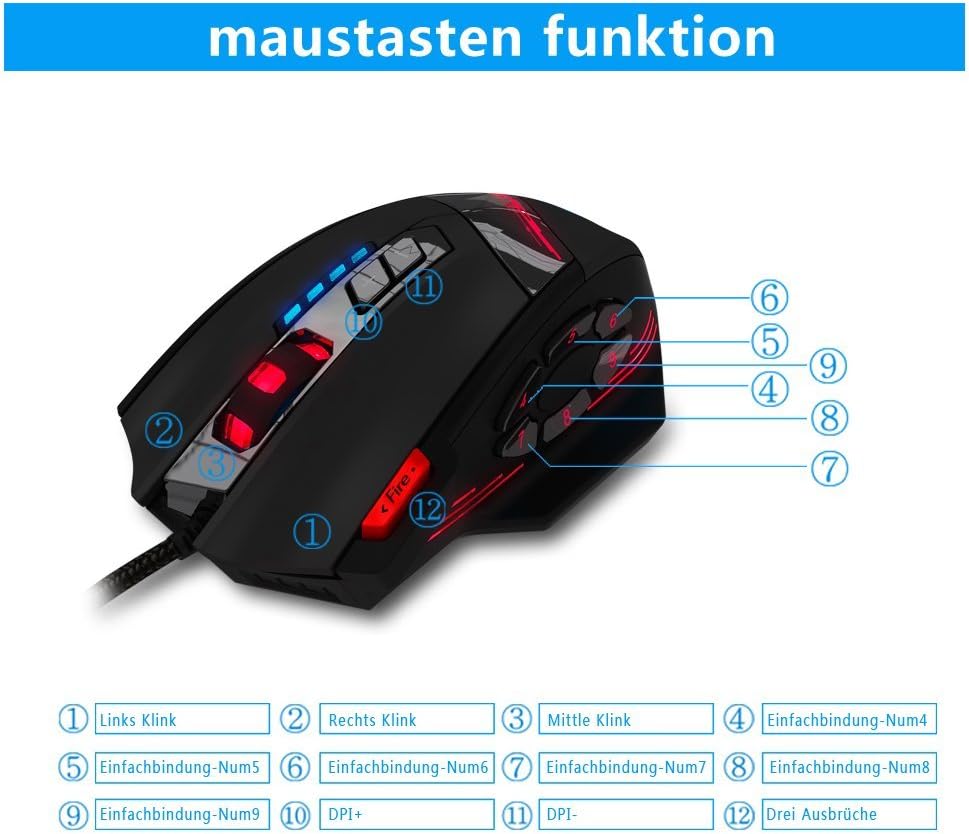
Image 1.2: The complete package contents of the zelotes C-12 Gaming Mouse.
2. Socrú
2.1 An Luch a Cheangal
Connect the USB cable of the zelotes C-12 Gaming Mouse to an available USB port on your computer. The mouse is plug-and-play for basic functionality.
2.2 Suiteáil Bogearraí (Roghnach)
For full customization of buttons, DPI, and lighting, install the provided software from the included CD. Insert the CD into your computer's optical drive and follow the on-screen instructions. If your computer does not have an optical drive, please visit the official zelotes website to download the latest software driver.
Note: The programming software is not fully compatible with Mac operating systems.
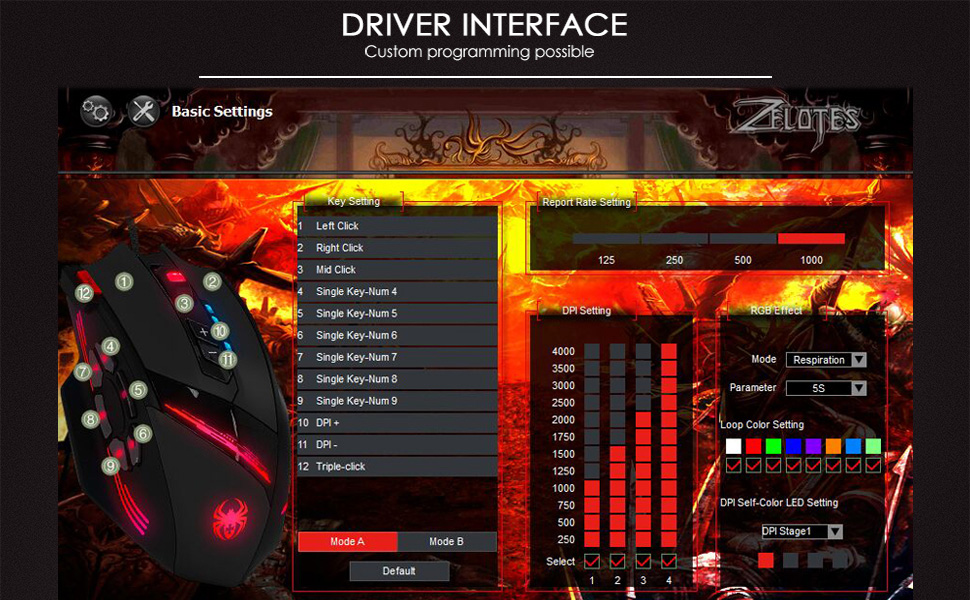
Image 2.1: The software interface for customizing the zelotes C-12 Gaming Mouse.
2.3 Weight Tuning
The mouse includes 8 removable weight blocks, each weighing 2.5 grams, located in a compartment on the underside of the mouse. To adjust the mouse's weight:
- Gently twist and remove the circular cover on the bottom of the mouse.
- Add or remove the 2.5g weight blocks as desired to achieve your preferred mouse feel.
- Replace the circular cover by twisting it back into place.
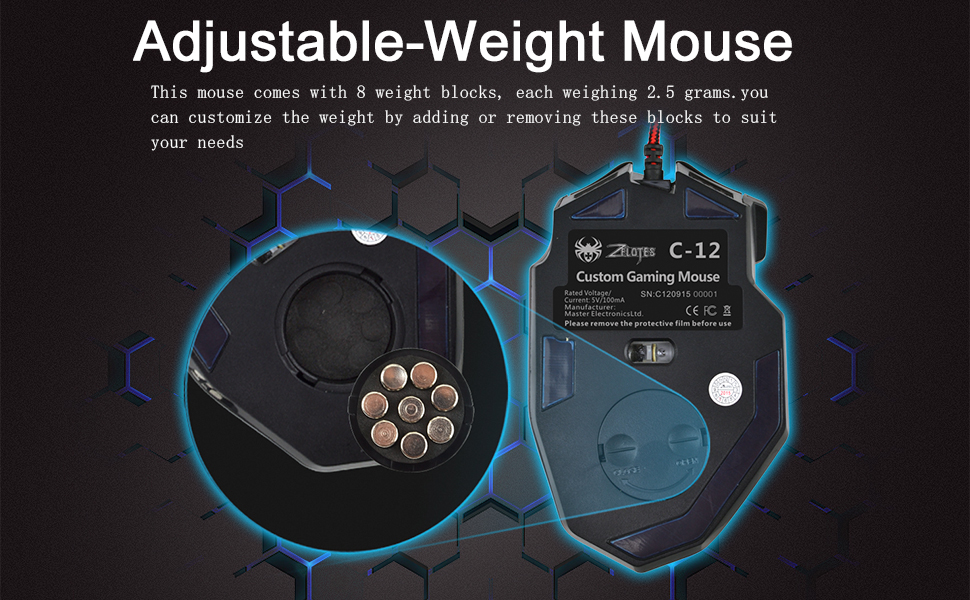
Image 2.2: Adjusting the weight of the zelotes C-12 mouse by adding or removing the 2.5g blocks.
Video 2.1: A demonstration of the weight tuning feature and programmable buttons on the zelotes C-12 Gaming Mouse.
3. Treoracha Oibriúcháin
3.1 Feidhmeanna Cnaipe
The zelotes C-12 mouse features 12 programmable buttons. The default functions are:
- Cliceáil ar Chlé (Cnaipe 1)
- Cliceáil ar dheis (Cnaipe 2)
- Cliceáil Meán / Roth Scrollaigh (Cnaipe 3)
- Cnaipí Taobh (Buttons 4-9): Default to various functions, customizable via software.
- DPI+ (Button 10): Increases DPI sensitivity.
- DPI- (Button 11): Decreases DPI sensitivity.
- Cnaipe Dóiteáin (Button 12): Default to triple-click, customizable via software.

Image 3.1: Labeled diagram of the zelotes C-12 mouse buttons.
3.2 Coigeartú PSO
The mouse offers 4 default DPI levels: 1000/1500/2000/4000 DPI. You can cycle through these levels using the dedicated DPI+ and DPI- buttons. For finer control and to reach up to 8000 DPI, use the included software.
Soilsiú 3.3 RGB
The mouse features multi-modes RGB backlighting, including 7-color cycle breathing and monochromatic constant bright modes. Lighting effects can be customized through the software to match your preferences.
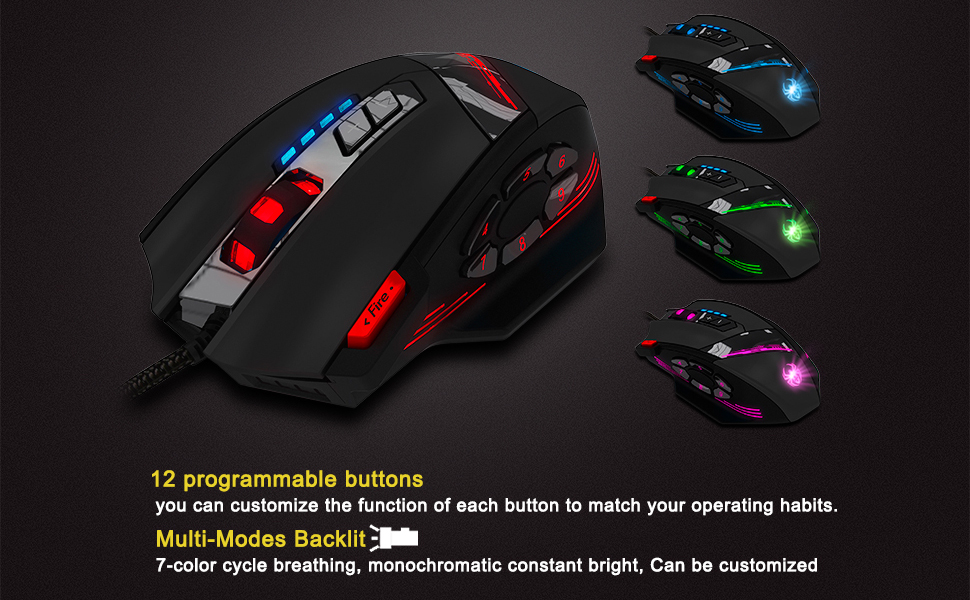
Image 3.2: The zelotes C-12 mouse showcasing its multi-color RGB lighting options.
3.4 Dearadh Eirgeanamaíochta
The mouse is designed for comfort during extended use, featuring a sweat-resistant and anti-slip rubber surface. Its ergonomic shape helps prevent wrist fatigue.

Image 3.3: The ergonomic design of the zelotes C-12 mouse provides a comfortable grip.
4. Cothabháil
To ensure the longevity and optimal performance of your zelotes C-12 Gaming Mouse, follow these maintenance guidelines:
- Glanadh: Bain úsáid as éadach bog, tirim chun dromchla na luiche a ghlanadh. I gcás salachar righin, déan beagán díghalrúcháin.ampNigh an t-éadach le huisce nó le tuaslagán glantacháin éadrom. Seachain ceimiceáin ghéara nó ábhair scríobacha.
- Cúram Braiteoir: Coinnigh an braiteoir optúil ar thaobh íochtair an luiche glan agus saor ó dheannach nó smionagar. Bain úsáid as swab cadáis nó aer comhbhrúite más gá.
- Bainistíocht Cábla: Seachain lúbadh géar nó tarraingt iomarcach ar an gcábla USB chun damáiste a chosc.
- Stóráil: Nuair nach bhfuil sé in úsáid, stóráil an luch i dtimpeallacht ghlan, thirim amach ó theocht mhór.
5. Fabhtcheartú
5.1 Luch Gan Fhreagracht
- Cinntigh go bhfuil an cábla USB ceangailte go daingean le do ríomhaire.
- Bain triail as an luch a cheangal le port USB difriúil.
- Test the mouse on another computer to rule out a computer-specific issue.
- Atosaigh do ríomhaire.
5.2 DPI or Button Settings Not Changing
- Ensure the zelotes C-12 software is correctly installed and running.
- Check if the settings are saved within the software after making changes.
- For Mac users, note that the programming software has limited compatibility. Basic DPI changes via mouse buttons should still function.
5.3 Soilsiú RGB Gan Obair nó Mícheart
- Verify lighting settings within the zelotes C-12 software.
- Ensure the mouse is properly connected and receiving power.
5.4 Mouse Movement Is Erratic
- Glan an braiteoir optúil ar bhun an luiche.
- Cinntigh go bhfuil tú ag úsáid an luch ar dhromchla oiriúnach (m.sh., ceap luiche). Seachain dromchlaí atá an-fhrithchaiteach nó trédhearcach.
6. Sonraíochtaí
| Gné | Cur síos |
|---|---|
| Branda | zelotes |
| Ainm an tSamhail | C-12 |
| Teicneolaíocht Nascachta | USB Wired |
| Teicneolaíocht Braite Gluaiseachta | Optical (A3050 Gaming Chip) |
| Socruithe DPI | 1000/1500/2000/4000 (Adjustable up to 8000 DPI via software) |
| Cainníocht Cnaipe | 12 Cnaipí Ríomhchláraithe |
| Tiúnadh Meáchan | 8 x 2.5g removable weights |
| Treoshuíomh Láimhe | Ar dheis |
| Comhoiriúnacht an Chórais Oibriúcháin | Win11, Win10, Win8, Win7, Mac OS (limited software compatibility for Mac) |
| Toisí (L x W x H) | 130mm x 81.5mm x 39.8mm |
| Ráta Vótaíochta | 125-1000Hz |
| Fad Cábla | 1.8m |
| Ábhar | Plaisteach (Bailchríoch Neamhlonrach) |

Image 6.1: Detailed technical specifications and dimensions of the zelotes C-12 Gaming Mouse.
7. Faisnéis Bharántas
The zelotes C-12 Professional Wired Gaming Mouse comes with a Barántas Monaróra 1 Bhliain from the date of purchase. This warranty covers defects in materials and workmanship under normal use. It does not cover damage caused by misuse, accident, unauthorized modification, or external causes.
Coinnigh do chruthúnas ceannaigh le haghaidh éilimh bharánta.
8. Tacaíocht
For further assistance, technical support, or warranty inquiries, please refer to the contact information provided with your product packaging or visit the official zelotes websuíomh.