
1. Réamhrá
This manual provides detailed instructions for the installation, operation, and maintenance of your Montech AX 120 ARGB Fans. These 120mm fans are designed to provide efficient cooling and customizable lighting for your computer system. Please read this manual thoroughly before installation to ensure proper function and safety.
2. Faisnéis Sábháilteachta
- Always disconnect power from your computer before installing or handling internal components.
- Handle fans by their frames, avoiding contact with the blades.
- Ensure proper grounding to prevent electrostatic discharge (ESD) damage.
- Coinnigh páirteanna beaga agus ábhair phacáistithe ar shiúl ó leanaí.
- Do not attempt to modify the fan or its cables. Unauthorized modifications may void your warranty and pose safety risks.
3. Ábhar Pacáiste
Deimhnigh go bhfuil na hearraí go léir i do phacáiste:
- Montech AX 120 ARGB Fan (x4)
- Scriúnna Gléasta (x16)
- Fan Hub (if included in your specific pack)

Figure 3.1: Montech AX 120 ARGB Fan (Pack of 4)
4. Socrú agus Suiteáil
Follow these steps to install your Montech AX 120 ARGB Fans:
- Ullmhaigh Do Chóras: Power off your computer and disconnect it from the power outlet. Open your computer case.
- Identify Fan Mounting Locations: Determine where you want to install the fans (e.g., front, top, rear, bottom of the case).
- Suiteáil na lucht leanúna: Position each fan in the desired location. The AX series fans are designed to blow air from the RGB-lit side towards the non-RGB side. Consider this for optimal airflow (e.g., intake or exhaust). Secure each fan using four mounting screws. The integrated anti-vibration pads help reduce noise from resonance.

Fíor 4.1: Tosaigh view of the Montech AX 120 ARGB Fan

Fíor 4.2: Ar ais view of the Montech AX 120 ARGB Fan, indicating airflow direction from front to back.
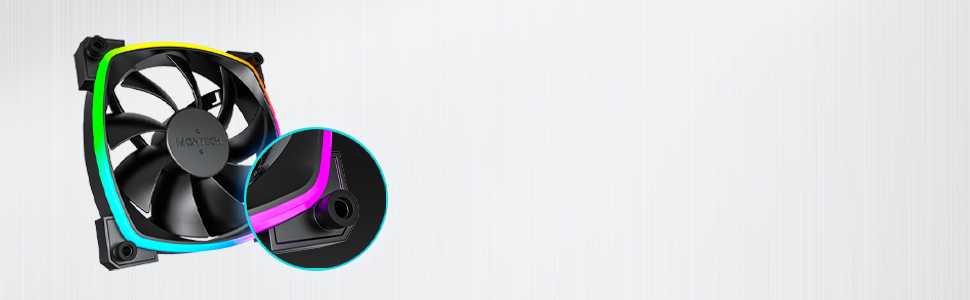
Figure 4.3: Integrated anti-vibration pads for reduced noise.
- Connect Power and ARGB Cables: Each fan has two cables: a 4-pin PWM cable for fan speed control and a 3-pin ARGB cable for lighting control.
- Connect the 4-pin PWM cable to an available 4-pin fan header on your motherboard or to a fan hub.
- Connect the 3-pin ARGB cable to an available 5V 3-pin ARGB header on your motherboard or to a compatible ARGB controller/hub. Nóta: Do not connect to a 12V RGB header, as this will damage the LEDs.
- Bainistíocht Cábla: Route cables neatly to avoid interference with other components and to improve airflow.
- Dún an Cás agus Cumraigh Air: Once all connections are secure, close your computer case, reconnect power, and power on your system.
5. Treoracha Oibriúcháin
The Montech AX 120 ARGB Fans offer both speed and lighting control:
5.1 Rialú Luas an Lucht leanúna (PWM)
The 4-pin PWM connection allows for precise fan speed control based on system temperature. The fan speed can be adjusted from 600 RPM to 1600 RPM.
- BIOS/UEFI: Access your motherboard's BIOS/UEFI settings to configure fan curves. This allows the fan speed to automatically adjust based on CPU or system temperatures.
- Bogearraí: Use your motherboard's fan control software (e.g., ASUS Fan Xpert, MSI Dragon Center, Gigabyte SIV) to create custom fan profiles within your operating system.

Figure 5.1: PWM fan speed adjustment from 600 RPM to 1600 RPM.
5.2 Rialú Soilsithe ARGB
The Addressable RGB (ARGB) lighting can be synchronized and customized through your motherboard's software or a dedicated ARGB controller.
- Bogearraí Máthairchláir: If connected to a 5V 3-pin ARGB header, use your motherboard's RGB software (e.g., ASUS Aura Sync, MSI Mystic Light Sync, Gigabyte RGB Fusion, ASRock Polychrome Sync) to control lighting effects, colors, and synchronization with other ARGB components.
- Rialaitheoir ARGB: If using a standalone ARGB controller, refer to the controller's manual for specific instructions on changing lighting modes.
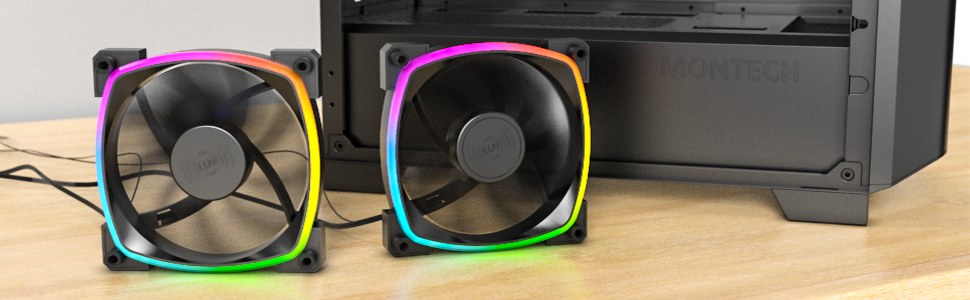
Figure 5.2: Customizable hexagonal ARGB lighting.
6. Cothabháil
Regular maintenance ensures optimal performance and longevity of your fans:
- Glanadh: Periodically clean dust from the fan blades and frame using compressed air or a soft brush. Ensure the computer is powered off and unplugged before cleaning.
- Cigireacht: Check cables for any signs of wear or damage. Ensure mounting screws are secure.
- Fad saoil imthacaí: The fans feature an HDB (Hydro Dynamic Bearing) designed for high-end durability and a lifespan of 40,000 hours. No user maintenance is required for the bearing.
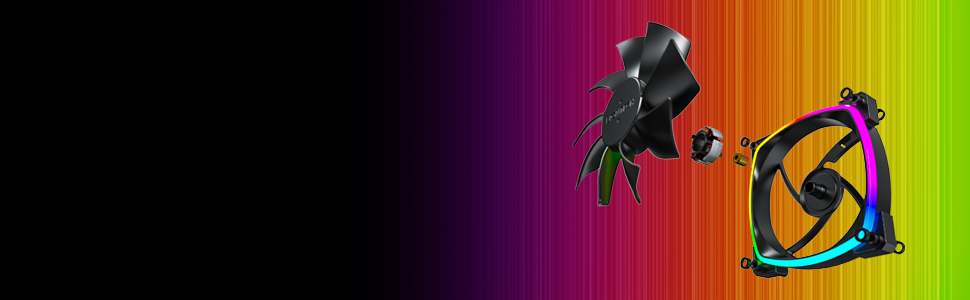
Figure 6.1: Hydro Dynamic Bearing (HDB) for extended lifespan.
7. Fabhtcheartú
Má bhíonn fadhbanna agat, féach ar an treoir fabhtcheartaithe seo a leanas:
| Fadhb | Cúis Féideartha | Réiteach |
|---|---|---|
| Fan gan sníomh | Loose 4-pin PWM cable connection Insufficient power from motherboard header Fan curve set too low in BIOS/software | Ensure 4-pin PWM cable is securely connected. Try connecting to a different fan header. Adjust fan curve settings in BIOS/software to ensure fans spin at low temperatures. |
| Níl soilsiú ARGB ag obair | Loose 3-pin ARGB cable connection Connected to incorrect 12V RGB header ARGB software not configured or running | Ensure 3-pin ARGB cable is securely connected to a 5V ARGB header. Verify connection is to a 5V 3-pin ARGB header, not a 12V 4-pin RGB header. Install and configure your motherboard's ARGB software or check your ARGB controller settings. |
| Torann iomarcach | Luas lucht leanúna ard Creathadh Bac | Adjust fan speed in BIOS/software to a lower RPM. Ensure all mounting screws are tight. The fans have anti-vibration pads to minimize this. Check for any cables or objects interfering with fan blades. |
8. Sonraíochtaí
Key technical specifications for the Montech AX 120 ARGB Fan:
- Múnla: AX120 PWM BLACK
- Toisí Fan: 120mm x 120mm x 25mm (4.72 x 4.72 x 0.98 orlach)
- Cineál imthacaí: Hydro Dynamic Bearing (HDB)
- Luas Rothlach: 600 - 1600 RPM (rialaithe ag PWM)
- Leibhéal Torainn: Under 27.9 dB(A)
- Ceanglóir Cumhachta: 4-PIN PWM
- Ceanglóir ARGB: ARGB 3-bioráin 5V
- Rátáilte Voltage: 12V DC (Fan), 5V DC (LED)
- Wattage: 2 vata
- Ábhar: Miotal, Plaisteach, Rubar
- Saolré: 40,000 uair
9. Barántas agus Tacaíocht
Montech products are manufactured to the highest quality standards. For warranty information, technical support, or customer service inquiries, please visit the official Montech websuíomh gréasáin nó déan teagmháil le do mhiondíoltóir áitiúil. Coinnigh do chruthúnas ceannaigh le haghaidh éilimh bharántais.