
1. Réamhrá
The Audizio Avola is a comprehensive audio system designed to provide a wide range of listening options. It integrates Internet Radio, DAB+, FM radio, a CD player, and Bluetooth connectivity into a single, elegant unit. This manual will guide you through the setup, operation, and maintenance of your Avola system, ensuring you can fully utilize its features for an optimal audio experience.
2. Treoracha Sábháilteachta
- Soláthar Cumhachta: Ná húsáid ach an t-oiriúntóir cumhachta a chuirtear ar fáil. Cinntigh go bhfuil an toirttage ag teacht le riachtanais do réigiúin.
- Uisce agus Taise: Do not expose the unit to rain, moisture, or liquids. Avoid placing objects filled with liquids, such as vases, on the unit.
- Aeráil: Cinntigh go bhfuil aeráil leordhóthanach timpeall an aonaid. Ná bac na hoscailtí aerála.
- Foinsí Teasa: Coinnigh an t-aonad ar shiúl ó fhoinsí teasa amhail radaitheoirí, cláir teasa, sorn, nó fearais eile a tháirgeann teas.
- Glanadh: Disconnect the unit from the power supply before cleaning. Use a soft, dry cloth. Do not use liquid cleaners or aerosol cleaners.
- Ag seirbhísiú: Ná déan iarracht an t-aonad a sheirbhísiú tú féin. Cuir gach seirbhísiú faoi bhráid phearsanra seirbhíse cáilithe.
- Seinnteoir CD: Do not insert foreign objects into the CD tray. Handle CDs by their edges to avoid scratches.
3. Ábhar Pacáiste
Deimhnigh go bhfuil na míreanna uile i láthair sa phacáistiú:
- 1x Audizio Avola Internet Radio
- 1x Cianrialú
- 1x Cuibheoir Cumhachta
- 1x User Manual (Quick Start Guide)

Image: Audizio Avola unit shown with its remote control and power adapter.
4. Táirge Tharview
4.1 Painéal Tosaigh

Íomhá: Tosaigh view of the Audizio Avola with the CD tray closed.
The front panel features the main display, control buttons, a CD tray, and input ports.
- Taispeáin: Color display for navigation and information.
- Cnaipí Rialaithe: MENU, INFO, REC/DEL, PRESET/REPEAT, STANDBY, I/R, Play/Pause, Stop, Skip/Fast Forward/Rewind.
- Tráidire CD: Chun dlúthdhioscaí fuaime a chur isteach.
- TUNE/SELECT Knob: Rotate to navigate menus, press to select.
- Knob VOLUME: Coigeartaíonn sé an leibhéal aschuir fuaime.
- USB Port: Chun gléasanna stórála USB a nascadh.
- Sliotán Cárta SD: Chun cártaí cuimhne SD a chur isteach.
- Ionchur AUX: Seac 3.5mm le haghaidh foinsí fuaime seachtracha.
- Jack Cluasán: Seac 3.5mm le haghaidh éisteachta príobháideach.

Image: Close-up of the Audizio Avola front panel showing USB, SD, AUX, and headphone ports.
4.2 Painéal Cúil
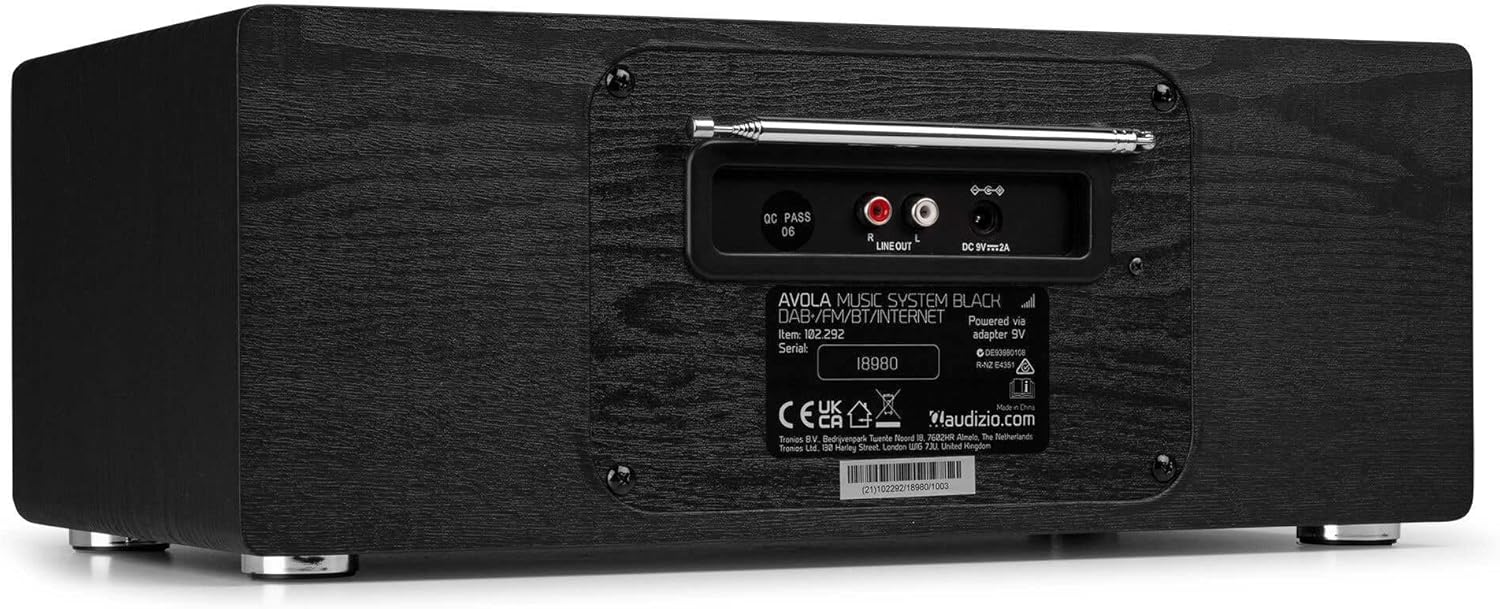
Íomhá: Cúl view of the Audizio Avola, highlighting the antenna and connection ports.
The rear panel houses essential connections:
- Antenna teileascópacha: For DAB+ and FM radio reception. Extend fully for best signal.
- LINE OUT (RCA): Chun ceangal le seachtrach ampardaitheoirí nó cainteoirí.
- DC 9V 2A Power Input: Chun an adapter cumhachta a nascadh.
5. Socrú
5.1 Ceangal Cumhachta
- Connect the power adapter to the DC 9V 2A input on the rear of the Avola unit.
- Breiseán an t-oiriúntóir cumhachta isteach i soicéad balla oiriúnach.
- The unit will enter standby mode. Press the STANDBY button on the unit or remote control to power on.
5.2 Socrú Antenna
For optimal DAB+ and FM radio reception, fully extend the telescopic antenna located on the rear panel. Adjust its position for the best signal quality.
5.3 Initial Setup (WLAN Connection)
To access Internet Radio features, the Avola must be connected to a Wi-Fi network.
- Upon first power-on, the unit may prompt you to set up the network connection. If not, press MENU, navigate to 'System Settings' and then 'Network'.
- Select 'Wi-Fi Network' and choose 'Scan' to find available networks.
- Roghnaigh do líonra Wi-Fi ón liosta.
- Enter your Wi-Fi password using the TUNE/SELECT knob to navigate characters and press to confirm each character.
- Once connected, the display will show a Wi-Fi icon.
6. Modhanna Oibriúcháin
6.1 Raidió Idirlín
Access thousands of radio stations worldwide via your Wi-Fi connection.
- Press the MENU button and select 'Internet Radio'.
- You can browse stations by location, genre, or search for specific stations.
- Use the TUNE/SELECT knob to navigate and select.
- To save a station as a preset, press and hold the PRESET/REPEAT button until the preset menu appears, then select a preset number.

Image: The Audizio Avola display showing the Internet Radio interface.
Raidió 6.2 DAB+
Digital Audio Broadcasting Plus offers high-quality digital radio.
- Press the MENU button and select 'DAB Radio'.
- The unit will automatically scan for available DAB+ stations.
- Use the TUNE/SELECT knob to browse and select stations.
- Save presets as described for Internet Radio.
6.3 FM Raidió
Listen to traditional analog FM radio broadcasts.
- Press the MENU button and select 'FM Radio'.
- Use the TUNE/SELECT knob to manually tune or press and hold to auto-scan for stations.
- Save presets as described for Internet Radio.
6.4 Seinnteoir CD
Play your favorite audio CDs.
- Press the MENU button and select 'CD Player'.
- Press the 'Open' button next to the CD tray to open it.
- Carefully place an audio CD onto the tray with the label side facing up.
- Press the 'Open' button again to close the tray. The unit will begin playing the CD automatically.
- Use the Play/Pause, Stop, and Skip buttons for playback control.
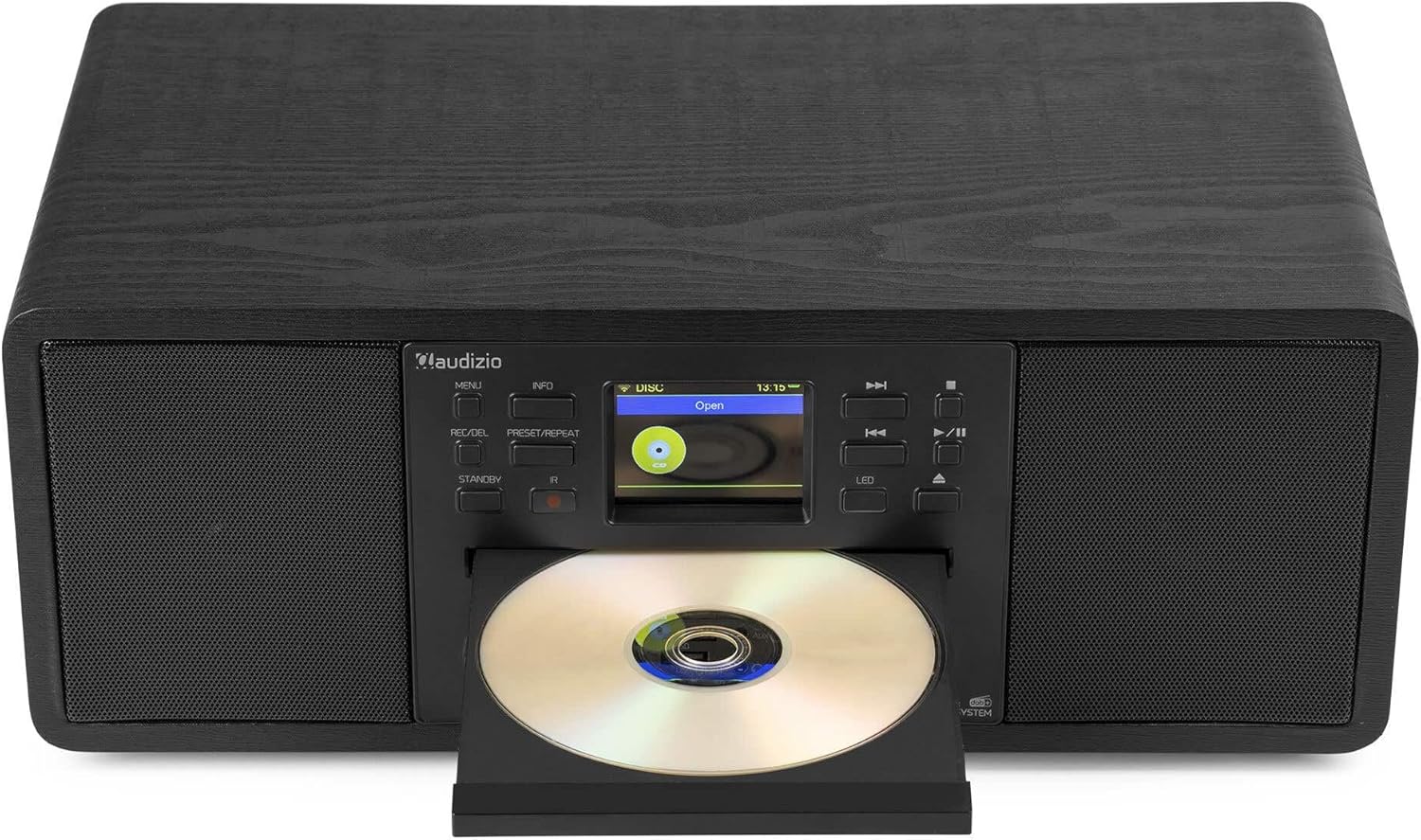
Image: The Audizio Avola with its CD tray open, ready for disc insertion.
6.5 Nascacht Bluetooth
Stream audio wirelessly from your smartphone, tablet, or other Bluetooth-enabled devices.
- Press the MENU button and select 'Bluetooth'.
- The Avola will enter pairing mode and become discoverable.
- On your Bluetooth device, search for 'Audizio Avola' in the Bluetooth settings and select it to pair.
- Once connected, the display will show 'BT Connected'. You can now play audio from your device through the Avola.

Image: The Audizio Avola display indicating a successful Bluetooth connection.
Athsheinm 6.6 USB/SD
Seinn fuaime files from USB drives or SD cards.
- Insert a USB drive into the USB port or an SD card into the SD card slot on the front panel.
- Press the MENU button and select 'USB' or 'SD' (the unit may automatically switch to the correct mode).
- Nascleanúint trí do files and folders using the TUNE/SELECT knob.
- Press the TUNE/SELECT knob to play a selected track.
7. Cothabháil
- Glanadh an Aonaid: Use a soft, dry, lint-free cloth to clean the exterior of the unit. Do not use abrasive cleaners, waxes, or solvents.
- Glanadh Lionsa CD: If CD playback becomes erratic, use a commercially available CD lens cleaner disc to clean the laser lens.
- Stóráil: Má tá an t-aonad á stóráil ar feadh tréimhse fada, dícheangail é ón soláthar cumhachta agus stóráil é in áit fhionnuar, thirim.
8. Fabhtcheartú
| Fadhb | Cúis Féideartha | Réiteach |
|---|---|---|
| Gan chumhacht | Níl an t-oiriúntóir cumhachta ceangailte nó tá an asraon lochtach. | Seiceáil naisc chumhachta. Bain triail as asraon difriúil. |
| Gan fuaim | Volume too low, mute activated, or incorrect source selected. | Increase volume. Check if mute is active. Ensure correct input source is selected. |
| Internet Radio not connecting | Incorrect Wi-Fi password, weak signal, or network issue. | Re-enter Wi-Fi password. Move unit closer to router. Check router status. |
| DAB+/FM reception poor | Níl an t-antenna sínte amach nó tá an comhartha lag. | Síneadh an t-antenna teileascópach go hiomlán agus coigeartaigh í. Bain triail as an aonad a athshuíomh. |
| CD gan seinm | CD inserted incorrectly, dirty/scratched CD, or unsupported format. | Ensure CD is inserted label-side up. Clean or replace CD. Verify CD format (supports CD-DA, MP3). |
| Bluetooth gan péireáil | Device not in pairing mode, or Avola not discoverable. | Ensure both devices are in pairing mode. Check Bluetooth settings on your device. |
9. Sonraíochtaí
| Gné | Sonraíocht |
|---|---|
| Ainm an tSamhail | Avola |
| Uimhir na Míre | 102.292 |
| Toisí (LxWxH) | 45.8 x 25.8 x 19.7 cm |
| Meáchan | 4 kg |
| Ionchur Cumhachta | 220 Volt (via power adapter) |
| Speaker Output Power (Max) | 60 Bhata |
| Modh Aschuir Fuaime | Steirió |
| Formáidí Fuaime Tacaithe | CD-DA, MP3 |
| Teicneolaíocht Nascachta | WLAN, Bluetooth, AUX, RCA |
| Gléasanna Comhoiriúnacha | MP3 Player, PC, Smartphone, Tablet |
| Dath | Dubh |
10. Barántas agus Tacaíocht
Audizio products are designed and manufactured to the highest standards. In the unlikely event of a problem with your product, please contact your retailer for assistance. Keep your proof of purchase for warranty claims. For further support or inquiries, please refer to the official Audizio websuíomh nó déan teagmháil lena seirbhís do chustaiméirí.