
Geshowit S1 Pro
Geshowit S1 Pro Portable Air Conditioner User Manual
Model: S1 Pro | Brand: Geshowit
Réamhrá
Thank you for choosing the Geshowit S1 Pro Portable Air Conditioner. This manual provides essential information for the safe and efficient operation of your new device. Please read it thoroughly before use and retain it for future reference.
Eolas Tábhachtach Sábháilteachta
Chun an baol tine, turraing leictrigh nó díobhála a laghdú, lean na réamhchúraimí bunúsacha seo i gcónaí:
- Sábháilteacht Leictreach: Cinntigh go bhfuil an fhoinse cumhachta ag teacht leis an toirttage requirements of the unit. Do not use damaged power cords or plugs. Avoid operating the unit with wet hands.
- Socrúchán: Place the unit on a stable, level surface. Ensure adequate ventilation around the unit, keeping at least 12 inches (30 cm) clear from walls or other objects. Do not block air inlets or outlets.
- Uisce agus Taise: Do not expose the unit to rain or excessive moisture. If using in high humidity, ensure the drain hose is properly connected to prevent water overflow.
- Leanaí agus Peataí: Keep the unit out of reach of children and pets. Do not allow them to play with or operate the appliance.
- Cothabháil: Always unplug the unit before cleaning or performing any maintenance. Do not attempt to repair or modify the unit yourself. Contact qualified service personnel for assistance.
- Úsáid Beartaithe: This appliance is designed for cooling and dehumidifying purposes in various environments such as rooms, tents, RVs, cars, and trucks. Do not use it for any other purpose.
Táirge Tharview
Ábhar an Phacáiste
The Geshowit S1 Pro Portable Air Conditioner package includes the following items:
- Geshowit S1 Pro Portable Air Conditioner Unit
- Clúdach Aeir Tosaigh
- Clúdach Aeir Cúil
- Drain Pipe (D: 1.6cm, L: 100cm)
- Air Duct (D: 10cm, L: 120cm)
- Air Duct (D: 13cm, L: 120cm)
- Lámhleabhar Úsáideora
- Note: Remote Control and Storage Bag are sold separately.

Príomhghnéithe
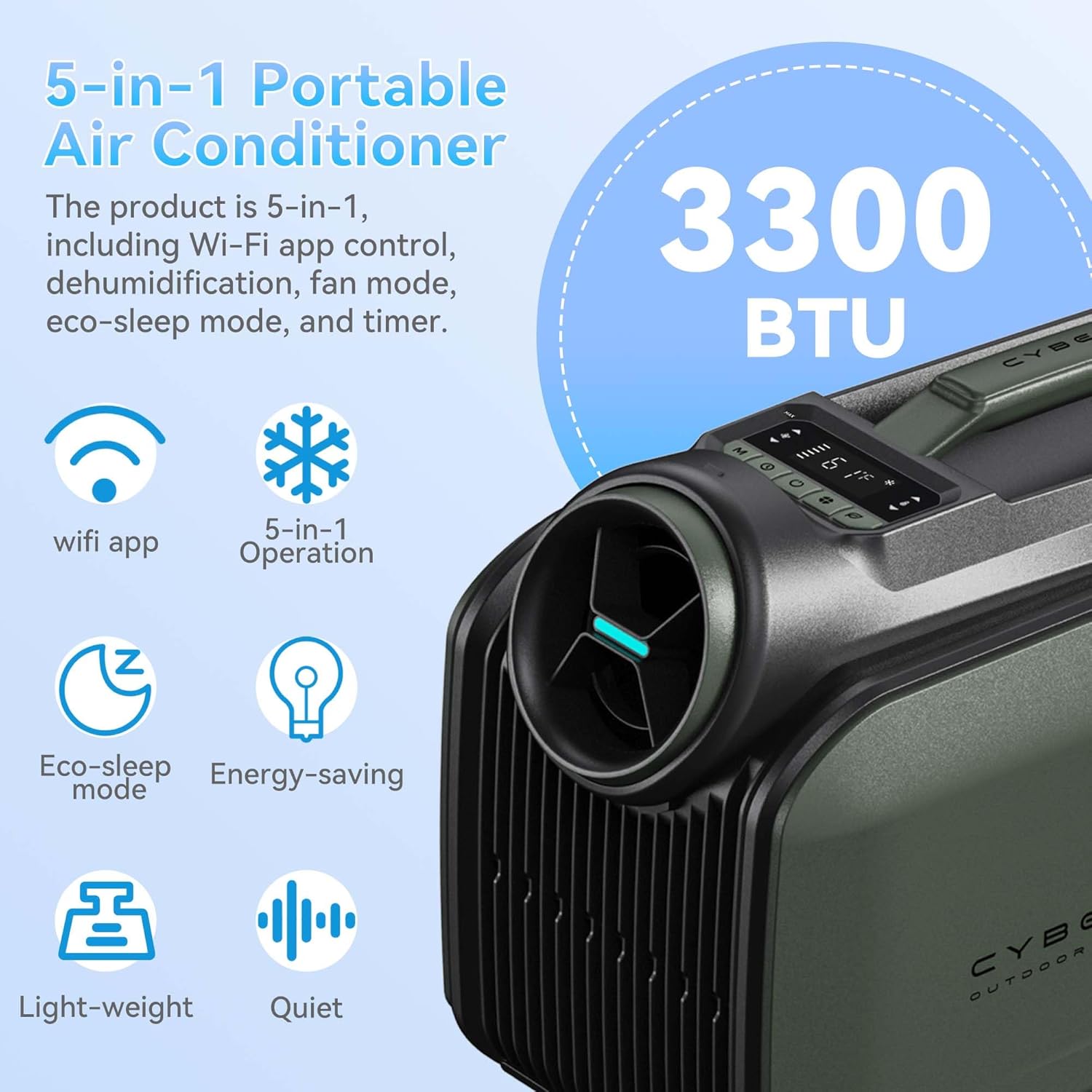
- Fuarú cumhachtach: Rapidly cools spaces by 18°F (10°C) in approximately 5 minutes with 3300 BTU cooling capacity.
- Éifeachtúlacht Fuinnimh: Features a high-efficiency 48V DC system and smart 3.0 inverter algorithm, consuming only 100W per hour in sleep mode.
- Roghanna Ilchumhachta: Supports AC power, DC battery, portable power stations (with solar panels), and car chargers.
- Oibríocht Chiúin: Ultra-quiet 38 dB Sleep Mode for undisturbed comfort.
- Feidhm Gan Drain: Operates without drainage in cooling mode when humidity is below 70%. A drain hose can be connected for high humidity conditions.
- Dlúth & Inaistrithe: Weighs 21.6 lbs (9.8 kg) with an aluminum alloy frame and ergonomic handle for easy transport.
- Ilchineálacht 5-in-1: Offers Cooling, Dehumidifier, Fan, Eco-Sleep Mode, and a 24-hour Timer.
- Rialú Cliste: WiFi App Control and a top-mounted control panel with LED display.
Socrú agus Suiteáil
1. Tube Installation
Follow these steps to properly install the air ducts:
- Connect the Tube: Attach the air duct to the tube connector by twisting it clockwise.
- Insert Cold Air Outlet: Insert the tube connector into the cold air outlet on the unit.
- Insert Air Inlet: Insert the other end of the tube connector into the air inlet on the unit.

2. Socrú Aonaid
The Geshowit S1 Pro offers flexible placement options depending on your cooling needs:
- Outside the Tent: For optimal cooling and reduced noise inside, place the AC unit outside the tent and direct the cold air in.
- Inside the Tent/Room: The unit can also be placed inside the tent or room, ensuring proper ventilation for the exhaust.
- Under a Canopy/Awning: Position the unit under a canopy or awning to provide cooling for outdoor seating areas.
Treoracha Oibriúcháin
Painéal Rialúcháin
The unit features a top-mounted control panel with an LED display for easy operation. Refer to the diagram below for button functions:

- Cnaipe Cumhachta: Casann sé an t-aonad ar siúl/as.
- Cnaipe Mód: Cycles through Cooling, Dehumidifier, Fan, and Eco-Sleep modes.
- Cnaipí Coigeartaithe Teochta: Increase or decrease the target temperature.
- Cnaipe Uaineadóir: Socraíonn sé an lasc ama 24 uair an chloig le haghaidh oibriú uathoibríoch.
- Taispeántas LED: Taispeánann sé socruithe reatha an teochta, an mhóid agus na lasc ama.
Modhanna Oibriúcháin
- Mód Fuarú: Provides powerful cooling to lower ambient temperature.
- Mód Dehumidifier: Reduces humidity in the air. In high humidity, connect the drain hose.
- Mód Fan: Scaipeann aer gan fuaraithe.
- Eco-Sleep Mode: Operates quietly and efficiently, consuming only 100W per hour. Ideal for overnight use.
- Mód Amadóir: Set the unit to turn on or off automatically after a specified duration (up to 24 hours).
Rialú Aipeanna WiFi
The Geshowit S1 Pro can be controlled via a dedicated WiFi application. Download the app from your device's app store and follow the in-app instructions for pairing and control.
Cianrialtán Roghnach
An optional remote control (sold separately) can be used to operate the unit. This remote also functions as a temperature and humidity display.

Cothabháil
Cinntíonn cothabháil rialta feidhmíocht is fearr agus síneann sí saolré d’oiriúntóra aer.
- Glanadh an Scagaire Aeir: Ba chóir an scagaire aeir a ghlanadh gach coicís nó níos minice ag brath ar an úsáid.
- Díphlugáil an t-aonad ón bhfoinse cumhachta.
- Bain an clúdach scagaire aeir.
- Bain an scagaire go réidh.
- Nigh an scagaire le huisce te gallúnaí. Sruthlaigh go maith agus lig dó triomú go hiomlán san aer sula gcuirtear ar ais é.
- Athcheangail clúdach an scagaire.
- Draining Water (High Humidity): If operating in high humidity, water may accumulate.
- Cinntigh go bhfuil an t-aonad múchta agus díphlugáilte.
- Connect the drain pipe to the drainage outlet.
- Direct the other end of the drain pipe into a suitable container or drain.
- Monitor the water level in the container and empty as needed.
- Glanadh Taobh amuigh: Glan an taobh amuigh den aonad le bog, damp éadach. Ná húsáid ceimiceáin gharbh ná glantóirí scríobacha.
- Stóráil: When not in use for extended periods, unplug the unit, clean it thoroughly, and store it in a cool, dry place.
Fabhtcheartú
Sula ndéanann tú teagmháil le tacaíocht do chustaiméirí, féach ar an tábla seo a leanas le haghaidh saincheisteanna coitianta agus a réitigh:
| Fadhb | Cúis Féideartha | Réiteach |
|---|---|---|
| Ní chasann aonad air. | No power supply; power cord not properly connected; power outlet faulty. | Check power connection; try a different outlet; ensure battery is charged if using DC power. |
| Fuarú neamhleor. | Air filter is dirty; air inlets/outlets blocked; room/area too large; doors/windows open. | Clean the air filter; ensure clear airflow; close doors/windows; consider unit capacity for the space. |
| Tá an t-aonad torannach. | Unit not on a level surface; internal components vibrating. | Place unit on a stable, level surface; ensure no loose parts. |
| Sceitheadh uisce. | Drain pipe not connected or blocked (in high humidity); unit tilted. | Ensure drain pipe is properly connected and clear; place unit on a level surface. |
| Cianrialtán nach n-oibríonn. | Batteries dead; remote out of range; obstruction between remote and unit. | Replace batteries; ensure remote is within range and pointed at the unit; remove obstructions. |
Sonraíochtaí Teicniúla
| Gné | Sonraíocht |
|---|---|
| Branda | Geshowit |
| Ainm an tSamhail | S1 Pro |
| Cumhacht Fuarú | 3300 Aonad Teirmeach Briotanach (BTU) |
| Meáchan Mír | 21.6 lb (9.8 kg) |
| Toisí Táirge | 18.1"D x 9.4"L x 13"A (46 x 24 x 33 cm) |
| Leibhéal Torainn | 48 dB (as low as 38 dB in Sleep Mode) |
| Imltage | 110 Volta |
| Wattage | 400 Watt-hours (100W/hour in Sleep Mode) |
| Cuisneoir | R-290 |
| Cineál Suiteáil | Installation free |
| Gnéithe Speisialta | Fast Cooling, No Drainage Required (under 70% humidity), Sleep saving energy mode, Timer Mode, WiFi App Control |
Barántas agus Tacaíocht
For information regarding product warranty, please refer to the warranty card included with your purchase or contact Geshowit customer support directly. Protection plans are available for purchase separately to extend coverage.
If you encounter any issues not covered in the troubleshooting section, or require further assistance, please contact Geshowit customer service through the official websuíomh nó an fhaisnéis teagmhála a chuirtear ar fáil i ndoiciméadacht do tháirge.
Ask a question about this manual
Ask about setup, troubleshooting, compatibility, parts, safety, or missing instructions. Manuals+ will review the question and use this page’s manual context to help answer it.