
Réamhrá
Thank you for choosing the Care Bears Wireless LED Headphones. These Bluetooth-enabled headphones are designed for a fun and interactive audio experience, featuring light-up ears and earcups, an adjustable headband, and convenient on-ear controls. This manual will guide you through the setup, operation, and maintenance of your new headphones.
Ábhar an Phacáiste
- Care Bears Wireless LED Headphones
- Cábla Muirearú USB
- Lámhleabhar Úsáideora
Táirge Tharview
Familiarize yourself with the various components of your headphones:

Fíor 1: Tosaigh view of the Care Bears Wireless LED Headphones, showcasing the adjustable headband, soft ear pads, and light-up ear features.
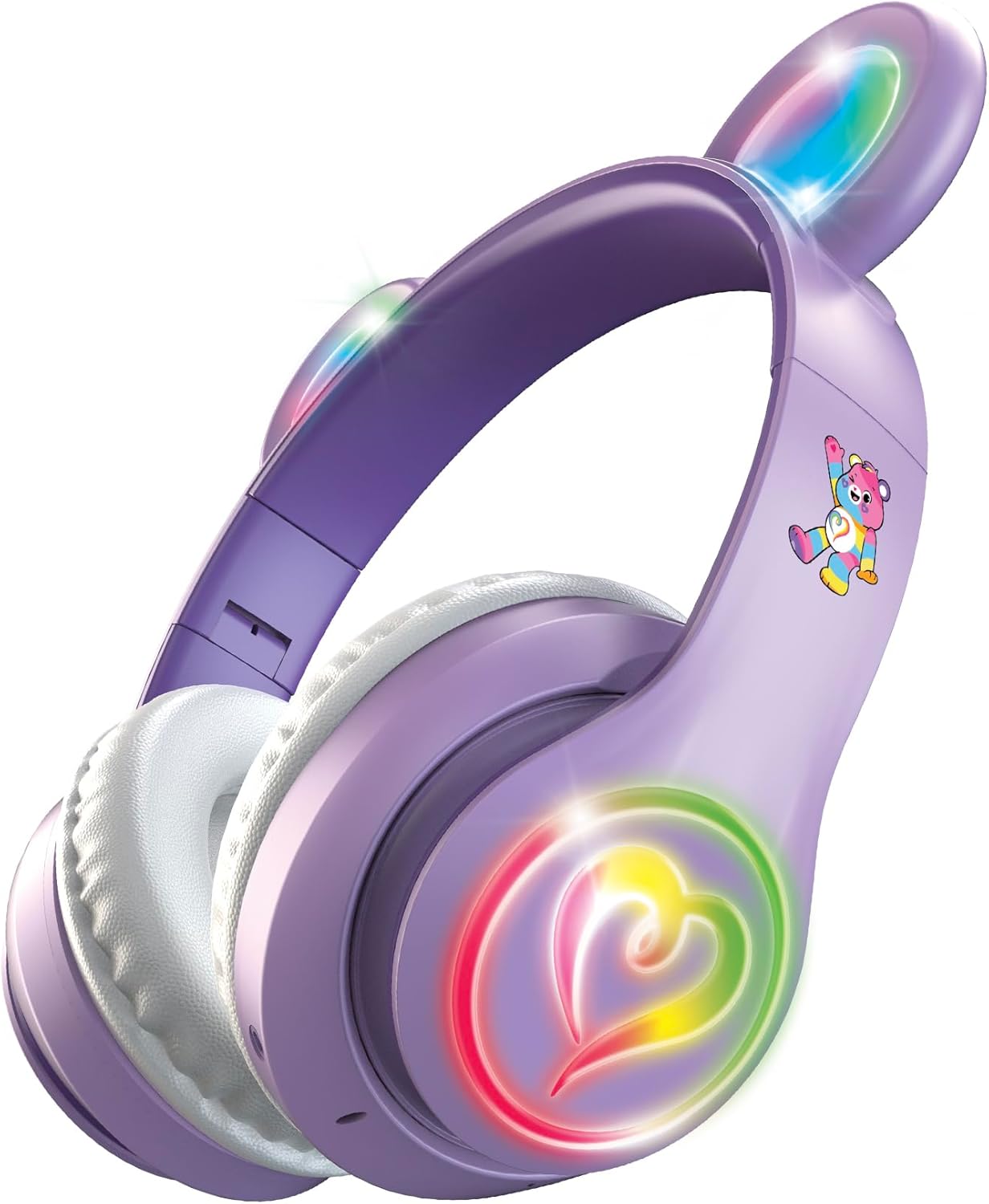
Fíor 2: Uillinneach view of the headphones with the multicolor LED lights activated on both the ears and the heart-shaped design on the earcups.
Príomhghnéithe:
- Banda Ceann Inchoigeartaithe: Le haghaidh feistiú compordach agus slán.
- Ceapaí Cluas Bog: Designed for extended listening comfort.
- Light-Up Ears and Earcups: Multicolor LED lights for a vibrant visual effect.
- On-Ear Control Panel: Buttons for power, play/pause, track navigation, and volume.
- Micreafón: Comhtháite le haghaidh glaonna saor ó lámha.
- Port Luchtaithe: Micro USB port for recharging the internal battery.
Socrú
1. Muirearú na gCluasán
- Locate the Micro USB charging port on one of the earcups.
- Connect the provided USB charging cable to the headphones and a compatible USB power source (e.g., computer USB port, USB wall adapter).
- The LED indicator light will illuminate during charging and change color or turn off when fully charged.
- A full charge provides approximately 8 hours of continuous use.
2. Péireáil Bluetooth
- Cinntigh go bhfuil na cluasáin luchtaithe go hiomlán.
- Press and hold the Power button on the earcup until the LED indicator light flashes, indicating pairing mode.
- Ar do ghléas (fón cliste, táibléad, ríomhaire), cumasaigh Bluetooth agus déan cuardach ar ghléasanna atá ar fáil.
- Select "Care Bears Headphones" (or similar name) from the list of found devices.
- Once paired, the LED indicator light will stop flashing and remain solid, or turn off, depending on the model.
- Déanfaidh na cluasáin iarracht go huathoibríoch athcheangal leis an bhfeiste péireáilte dheireanach nuair a chuirtear ar siúl iad.
Treoracha Oibriúcháin
Cumhacht ar / As
- Chun Cumhacht a Chur ar: Brúigh agus coinnigh an cnaipe Cumhachta go dtí go lasann an táscaire LED suas.
- Chun Cumhacht as: Brúigh agus coinnigh an cnaipe Cumhachta go dtí go múchfaidh an táscaire LED.
Athsheinm Ceoil
- Seinn/Sos: Brúigh an cnaipe Seinn/Sos uair amháin.
- An Chéad Amhrán Eile: Press the 'Next Track' button (often marked with a forward arrow or '+').
- Rian Roimhe Seo: Press the 'Previous Track' button (often marked with a backward arrow or '-').
- Imleabhar Suas: Press and hold the 'Volume Up' button (often marked with '+').
- Imleabhar an Dúin: Press and hold the 'Volume Down' button (often marked with '-').
Glaonna Gan Lámha
- Freagra/Deireadh Glao: Press the Play/Pause button once during an incoming call to answer, and once again to end the call.
- Diúltaigh Glao: Press and hold the Play/Pause button for approximately 2 seconds during an incoming call.
- Uimhir Dheiridh Redial: Double-press the Play/Pause button when not on a call.
Rialú Solais faoi stiúir
The headphones feature multicolor LED lights on the ears and earcups. Refer to the specific button on your headphones, often labeled 'Light' or a light bulb icon, to cycle through light modes or turn them off.
Cothabháil
- Glanadh: Bain úsáid as éadach bog, tirim chun na cluasáin a ghlanadh. Ná húsáid glantóirí scríobacha ná tuaslagóirí.
- Stóráil: Stóráil na cluasáin in áit fhionnuar, thirim amach ó sholas díreach na gréine agus ó theocht mhór.
- Seachain Uisce: Níl na cluasáin seo uiscedhíonach. Seachain nochtadh d'uisce nó taise iomarcach.
Fabhtcheartú
- Gan Cumhacht: Cinntigh go bhfuil na cluasáin luchtaithe go hiomlán.
- Ní féidir péireáil: Make sure Bluetooth is enabled on your device and the headphones are in pairing mode. Move closer to your device.
- Gan Fuaim: Check the volume level on both the headphones and your connected device. Ensure the headphones are properly paired.
- Soilse nach bhfuil ag obair: Ensure the headphones are powered on and check if there is a dedicated button to activate the LED lights.
Sonraíochtaí
- Uimhir Mhúnla: CBHPLEDGV101-MFN
- Nascacht: Bluetooth 4.2
- Socrúchán Cluas: Thar Cluas
- Saol Battery: Suas le 8 n-uaire an chloig (meán)
- Raon Minicíochta: 20Hz - 20,000Hz
- Modh Rialaithe: Brúigh Cnaipe
- Ábhar: Plastic, Fabric, Silicone
- Meáchan Mír: 0.3 Punt
- Gnéithe Breise: Light-Up Ears and Earcups with Multicolor LED Lights
Faisnéis Bharántas
These headphones come with a Barántas 30 Lá Teoranta from the manufacturer. Please retain your proof of purchase for any warranty claims. The warranty covers manufacturing defects but typically does not cover damage caused by misuse, accidents, or unauthorized modifications.
Tacaíocht
For further assistance, troubleshooting, or warranty inquiries, please refer to the contact information provided on the product packaging or visit the official Care Bears product support websuíomh.