
1. Réamhrá
This manual provides detailed instructions for the installation, operation, and maintenance of your Hikity Android 15 Car Stereo. Please read this manual thoroughly before installation and use to ensure proper function and to maximize your experience with the device. This unit is specifically designed for Hyundai Santa Fe IX45 models from 2013 to 2017 and supports original ampardaitheoirí.
2. Táirge Tharview
Príomhghnéithe
- Córas oibriúcháin Android 15
- 9-inch HD Touchscreen Display (1280*720P)
- 4GB RAM + 64GB ROM for smooth performance and ample stóráil
- Wireless Apple Carplay and Android Auto support
- Built-in GPS Navigation with offline map support (Herewego)
- WiFi and Bluetooth 5.0 connectivity
- Digital Sound Processor (DSP) with 32 EQ adjustments
- FM RDS Radio
- Supports AHD Backup Camera input
- Comhoiriúnacht Rialaithe Roth Stiúrtha (SWC)
- Mirror Link functionality
Ábhar an Phacáiste
Deimhnigh go bhfuil na míreanna uile i láthair sa phacáiste:
- 1 x Aonad Steirió Gluaisteáin Android
- 1 x Cábla Cumhachta
- 1 x Ceamara Cúltaca
- 2 x Oiriúntóir USB
- 1 x Antenna Raidió
- 1 x antenna GPS
- 1 x CAM-VIN Cable
- 1 x Lámhleabhar Úsáideora (an doiciméad seo)
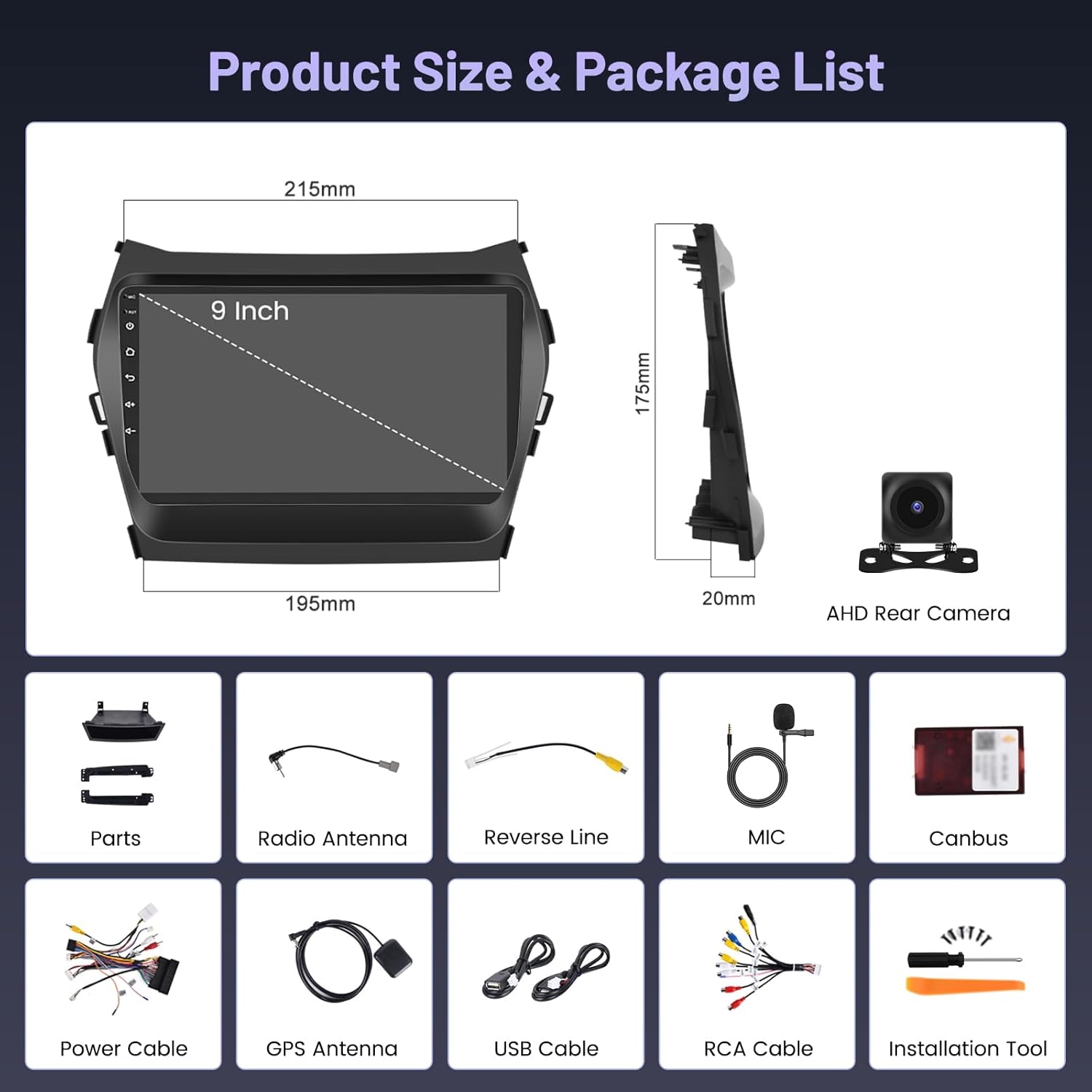
Image: Diagram showing the dimensions of the 9-inch car stereo unit and a visual list of all included accessories: Canbus, Power Cable, Reverse Line, GPS Antenna, USB Cable, Radio Antenna, RCA Cable, Parts, MIC, AHD Rear Camera, and Installation Tool.
3. Socrú agus Suiteáil
Moltar suiteáil ghairmiúil. Cinntigh go bhfuil cumhacht na feithicle dícheangailte sula dtosaíonn tú ar an suiteáil.
3.1 Seiceáil Réamhshuiteála
- Verify vehicle compatibility: Hyundai Santa Fe IX45 (2013-2017).
- Deimhnigh go bhfuil gach rud atá sa phacáiste i láthair.
- Ensure you have the necessary tools for car stereo removal and installation.
3.2 Suiteáil Tharview
The car stereo is designed to integrate seamlessly into your Hyundai Santa Fe IX45 dashboard. The image below illustrates the visual transformation from the original factory radio to the new Hikity Android 15 Car Stereo for both low and high configuration vehicles.

Image: A comparison showing the car dashboard before and after installing the Hikity Android 15 Car Stereo in both low and high configuration Hyundai Santa Fe IX45 models (2013-2017).
3.3 Naisc Sreangaithe
Carefully connect all cables as per the wiring diagram. Incorrect wiring can damage the unit or vehicle electronics.
- Cábla Cumhachta: Connect to the vehicle's power harness. Ensure correct positive, negative, and ACC connections.
- Antenna Raidió: Connect the included radio antenna for FM/AM reception.
- Antenna GPS: Suiteáil an t-antenna GPS in áit a bhfuil radharc soiléir ann view den spéir le haghaidh glacadh comhartha is fearr.
- Oiriúntóirí USB: Connect the USB adapters for external storage or wired Carplay/Android Auto.
- CAM-VIN: Connect this cable for the backup camera input.
- Cáblaí RCA: Use for external amplifiers, subwoofers, or auxiliary video/audio input/output.
3.4 Suiteáil Ceamara Cúltaca
The included AHD backup camera provides clear rear visibility. Follow the wiring diagram for proper connection.

Image: A detailed wiring diagram for the AHD backup camera, showing connections to the car stereo (Reverse Input Cable), camera power (Rod wire to Power, Black to GND), and the camera itself.
Céimeanna Sreangaithe:
- Connect the camera's power cable to the vehicle's reversing lamp (red wire to positive, black wire to ground).
- Connect the video signal cable from the camera to the CAM-VIN input on the car stereo.
- Ensure the 'Reverse' trigger wire from the car stereo's power harness is connected to the vehicle's reverse light signal.

Image: Illustrates the AHD backup camera with features like HD image quality, waterproof design, distance guidelines, and a wide-angle lens for ultra-clear vision effects.
4. Treoracha Oibriúcháin
4.1 Initial Power-On and Interface
After installation, turn on your vehicle's ignition. The stereo will boot up, displaying the Android home screen. Navigate the interface using the 9-inch touchscreen.
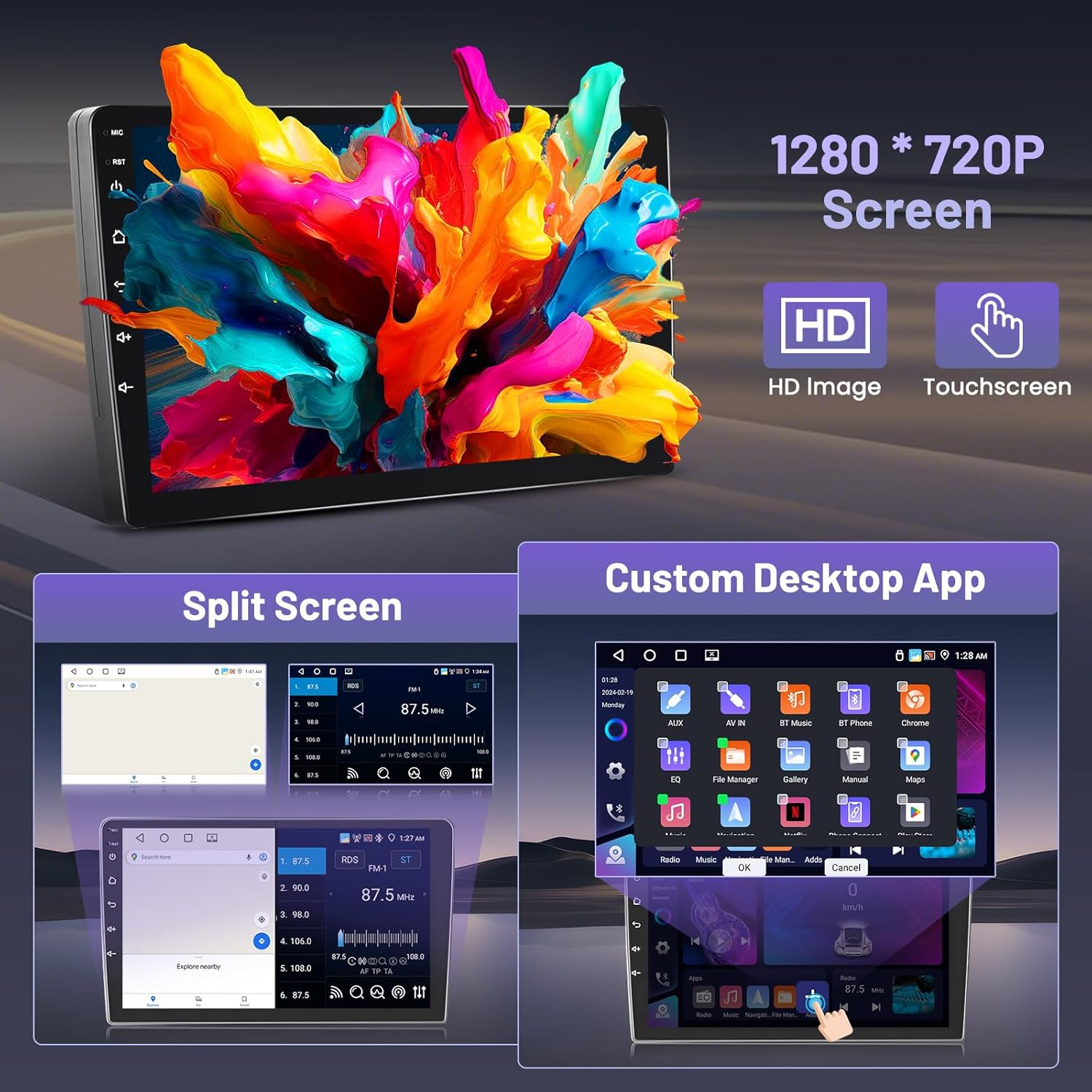
Image: Shows the 9-inch 1280*720P HD touchscreen with examples of split-screen functionality and a customizable desktop app layout.
4.2 Carplay Gan Sreang agus Android Auto
Connect your smartphone wirelessly for seamless integration of navigation, music, calls, and more.

Image: Depicts a smartphone connected wirelessly to the car stereo, showcasing Carplay, Android Auto, and Mirror Link interfaces.
Connection Steps (refer to video for visual guide):
- Open the 'ApplePlay' (for Carplay) or 'Android Auto' app on the car stereo.
- Ensure Bluetooth is enabled on the car stereo.
- On your smartphone, turn on Bluetooth and search for the car stereo's Bluetooth device name (e.g., RK3326S99).
- Pair your phone with the car stereo via Bluetooth and complete any authorization prompts on both devices.
- Once connected, Carplay or Android Auto will launch automatically.
Video: Demonstrates the step-by-step process of connecting a smartphone to the Hikity Android Car Stereo for Wireless Carplay and Wireless Android Auto functionality, including Bluetooth pairing and interface navigation.
4.3 Feidhmiúlacht Bluetooth
Beyond Carplay/Android Auto, Bluetooth allows for hands-free calling and audio streaming.
- Glaonna Gan Lámha: Access your phone's contacts, make calls, and answer incoming calls directly from the stereo screen.
- Sruthú Fuaime: Seinn ceol ó do ghuthán cliste trí chainteoirí an ghluaisteáin.
4.4 Nascleanúint GPS
Tagann GPS ionsuite leis an aonad agus tacaíonn sé le loingseoireacht ar líne agus as líne araon.
- Léarscáileanna As Líne: The pre-installed "Herewego" app allows you to download map data for offline use.
- Nascleanúint Ar Líne: Connect to WiFi or a mobile hotspot to use online navigation apps like Google Maps.
4.5 Nascacht WiFi
Connect the car stereo to a WiFi network or your phone's hotspot to access online features, download apps, and browse the internet.
4.6 FM RDS Radio
Tune into your favorite radio stations with clear sound and quality. The RDS (Radio Data System) feature displays station information where available.
4.7 Socruithe DSP agus EQ
Saincheap do thaithí fuaime leis an bPróiseálaí Fuaime Digiteach (DSP) agus an Cothromóir 32-bhanda (EQ).
- Access various sound effects like 3D optimized, 5.1 Panorama, and HiFi scene.
- Adjust individual frequency bands to match your audio preferences.

Íomhá: Taispeántas colláiseasing the Bluetooth interface for calls and music, the Equalizer (EQ) settings, 5G WiFi connectivity, GPS navigation map, and FM RDS radio interface.
4.8 Rialú Roth Stiúrtha (SWC)
After installation, configure the steering wheel controls to operate the car stereo without additional accessories.
Céimeanna Cumraíochta:
- Téigh go dtí Socruithe > Factory Set Up.
- Iontráil an focal faire: 8888.
- Déan nascleanúint chuig Party Control learning or Foghlaim roth stiúrtha.
- Lean na treoracha ar an scáileán chun feidhmeanna a shannadh do chnaipí roth stiúrtha.

Image: Shows the car stereo's interface for learning steering wheel controls, with options to select, press, start, reset, and save button assignments for various functions like volume, track, and mode.
5. Cothabháil
- Glanadh: Bain úsáid as éadach bog, tirim chun an scáileán agus an t-aonad a ghlanadh. Seachain glantóirí scríobacha nó tuaslagóirí.
- Nuashonruithe Bogearraí: Seiceáil go tréimhsiúil le haghaidh nuashonruithe bogearraí trí shocruithe an chórais chun feidhmíocht is fearr agus rochtain ar ghnéithe nua a chinntiú.
- Teocht: Seachain an t-aonad a nochtadh do theocht foircneach.
6. Fabhtcheartú
Má bhíonn fadhbanna agat, féach ar na fadhbanna agus na réitigh choitianta seo a leanas:
| Fadhb | Cúis Féideartha | Réiteach |
|---|---|---|
| Gan Cumhacht | Sreangú mícheart, fiús séidte, fadhb chumhachta feithicle. | Seiceáil naisc an chábla cumhachta, déan iniúchadh ar fhiúsanna na feithicle, agus cinntigh go bhfuil adhaint na feithicle ar siúl. |
| Gan Fuaim | Fadhb le sreangú cainteoir, toirt ró-íseal, socruithe míchearta aschuir fuaime. | Verify speaker connections, increase volume, check audio settings (e.g., balance/fader). |
| GPS Gan Obair | GPS antenna not connected or poorly positioned, no map data. | Cinntigh go bhfuil antenna GPS ceangailte go daingean agus go bhfuil sé soiléir view of the sky. Download offline map data or connect to WiFi for online maps. |
| Saincheisteanna Ceangal Bluetooth | Bluetooth off on phone/stereo, pairing error. | Ensure Bluetooth is enabled on both devices. Delete previous pairings and re-pair. Restart both devices if necessary. |
| Ceamara Cúltaca Gan Taispeántas | Incorrect camera wiring, CAM-VIN not connected, reverse trigger not active. | Check camera power and video signal connections. Verify the reverse trigger wire is correctly connected to the vehicle's reverse light. |
Má leanann fadhbanna, déan teagmháil le tacaíocht do chustaiméirí.
7. Sonraíochtaí
| Gné | Sonraíocht |
|---|---|
| Branda | Hikity |
| Ainm an tSamhail | GPS Car Stereo |
| Uimhir Mhúnla | A7796A3662H1MI2US26-C536 |
| Córas Oibriúcháin | Android 15 |
| RAM | 4GB |
| ROM | 64GB |
| Méid an Scáileáin | 9 Orlach |
| Cineál Taispeána | LCD, Capacitive Touchscreen |
| Taifeach Scáileáin | 1280*720P |
| Nascacht | Bluetooth 5.0, USB, FM, AUX, WiFi |
| GPS | Supported Satellite Navigation System (Worldwide Map Type) |
| Modh Aschuir Fuaime | Steirió |
| Gnéithe Speisialta | Carplay, Android Auto, DSP, EQ, Customize Homepage App |
| Toisí na Mír (L x W x H) | 10.14" x 7.02" x 2.34" |
| Meáchan Mír | 1.58 cileagram |
8. Barántas agus Tacaíocht
Faisnéis Bharántas
Hikity offers the following warranty and support for this product:
- Ráthaíocht Airgid Ar Ais 15 Lá: Le haghaidh tuairisceáin laistigh de 15 lá ón gceannach.
- Athsholáthar 12 mhí: For product defects within 12 months of purchase.
- Tacaíocht Theicniúil ar feadh an tSaoil: Ongoing assistance for any technical issues.
Tacaíocht do Chustaiméirí
For technical assistance, warranty claims, or any other inquiries, please contact Hikity customer service:
- Ríomhphost: hikitysales@163.com

Image: Details how to contact Hikity customer service, including an email address for support inquiries.