
1. Réamhrá
This manual provides detailed instructions for the safe and effective use of your POWRUI 6-Outlet Extender with 3 USB Charging Ports (1 USB-C) and Night Light, Model AHR-508. Please read this manual thoroughly before installation and operation, and retain it for future reference.
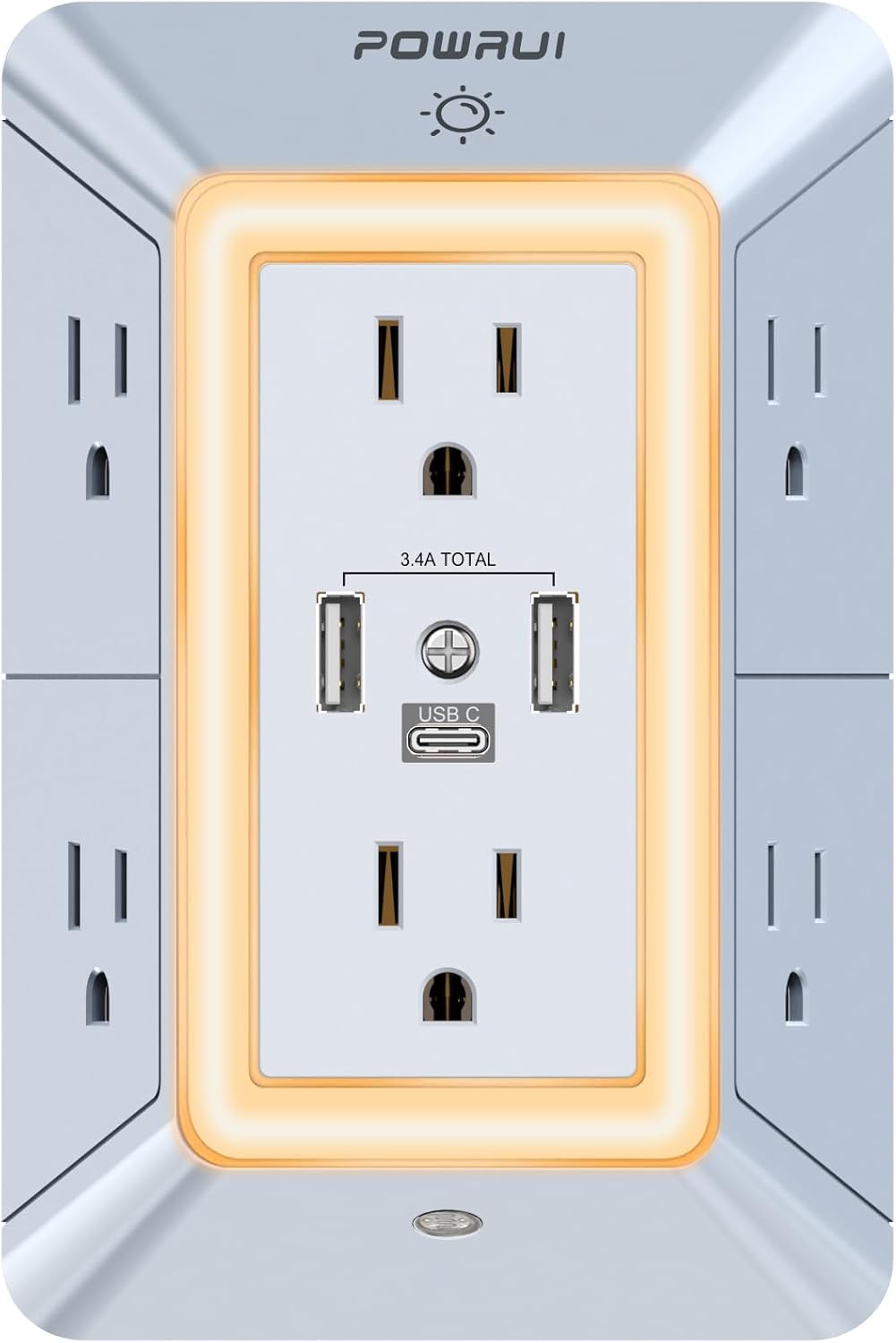
Íomhá 1.1: Tosaigh view of the POWRUI 6-Outlet Extender, showing 6 AC outlets, 2 USB-A ports, and 1 USB-C port, surrounded by an illuminated night light ring.
2. Treoracha Sábháilteachta
Chun an baol turraing leictrigh, tine nó díobhála a laghdú, lean na réamhchúraimí sábháilteachta bunúsacha seo i gcónaí:
- This product is for indoor use only. Do not use in wet or damp láithreacha.
- Do not exceed the maximum power rating of 1875W or current of 15A.
- Ensure the wall outlet is properly grounded.
- Ná díchóimeáil ná ná déan modhnú ar an bhfeiste. Cuir gach seirbhísiú faoi bhráid phearsanra cáilithe.
- Coinnigh leanaí ar shiúl ón bhfeiste.
- Avoid plugging in appliances with damaged cords or plugs.
- Ní thacaíonn an port USB-C le gléasanna a bhfuil toirt luchtaithe 14-22V ag teastáil uathu.tage.
3. Gnéithe Táirgí
The POWRUI AHR-508 offers multiple functionalities for your power needs:
- 6 Asraon AC: Provides six standard AC outlets (15A, 1875W total) with wide spacing for larger adapters.
- 3 Chalafort Luchtaithe USB: Includes two USB-A ports and one USB-C port, with a total output of 5V/3.4A for fast charging compatible devices.
- Cosaint Borrtha 1680 Joule: Cosnaíonn feistí nasctha ó bhorradh cumhachta agus ó spící.
- Solas Oíche Chliste: Features a dusk-to-dawn sensor for automatic activation and a touch sensor for three levels of adjustable brightness.
- Fireproof Shell: Constructed with a safe, fireproof shell for enhanced safety.
- Dearadh Sábhála Spás: 3-sided design allows for efficient use of space.

Image 3.1: Diagram illustrating the key features of the POWRUI 6-Outlet Extender, including 6 AC outlets, 2 USB-A and 1 USB-C port, 1680J surge protection, light sensor, and 3-level brightness touch sensor.
4. Ábhar Pacáiste
Deimhnigh go bhfuil na hearraí go léir i do phacáiste:
- 1 x POWRUI Multi-Outlet Extender with USB Ports (Model AHR-508)
- 1 x Lámhleabhar Treorach
5. Socrú agus Suiteáil
The POWRUI AHR-508 is designed for easy installation into a standard duplex wall receptacle.
- Aithin Asraon Oiriúnach: Locate a standard 3-prong duplex wall outlet. Ensure there is sufficient space around the outlet for the extender's dimensions (5.5 x 3.8 x 1.7 inches).
- Seiceáil Comhoiriúnacht: This product is compatible with standard duplex and decor outlets. It is not suitable for USB receptacles or GFCI outlets due to the design of the back plastic post. The wall outlet must have at least 1 inch of space between the two parallel sockets.
- Breiseán Isteach: Align the prongs of the POWRUI extender with the slots of your wall outlet. Push firmly until the extender is flush against the wall. The groove on the back ensures a snug fit.
- Slán (Roghnach): If your wall outlet has a center screw, you may use it to further secure the extender.

Íomhá 5.1: Ar ais view of the POWRUI 6-Outlet Extender, highlighting the design for flush wall mounting and compatibility with duplex receptacles.

Image 5.2: Visual guide showing compatibility with standard duplex and decor outlets, and incompatibility with USB receptacles and GFCI outlets.
6. Treoracha Oibriúcháin
6.1 Asraon AC
Plug your devices directly into any of the six AC outlets. The wide spacing between outlets accommodates larger power adapters without blocking adjacent ports.
6.2 Chalafort Muirearú USB
Connect your USB-powered devices to the two USB-A ports or the single USB-C port. The total output for all USB ports is 3.4A. Note that the USB-C port is not designed for devices requiring 14-22V charging voltage.
6.3 Solas Oíche Chliste
The integrated night light features both a dusk-to-dawn sensor and a touch sensor for manual control and brightness adjustment.
- Automatic Mode (Dusk-to-Dawn Sensor): The night light will automatically turn on when ambient light is insufficient and turn off when the area becomes bright. This mode is active by default.
- Manual Control & Brightness Adjustment:
- Touch the sensor area (usually indicated by a small dot or icon on the front) to cycle through brightness levels: Off → 1st Level → 2nd Level → 3rd Level → Off.
- This allows you to manually override the dusk-to-dawn sensor or set a preferred brightness.

Image 6.1: Illustration demonstrating the dusk-to-dawn sensor functionality (day/night modes) and the three adjustable brightness levels of the night light via touch control.
7. Sonraíochtaí
| Uimhir Mhúnla | AHR-508 |
| Ionchur Voltage | 125VAC; 60Hz |
| uas. Reatha | 15A |
| Max. Rátáil Cumhachta | 1875W |
| Aschur Iomlán USB | 5V/3.4A |
| Rátáil Cosanta borrtha | 1680 Giúl |
| Toisí Táirge | 5.5 x 3.8 x 1.7 orlach |
| Meáchan Mír | 9.1 unsa |
| Deimhnithe | ETL Liostaithe |
8. Fabhtcheartú
If you encounter issues with your POWRUI 6-Outlet Extender, refer to the following common problems and solutions:
- No Power to Outlets/USB Ports:
- Ensure the extender is fully plugged into a functional wall outlet.
- Seiceáil an bhfuil cumhacht ag teacht chuig an asraon balla féin (m.sh., trí ghléas eile a phlugáil isteach).
- If the surge protector has been tripped, unplug all devices, wait a few minutes, and then plug them back in.
- Verify that the total power draw of connected devices does not exceed 1875W.
- Night Light Not Working Automatically:
- Cinntigh nach bhfuil bac ar an braiteoir solais chomhthimpeallaigh.
- Test the night light manually by touching the sensor to cycle through brightness levels. If it works manually, the automatic sensor might be detecting too much ambient light.
- USB-C Port Not Charging:
- Confirm your device is compatible with 5V charging and does not require 14-22V.
- Bain triail as cábla USB-C difriúil.
9. Barántas agus Tacaíocht
POWRUI provides a 30-day return policy and a 12-month warranty for this product. For any questions or support needs, please contact POWRUI customer service. Our team aims to respond within 24 hours.
For further assistance, please visit the official POWRUI store or contact their customer support channels.