
1. Réamhrá
This manual provides essential instructions for the safe and effective operation of your Fujifilm S4500 and S4530 Compact Digital Camera. Please read this manual thoroughly before using the camera and keep it in a safe place for future reference. The Fujifilm S4500/S4530 is equipped with a 14MP CCD sensor, a 30x optical zoom Fujinon lens, and is capable of recording 720p HD movies.
2. Táirge Tharview
Familiarize yourself with the main components of your camera.
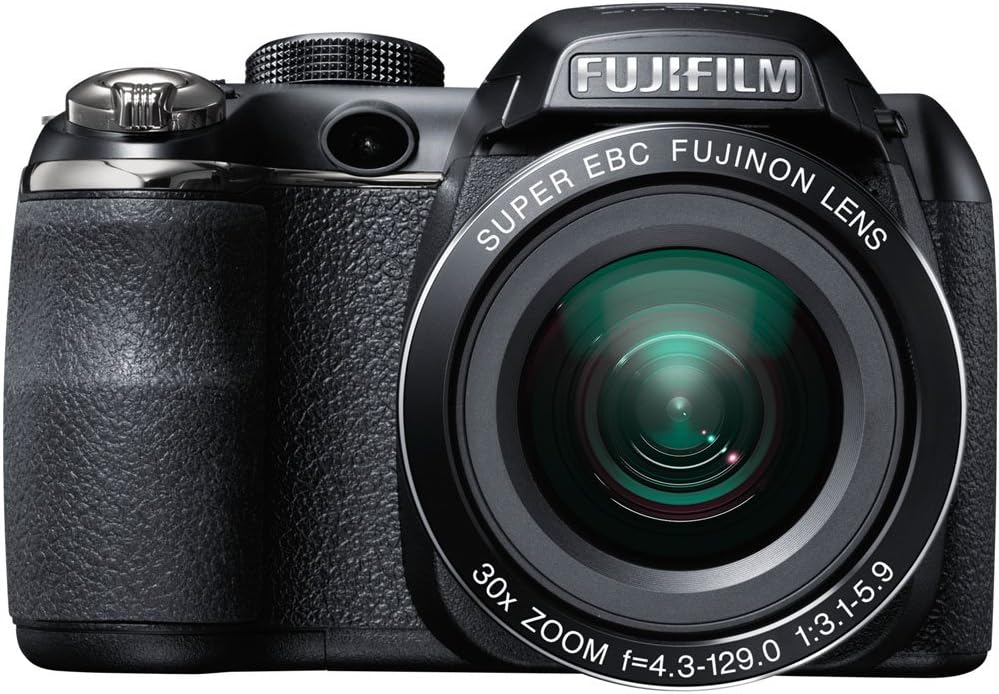
Fíor 2.1: Tosaigh view of the Fujifilm S4500/S4530 camera with the built-in flash in the raised position, showcasing the Fujinon 30x optical zoom lens.

Fíor 2.2: Tosaigh view of the Fujifilm S4500/S4530 camera with the built-in flash in the lowered position, highlighting the lens barrel and grip.

Fíor 2.3: Taobh view of the Fujifilm S4500/S4530 camera, showing the ergonomic grip and control layout.
Príomh-chomhpháirteanna:
- Lionsa: Fujinon 30x Optical Zoom Lens (24-720mm equivalent).
- Flash: Built-in pop-up flash.
- Taispeáint LCD: 3-inch, 230,000-dot screen for viewing and menu navigation.
- Viewaimsitheoir: Leictreonach Viewaimsitheoir (EVF).
- Diailigh Rialaithe: For selecting shooting modes.
- Cnaipe Shutter: Chun grianghraif a ghabháil.
- Luamhán súmáil: Controls optical and digital zoom.
3. Socrú
3.1. Cadhnraí a Chur isteach
- Oscail clúdach urrann na ceallraí atá suite ag bun an cheamara.
- Insert four (4) AA alkaline batteries, ensuring correct polarity (+/-) as indicated inside the compartment.
- Dún an clúdach urrann ceallraí go daingean.
3.2. Cárta Cuimhne a chur isteach
- Oscail clúdach an tsliotáin cárta cuimhne, atá suite de ghnáth ar thaobh nó ar bhun an cheamara.
- Insert an SD, SDHC, or SDXC memory card with the label facing the correct direction until it clicks into place.
- Dún clúdach an sliotáin cárta cuimhne go daingean.
3.3. An Chumhacht Ar Siúl Tosaigh agus Socrú Dáta/Ama
- Brúigh an AR / AS cnaipe chun cumhacht a thabhairt ar an gceamara.
- The first time you power on, you will be prompted to set the date and time. Use the directional buttons to navigate and the MENU / Ceart go leor cnaipe chun a dhearbhú.
- Lean na treoracha ar an scáileán chun an socrú tosaigh a chríochnú.
4. Treoracha Oibriúcháin
4.1. Grianghraif a Thógáil
- Cuir an ceamara ar siúl.
- Select a shooting mode using the mode dial (e.g., UATH for automatic settings).
- Frámaigh do ghrianghraf ag baint úsáide as an monatóir LCD nó an monatóir leictreonach viewaimsitheoir.
- Use the zoom lever to adjust the focal length.
- Brúigh an cnaipe comhla leathbhealach síos chun díriú. Casfaidh an fráma fócais glas nuair a bheidh an fócas bainte amach.
- Brúigh an cnaipe comhla go hiomlán síos chun an pictiúr a thógáil.
4.2. Físeáin Taifeadadh
- Turn the mode dial to the movie recording setting (often indicated by a film camera icon).
- Frámaigh d’ábhar.
- Press the dedicated movie record button (if available) or the shutter button to start recording.
- Press the button again to stop recording. The camera records in 720p HD resolution.
4.3. Athsheinm
- Brúigh an IMIRCE cnaipe chun modh athsheinm a chur isteach.
- Use the directional buttons to scroll through your photos and videos.
- Brúigh MENU / Ceart go leor chuig view options for the selected image/video.
4.4. Móid Splanc
The camera offers various flash modes, including Auto and Red Eye Reduction. To change the flash mode, press the flash button (often indicated by a lightning bolt icon) and use the directional buttons to select your desired mode from the on-screen menu.
5. Cothabháil
5.1. Glanadh an Cheamara
- Lionsa: Bain úsáid as éadach bog, saor ó lint nó scuab lionsa chun deannach a bhaint go réidh. I gcás smúdáin, bain úsáid as tuaslagán glantacháin lionsa speisialaithe a chuirtear ar an éadach, ní go díreach ar an lionsa.
- Taispeáint LCD: Wipe gently with a soft, dry cloth. Avoid pressing too hard.
- Comhlacht ceamara: Use a soft, dry cloth to wipe away dust and fingerprints. Do not use organic solvents or strong cleaning agents.
5.2. Cúram Battery
- Bain na cadhnraí as an gceamara nuair nach mbeidh sé in úsáid ar feadh tréimhse fada chun sceitheadh a chosc.
- Stóráil cadhnraí in áit fhionnuar, thirim.
- Replace all four AA batteries at the same time with new ones for optimal performance.
5.3. Stóráil
When storing the camera, ensure it is turned off, and the lens cap is attached. Store in a dry, well-ventilated area away from direct sunlight, high temperatures, and humidity.
6. Fabhtcheartú
| Fadhb | Réiteach |
|---|---|
| Ní chasann an ceamara air. | Check if batteries are inserted correctly and are fully charged. Replace with new AA batteries if necessary. |
| Tá íomhánna doiléir. | Ensure the lens is clean. Press the shutter button halfway to allow the camera to focus before taking the shot. Check if the camera is in a suitable shooting mode for the lighting conditions. |
| Ní lasann an splanc. | Check the flash mode settings. Ensure the flash is raised if it is a pop-up type. The flash may not fire if the battery level is low. |
| Earráid cárta cuimhne. | Ensure the memory card is inserted correctly. Try formatting the card (this will erase all data). If the problem persists, try a different memory card. |
| Ní féidir físeán a thaifeadadh. | Ensure the camera is in video recording mode. Check if there is sufficient space on the memory card. |
7. Sonraíochtaí
| Gné | Sonraigh |
|---|---|
| Ainm an tSamhail | Fujifilm S4500 / S4530 |
| Braiteoir Íomhá | 14 Megapixel 1/2.3-inch CCD |
| Lionsa | Fujinon 30x Optical Zoom (24-720mm equivalent) |
| Zúmáil Digiteach | Suas go dtí 6.7x |
| Cobhsú Íomhá | Cobhsú Íomhá Digiteach |
| Taispeáint LCD | 3.0-inch, 230,000 dots |
| Taifeadadh Físeáin | 720p HD (MP4 format) |
| Meáin Stórála | SD / SDHC / SDXC memory cards |
| Íogaireacht ISO | Auto, 100, 200, 400, 800, 1600, 3200, 6400 (expanded to 51200) |
| Luas Shutter | 8 soicind go 1/2000 soicind |
| Soláthar Cumhachta | 4x cadhnraí alcaileach AA |
| Nascacht | HDMI, USB |
| Toisí (thart.) | 1.2 Pounds (Item Weight) |
8. Barántas agus Tacaíocht
This Fujifilm S4500/S4530 camera typically comes with a 90-day limited warranty. Please refer to your purchase documentation for specific warranty terms and conditions. For technical support or service inquiries, please contact Fujifilm customer service or the retailer from whom the product was purchased.