
M27
tranyoo M27 TWS Bluetooth Earphones User Manual
Múnla: M27
Réamhrá
Thank you for choosing the tranyoo M27 TWS Bluetooth Earphones. These wireless earbuds are designed for an immersive audio experience, featuring Bluetooth 5.3 connectivity for stable connections, a comfortable in-ear fit, and a waterproof design suitable for sports. This manual provides detailed instructions on how to set up, operate, maintain, and troubleshoot your new earphones.

Image: The retail packaging for the tranyoo M27 TWS Bluetooth Earphones, showcasing the product and key features.
Socrú
1. Díbhosca agus Ábhar an Phacáiste
Carefully open the product packaging. Ensure all components are present.
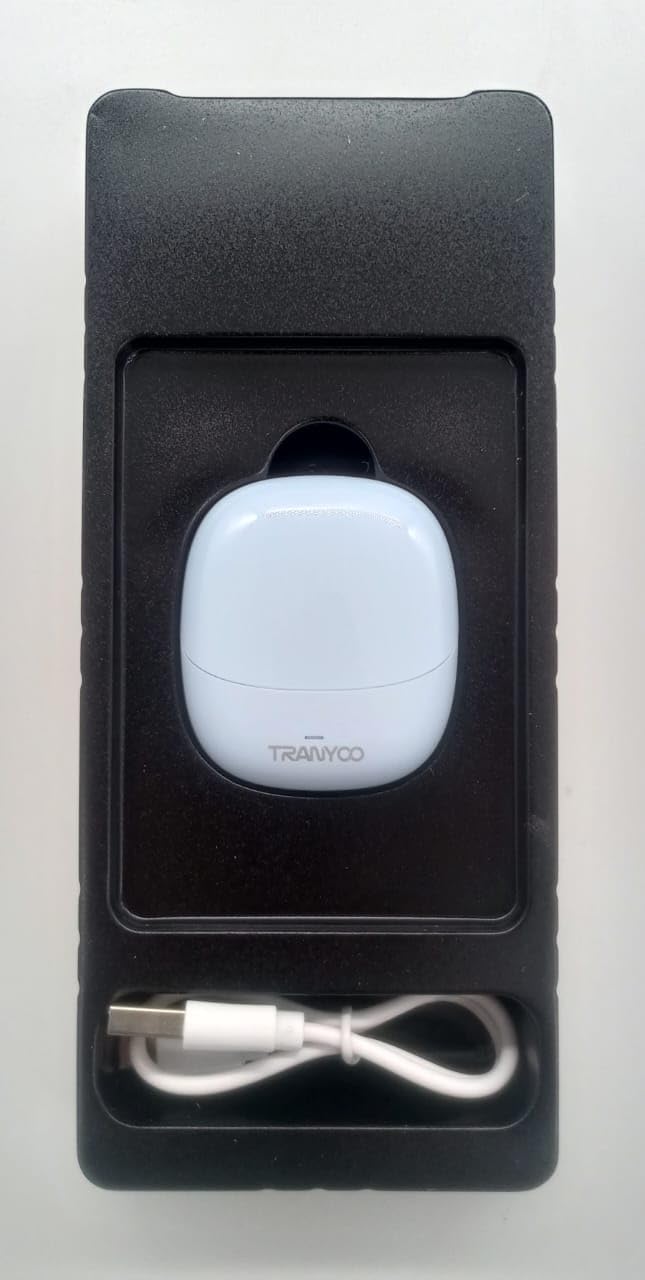
Image: The tranyoo M27 TWS Earphones nestled in their protective packaging, alongside the included USB charging cable.
- tranyoo M27 TWS Earbuds (Left and Right)
- Cás Muirir
- Cábla Muirearú USB
- Lámhleabhar Úsáideora (an doiciméad seo)
2. Muirearú Tosaigh
Sula n-úsáidtear iad den chéad uair, luchtaigh na cluasáin agus an cás luchtaithe go hiomlán.
- Cuir an dá earbuds sa chás luchtaithe.
- Connect the USB charging cable to the charging port on the case and plug the other end into a USB power source (e.g., computer USB port, wall adapter).
- The indicator lights on the case and/or earbuds will show charging status. Refer to the specific light behavior in the Operating section le haghaidh sonraí.
- Nuair a bheidh tú luchtaithe go hiomlán, dícheangail an cábla luchtaithe.

Image: The tranyoo M27 TWS Earbuds securely seated within their open charging case, ready for charging or use.
3. Péireáil le Gléas
The tranyoo M27 uses Bluetooth 5.3 for quick and stable pairing.
- Cinntigh go bhfuil na cluasáin luchtaithe agus curtha sa chás luchtaithe iad.
- Oscail an cás luchtaithe. Rachaidh na cluasáin isteach sa mhodh péireála go huathoibríoch (splancfaidh na soilse táscaire).
- Ar do ghléas (fón cliste, táibléad, ríomhaire glúine), téigh go dtí na socruithe Bluetooth.
- Cuir Bluetooth ar siúl.
- Cuardaigh le haghaidh available devices. You should see "tranyoo M27" or a similar name appear in the list.
- Select "tranyoo M27" to connect.
- Once connected, the indicator lights on the earbuds will stop flashing or change to a steady light, and you will hear a confirmation tone.
- For subsequent uses, the earbuds will automatically connect to the last paired device when taken out of the case, if Bluetooth is enabled on the device.
Treoracha Oibriúcháin
1. Cumhacht Ar / As
- Cumhacht ar: Open the charging case, and the earbuds will automatically power on. Alternatively, if out of the case and off, long-press the touch area on both earbuds for approximately 3 seconds.
- Múch: Place the earbuds back into the charging case and close the lid. They will automatically power off and begin charging. Alternatively, if out of the case, long-press the touch area on both earbuds for approximately 5 seconds.
2. Rialuithe Dteagmhála
The tranyoo M27 features intuitive touch controls on each earbud. The specific functions may vary slightly depending on your device and application.
| Gníomh | Feidhm |
|---|---|
| Tapáil Aonair (Clé/Deas) | Seinn/Sos Ceol, Freagair/Deireadh Glao |
| Tapáil Dúbailte (Earbud ar dheis) | An Chéad Rian Eile |
| Tapáil faoi dhó (Cluas Clé) | Rian Roimhe Seo |
| Tapáil Thrífhillte (Clé/Deas) | Gníomhaigh Cúntóir Gutha (Siri, Cúntóir Google) |
| Long Press (Left/Right, 2 seconds) | Diúltaigh Glao |
| Long Press (Right Earbud, 2 seconds) | Imleabhar Suas |
| Long Press (Left Earbud, 2 seconds) | Imleabhar Síos |
3. Ag Caitheamh na gCluasán
Chun an caighdeán fuaime agus an chompord is fearr a fháil, cinntigh go bhfuil na cluasáin suite i gceart i do chluasa.
- Identify the 'L' (Left) and 'R' (Right) markings on each earbud.
- Cuir gach cluasán isteach go réidh sa chanáil cluaise chomhfhreagrach.
- Rotate the earbud slightly until it feels secure and comfortable, forming a good seal.
4. Gné Uiscedhíonach
The tranyoo M27 earphones are designed with a waterproof rating suitable for sports activities. This means they are resistant to sweat and light splashes. Do not submerge the earphones in water or expose them to heavy rain. Níl an cás luchtaithe uiscedhíonach.
Cothabháil
- Glanadh: Regularly clean the earbuds and charging case with a soft, dry, lint-free cloth. Do not use abrasive cleaners, alcohol, or chemical solvents. Gently remove any earwax or debris from the earbud tips and speaker mesh using a small, soft brush or cotton swab.
- Stóráil: When not in use, store the earbuds in their charging case to protect them from dust, damage, and to keep them charged. Store in a cool, dry place away from direct sunlight and extreme temperatures.
- Cúram Battery: To prolong battery life, avoid fully discharging the earbuds and charging case frequently. Charge them regularly, even if not in constant use. Avoid leaving them uncharged for extended periods.
Fabhtcheartú
If you encounter issues with your tranyoo M27 earphones, try the following solutions:
| Fadhb | Réiteach Féideartha |
|---|---|
| Níl na cluasáin ag péireáil leis an ngléas. |
|
| Gan aon fhuaim ó chluasán amháin nó an dá cheann. |
|
| Níl an cás muirir ag muirearú. |
|
| Droch-chaighdeán fuaime nó nasc uaineach. |
|
Sonraíochtaí
| Gné | Sonraigh |
|---|---|
| Múnla | M27 |
| Teicneolaíocht Nascachta | Gan Sreang (Bluetooth 5.3) |
| Socrúchán Cluas | I gCluas |
| Fachtóir Foirme | I gCluas |
| Ábhar | Plaisteach |
| Dath | Gorm |
| Úsáidí Sonracha | Spórt |
| Gléasanna Comhoiriúnacha | Telephones, Tablets, Laptops, Smart Speaker, Cellphones |
| Toisí Pacáiste | 19 x 8.2 x 3.8 cm |
| Meáchan Mír | 100 g |
Barántas agus Tacaíocht
For warranty information and customer support, please refer to the documentation provided at the time of purchase or contact your retailer. You may also visit the official tranyoo websuíomh gréasáin le haghaidh na n-acmhainní tacaíochta agus na sonraí teagmhála is déanaí.
For technical assistance or inquiries, please have your product model (M27) and purchase details ready.
Ask a question about this manual
Ask about setup, troubleshooting, compatibility, parts, safety, or missing instructions. Manuals+ will review the question and use this page’s manual context to help answer it.