
Flashpoint R2 Nano
Flashpoint R2 Nano Touchscreen TTL Wireless Flash Trigger User Manual
For Panasonic and Olympus Cameras
1. Réamhrá
The Flashpoint R2 Nano Remote is a compact and advanced wireless flash trigger designed for Panasonic and Olympus camera systems. It offers precise control over your flash settings through an intuitive touchscreen interface and OLED display, enhancing your photography experience with seamless integration and reliable performance.
I measc na bpríomhghnéithe tá:
- Comhtháthú gan uaim: Full TTL compatibility with Olympus/Panasonic cameras for optimal exposure.
- Ultimate Reliability: Stable 2.4 GHz radio frequency with 32 channels, ensuring consistent triggering up to 328 feet (100 meters).
- Sioncronú Ardluais (HSS): Achieve sync speeds up to 1/8000s for creative effects and motion freezing.
- Rialú scáileán tadhaill iomasach: Responsive interface for quick and easy adjustments.
- Versatile Group Control: Manage up to 16 groups (A-F, 0-9) independently for complex lighting setups.
2. Cad atá sa Bhosca
Upon unboxing your Flashpoint R2 Nano, please verify that all components are present:
- Flashpoint R2 Nano Remote
- Cábla Muirearú USB-C
- Mála Stórála
- Lámhleabhar Úsáideora (an doiciméad seo)
3. Táirge Tharview
Familiarize yourself with the components and controls of your R2 Nano remote.
Fíor 3.1: Tosaigh agus Taobh View of the R2 Nano with Key Components Labeled.
- Scáileán Tadhaill: Main interface for settings and control.
- Roghnaigh Diailigh: For navigating menus and adjusting values.
- Athraigh Cumhacht: Casann sé an gléas ar / as.
- Cnaipe Tástála: Triggers a test flash.
- Installing/Detaching Button: Releases the remote from the hotshoe.
- Sliotán Gléasta: Connects to the camera's hotshoe.
- Port Muirearú USB-C: Le haghaidh muirearú ceallraí.

Figure 3.2: R2 Nano Touchscreen Interface Details.
- Channel (CH): Displays the current wireless channel (e.g., CH6).
- Group (A, B, C, etc.): Indicates the active flash groups.
- Leibhéal Cumhachta Aschuir: Shows the flash power setting (e.g., +0.0, 1/128).
- Parameters - / +: Touch controls for decreasing/méadarasinluachanna g.
- Modhanna Sioncronaithe: Icons indicating sync modes (e.g., HSS, front curtain, rear curtain).
- Samhaltú L.amp: Icon for modeling lamp stádas.
- Táscaire Battery: Taispeánann sé an leibhéal ceallraí reatha.
4. Socrú
4.1 An Ceallra a mhuirearú
The R2 Nano is equipped with a built-in rechargeable lithium battery. Before first use, fully charge the device.
- Locate the USB-C charging port on the side of the R2 Nano.
- Connect the provided USB-C charging cable to the port.
- Ceangail an ceann eile den chábla le hoiriúntóir cumhachta USB (nach bhfuil san áireamh) nó le port USB ríomhaire.
- The battery indicator on the screen will show charging status. A full charge from 0% to 100% typically takes approximately 2 hours.

Figure 4.1: Charging the R2 Nano via USB-C.
4.2 Gléasadh ar Cheamara
The R2 Nano features an easy-mounting, durable hotshoe design for secure attachment to your camera.
- Cinntigh go bhfuil do cheamara múchta.
- Slide the R2 Nano's mounting slot onto your camera's hotshoe.
- Brúigh go réidh go dtí go gcliceálann sé ina áit, ag cinntiú nasc slán.
- To detach, press the Installing/Detaching Button and slide the remote off.

Figure 4.2: Mounting the R2 Nano on a Camera Hotshoe.
5. Treoracha Oibriúcháin
5.1 Cumhachtú Amach/Amach
- To power on, press and hold the Power Switch until the screen illuminates.
- To power off, press and hold the Power Switch until the screen turns off.
5.2 Nascleanúint a dhéanamh ar an gComhéadan Scáileáin Tadhaill
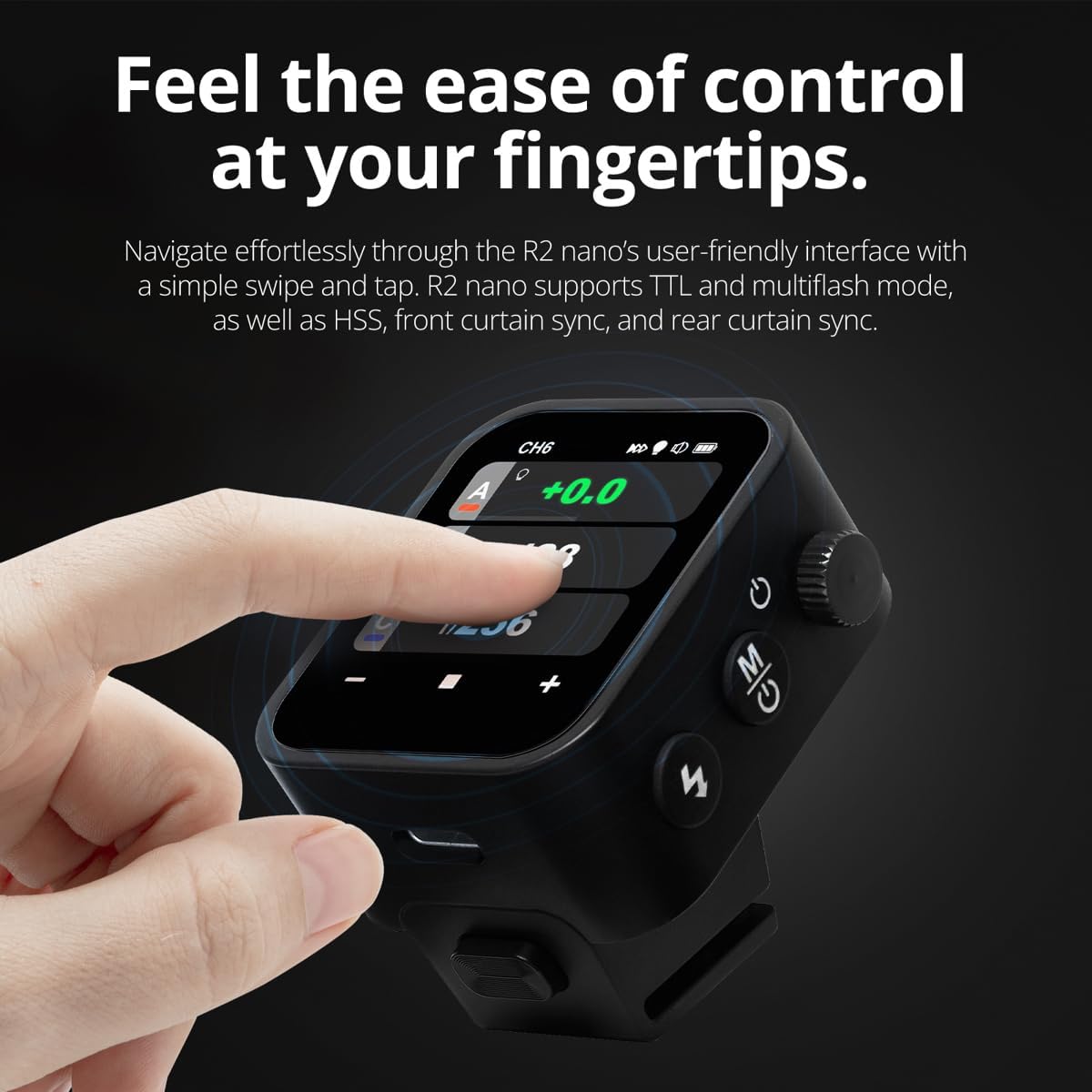
The R2 Nano features a responsive touchscreen and a select dial for intuitive control.

Figure 5.1: High Definition OLED Screen Interface.
- Idirghníomhaíocht Tadhaill: Tap on a group (A, B, C, etc.) to select it for adjustment. Tap on parameters like power level to modify them.
- Roghnaigh Diailigh: Rotate the dial to scroll through options or adjust values. Press the dial to confirm selections.
- Coigeartú Paraiméadar: Use the on-screen '-' and '+' buttons or the Select Dial to change flash power, exposure compensation, or other settings.

Figure 5.2: Touchscreen Interaction for Settings Adjustment.
5.3 Setting Channels and Groups
To avoid interference and control multiple flashes, set appropriate channels and groups.
- Access the channel settings through the touchscreen menu. Select a channel from 1 to 32. Ensure your flash units are set to the same channel.
- Assign flash units to different groups (A-F, 0-9) to control them independently. The R2 Nano allows control of up to 16 groups.
5.4 Flash Modes (TTL, Manual, Multi-flash)
The R2 Nano supports various flash modes to suit different shooting scenarios.
- TTL (Tríd an Lionsa): Automatically adjusts flash output for correct exposure. Ideal for fast-paced shooting where lighting conditions change frequently.
- Lámhleabhar (M): Allows precise control over flash power output (e.g., 1/1 to 1/256). Suitable for consistent lighting setups and creative control.
- Multi-flash (Stroboscopic): Scaoileann sé sraith splancanna gasta le linn nochtadh aonair chun ilghluaiseachtaí ábhair a ghabháil.
5.5 Sync Modes (HSS, Front Curtain, Rear Curtain)
Select the appropriate sync mode based on your shutter speed and desired effect.
- HSS (Sioncrónú Ardluais): Enables flash synchronization at shutter speeds faster than the camera's native sync speed (up to 1/8000s). Useful for overpowering ambient light or using wide apertures in bright conditions.
- Sioncronú Cuirtín Tosaigh: The flash fires at the beginning of the exposure. This is the standard sync mode.
- Sioncronú Cuirtín Cúil: The flash fires just before the second curtain closes. This creates a streaking effect behind moving subjects, giving a sense of motion.
6. Cothabháil
Proper maintenance ensures the longevity and optimal performance of your R2 Nano remote.
- Glanadh: Use a soft, dry cloth to clean the exterior of the device. For the touchscreen, use a microfiber cloth specifically designed for electronics. Avoid using harsh chemicals or abrasive materials.
- Stóráil: When not in use, store the R2 Nano in its provided storage bag to protect it from dust and scratches. Store in a cool, dry place away from direct sunlight and extreme temperatures.
- Cúram Battery: To maintain battery health, avoid fully discharging the battery frequently. If storing for extended periods, charge the battery to approximately 50% every few months.
- Teagmhálacha Hotshoe: Keep the hotshoe contacts clean and free of debris to ensure reliable communication with your camera.
7. Fabhtcheartú
If you encounter issues with your Flashpoint R2 Nano, refer to the following common problems and solutions.
| Fadhb | Cúis Féideartha | Réiteach |
|---|---|---|
| Ní chuireann an gléas cumhacht ar. | Tá ceallraí ídithe. | Charge the device using the USB-C cable. |
| Flash units not firing. | Socruithe míchearta cainéal nó grúpa. | Ensure the R2 Nano and flash units are set to the same channel and correct groups. |
| Flash units not firing. | Remote not securely mounted. | Ensure the R2 Nano is fully seated in the camera's hotshoe. |
| Inconsistent flash triggering. | Cur isteach comhshaoil. | Change the wireless channel to one with less interference. Ensure no obstructions between remote and flash. |
| Scáileán tadhaill neamhfhreagrach. | Fabht sealadach bogearraí. | Power off the device, wait a few seconds, then power it back on. |
| HSS not working. | Camera or flash not set to HSS mode. | Verify HSS is enabled on both the R2 Nano and your compatible flash unit. Ensure camera shutter speed is above sync speed. |
8. Sonraíochtaí
| Gné | Sonraigh |
|---|---|
| Múnla | Flashpoint R2 Nano |
| Comhoiriúnacht | Panasonic and Olympus Cameras |
| Minicíocht Gan Sreang | 2.4 GHz |
| Cainéil | 32 |
| Grúpaí | 16 (AF, 0-9) |
| Sreang Range | Suas le 100 méadar (328 troigh) |
| Luas sioncronaithe | Suas le 1/8000s (HSS) |
| Taispeáin | Touchscreen OLED |
| Ceallraí | Ceallraí Litiam In-ath-mhuirearaithe Tógtha |
| Port Muirearú | USB-C |
| Toisí Táirge | 5.25 x 4.25 x 2.5 orlach |
| Meáchan Mír | 6.4 unsa |
| Monaróir | Splancphointe |
| Dáta Ar Fáil den Chéad Uair | 19 Meitheamh, 2024 |
9. Barántas agus Tacaíocht
Flashpoint products are designed for reliability and performance. For warranty information, technical support, or service inquiries, please refer to the official Flashpoint websuíomh gréasáin nó déan teagmháil le do dhíoltóir údaraithe.
Coinnigh do chruthúnas ceannaigh le haghaidh aon éilimh bharántais.
Ask a question about this manual
Ask about setup, troubleshooting, compatibility, parts, safety, or missing instructions. Manuals+ will review the question and use this page’s manual context to help answer it.