
1. Réamhrá
This manual provides detailed instructions for the installation, operation, and maintenance of the Yitouniu EWeLink 2-Channel Smart WiFi Switch Relay. This device enables remote control of household appliances and electronic devices via a mobile application, RF remote control, and voice commands through smart assistants like Alexa and Google Home. It supports various operating modes and timing functions to enhance smart home automation.
2. Faisnéis Sábháilteachta
- Ensure power is disconnected before installation or maintenance to prevent electric shock.
- Installation should be performed by qualified personnel or under strict adherence to electrical safety guidelines.
- Ná sáraigh an sruth uasta agus toirttage ratings specified for the device.
- Coinnigh an gléas ar shiúl ó uisce, taise, agus teochtaí foircneacha.
- Deimhnigh go bhfuil na naisc sreangaithe go léir slán agus ceart sula ndéantar an chumhacht a athbhunú.
3. Táirge Tharview
The Yitouniu EWeLink Smart WiFi Switch Relay is a compact, 2-channel device designed for integrating traditional appliances into a smart home system. It features WiFi and Bluetooth connectivity for app control and supports RF 433MHz for remote control.

Íomhá 3.1: Tosaigh view of the Yitouniu EWeLink Smart WiFi Switch Relay. The device is white with branding and connection labels visible.

Íomhá 3.2: Dlúth-amharc view of the Yitouniu EWeLink Smart WiFi Switch Relay, showing input terminals (N, L), output terminals (NO, COM, NC), and model information.

Image 3.3: The compact size of the Yitouniu EWeLink Smart WiFi Switch Relay, held in a hand for scale.
4. Sonraíochtaí
| Paraiméadar | Luach |
|---|---|
| Ionchur Voltage | AC/DC 85-250V, Micro USB 5V input |
| Max Reatha | 10A |
| Cumhacht Max | 2200W |
| Caighdeán wifi | WiFi 2.4GHz b/n/g + Bluetooth (IEEE 802.11b/g/n) |
| Teocht Oibriúcháin | -20°C go 70°C |
| Ábhar | ABS lasair-retardant |
| Toisí Táirge | 2.76 x 1.77 x 1.1 orlach |
| Meáchan Mír | 1.76 unsa |
| Cineál Teagmhála | De ghnáth Oscailte |
| Rátáil Idirnáisiúnta um Chosaint | IP65 |
| Deimhniú | CCFG |
5. Socrú agus Suiteáil
5.1 Treoracha Sreangaithe
The device supports both AC/DC 85-250V input and Micro USB 5V input. Ensure correct wiring based on your application. The relay has Normally Open (NO), Common (COM), and Normally Closed (NC) contacts for controlling external devices.
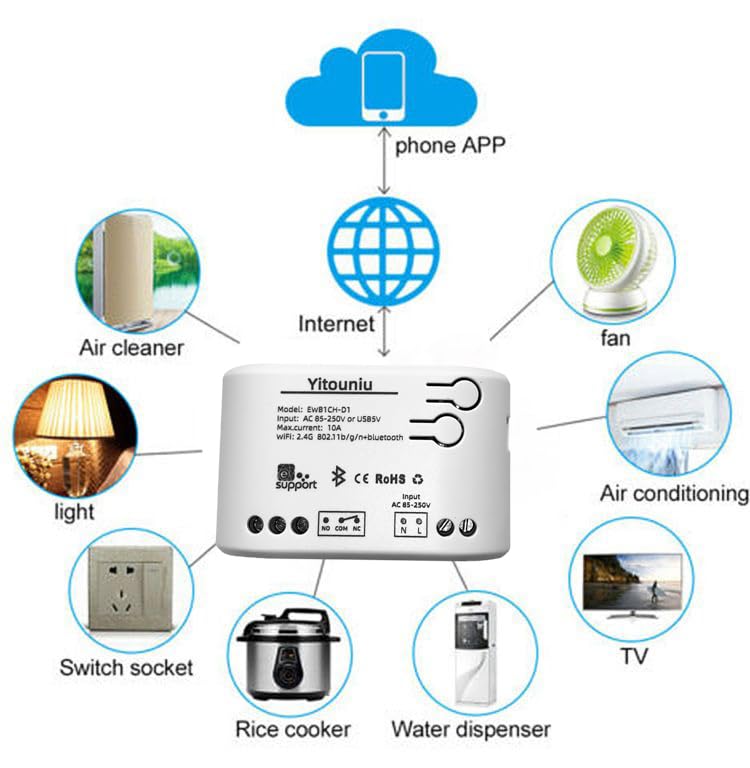
Image 5.1: Diagram illustrating the connectivity of the Yitouniu EWeLink Smart WiFi Switch Relay to various household appliances like lights, fans, and air conditioners, all controlled via a phone app and the internet.
5.2 Íoslódáil agus Péireáil Aipeanna
- Íoslódáil an eWeLink aip ón Apple App Store nó Google Play Store.
- Cláraigh cuntas agus logáil isteach.
- Power on the Smart WiFi Switch Relay.
- Open the eWeLink app, tap the '+' icon to add a device.
- Follow the on-screen instructions to connect the device to your 2.4GHz WiFi network.

Image 5.2: Screenshots of the eWeLink app interface, showing controls for a garage door (ON/OFF) and a scheduling function for setting specific times.
6. Modhanna Oibriúcháin
The device supports three operating modes: self-locking, interlocking, and inching (micromotion). These modes can typically be configured within the eWeLink app or via physical buttons on the device, depending on the specific model variant.
- Mód Féinghlasála: Each channel operates independently. Pressing the button (or app control) turns the relay ON, pressing it again turns it OFF.
- Interlocking Mode: When one channel is turned ON, all other channels are automatically turned OFF. This is useful for applications where only one device should be active at a time.
- Inching (Micromotion) Mode: The relay turns ON for a set duration (e.g., 0.5 seconds to 1 hour) and then automatically turns OFF. This is suitable for momentary actions like garage door openers or pulse controls.
7. Rialú Aipeanna agus Rialú Gutha
7.1 eWeLink App Features
The eWeLink app provides comprehensive control over your Smart WiFi Switch Relay:
- Cianda ar siúl / as: Control connected devices from anywhere with an internet connection.
- Feidhmeanna Amúcháin: Set schedules, countdowns, or recurring timers for automatic on/off operations.
- Rialú Neamhspleách: Each of the two channels can be controlled independently.
- Comhroinnt Gléas: Share control of your devices with family members.
- Rialú Grúpa: Organize multiple smart devices into groups for simultaneous control.

Image 7.1: A user remotely controlling home lighting via the eWeLink mobile application, demonstrating the convenience of app-based control.

Image 7.2: Illustration of the eWeLink app's group control and sharing functions, allowing multiple users to manage devices across different rooms.

Image 7.3: The timing function interface within the eWeLink app, enabling users to set specific on/off times for connected appliances.
7.2 Comhtháthú Rialaithe Gutha
The Yitouniu Smart WiFi Switch Relay is compatible with popular voice assistants, including Amazon Alexa and Google Home/Nest. To enable voice control:
- Ensure your Smart WiFi Switch Relay is successfully paired with the eWeLink app.
- Oscail an aip Alexa nó Google Home.
- Navigate to the 'Skills' or 'Works with Google' section.
- Cuardaigh le haghaidh and enable the 'eWeLink Smart Home' skill/service.
- Link your eWeLink account when prompted.
- Discover devices. Your Smart WiFi Switch Relay should now be controllable via voice commands.
Example horduithe:
- "A Alexa, cuir solas an tseomra suí ar siúl."
- "A Google, múch an lucht leanúna."

Image 7.4: A user interacting with voice assistants like Amazon Alexa and Google Home to control smart devices, highlighting the voice control capability of the relay.
8. Cothabháil
The Yitouniu Smart WiFi Switch Relay requires minimal maintenance. Follow these guidelines:
- Glanadh: Wipe the device with a dry, soft cloth. Do not use liquid cleaners or solvents.
- Seiceáil Ceangal: Déan iniúchadh tréimhsiúil ar naisc sreangaithe lena chinntiú go bhfanann siad slán.
- Nuashonruithe Firmware: Keep the eWeLink app updated to receive the latest firmware for the device, which may include performance improvements and new features.
9. Fabhtcheartú
- Device not connecting to WiFi:
- Ensure your WiFi network is 2.4GHz. The device does not support 5GHz networks.
- Check if the WiFi password entered in the app is correct.
- Move the device closer to your WiFi router.
- Restart the device and your router.
- Device offline in app:
- Verify your home internet connection is active.
- Seiceáil an bhfuil cumhacht ag an bhfeiste.
- Atosaigh an gléas.
- Rialú gutha nach bhfuil ag obair:
- Confirm the eWeLink skill/service is enabled and linked in your Alexa or Google Home app.
- Ensure the device is named clearly in the eWeLink app and discovered by your voice assistant.
- Seiceáil do nasc idirlín.
- Device not responding to RF remote:
- Ensure the RF remote is paired with the switch. Refer to the RF pairing instructions (if applicable to your specific remote).
- Check the battery in the RF remote.
10. Cad atá sa Bhosca
Nuair a osclaítear pacáistiú an táirge, ba cheart go mbeadh na míreanna seo a leanas le fáil:
- 1 x Yitouniu Wifi 2-Channel Relay Switch
- 1 x Lámhleabhar Treoracha (an doiciméad seo)
11. Barántas agus Tacaíocht
This product comes with a standard manufacturer's warranty. For specific warranty terms, conditions, and duration, please refer to the documentation included with your purchase or contact Yitouniu customer support. For technical assistance or further inquiries, please visit the official Yitouniu websuíomh nó déan teagmháil lena gcainéil seirbhíse do chustaiméirí.