
Réamhrá
This manual provides essential instructions for setting up, operating, and maintaining your Plimpton PlimPad Kids20 tablet. This device is designed for children, featuring Android 14, an Octa-core processor, 8GB RAM (expandable), 64GB ROM (expandable to 1TB), and a durable EVA shockproof case. It includes pre-installed Google Kids Space and parental control features to ensure a safe and educational experience.
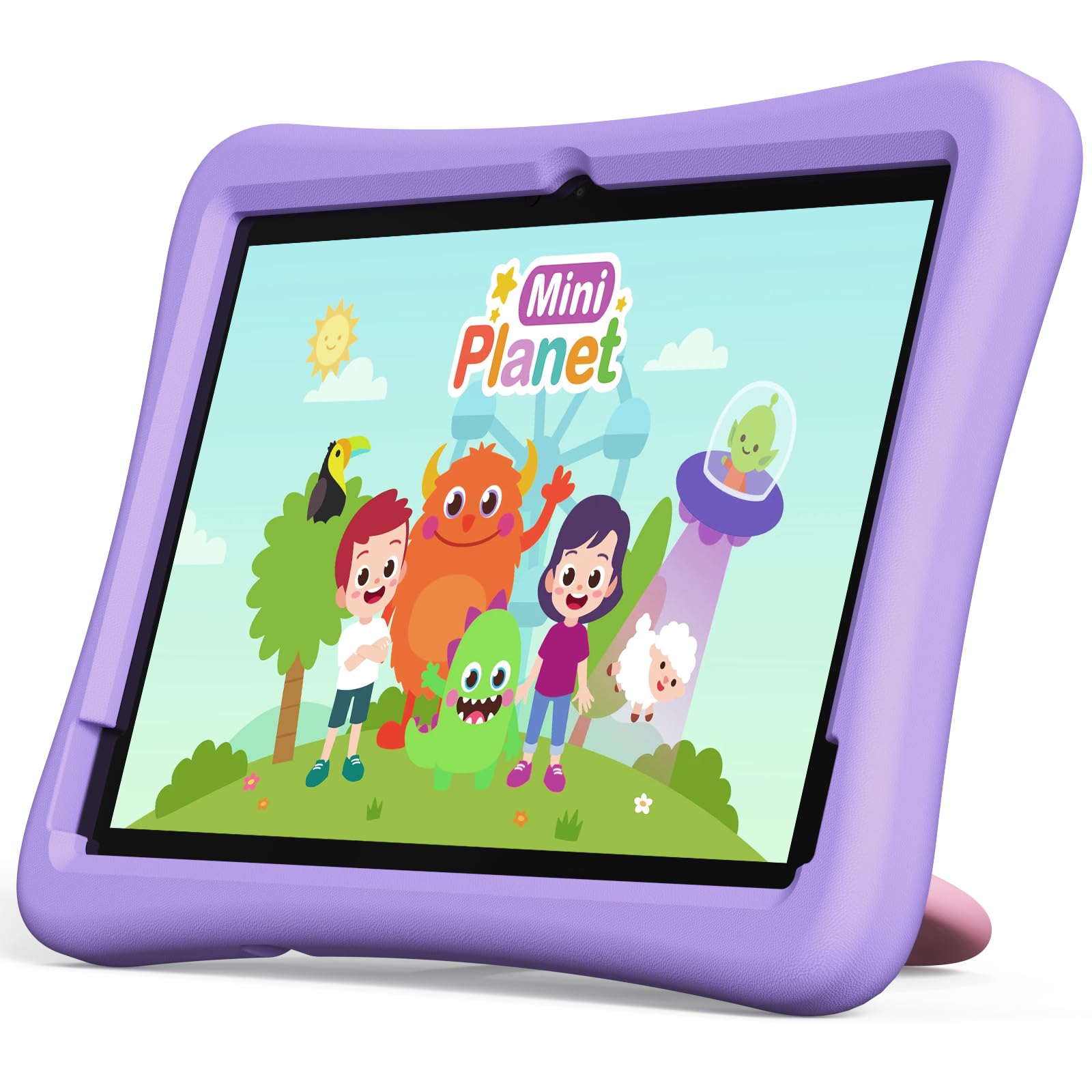
Image: The Plimpton PlimPad Kids20 tablet in its violet shockproof EVA case.
Cad atá sa Bhosca
Deimhnigh go bhfuil na hearraí go léir sa phacáiste sula dtéann tú ar aghaidh leis an socrú.
- 1x Plimpton PlimPad Kids20 Tablet
- 1x USB Adapter
- 1x 1.8m Charging Cable
- 1x lámhleabhar úsáideora
Socrú
1. Muirearú an Tablet
Before first use, fully charge the tablet.
- Connect the USB charging cable to the tablet's USB Type-C port.
- Breiseán an cuibheoir USB i asraon cumhachta.
- Soilseoidh an táscaire luchtaithe. Lig roinnt uaireanta an chloig le haghaidh luchtú iomlán.
2. Cumhacht Ar / As
- Chun Cumhacht a Chur ar: Brúigh agus coinnigh an cnaipe Power go dtí go lasfaidh an scáileán suas.
- Chun Cumhacht as: Brúigh agus coinnigh an cnaipe Cumhachta, ansin roghnaigh "Múch" ó na roghanna ar an scáileán.
- Chun Atosaigh: Brúigh agus coinnigh an cnaipe Cumhachta, ansin roghnaigh "Atosaigh" ó na roghanna.
3. Socrú Tosaigh
Upon first power-on, follow the on-screen prompts to configure your tablet. This typically includes:
- Ag roghnú do theanga.
- Connecting to a Wi-Fi network (supports Wi-Fi 6, 2.4GHz + 5.0GHz).
- Setting up a Google account. This is crucial for accessing Google Kids Space and downloading apps.
- Configuring date and time.
4. Cárta Micrea SD a Chur Isteach
The tablet supports Micro SD cards up to 1TB for expanded storage.
- Locate the Micro SD card slot on the side of the tablet.
- Carefully insert the Micro SD card into the slot until it clicks into place.
- The tablet will detect the new storage. You may be prompted to format it for use as portable or internal storage.
Oibriú an Tablet
1. Nascleanúint Bhunúsach
The PlimPad Kids20 uses a capacitive touchscreen for interaction.
- Tapáil: Roghnaigh mír nó oscail feidhmchlár.
- Beartaíonn agus Coinnigh: Rochtain a fháil ar bhiachláir chomhthéacsúla nó deilbhíní a bhogadh.
- Swipe: Navigate through screens or scroll within applications.
- Pinch-to-Zúmáil: Enlarge or reduce content (e.g., photos, web leathanaigh).
2. Google Kids Space
The tablet comes with Google Kids Space pre-installed, offering a curated selection of educational and entertaining content.

Image: A child and adult interacting with the tablet, showing the Google Kids Space interface.
- Access Kids Space from the home screen or app drawer.
- Content includes interactive educational apps, books, games, and videos.
- Content is teacher-approved and designed to promote learning and creativity.
3. Parental Controls (Google Family Link)
Manage your child's tablet usage and ensure a safe online environment using Google Family Link.

Image: A child using the tablet, with an overlay indicating Google Family Link for parental control.
- Download the Google Family Link app on your own device.
- Link your child's Google account on the tablet to your Family Link account.
- Through Family Link, you can:
- Set screen time limits.
- Approve or block app downloads.
- Bainistigh webrochtain suímh.
- Track device location.
4. Nascacht
- Wi-Fi: Connect to wireless networks via Settings > Network & internet > Wi-Fi. The tablet supports dual-band Wi-Fi (2.4/5 GHz) for fast and stable connections.
- Bluetooth 5.3: Pair with Bluetooth devices like headphones or speakers via Settings > Connected devices > Bluetooth.
5. Úsáid Ceamara
Tá ceamara cúil 5MP agus ceamara tosaigh 2MP ar an táibléad.
- Oscail an aip Ceamara ón scáileán baile nó ón tarraiceán aipeanna.
- Switch between front and rear cameras as needed.
- Tap the shutter button to take photos or record videos.
Cothabháil
1. Glanadh an Táibléid
- Bain úsáid as éadach bog, saor ó lint chun an scáileán agus an corp a ghlanadh.
- Le haghaidh smúdáin righne, beagán dampNigh an t-éadach le huisce nó le glantóir scáileáin.
- Seachain ceimiceáin harsh nó ábhair scríobacha.
2. Nuashonruithe Bogearraí
Seiceáil go rialta le haghaidh nuashonruithe bogearraí agus suiteáil iad chun feidhmíocht agus slándáil is fearr is féidir a chinntiú.
- Téigh go Socruithe> Córas> Nuashonrú córais.
- Lean na treoracha ar an scáileán chun aon nuashonruithe atá ar fáil a íoslódáil agus a shuiteáil.
3. Bainistíocht Stórála
To maintain performance, periodically manage the tablet's storage.
- Téigh go Socruithe > Stóráil chun view úsáid stórála.
- Díshuiteáil aipeanna neamhúsáidte.
- Scrios gan ghá files, photos, or videos.
- Bog go mór files to an inserted Micro SD card.
Fabhtcheartú
Má bhíonn fadhbanna agat, bain triail as na réitigh seo a leanas sula ndéanann tú teagmháil leis an tacaíocht.
| Fadhb | Réiteach |
|---|---|
| Ní lasann an táibléad. | Ensure the tablet is fully charged. Connect it to the charger for at least 30 minutes, then try powering on again. |
| Fadhbanna le nasc Wi-Fi. | Restart the tablet and your Wi-Fi router. Check Wi-Fi settings to ensure the correct network is selected and the password is entered correctly. |
| Tá aipeanna ag tuairteáil nó ag reo. | Close and reopen the app. Clear the app's cache (Settings > Apps > [App Name] > Storage & cache > Clear cache). If the problem persists, uninstall and reinstall the app. |
| Feidhmíocht mhall. | Dún aipeanna nach n-úsáidtear. Glan an taisce agus an t-aip shealadach. files. Consider uninstalling large, unused applications or moving data to an SD card. Restart the tablet. |
| Tá an scáileán neamhfhreagrach. | Perform a forced restart by holding the Power button for approximately 10-15 seconds until the tablet restarts. |
Sonraíochtaí
Key technical specifications for the Plimpton PlimPad Kids20 tablet.
| Gné | Sonraigh |
|---|---|
| Ainm an tSamhail | Plimpad Kids20 |
| Córas Oibriúcháin | Android 14 |
| Próiseálaí | Allwinner A523 Octa-core (up to 2.0 GHz) |
| RAM | 8 GB (4 GB + 4 GB extended virtual memory) |
| Stóráil Inmheánach (ROM) | 64 GB |
| Stóráil Expandable | Up to 1 TB via Micro SD card |
| Méid an Scáileáin | 10.1 Orlach |
| Taifeach Taispeána | 1280 x 800 Pixels (HD IPS) |
| Cineál Taispeána | LCD, G+G wear-resistant glass |
| Cumas Battery | 6000 mAh Lithium-ion (22.8 Wh) |
| Ceamara Cúil | 5 meigibheart |
| Ceamara Tosaigh | 2 meigibheart |
| Wi-Fi | Wi-Fi 6 (802.11ax), Dual-band (2.4 GHz + 5.0 GHz) |
| Bluetooth | Bluetooth 5.3 |
| Calafoirt | USB Type-C, 3.5mm Headphone Jack, Micro SD slot |
| Gnéithe Speisialta | Stereo Speakers, USB OTG support, Eye-care screen, EVA shockproof case with 360-degree rotating handle |
| Toisí | 24L x 16.1W x 0.9H cm |
Barántas agus Tacaíocht
The Plimpton PlimPad Kids20 tablet comes with a Barántas athsholáthair 2 bliana saor in aisce.
For any issues, including screen damage or operational problems, please contact our professional after-sales customer service. Refer to the contact information provided with your purchase or on the official Plimpton websuíomh.
Tábhachtach: Do not attempt to repair the device yourself, as this may void your warranty.

