
1. Réamhrá
Thank you for choosing the MAIRDI M890DCBTENC Bluetooth Headset. This manual provides essential information for setting up, operating, and maintaining your headset to ensure optimal performance and longevity. Please read this manual carefully before using the product.

Image 1: MAIRDI M890DCBTENC Bluetooth Headset.
Príomhghnéithe:
- Nascacht Gan uaim: Bluetooth V5.2 for stable and fast wireless connections.
- Fuaim HD: APTX and low latency technology for high-fidelity sound.
- Micreafón Cealaithe Torainn AI: Dual-mic technology filters out 98% of background noise for crystal-clear calls.
- Saol Leathnaithe Battery: Up to 40 hours of talk and music time on a single charge.
- Péireáil Ilphointe: Connects to two devices simultaneously (e.g., PC/laptop and mobile phone).
- Comfort & Adjustability: 330-degree rotatable microphone boom, adjustable headband, and super soft leather ear cushions.
- Muirearú Ilghnéitheach: Includes a charging stand with an in-built Bluetooth receiver for plug-and-play PC connectivity, or charge via USB cable.
2. Cad atá sa Bhosca
Upon opening your MAIRDI M890DCBTENC Bluetooth Headset package, you should find the following items:
- MAIRDI M890DCBTENC Bluetooth Headset
- Charging Base (with integrated Bluetooth receiver)
- Cábla Muirearú USB
- Treoir Úsáideora
- Déan Pouch
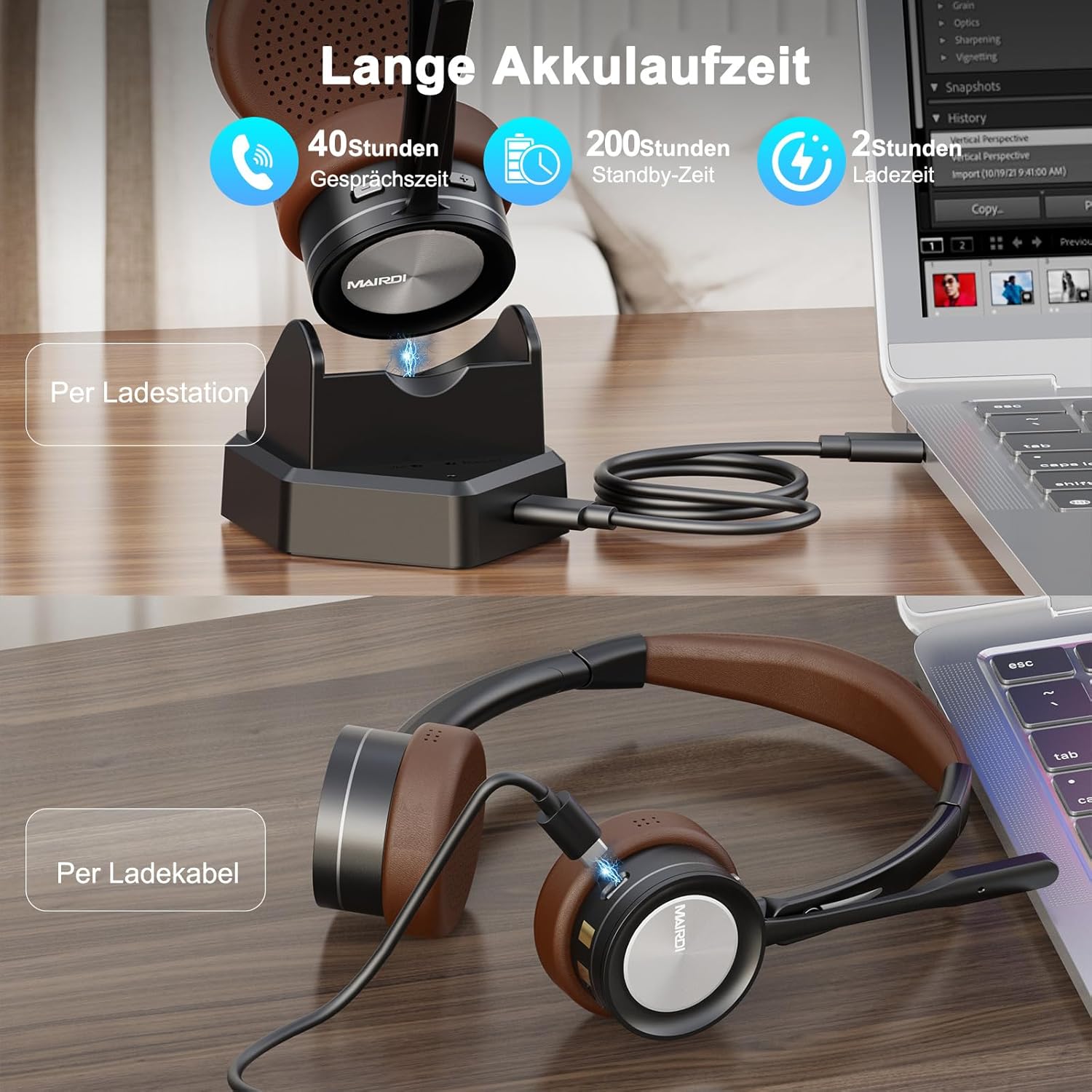
Image 2: The MAIRDI M890DCBTENC Headset with its charging base and USB cable.
3. Socrú
3.1 Muirearú Tosaigh
Before first use, fully charge your headset. Connect the USB charging cable to the charging base and a power source (e.g., computer USB port or wall adapter). Place the headset on the charging base. The indicator light will show charging status.

Image 3: The headset can be charged via the charging station or directly with the USB cable.
3.2 Ag Ceangal le Gléas
Your headset offers two primary connection methods: via the charging base (with integrated Bluetooth receiver) for PCs without Bluetooth, or directly via Bluetooth to any compatible device.
3.2.1 Connecting via Charging Base (for PC)
- Connect the charging base to your PC's USB port using the provided USB cable. The base acts as a plug-and-play Bluetooth receiver.
- Turn on the headset. It will automatically attempt to pair with the connected charging base.
- Once connected, your PC should recognize the headset as an audio device. Select it as your input/output device in your system's sound settings.
3.2.2 Connecting via Bluetooth (Direct)
- Ensure the headset is powered on and in pairing mode (usually indicated by a flashing LED).
- On your device (PC, laptop, Mac, smartphone), go to Bluetooth settings.
- Cuardaigh le haghaidh available devices and select "MAIRDI M890DCBTENC" from the list.
- Once paired, the headset's LED indicator will show a steady light.

Image 4: The headset supports multipoint pairing, allowing simultaneous connection to a laptop and a smartphone.
3.3 Multipoint Pairing
The headset supports connecting to two Bluetooth devices simultaneously. After pairing with the first device, put the headset back into pairing mode and connect to the second device. The headset will manage audio switching between the two connected devices.
4. Treoracha Oibriúcháin
4.1 Cumhacht ar siúl / as
- To power on, slide the power switch to the 'ON' position.
- Chun an cumhacht a mhúchadh, sleamhnaigh an lasc cumhachta go dtí an suíomh 'AS'.
4.2 Bainistiú Glaonna
- Freagra/Deireadh Glao: Press the multi-functional button once.
- Diúltaigh Glao: Press and hold the multi-functional button for 2 seconds.
- Balbhaigh micreafón: Press the mute button on the microphone boom. An audible prompt will indicate 'Mute On' or 'Mute Off'.

Image 5: The headset features a microphone with noise cancellation and a dedicated mute button.
4.3 Volume Control & Music Playback
- Imleabhar Suas/Síos: Use the dedicated volume buttons on the earcup.
- Seinn/Sos: Press the multi-functional button once.
- An Chéad Amhrán Eile: Press and hold the 'Volume Up' button.
- Rian Roimhe Seo: Press and hold the 'Volume Down' button.
4.4 Microphone Adjustment
The microphone boom can be rotated 330 degrees to position it optimally for your voice or to move it out of the way when not in use. Ensure the microphone is positioned close to your mouth for best voice pickup and noise cancellation.

Image 6: The headset features a soft earpad, 330° rotatable microphone arm, and an adjustable headband for comfort.
4.5 Busy Light Indicator
The headset features a busy light indicator to signal to others when you are on a call or in a meeting, helping to minimize interruptions.
5. Cothabháil
To ensure the longevity and optimal performance of your MAIRDI M890DCBTENC headset, follow these maintenance guidelines:
- Glanadh: Bain úsáid as éadach bog, tirim chun an chluasán agus an bonn luchtaithe a ghlanadh. Seachain ceimiceáin ghéara nó ábhair scríobacha a úsáid.
- Stóráil: When not in use, store the headset in the provided carry pouch or on the charging base to protect it from dust and damage.
- Cúram Battery: Avoid fully discharging the battery frequently. Charge the headset regularly, even if not in daily use, to maintain battery health.
- Coinníollacha Comhshaoil: Do not expose the headset to extreme temperatures, humidity, or direct sunlight. Keep it away from water and other liquids.
6. Fabhtcheartú
Má bhíonn fadhbanna agat le do chluasán, féach ar na fadhbanna agus na réitigh choitianta seo a leanas:
| Fadhb | Réiteach Féideartha |
|---|---|
| Ní lasann na cluasáin. | Ensure the headset is fully charged. Connect it to the charging base or directly via USB cable. |
| Ní féidir péireáil le gléas. | Ensure the headset is in pairing mode (flashing LED). Turn off and on Bluetooth on your device. Move the headset closer to the device. Clear previous Bluetooth connections on your device. |
| Gan fuaim nó droch-chaighdeán fuaime. | Check volume levels on both the headset and your connected device. Ensure the headset is selected as the default audio input/output device. Re-pair the headset. |
| Micreafón nach bhfuil ag obair. | Ensure the microphone is not muted. Check that the headset is selected as the default microphone in your device's sound settings. Position the microphone boom correctly. |
| Saol ceallraí gearr. | Ensure the headset is fully charged before use. Battery life can vary based on usage patterns and volume levels. |
7. Sonraíochtaí
| Gné | Sonraigh |
|---|---|
| Branda | MAIRDI |
| Uimhir Mhúnla | M890DCBTENC |
| Dath | Donn |
| Teicneolaíocht Nascachta | Gan sreang (Bluetooth) |
| Leagan Bluetooth | 5.2 |
| Socrúchán Cluas | Ar Cluas |
| Rialú Torainn | Leithlisiú Fuaime |
| Micreafón | AI Noise-Canceling, 330° Rotatable |
| Saol na Ceallraí (Meánach) | 40 Uair |
| Raon Minicíochta | 20 Hz - 20,000 Hz |
| Cineál tiománaí fuaime | Tiománaí Dinimiciúla |
| Cineál Rialaithe | Rialú Toirte, Cianrialtán |
| Gléasanna Comhoiriúnacha | PC, Laptop, Desktop, Mac, Smartphone, Cell Phone |
| Meáchan Mír | 0.53 cileagram |
| Ábhar | Leathar (cúisíní cluaise) |
8. Barántas agus Tacaíocht
For warranty information and customer support, please refer to the official MAIRDI website or contact your retailer. Keep your purchase receipt as proof of purchase for warranty claims.
9. Físeáin Táirgí
Bluetooth Headset with Microphone for PC
Físeán 1: Thar barrview of the MAIRDI Bluetooth Headset with Microphone for PC, highlighting its features and design.