
Réamhrá
Thank you for choosing the VTech ES2051 Digital Cordless Phone. This manual provides comprehensive instructions for setting up, operating, and maintaining your new phone system. The ES2051 is designed for ease of use, featuring a digital answering machine, call blocking capabilities, volume amplification, and an antibacterial plastic construction for enhanced hygiene.
Please read this manual thoroughly before using your phone to ensure proper operation and to take full advantage dá ghnéithe.
Eolas Sábháilteachta
Lean réamhchúraimí sábháilteachta bunúsacha i gcónaí agus an táirge seo á úsáid agat chun an baol tine, turraing leictrigh agus díobhála do dhaoine a laghdú.
- Ná húsáid an táirge seo in aice le huisce nó nuair a bhíonn tú fliuch.
- Avoid using the phone during a thunderstorm. There may be a remote risk of electric shock from lightning.
- Ná húsáid an táirge seo chun sceitheadh gáis a thuairisciú i gcomharsanacht an sceite.
- Use only the power adapter and batteries provided with this product.
- Do not dispose of batteries in a fire. They may explode. Check with local codes for special disposal instructions.
- Díphlugáil an táirge seo ón asraon balla roimh ghlanadh. Ná húsáid glantóirí leachtacha nó aerasóil. Úsáid fógraamp éadach do ghlanadh.
Ábhar an Phacáiste
Cinntigh go bhfuil na hearraí go léir i do phacáiste:
- Main Base Unit with Digital Answering Machine
- Cordless Handset(s) (typically two for this model)
- Handset Charger(s) (for additional handsets)
- Oiriúntóir(í) Cumhachta
- Corda Líne Theileafóin
- NiMH AAA Rechargeable Batteries (4 included)
- Lámhleabhar Úsáideora (an doiciméad seo)
Socrú
1. An tAonad Bonn a Cheangal
- Plug the small end of the power adapter into the power jack on the back of the base unit.
- Breiseán ceann mór an oiriúnaitheora cumhachta isteach i soicéad balla nach bhfuil faoi rialú lasc balla.
- Plug one end of the telephone line cord into the telephone jack on the back of the base unit.
- Breiseán an ceann eile den sreang teileafóin isteach i seac balla teileafóin.
2. Cadhnraí a Shuiteáil agus a Mharú
- Oscail an clúdach urrann ceallraí ar chúl an gléas láimhe.
- Insert the supplied NiMH AAA batteries, observing the correct polarity (+ and -).
- Dún an clúdach urrann ceallraí.
- Place the handset in the base unit or charger to charge. The handset will beep, indicating it is charging.
- Allow the handset to charge for at least 16 hours before initial use. For optimal battery performance, keep the handset in the charger when not in use.

Image: The VTech ES2051 Digital Cordless Phone system, showing the main base with one handset and a charging cradle for the second handset, ready for setup.
Treoracha Oibriúcháin
Glaonna a Dhéanamh agus a Fháil
- Chun Glao a Dhéanamh: Brúigh TALK / FLASH or Cainteoir, ansin diailigh an uimhir theileafóin.
- Chun Glao a Fhreagairt: Brúigh TALK / FLASH or Cainteoir nuair a bhuaileann an fón.
- Chun Glao a Chríochnú: Brúigh AS/SCAILTE or place the handset back in the base/charger.
Meaisín Freagra Digiteach
The integrated digital answering machine can record up to 30 minutes of messages. It automatically answers calls when you are unavailable.
- Teachtaireachtaí a Sheinm: Brúigh IMIR/STAIDIR ar an aonad bonn.
- Teachtaireachtaí á scriosadh: Brúigh Scrios le linn athsheinm teachtaireachta.
- Fógra a Thaifeadadh: Follow the instructions in the full manual for custom outgoing message recording.

Image: A woman interacting with the VTech ES2051 phone, highlighting the digital message counter on the base unit, which indicates the number of new messages.
Blocker Glaonna
The selective call blocking feature allows you to block up to 100 unwanted numbers, preventing them from ringing your phone.
- Chun Uimhir a Bhlocáil: During a call or from the Caller ID log, press the BLOC CALL button (often represented by a specific icon) and follow the on-screen prompts to add the number to the blacklist.
- Bainistiú Uimhreacha Blocáilte: Access the call block list through the handset menu to review or remove blocked numbers.

Image: A visual representation of the call blocker feature, showing a family in a kitchen setting with an icon indicating unwanted calls are being blocked.
Toirt Amplitheoir
An toirt amplification feature enhances incoming sounds and voices, improving clarity and volume in the handset earpiece. This is particularly useful for users with hearing impairments or those who prefer a louder audio experience.
- Activating/Adjusting: During a call, press the dedicated TOSÚ TOIRT button (often indicated by a speaker icon with a plus sign) or use the volume up/down keys to increase the earpiece volume.
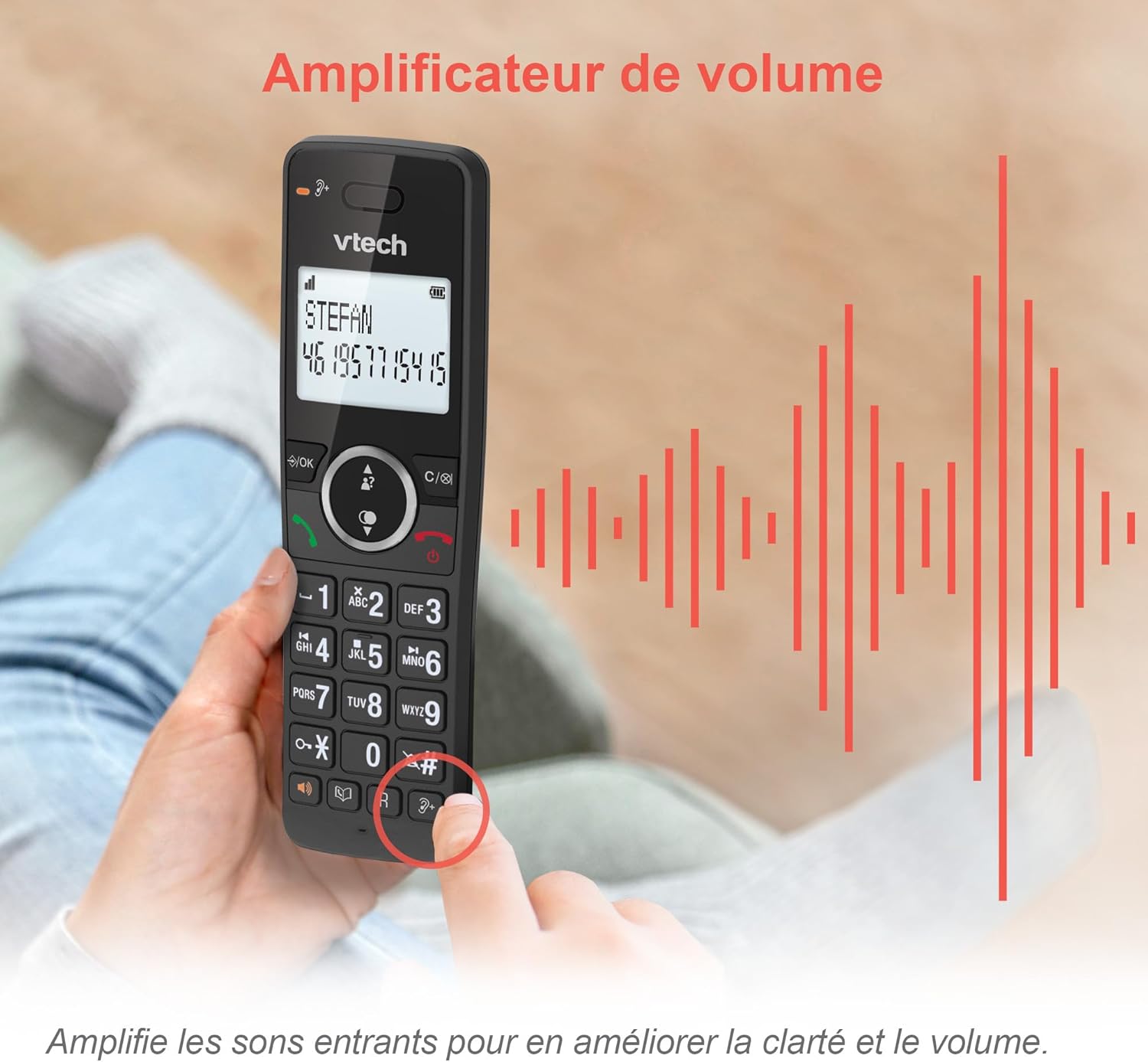
Image: A hand holding the VTech ES2051 handset, with graphic sound waves emanating from the earpiece, illustrating the volume amplification feature.
Conference Function
The conference function allows multiple users to participate in a single conversation. You can set up a three-way conference call with two internal callers (handsets) and one external caller.
- Glao Comhdhála a Thosú: Refer to the detailed instructions in the full manual for specific steps on how to add a third party to an ongoing call.

Image: Three people engaged in a conversation, visually representing the three-way conference call capability of the VTech ES2051 phone system.
Feidhm Intercom
The intercom feature allows you to communicate between handsets within your home without using the landline. This is useful for calling family members in different rooms.
- Ag baint úsáide as Intercom: Brúigh an INTERCOM button (if available) or access the intercom function through the handset menu, then select the desired handset to call.
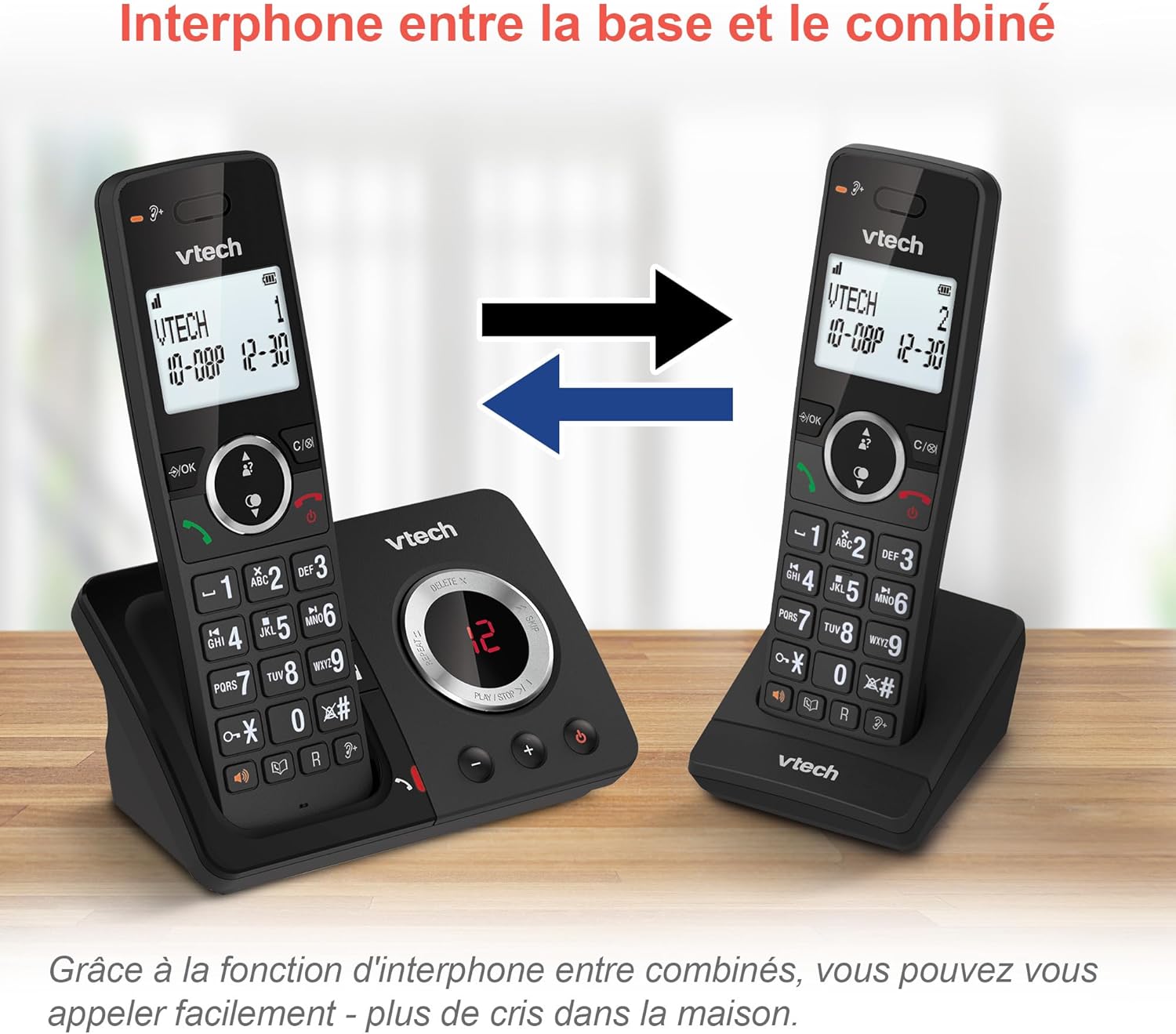
Image: A diagram showing two VTech ES2051 handsets with arrows indicating communication between them, illustrating the intercom feature.
Phonebook and Call Features
The phone includes a 100-name and number phonebook, 8 speed dial keys, and a backlit screen and keypad for easy visibility.
- Teagmhálacha a Stóráil: Navigate to the phonebook menu to add, edit, or delete contacts.
- Diailiú Luas: Assign frequently called numbers to the 8 speed dial keys for quick access.
- Log aitheantais glaoiteora: Review the last 20 incoming calls with Caller ID information.
- Athchraoladh: Access the list of the last 10 dialed numbers for quick redialing.

Íomhá: Colláis d'íomhánna a thaispeántarasing various VTech ES2051 phone features, including the 100-entry phonebook, call display, redial function, and an 18-hour talk time battery life indicator.
Mód ECO
The ECO mode automatically adjusts and minimizes the radio frequency power based on the distance between the handset and the base unit. This feature helps conserve energy and reduce power consumption.
Cothabháil
An Fón a Glanadh
The VTech ES2051 is made with antibacterial plastic and features a seamless, easy-to-clean design. To clean your phone:
- Unplug the base unit from the wall outlet and telephone line.
- Glan dromchlaí an ghutháin le clúdach bog, damp éadach. Ná húsáid glantóirí leachtacha nó aerasóil.
- Ensure the phone is completely dry before plugging it back in.
Cúram Battery
- Use only the supplied rechargeable NiMH AAA batteries.
- Ná diúscartha cadhnraí i dtine.
- Mura n-úsáidfear an fón ar feadh tréimhse fada, bain na cadhnraí as chun sceitheadh a chosc.
Fabhtcheartú
If you experience any issues with your VTech ES2051 phone, try the following troubleshooting steps:
| Fadhb | Réiteach |
|---|---|
| Uimh ton dhiailiú | Ensure the telephone line cord is securely plugged into both the base unit and the wall jack. Check if other phones on the same line are working. |
| Ní féidir glaonna a dhéanamh ná a fháil | Check the power connection to the base unit. Ensure the handset batteries are charged. If using a DSL service, you may need a DSL filter. |
| Handset displays "Out of Range" or "No Power at Base" | Move the handset closer to the base unit. Ensure the base unit's power adapter is securely plugged in. |
| Meaisín freagartha nach dtaifeadann teachtaireachtaí | Check if the answering machine is turned ON. Ensure there is enough recording time available (max 30 minutes). |
| Droch-chaighdeán fuaime nó statach | Bog an gléas láimhe níos gaire don bhunaonad. Seachain an bunaonad a chur in aice le gléasanna leictreonacha eile (m.sh., micreathonnáin, ródairí Wi-Fi) a d’fhéadfadh cur isteach a chur faoi deara. |
If the problem persists after trying these steps, please refer to the VTech support websuíomh nó déan teagmháil le seirbhís do chustaiméirí le haghaidh tuilleadh cúnaimh.
Sonraíochtaí
| Gné | Sonraigh |
|---|---|
| Branda | VTech |
| Uimhir Mhúnla | ES2051 |
| Dath | dubh |
| Cineál Fón | Gan sreang |
| Cineál Córais Freagartha | Digiteach |
| Am Taifeadta an Mheaisín Freagartha | Suas le 30 nóiméad |
| Gléasanna Comhoiriúnacha | Landlines, Answering Machine |
| Cadhnraí | 4 AAA - included |
| Comhdhéanamh Battery | NiMH |
| Foinse Cumhachta | Ceallraí Powered |
| Ábhar | Plastic (Antibacterial) |
| Cineál Dialer | Méarchlár Simplí |
| Toisí na Mír (L x W x H) | 18.3 x 13.5 x 11 ceintiméadar |
| Tír Bhunaidh | tSín |
Barántas agus Tacaíocht
VTech products are manufactured to high-quality standards. For information regarding warranty coverage, please refer to the warranty card included with your product or visit the official VTech websuíomh do do réigiún.
For technical support, frequently asked questions, or to download the full user manual, please visit the VTech support section online or contact their customer service helpline. Contact details can typically be found on the VTech weban suíomh nó ar phacáistiú an táirge.