
1. Réamhrá
Go raibh maith agat as an gceannachasing the Sharp GX-BT390 Crystal Clear Series Bluetooth Speaker. This portable speaker is designed to deliver high-quality audio with enhanced bass, featuring IP67 waterproof and dustproof capabilities, LED light modes, and True Wireless Stereo (TWS) pairing. This manual provides essential information for setup, operation, and maintenance to ensure optimal performance and longevity of your device.
2. Ábhar Pacáiste
Seiceáil le do thoil go bhfuil na hearraí uile i láthair:
- Sharp GX-BT390 Bluetooth Speaker
- Cábla Muirir (USB-C)
- Lámhleabhar Úsáideora
3. Táirge Tharview
Familiarize yourself with the various parts of your Sharp GX-BT390 speaker.
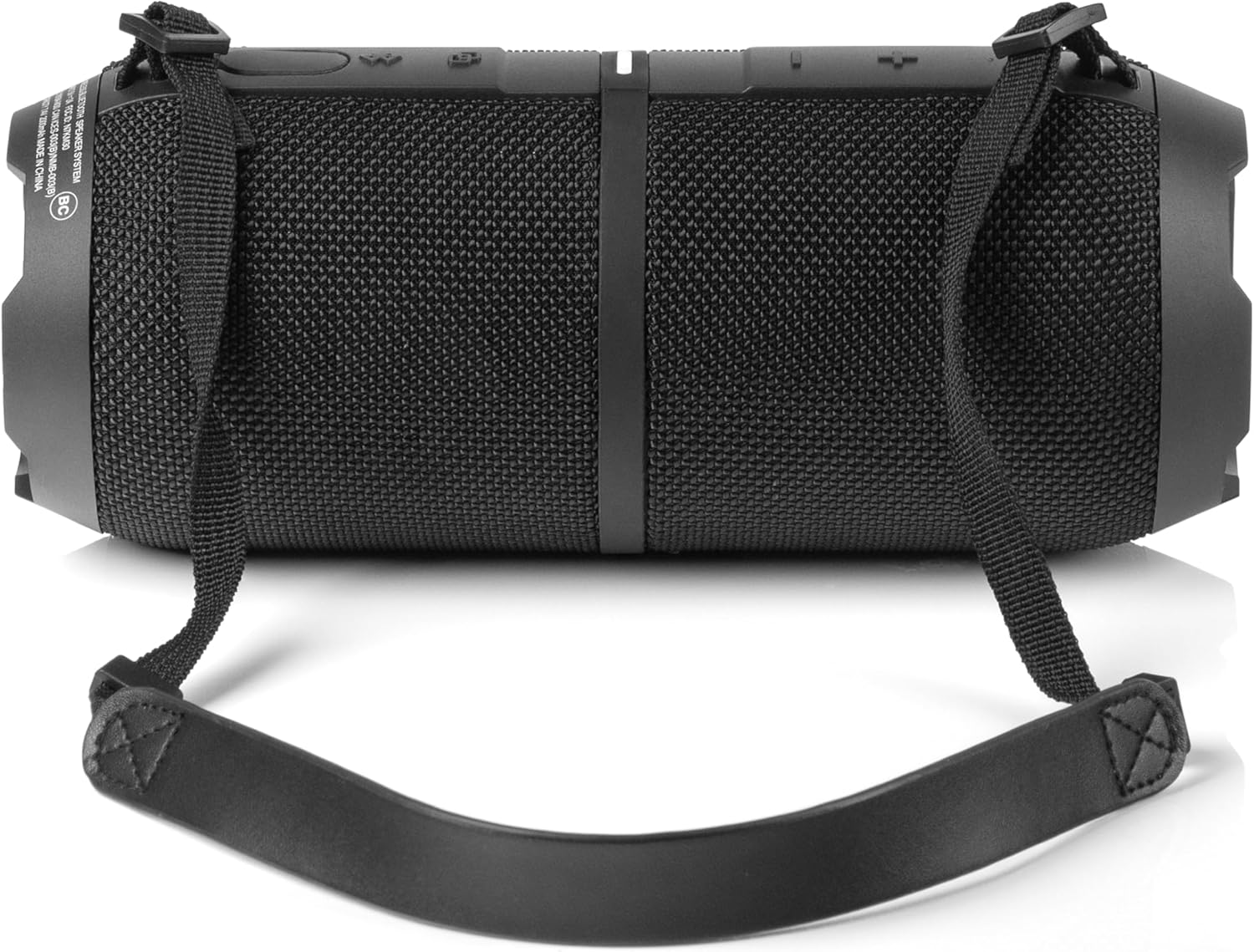
Fíor 3.1: Tosaigh view of the Sharp GX-BT390 speaker, highlighting the control panel with volume buttons, play/pause, and power indicator.

Fíor 3.2: Ar ais view of the Sharp GX-BT390 speaker, illustrating the sealed charging port and attachment points for the carrying strap.

Fíor 3.3: Taobh view of the Sharp GX-BT390 speaker, showing the textured surface and the adjustable carrying strap.

Figure 3.4: The Sharp GX-BT390 speaker with its end cap illuminated, displaying the Sharp logo and an active LED light mode.
Rialuithe agus Táscairí:
- Cnaipe Cumhachta: Brúigh agus coinnigh chun cas ar / as.
- Imleabhar Suas (+): Méadú ar an toirt.
- Imleabhar Síos (-): Laghdú toirte.
- Cnaipe Seinn/Sos: Play or pause music, answer/end calls.
- Cnaipe Péireála Bluetooth: Cuir tús le mód péireála Bluetooth.
- Táscaire LED: Shows power status, charging status, and Bluetooth connection status.
- Cnaipe Mód Éadrom: Rothaigh trí mhodhanna solais LED.
4. Socrú
4.1 Muirearú an Chainteora
- Open the protective cover on the back of the speaker to access the USB-C charging port.
- Connect the provided USB-C cable to the speaker's charging port.
- Ceangail an ceann eile den chábla USB-C le hoiriúntóir cumhachta USB comhoiriúnach (nach bhfuil san áireamh).
- Taispeánfaidh an táscaire LED stádas an mhuirir. Tógann muirear iomlán thart ar 3-4 uair an chloig de ghnáth.
- Once fully charged, disconnect the cable and securely close the protective cover to maintain IP67 water and dust resistance.
4.2 Cumhachtú Amach/Amach
- Chun Cumhacht a Chur ar: Press and hold the Power button for approximately 2 seconds until you hear an audible tone and the LED indicator illuminates.
- Chun Cumhacht as: Press and hold the Power button for approximately 2 seconds until you hear an audible tone and the LED indicator turns off.
4.3 Péireáil Bluetooth
- Ensure the speaker is powered on and within 1 meter of your Bluetooth device.
- The speaker will automatically enter Bluetooth pairing mode when first powered on, or if no device is connected. The LED indicator will flash rapidly.
- Ar do ghléas Bluetooth (fón cliste, táibléad, srl.), cumasaigh Bluetooth agus déan cuardach ar ghléasanna atá ar fáil.
- Select "Sharp GX-BT390" from the list of devices.
- Once paired, you will hear a confirmation tone, and the LED indicator will glow solid blue.
- If pairing fails, turn off the speaker and your device, then repeat the steps.
5. Treoracha Oibriúcháin
5.1 Athsheinm Ceoil
- Seinn/Sos: Brúigh an cnaipe Seinn/Sos uair amháin.
- Imleabhar Suas: Brúigh an cnaipe '+'.
- Imleabhar an Dúin: Brúigh an cnaipe '-'.
- An Chéad Amhrán Eile: Brúigh agus coinnigh an cnaipe '+'.
- Rian Roimhe Seo: Brúigh agus coinnigh an cnaipe '-'.
5.2 Glaonna Saorláimhe
The Sharp GX-BT390 features a built-in microphone for hands-free calls when connected to your smartphone.
- Freagra Glao: Brúigh an cnaipe Seinn/Sos uair amháin.
- Glao Deiridh: Brúigh an cnaipe Seinn/Sos uair amháin le linn glao.
- Diúltaigh Glao: Brúigh agus coinnigh an cnaipe Súgartha/Sos ar feadh 2 soicind.
5.3 Péireáil Fíor-Steirió Gan Sreang (TWS)
You can pair two Sharp GX-BT390 speakers together for a stereo sound experience.
- Ensure both GX-BT390 speakers are powered on and not connected to any Bluetooth device.
- On one speaker (this will be the primary speaker), press and hold the Bluetooth pairing button for 3 seconds. You will hear a tone.
- Déanfaidh an dá chainteoir cuardach go huathoibríoch ar a chéile agus ceanglóidh siad lena chéile. Nuair a bheidh siad ceangailte, cloisfidh tú ton deimhnithe.
- Now, connect your Bluetooth device to the primary speaker as described in section 4.3.
5.4 Modh Solais LED
The speaker features two LED mood lighting effects that synchronize with the music.
- Press the Light Mode button to cycle through the available light modes.
- Press the Light Mode button again to select the next mode or turn off the lights.

Fíor 5.1: Os a chionnview of key features including hands-free calling, LED light effects, IP67 rating, 10-hour playtime, 30W power output, and Bluetooth connectivity.
6. Cothabháil
To ensure the longevity and performance of your Sharp GX-BT390 speaker, follow these maintenance guidelines:
- Glanadh: Glan an cainteoir le bog, damp éadach. Ná húsáid glantóirí nó tuaslagóirí scríobach.
- Friotaíocht Uisce agus Deannaigh (IP67): The speaker is rated IP67, meaning it is protected from dust ingress and can withstand immersion in water up to 1 meter for 30 minutes. Ensure the charging port cover is securely closed to maintain this rating. Avoid prolonged exposure to water or extreme conditions.
- Stóráil: Stóráil an cainteoir in áit fhionnuar, thirim amach ó sholas díreach na gréine agus ó theocht mhór.
- Cúram Battery: To preserve battery life, charge the speaker regularly, even if not in use for extended periods. Avoid fully discharging the battery frequently.

Figure 6.1: Visual representation of the speaker's IP67 waterproof and dustproof capabilities.
7. Fabhtcheartú
Má bhíonn fadhbanna agat le do chainteoir, féach ar na fadhbanna agus na réitigh choitianta seo a leanas:
| Fadhb | Cúis Féideartha | Réiteach |
|---|---|---|
| Ní théann an cainteoir ar siúl | Ceallraí íseal; Níor brúdh an cnaipe cumhachta fada go leor | Muirearaigh an cainteoir; Brúigh agus coinnigh an cnaipe Cumhachta ar feadh 2 soicind |
| Gan fuaim | Volume too low; Device not paired; Speaker muted | Increase volume on speaker and device; Re-pair Bluetooth; Check device mute settings |
| Theipeann ar phéireáil Bluetooth | Speaker too far from device; Device Bluetooth off; Interference | Ensure speaker is within 1 meter; Turn device Bluetooth on/off; Move away from other wireless devices |
| Droch-chaighdeán fuaime | Ceallraí íseal; Gléas rófhada uainn; Bacainní | Charge speaker; Move device closer; Remove obstructions between speaker and device |
| Teipeann ar phéireáil TWS | Speakers not in pairing mode; Already connected to another device | Cinntigh go bhfuil an dá chainteoir dícheangailte ó ghléasanna eile; Lean céimeanna péireála TWS go cúramach |
8. Sonraíochtaí
Detailed technical specifications for the Sharp GX-BT390 Bluetooth Speaker:
| Gné | Sonraíocht |
|---|---|
| Ainm an tSamhail | GX-BT390(K) |
| Cineál Cainteoir | Cainteoir Bluetooth Inaistrithe Allamuigh |
| Teicneolaíocht Nascachta | Bluetooth |
| Teicneolaíocht Cumarsáide Gan Sreang | Bluetooth |
| Cainteoir Cumhacht Aschuir Uasta | 60 Vata (30W RMS) |
| Modh Aschuir Fuaime | Steirió (le péireáil TWS) |
| Gnéithe Speisialta | Bass Boost, Built-in Microphone, Dustproof, LED Light, Lightweight |
| Leibhéal Friotaíocht Uisce | IP67 (Dustdhíonach agus uiscedhíonach) |
| Foinse Cumhachta | Battery Powered (1 ceallraí ian litiam san áireamh) |
| Saol Battery | Suas le 10 uair an chloig |
| Raon uasta | 33 troigh (10 méadar) |
| Modh Rialaithe | Cnaipí Tadhaill |
| Toisí Táirge | 4"D x 8.5"L x 4"A (10.16 cm D x 21.59 cm L x 10.16 cm A) |
| Meáchan Mír | 1.75 punt (28 unsa) |

Figure 8.1: Internal component diagram illustrating the speaker drivers responsible for 30-watt rich bass and powerful sound.
9. Barántas agus Tacaíocht
The Sharp GX-BT390 Bluetooth Speaker comes with a Limited Warranty. Please refer to the warranty card included in your package for specific terms and conditions. For technical support or service inquiries, please contact Sharp customer service through their official websuíomh nó an fhaisnéis teagmhála a chuirtear ar fáil le do dhoiciméadacht táirge.