
Réamhrá
This manual provides instructions for the Ceybo 3026000066 Remote Control, designed for use with Onn Roku Smart TVs. This remote offers an intuitive layout and simple button configuration for ease of use. It is a direct replacement and requires no programming.

Tosaigh view of the Ceybo 3026000066 remote control, showing its ergonomic design and button layout.
Socrú
Suiteáil Battery
The Ceybo 3026000066 remote control requires two AAA batteries (not included) for operation. Follow these steps to install the batteries:
- Aimsigh an clúdach urrann ceallraí ar chúl an chianrialtáin.
- Brúigh síos ar an táb agus sleamhnaigh an clúdach síos chun an urrann a oscailt.
- Cuir isteach dhá chadhnraí AAA nua, ag cinntiú go bhfuil na críochfoirt dhearfacha (+) agus dhiúltacha (-) ailínithe i gceart leis na marcanna taobh istigh den urrann.
- Sleamhnaigh clúdach urrann na ceallraí ar ais ina áit go dtí go gcliceálann sé go daingean.
Nóta: This remote control does not require any programming or pairing. Once batteries are installed, it is ready for use with compatible Onn Roku Smart TVs.
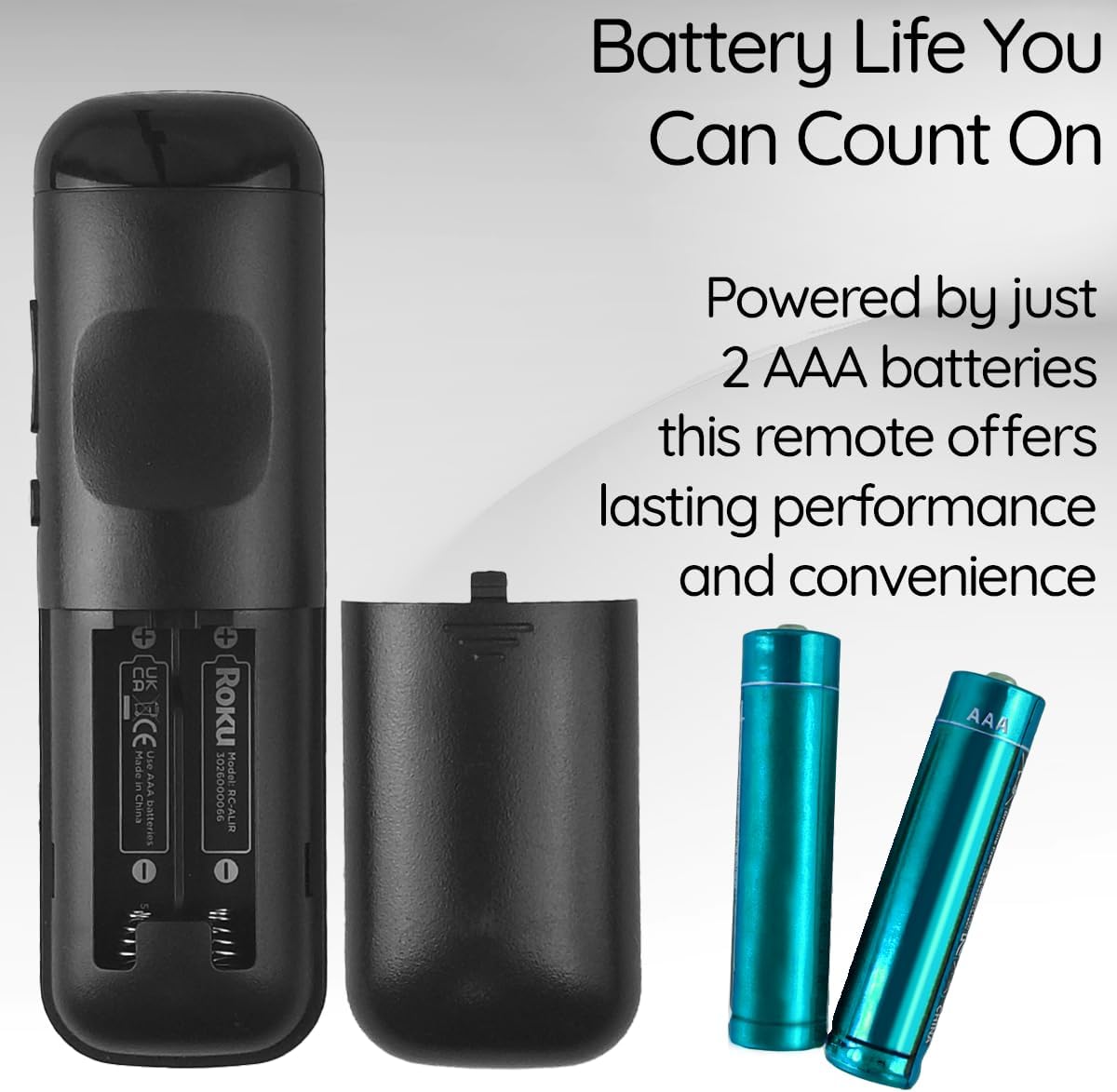
View of the remote control's battery compartment, indicating the use of two AAA batteries.
Treoracha Oibriúcháin
The Ceybo 3026000066 remote control features a user-friendly design with clearly labeled buttons for easy navigation and quick access to your entertainment options.
Príomhfheidhmeanna:
- Cnaipe Cumhachta: Casann sé an teilifís air nó as.
- Directional Pad (Up, Down, Left, Right) & OK Button: Nascleanúint trí roghchláir agus roghanna a roghnú.
- Cnaipe Ar Ais: Filleann sé ar an scáileán nó roghchlár roimhe seo.
- Cnaipe Baile: Returns to the Roku home screen.
- Imleabhar Suas/Síos: Coigeartaíonn an méid teilifíse.
- Cnaipe Mute: Balbhaíonn nó díbhalbhaíonn fuaim na teilifíse.
- Seinn/Sos, Meall Ar Aghaidh, Athchasadh: Rialaíonn athsheinm na meán.
- Star Button (*): Accesses options within certain apps or menus.
Dedicated Shortcut Buttons:
This remote includes dedicated shortcut buttons for popular streaming services, allowing for instant access with a single press:
- Netflix
- Fíorthábhacht+
- Apple teilifíse
- HBOMax

Dún-suas view of the remote control highlighting the dedicated shortcut buttons for Netflix, Paramount+, Apple TV, and HBOMax.
Comhoiriúnacht
The Ceybo 3026000066 Remote Control is compatible with the following Onn Roku Smart TV models:
- 100005843
- 100007147
- 100012586
- 100005397
- 100018971
- 100005844
- 100024699
- 100012587
- 100021261
- 100012588
- 100012590
- 100012589
- 100005395
- 100005842
- 100068372
- 100018254
- 100012584
- 100012585
- 100021258
- 100005396
Tábhachtach: This remote control is nach bhfuil ag luí with Roku Box or Roku Stick devices.

Image illustrating the Ceybo remote control alongside various Onn Roku Smart TV models, indicating broad compatibility.
Cothabháil
To ensure optimal performance and longevity of your remote control, consider the following maintenance tips:
- Athsholáthar Ceallra: Replace both AAA batteries when the remote's responsiveness decreases or it stops functioning. Always replace both batteries at the same time with new ones.
- Glanadh: Use a soft, dry cloth to clean the remote's surface. Avoid using liquid cleaners or abrasive materials, as these can damage the remote.
- Stóráil: Store the remote in a dry place away from extreme temperatures and direct sunlight. If the remote will not be used for an extended period, remove the batteries to prevent leakage.
Fabhtcheartú
If you encounter issues with your Ceybo 3026000066 remote control, try the following troubleshooting steps:
- Cianda Gan Freagra:
- Seiceáil an bhfuil na cadhnraí curtha isteach i gceart leis an bpolaireacht cheart (+/-).
- Replace the batteries with new AAA batteries. Weak or dead batteries are a common cause of remote control issues.
- Ensure there is a clear line of sight between the remote control and the TV's infrared receiver. Obstructions can block the signal.
- Cnaipí Nach bhfuil ag obair:
- If only specific buttons are not working, try cleaning the remote's surface around those buttons.
- Replace the batteries, as low power can sometimes affect individual button responsiveness.
- Remote Works Intermittently:
- Is minic a léiríonn sé seo go bhfuil cumhacht na ceallraí íseal. Cuir na ceallraí nua ina n-áit.
- Ensure you are within the maximum operating range of 30 feet from the TV.
Mura réitíonn na céimeanna seo an fhadhb, féach ar an rannán Barántas agus Tacaíocht.
Sonraíochtaí
| Branda | Ceybo |
| Ainm / Uimhir Múnla | 3026000066 |
| Gné Speisialta | Ergonomic, Lightweight, No Programming Required |
| Dath | Dubh |
| Líon Uasta na nGléasanna Tacaithe | 1 |
| Gléasanna Comhoiriúnacha | Television (Onn Roku Smart TVs) |
| Teicneolaíocht Nascachta | Infridhearg |
| Cainníocht Cnaipe | 15 |
| Cineál Rialaitheora | Rialú Cnaipe |
| Raon uasta | 30 troigh |
| Cineál Battery | AAA (2 required, not included) |
| UPC | 689176329575 |
Barántas agus Tacaíocht
This Ceybo remote control comes with a Barántas Monaróra 1 Bhliain.
For technical support, warranty claims, or further assistance, please contact Ceybo customer service. Refer to the product packaging or the Ceybo official webláithreán gréasáin le haghaidh faisnéise teagmhála.