
1. Eolas Tábhachtach Sábháilteachta
Please read these safety instructions carefully before operating your TV and retain them for future reference. This manual provides important information regarding the safe installation, use, and maintenance of your Sharp 40FH2EA television.
- Foinse Cumhachta: Connect the TV only to an AC 220-240V, 50Hz power supply.
- Aeráil: Cinntigh go bhfuil aeráil leordhóthanach timpeall an teilifíseáin. Ná bac na hoscailtí aerála.
- Uisce agus Taise: Ná nochtaigh an teilifís don bháisteach ná don taise. Ná cuir rudaí atá lán le leachtanna, amhail vásaí, ar an teilifís.
- Foinsí Teasa: Keep the TV away from heat sources like radiators, heat registers, stoves, or other apparatus that produce heat.
- Glanadh: Díphlugáil an teilifís ón asraon balla sula nglanann tú é. Bain úsáid as éadach bog, tirim. Ná húsáid glantóirí leachtacha ná glantóirí aerasóil.
- Gléasta: When wall-mounting, ensure the wall mount is suitable for the TV's weight and installed by qualified personnel.
- Páistí: Supervise children to ensure they do not play with the TV.
2. Ábhar Pacáiste
Deimhnigh go bhfuil na míreanna uile i láthair sa phacáistiú:
- Sharp 40FH2EA 40-inch Full HD LED Android TV
- Cianrialú
- Seastáin Teilifíse (2x)
- Scriúnna le haghaidh Seastáin Teilifíse
- Cábla Cumhachta
- Treoir Tosaigh Tapa
- Bileog Faisnéise Sábháilteachta

Íomhá: Tosaigh view of the Sharp 40FH2EA television, showcasina dhearadh bezel caol.
3. Socrú
3.1 Na Seastáin Teilifíse a Cheangail
- Cuir an teilifís go cúramach agus í aghaidh síos ar dhromchla bog, glan chun damáiste don scáileán a chosc.
- Ailínigh gach seastán leis na sliotáin chomhfhreagracha ar bhun an teilifíse.
- Daingnigh na seastáin ag baint úsáide as na scriúnna atá ar fáil. Cinntigh go bhfuil siad teannta go daingean.

Image: The Sharp 40FH2EA television viewed from an angle, showing the two attached stand feet supporting the unit.
3.2 Gléasanna Seachtracha a Cheangal
The Sharp 40FH2EA offers various connection options for your external devices.
- HDMI: Connect Blu-ray players, game consoles, or set-top boxes to the HDMI ports. This model features 3 HDMI inputs.
- USB: Insert USB drives for media playback or software updates into the 2 USB ports.
- Antenna/Cábla: Connect your antenna or cable TV signal to the RF input.
- Ethernet (LAN): Chun nasc idirlín cobhsaí a bheith agat, ceangail cábla Eitirnéad leis an gcalafort LAN.
- Fuaim Amach: Use the optical digital audio output for connecting to a soundbar or home theater system.

Íomhá: Pro taobhfile of the Sharp 40FH2EA TV, highlighting the accessible USB and HDMI ports on the left side.
Íomhá: Cúl view of the Sharp 40FH2EA TV, displaying the various input and output ports including HDMI, USB, and antenna connections.
3.3 An Chumhachtú Tosaigh agus an Socrú den Chéad Uair
- Ceangail an cábla cumhachta leis an teilifís agus ansin le soicéad balla.
- Brúigh an cnaipe cumhachta ar an gcianrialtán nó ar an teilifís.
- Follow the on-screen instructions to select your language, country, and network settings (Wi-Fi or Ethernet).
- Perform a channel scan for DVB-T/T2/C/S/S2 signals to find available TV channels.
- Log in with your Google account to access Android TV features and download apps.
4. Ag Oibriú an Teilifíse
4.1 Feidhmeanna Cianrialtáin
The remote control allows you to navigate the TV's features. Familiarize yourself with the main buttons:
- Cumhacht (Cnaipe dearg): Casann sé an teilifís air nó as.
- Foinse: Selects input sources (HDMI 1, HDMI 2, TV, etc.).
- Líon Cnaipí (0-9): Roghnú díreach cainéal.
- Toirt (+/-): Coigeartaíonn an leibhéal toirte.
- Cainéal (CH +/-): Athraíonn sé bealaí teilifíse.
- Ceap Loingseoireachta (Suas/Síos/Clé/Deas/Ceart go leor): Nascleanúint a dhéanamh trí bhiachláir agus roghanna a dheimhniú.
- Ar ais: Filleann sé ar an scáileán nó roghchlár roimhe seo.
- Baile: Rochtain ar scáileán baile Android TV.
- Netflix, Prime Video, YouTube, Google Play: Dedicated buttons for quick access to streaming services.

Image: The remote control for the Sharp 40FH2EA TV, showing its layout with navigation buttons and dedicated streaming service buttons.
4.2 Gnéithe Teilifíse Cliste (Android TV)
Your Sharp 40FH2EA TV runs on Android TV, providing access to a wide range of apps and services.
- Scáileán Baile: The central hub for your apps, recommended content, and settings.
- Google Play Store: Download additional apps, games, and content.
- Rialú Gutha: Use the built-in Google Assistant (if available on your remote) to search for content, control smart home devices, and more.
- Chromecast Insuite: Craol ábhar ó do ghuthán cliste nó taibléad go díreach chuig an teilifís.
- Seirbhísí Sruthaithe: Access popular services like Netflix, YouTube, Amazon Prime Video, Hulu, Disney+, and more.

Image: The Android TV home screen displayed on the Sharp 40FH2EA, featuring various streaming app icons and content recommendations.
5. Cothabháil
5.1 Glanadh an teilifíseáin
- Díphlugáil an teilifís i gcónaí sula ndéantar é a ghlanadh.
- Bain úsáid as éadach bog, tirim, saor ó lint chun an scáileán agus an comh-aireachta a ghlanadh.
- I gcás marcanna righne ar an scáileán, déan é a dhí-ocsaídiú go héadrom.ampen the cloth with water or a specialized screen cleaner (ensure it's safe for LED screens) and wipe gently.
- Never spray cleaners directly onto the screen or cabinet.
5.2 Nuashonrú Bogearraí
Your Android TV may receive software updates periodically. It is recommended to keep your TV's software updated for optimal performance and security. Updates can usually be found in the TV's settings menu under 'About' or 'System Update'.
6. Fabhtcheartú
Má bhíonn fadhbanna agat le do theilifís, féach ar na fadhbanna agus na réitigh choitianta seo a leanas:
| Fadhb | Cúis / Réiteach Féideartha |
|---|---|
| Gan chumhacht | Ensure the power cable is securely connected to the TV and the wall outlet. Check if the outlet is working. Try a different outlet. |
| Gan pictiúr, ach tá fuaim ann | Seiceáil an fhoinse ionchuir. Cinntigh go bhfuil gléasanna seachtracha ar siúl agus ceangailte i gceart. Bain triail as cábla HDMI difriúil. |
| Gan fuaim, ach tá pictiúr ann | Check the volume level. Ensure the TV is not muted. Check audio settings and external audio device connections. |
| Cianrialtán nach bhfuil ag obair | Cuir na cadhnraí ina n-áit. Cinntigh nach bhfuil aon bhacainní idir an cianrialtán agus braiteoir infridhearg an teilifíseáin. |
| Ní féidir ceangal le Wi-Fi | Cinntigh go bhfuil do ródaire Wi-Fi ar siúl agus ag obair. Cuir isteach an focal faire Wi-Fi arís. Bain triail as an teilifís agus an ródaire a atosú. |
| Tá aipeanna mall nó ag tuairteáil | Close unused apps. Clear app cache (in TV settings). Restart the TV. Ensure sufficient internet speed. |
If the problem persists, consult the full user manual available on the Sharp support websuíomh nó déan teagmháil le tacaíocht do chustaiméirí.
7. Sonraíochtaí
Detailed technical specifications for the Sharp 40FH2EA 40-inch Full HD LED Android TV:
| Gné | Sonraíocht |
|---|---|
| Ainm an tSamhail | 40FH2EA |
| Uimhir Mhúnla Inmheánach | 2T-C40FHx |
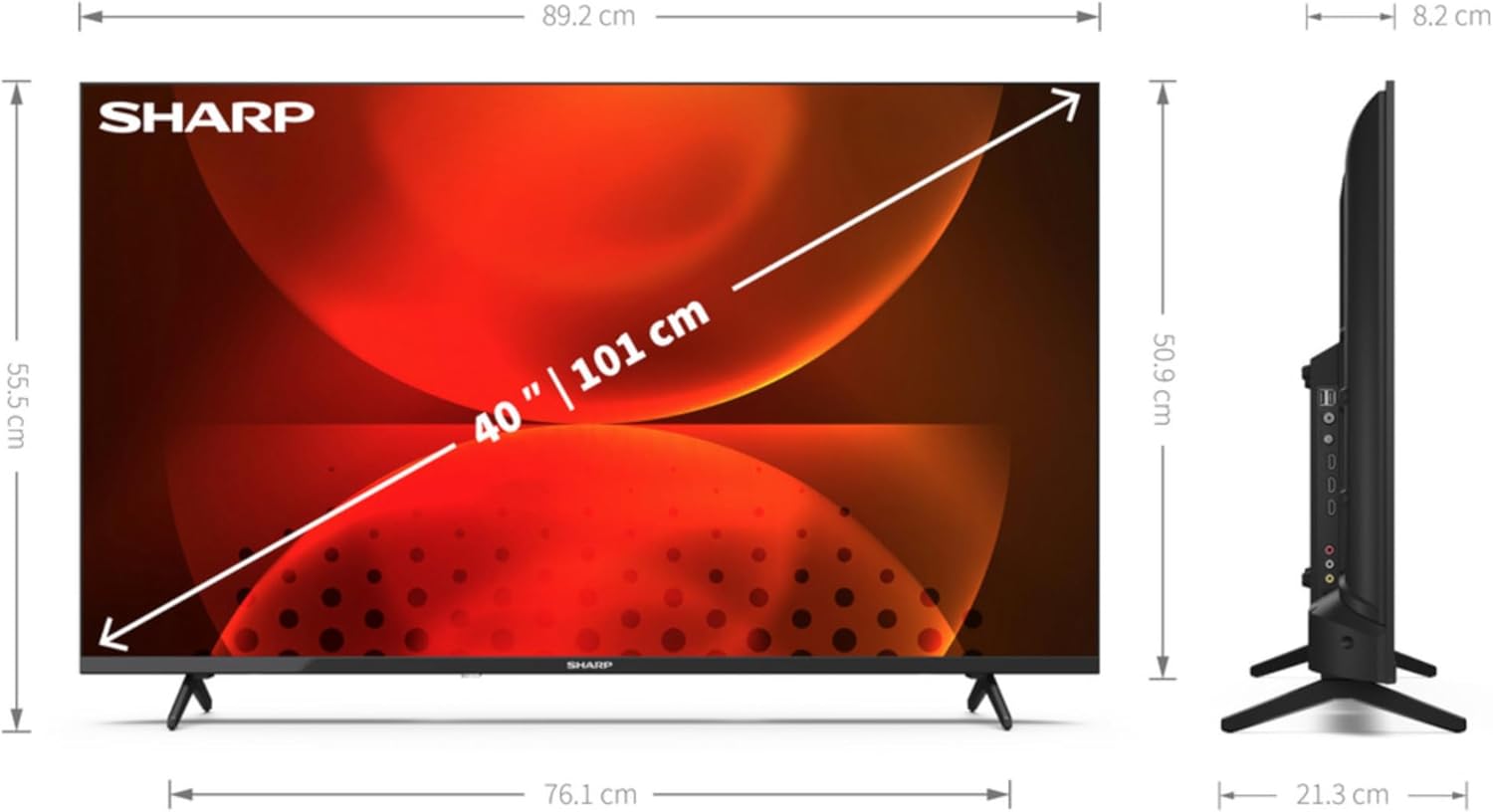
| Méid an Scáileáin | 40 orlach (101.6 cm) |
| Taifeach Taispeána | 1920 × 1080 picteilín (HD Iomlán) |
| Teicneolaíocht Taispeána | stiúir |
| Cruth Scáileáin | Maol |
| Ardán Smart TV | Teilifíse Android |
| Motion Interpolation Technology | AMR (Active Motion Rate) 400 |
| Cóimheas Gné Dúchais | 16:9 |
| Digital Signal Format | DVB, DVB-C, DVB-S, DVB-S2, DVB-T, DVB-T2 |
| Nascacht Gan Sreang | Wi-Fi, Bluetooth |
| Nascacht Wired | LAN ethernet |
| Poirt HDMI | 3 |
| Calafoirt USB | 2 |
| Dath | Dubh |
| Seirbhísí Idirlín Tacaithe | Netflix, YouTube, Amazon Prime Video, Hulu, Disney+, etc. |
8. Barántas agus Tacaíocht
For warranty information, please refer to the warranty card included with your product or visit the official Sharp website for your region. For technical support, product registration, or to download the full user manual, please visit the Sharp support portal or contact their customer service department.
Tacaíocht Ar Líne: www.sharpconsumer.com