
1. Réamhrá
Thank you for choosing the Dexnor Keyboard Case. This manual provides essential information for setting up, operating, and maintaining your new keyboard case. Designed to enhance your Samsung Galaxy Tab experience, this case features a magnetic attachment, a precise multi-touch trackpad, a 7-color backlit QWERTZ keyboard, and convenient S Pen storage. Please read this manual thoroughly before use to ensure optimal performance and longevity of your device.
2. Comhoiriúnacht
This keyboard case is exclusively designed for the following Samsung Galaxy Tab models:
- Samsung Galaxy Tab S10 Lite (Model SM-X400, SM-X406B)
- Samsung Galaxy Tab S10 FE 10.9" 2025 (Model SM-X520, SM-X526, SM-X526B)
- Samsung Galaxy Tab S9 FE 10.9" 2023 (Model SM-X510/SM-X516B/SM-X518U)
- Samsung Galaxy Tab S9 11" 2023 (Model SM-X710/SM-X716B/SM-X718U)
Note: This case is NOT compatible with Samsung Galaxy Tab S9+/S9 FE+ 12.4" or Samsung Galaxy Tab S11 (2025) 11". Please verify your tablet model before purchase.

Figure 2.1: Compatible and incompatible tablet models.
3. Ábhar Pacáiste
Seiceáil an pacáiste le do thoil le haghaidh na míreanna seo a leanas:
- Dexnor Keyboard Case
- Cábla Muirearú USB-C
- Treoir Tosaigh Tapa
- Lámhleabhar Úsáideora (an doiciméad seo)
4. Socrú
4.1 Do Tháibléad a Cheangail
The keyboard case features a strong magnetic hinge for secure attachment. Simply align your Samsung Galaxy Tab with the magnetic area on the case. The tablet will snap into place, transforming your device into a laptop-like setup.

Figure 4.1: Magnetic attachment and adjustable viewuillinn ing.
4.2 Pairing the Keyboard via Bluetooth
- Cinntigh go bhfuil an méarchlár luchtaithe go leordhóthanach.
- Turn on the keyboard by pressing the power button (usually located on the side or top edge of the keyboard). The indicator light will flash, indicating it's in pairing mode.
- On your Samsung Galaxy Tab, go to Socruithe > Gléasanna nasctha > Bluetooth agus cas Bluetooth air.
- Your tablet will search for available devices. Select "Dexnor Keyboard" (or similar name) from the list.
- Follow any on-screen prompts to complete the pairing process. Once paired, the indicator light on the keyboard will stop flashing.
5. Treoracha Oibriúcháin
5.1 Coigeartú Viewing Uillinneacha
The robust aluminum alloy hinge allows for flexible viewing angles, transforming your tablet into a versatile workstation. Adjust the tablet's position to your preferred angle for typing, reading, or viewábhar.

Figure 5.1: Tablet in floating cantilever position for optimal viewing.
5.2 Trackpad Il-Tadhall
The integrated high-precision multi-touch trackpad supports various gestures for seamless navigation. Use multi-finger gestures for actions such as scrolling, swiping, and zooming, enhancing your productivity.

Figure 5.2: Multi-touch trackpad for precise control.
5.3 Backlit Keyboard
The keyboard features 7 different backlight colors and 3 adjustable brightness levels for comfortable typing in any lighting condition. Use the dedicated backlight key (often a sun icon or Fn + light key combination) to cycle through colors and adjust brightness.

Figure 5.3: Backlit QWERTZ keyboard with adjustable colors.
5.4 S Pen Holder
The case provides two convenient locations for your S Pen: an integrated magnetic holder within the keyboard for secure storage and a cutout slot at the rear of the case for charging and additional storage. This design ensures quick access and prevents loss.
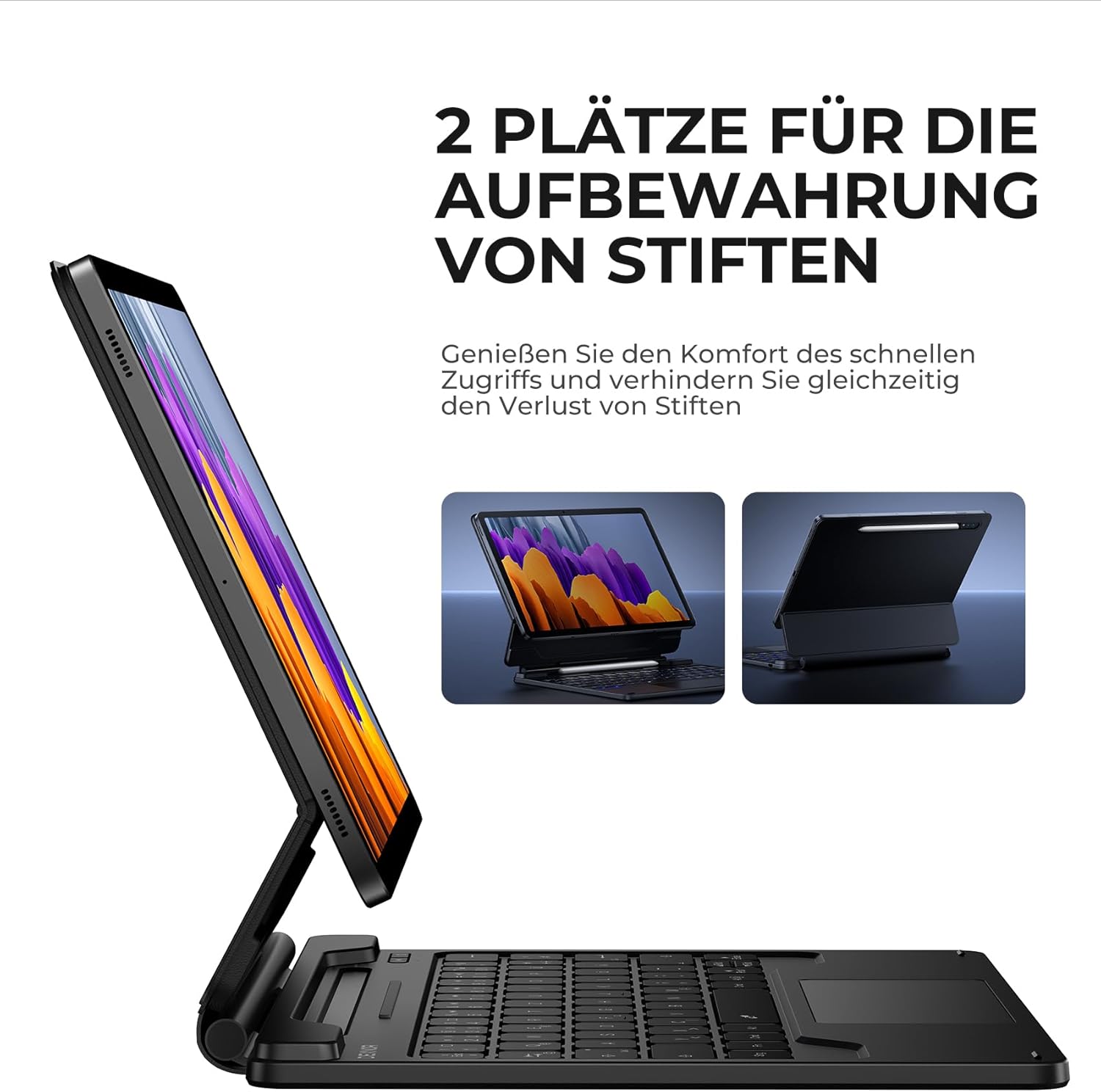
Figure 5.4: Dual S Pen storage options.
5.5 DEX Mode
Combine your tablet with the keyboard case and activate Samsung DEX mode to transform your tablet into a desktop-like experience. This allows for enhanced multitasking and productivity, similar to a traditional laptop setup.
5.6 Eochracha Aicearra
The keyboard includes a series of convenient shortcut keys for quick control over media playback, volume, and other tablet functions. Refer to the keyboard layout for specific key functions.

Figure 5.5: Keyboard layout with shortcut keys.
5.7 Automatic Sleep/Wake Function
The case supports automatic sleep/wake functionality. Closing the case will put your tablet to sleep, and opening it will wake it up, conserving battery life for both your tablet and the keyboard.
6. Muirearú an Mhéarchláir
The keyboard is equipped with a long-lasting 650 mAh battery. To charge the keyboard:
- Connect the provided USB-C charging cable to the charging port on the keyboard.
- Ceangail an ceann eile den chábla le hoiriúntóir cumhachta USB (nach bhfuil san áireamh) nó le port USB ríomhaire.
- The charging indicator light will illuminate during charging and turn off once fully charged. A full charge takes approximately 3.5 hours.
A single charge provides up to 200 hours of working time and 1200 hours of standby time.

Figure 6.1: USB-C charging port.
7. Cothabháil
To ensure the longevity and optimal performance of your Dexnor Keyboard Case:
- Glanadh: Bain úsáid as bog, damp cloth to wipe the exterior of the case. For the keyboard keys, use a soft, dry cloth or a specialized keyboard cleaner. Avoid harsh chemicals or abrasive materials.
- Stóráil: When not in use for extended periods, store the keyboard case in a cool, dry place. Ensure the case is closed to protect the tablet and keyboard.
- Seachain Leachtanna: Keep the keyboard away from liquids to prevent damage to internal components.
- Bí cúramach: While durable, avoid dropping the case or subjecting it to excessive force.
8. Fabhtcheartú
8.1 Níl an Méarchlár ag Ceangal
- Seiceáil Battery: Cinntigh go bhfuil an méarchlár luchtaithe.
- Athphéireáil: Delete the keyboard from your tablet's Bluetooth device list and attempt to pair it again (refer to Section 4.2).
- Atosaigh Gléasanna: Restart both your tablet and the keyboard.
- Cur isteach: Bog ar shiúl ó ghléasanna eile gan sreang a d'fhéadfadh cur isteach a chruthú.
8.2 Gan Fhreagracht ar an Trackpad
- Seiceáil Ceangal: Cinntigh go bhfuil an méarchlár ceangailte i gceart trí Bluetooth.
- Glan an Trackpad: Ensure the trackpad surface is clean and free of debris.
- Atosaigh: Restart the keyboard and tablet.
8.3 Soilsiú Cúlra Gan Obair
- Seiceáil Battery: Low battery can affect backlight functionality. Charge the keyboard.
- Toggle Backlight: Press the backlight key (or Fn + backlight key) to ensure it's not turned off or at the lowest brightness setting.
8.4 Saincheisteanna Muirir
- Seiceáil Cábla: Ensure the USB-C cable is securely connected to both the keyboard and the power source. Try a different USB-C cable if available.
- Foinse Cumhachta: Bain triail as adapter cumhachta USB difriúil nó port.
9. Sonraíochtaí
| Branda | Dexnor |
| Uimhir Mhúnla | DK005 |
| Teicneolaíocht Nascachta | Bluetooth |
| Gnéithe Speisialta | Multi-Touch Trackpad, Backlit Keyboard, S Pen Holder |
| Gléasanna Comhoiriúnacha | Samsung Galaxy Tab S10 Lite 10.9", Samsung Galaxy Tab S9 11", Samsung Galaxy Tab S9 FE/S10 FE 10.9" |
| Comhdhéanamh Battery | Litiam-ian |
| Cumas Battery | 650 mAh |
| Am Muirir | Thart. 3.5 n-uaire |
| Am Oibre | Suas le 200 uair an chloig |
| Am Fuireachas | Suas le 1200 uair an chloig |
| Leagan Amach Méarchláir | QWERTZ (Gearmáinis) |
| Toisí Táirge | 25.9L x 20.5W x 1.9H cm |
10. Barántas agus Tacaíocht
Dexnor provides a 1-year manufacturer's warranty for this product. Additionally, lifetime technical support is available.
For warranty claims, technical assistance, or any product-related inquiries, please contact Dexnor customer support through the retailer's platform or visit the official Dexnor webláithreán gréasáin le haghaidh faisnéise teagmhála.