
1. Réamhrá
The LEAUDIO XDUOO XD05 Plus 2 is a high-performance portable Digital-to-Analog Converter (DAC) and headphone amplifier designed to deliver exceptional audio quality. It features advanced decoding capabilities, powerful output, and versatile connectivity options for various audio sources and headphones.
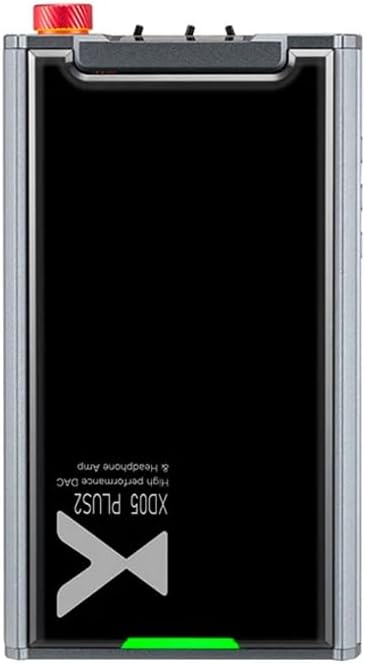
Fíor 1: Barr view of the XDUOO XD05 Plus 2, highlighting its compact design and model branding.
2. Ábhar Pacáiste
Seiceáil an pacáiste le do thoil le haghaidh na míreanna seo a leanas:
- XDUOO XD05 Plus 2 Portable DAC Headphone Amplitheoir
- Cábla USB
- Lámhleabhar Úsáideora (an doiciméad seo)
3. Leagan Amach an Ghléis
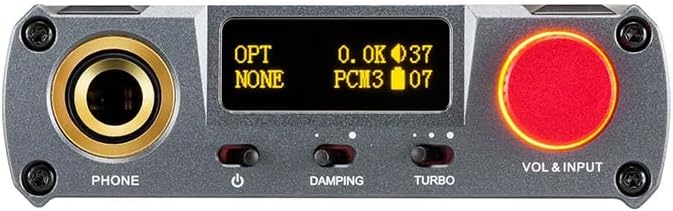
Figure 2: Front panel controls including the headphone output, OLED display, Damping switch, Turbo switch, and Volume/Input knob.

Figure 3: Rear panel connections featuring AUX In/Out, USB In, UAC 1.0/2.0 switch, Charge port, and Digital In (Optical/Coaxial).
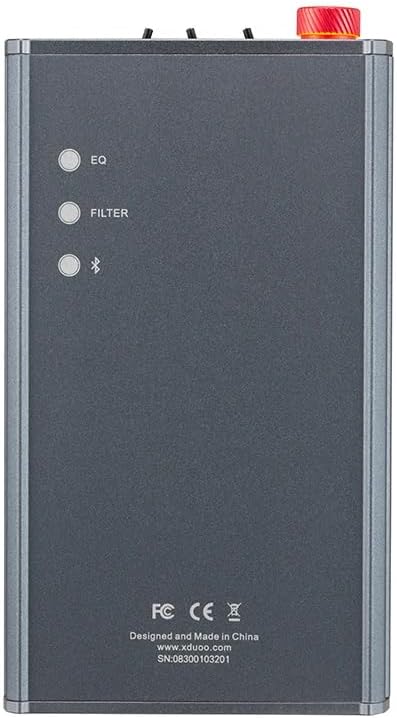
Figure 4: Side panel buttons for EQ, Filter, and Bluetooth functions.
4. Socrú agus Naisc
4.1 Muirearú an Ghléis
Connect the provided USB cable to the 'CHARGE' port on the rear panel (Figure 3) and plug the other end into a USB power adapter (not included) or a computer's USB port. The charging time is approximately 3 hours for fast charging and 5 hours for slow charging.
4.2 Ag Ceangal le Foinsí Fuaime
The XD05 Plus 2 offers multiple input options:
- Ionchur USB: Connect to computers (Windows/Linux/Mac OSX), smartphones (iOS/Android), or other USB audio sources using the 'USB IN' port (Figure 3). Ensure the UAC switch is set to the appropriate mode (UAC 1.0 or UAC 2.0) for your device.
- Digital Input (Optical/Coaxial): Connect to desktop CDs, Hi-Fi players, or digital turntables via the 'DIGITAL IN' port (Figure 3).
- Ionchur Bluetooth: For wireless audio streaming, refer to Section 5.4 for Bluetooth pairing instructions.
- AUX In/Out: Use the 'AUX IN/OUT' port (Figure 3) for analog input or output connections.
4.3 Cluasáin a nascadh
Plug your headphones into the 'PHONE' output jack on the front panel (Figure 2).
5. Treoracha Oibriúcháin
5.1 Cumhacht Ar Siúl/Múch agus Roghnú Ionchuir
Press and hold the power button (located near the 'PHONE' jack, Figure 2) to turn the device on or off. Rotate the 'VOL & INPUT' knob (Figure 2) to adjust the volume. Press the 'VOL & INPUT' knob to cycle through available input sources (USB, Optical, Coaxial, Bluetooth, AUX).
5.2 Rialú Toirt
The device features a 99-level digital volume adjustment, ensuring balanced left and right channels at any volume setting. Rotate the 'VOL & INPUT' knob to precisely set your desired listening level.
5.3 Sound Adjustments (EQ, Filter, Damping, Turbo)
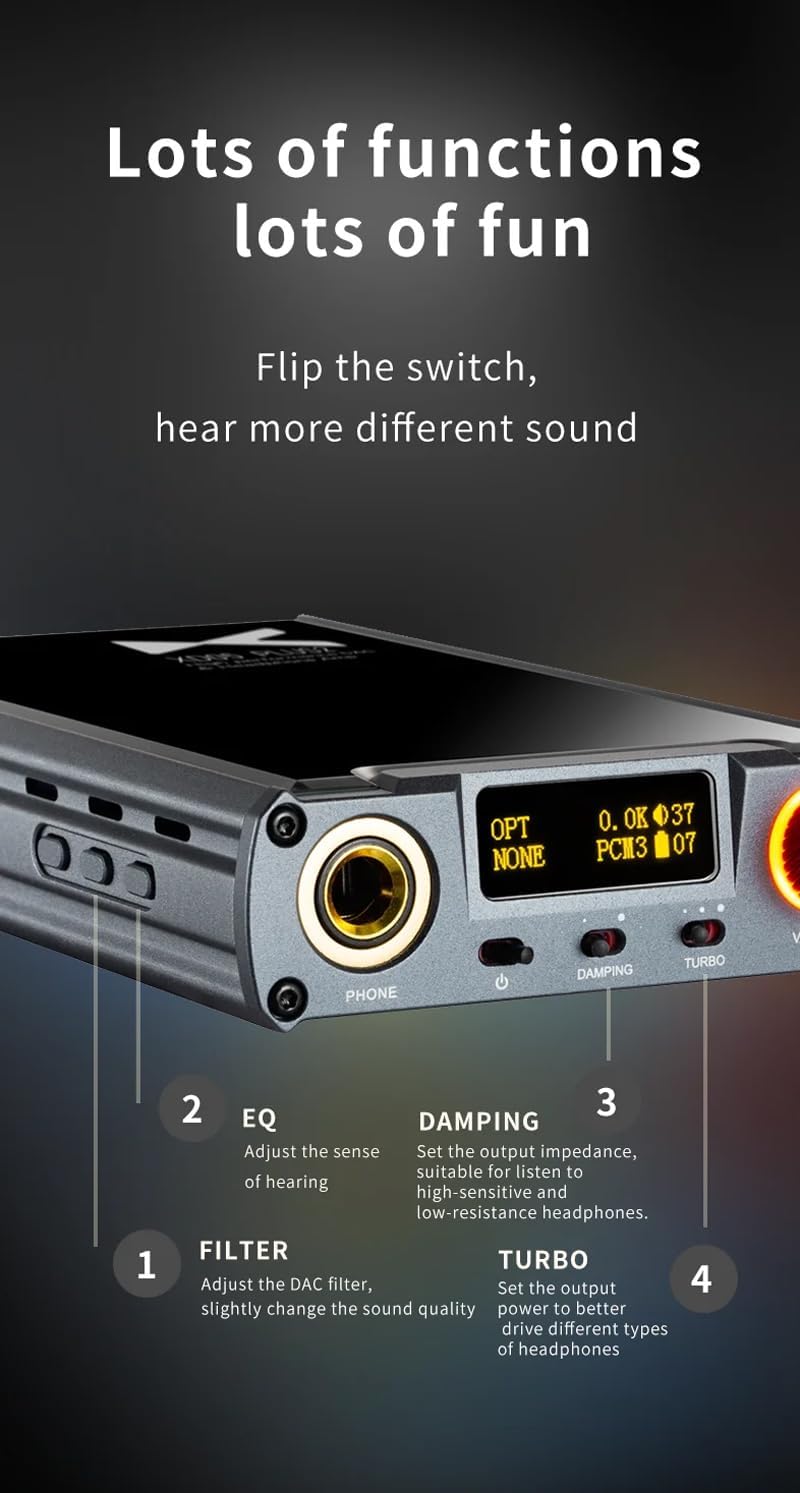
Fíor 5: Mionsonraithe view of sound adjustment controls and their functions.
- Cothromóir (EQ): Press the 'EQ' button (Figure 4) to adjust the sense of hearing and tailor the sound to your preference.
- Scagaire: Press the 'FILTER' button (Figure 4) to slightly change the sound quality by adjusting the DAC filter settings.
- Dampá: Use the 'DAMPING' switch (Figure 2) to set the output impedance, suitable for high-sensitivity and low-resistance headphones.
- Turbo: Use the 'TURBO' switch (Figure 2) to set the output power, allowing the device to better drive different types of headphones.
5.4 Péireáil Bluetooth
To pair your device via Bluetooth 5.1:
- Ensure the XD05 Plus 2 is powered on and Bluetooth input is selected.
- Press the 'Bluetooth' button (Figure 4) to enter pairing mode. The Bluetooth indicator on the OLED screen will flash.
- On your source device (e.g., smartphone, tablet), search for available Bluetooth devices and select "XDUOO XD05 Plus 2".
- Once connected, the Bluetooth indicator will stop flashing.
Supported Bluetooth formats include AAC, SBC, aptX, aptX LL, aptX HD, and LDAC.
5.5 Ag cur in ionad an Ampsliseanna ardaitheoir
Tá an amplifier chip is user-replaceable, allowing for customization of your audio experience. Refer to the manufacturer's guidelines or a qualified technician for instructions on safely replacing the op-amp sceallóga.
6. Sonraíochtaí
| Gné | Sonraíocht |
|---|---|
| Ceallraí | 3.8V/5000mAh |
| Scáileán | 0.91 orlach OLED |
| OS comhoiriúnach | Windows/Linux/Mac OSX/iOS/Android |
| Frequency Response (USB/SPDIF) | 20Hz~20kHz (±0.5dB) |
| Freagra Minicíochta (AMP) | 10Hz~80kHz (±0.5dB) |
| USB Sampling Rate (PCM) | 16-32BIT/44.1-384KHZ |
| USB Sampling Rate (DSD) | DOP/NATIVE DSD64-256 |
| USB Sampling Rate (MQA) | OFS rendering layer decoding |
| OPT/COA Sampling Rate (PCM) | 16-24BIT/44.1-192KHZ |
| OPT/COA Sampling Rate (DSD) | DSD64 (DOP) |
| Bluetooth Formats | AAC/SBC/aptX/aptX LL/aptX HD/LDAC |
| Gnóthachan | +0dB/3dB/6dB |
| Cumhacht Aschuir Cluasáin | 1200mW (32Ω ualach) |
| Headphone THD+N | 0.0015%@1kHz |
| Headphone S/N | 121dB |
| Headphone Crosstalk | >76dB |
| AUX OUT Output Level | 2.0Foirmeacha |
| AUX OUT THD+N | 0.0009%@1kHz |
| AUX OUT S/N | 122dB |
| AUX OUT Crosstalk | ≥109dB |
| Battery Life (USB IN) | ≥9H |
| Battery Life (SPDIF IN) | ≥15H |
| Battery Life (BT IN) | ≥18H |
| Charging Time (Fast) | ≤3 uair an chloig |
| Charging Time (Slow) | ≤5 uair an chloig |
| Méid | 13.0 x 7.5 x 2.2 cm |
| Meáchan | 0.29 kg |
7. Cothabháil
To ensure the longevity and optimal performance of your XDUOO XD05 Plus 2, follow these maintenance guidelines:
- Coinnigh an gléas glan trína ghlanadh le héadach bog tirim. Seachain ceimiceáin ghéara nó ábhair scríobacha a úsáid.
- Cosain an gléas ó theocht mhór, solas díreach na gréine agus taise.
- Seachain an gléas a scaoileadh nó a chur faoi réir tionchair láidre.
- Nuair nach bhfuil sé in úsáid ar feadh tréimhsí fada, stóráil an gléas in áit fhionnuar, thirim.
8. Fabhtcheartú
If you encounter issues with your XDUOO XD05 Plus 2, please refer to the following common troubleshooting steps:
- Gan Fuaim:
- Seiceáil an bhfuil an fheiste faoi thiomáint.
- Cinntigh go bhfuil na cluasáin ceangailte i gceart.
- Deimhnigh go bhfuil an fhoinse ionchuir cheart roghnaithe.
- Coigeartaigh an leibhéal toirte.
- Check the audio source device for proper playback and volume settings.
- Drochchaighdeán Fuaime:
- Cinntigh go bhfuil gach cábla ceangailte go daingean.
- Try a different audio cable or source.
- Check EQ and Filter settings; reset them to default if necessary.
- Ensure the UAC switch is set correctly for your USB connection.
- Saincheisteanna Ceangail Bluetooth:
- Ensure the device is in Bluetooth pairing mode.
- Move the source device closer to the amplitheoir.
- Clear previous Bluetooth pairings on both devices and try pairing again.
- Gléas Gan Muirearú:
- Verify the USB cable is connected to the 'CHARGE' port.
- Bain triail as cábla USB difriúil nó adapter cumhachta.
- Cinntigh go bhfuil an fhoinse cumhachta ag feidhmiú.
9. Físeán Táirge Oifigiúil
Físeán 1: Thar barrview of the LEAUDIO XDUOO XD05 Plus 2 DAC Amp, taispeáinasing its features and design. This video provides a visual guide to the product's capabilities and physical aspects.
10. Barántas agus Tacaíocht
For warranty information and technical support, please refer to the documentation included with your product or contact LEAUDIO customer service directly. You may also visit the official LEAUDIO websuíomh gréasáin le haghaidh na n-acmhainní tacaíochta is déanaí.