
1. Réamhrá
The Sonoro MeisterSTÜCK Compact System (Gen.2) is an advanced all-in-one audio system designed for high-fidelity sound and versatile connectivity. This manual provides essential information for setting up, operating, and maintaining your device, ensuring optimal performance and longevity.

Fíor 1: Tosaigh view of the Sonoro MeisterSTÜCK Compact System (Gen.2).
2. Socrú
2.1 Díphacáil agus Socrúchán
- Bain na comhpháirteanna go léir as an bpacáistiú go cúramach. Coinnigh an pacáistiú le haghaidh iompair nó seirbhíse sa todhchaí.
- Place the MeisterSTÜCK on a stable, level surface, ensuring adequate ventilation around the unit. Avoid direct sunlight, heat sources, and excessive moisture.
Fíor 2: Example placement of the Sonoro MeisterSTÜCK in a home environment.
2.2 Ceangal Cumhachta
- Connect the power cable to the AC IN port on the rear of the unit, then plug it into a suitable wall outlet.
2.3 Socrú Tosaigh
- Upon first power-on, the system will guide you through initial setup steps, including language selection and network configuration (Wi-Fi).
- For optimal sound, utilize the dedicated room correction application to calibrate the audio output to your specific room acoustics.
3. Treoracha Oibriúcháin
3.1 Bunrialuithe
- Cumhacht ar siúl / as: Brúigh an cnaipe cumhachta ar an bpainéal tosaigh nó ar an gcianrialtán.
- Rialú Toirte: Use the rotary knob on the front panel or the volume buttons on the remote control.
- Roghnú Foinse: Press the 'Source' button on the front panel or remote to cycle through available inputs (CD, FM, DAB+, Internet Radio, Bluetooth, Aux, Optical, HDMI).
3.2 Oibriú an Seinnteora CD
- Insert a CD into the slot on the front panel. The system will automatically detect and begin playback.
- Use the Play/Pause, Skip Forward, and Skip Backward buttons on the front panel or remote for control.
- To eject a CD, press the Eject button.
3.3 Radio (FM/DAB+/Internet Radio)
- Select FM, DAB+, or Internet Radio as the source.
- Use the navigation controls to browse stations. For Internet Radio, you can search by genre, location, or name.
- Sábháil do stáisiúin is fearr leat mar réamhshocruithe le haghaidh rochtana tapa.
3.4 Wireless Streaming (Bluetooth, AirPlay, Google Cast, Spotify Connect)
- Bluetooth: Select Bluetooth as the source. On your mobile device, search for 'Sonoro MeisterSTÜCK' in Bluetooth settings and pair. The system supports bidirectional Bluetooth for connecting headphones or external speakers.
- AirPlay/Google Cast: Ensure your device and the MeisterSTÜCK are on the same Wi-Fi network. Select the MeisterSTÜCK from the AirPlay or Google Cast options in your streaming application.
- Spotify Connect: Open the Spotify app on your device, play music, and select the MeisterSTÜCK as the playback device.
3.5 Cianrialtán

Figure 3: The included remote control for the Sonoro MeisterSTÜCK.
The remote control provides full functionality for the MeisterSTÜCK, including power, volume, source selection, playback controls, and menu navigation. Ensure the included AAA batteries are correctly inserted.
4. Naisc
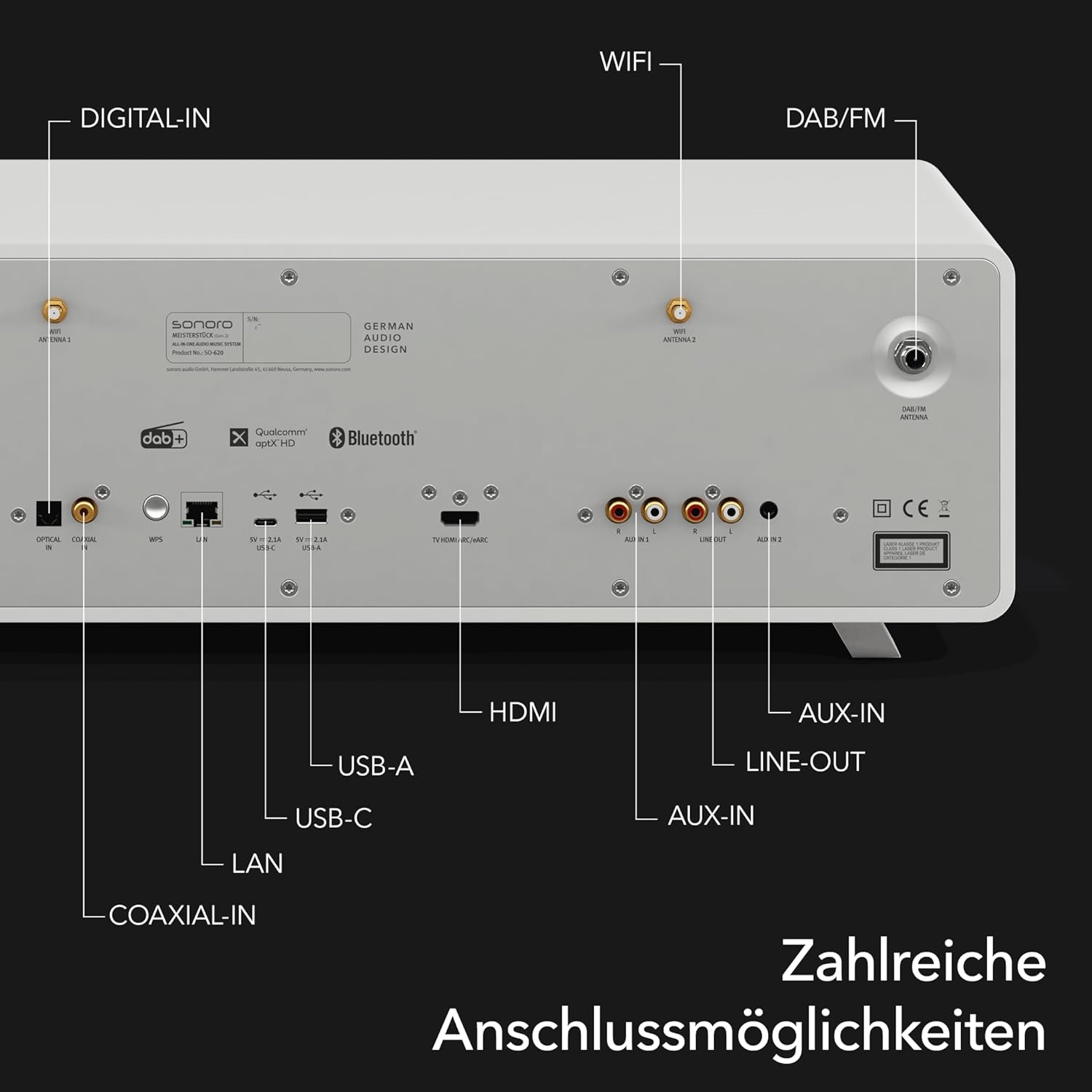
The MeisterSTÜCK offers a wide array of connectivity options on its rear panel to integrate with various audio and video devices.

Fíor 4: Mionsonraithe view of the rear connection panel.
- HDMI (eARC): Connect to a compatible TV for enhanced audio return channel functionality.
- USB-A: Le haghaidh athsheinm meán ó ghléasanna stórála USB.
- USB-C: Supports both charging external devices and media playback.
- Ionchur Digiteach Optúil: Connect digital audio sources such as TVs or game consoles.
- Auxiliary Input (3.5mm & RCA): Connect analog audio sources like MP3 players or older audio equipment.
- LAN (Eiteirnéad): Le haghaidh nasc líonra sreangaithe cobhsaí.
- DAB/FM Antenna: Connect the included antennas for digital and analog radio reception.
- Líne Amach: Chun ceangal le seachtrach ampardaitheoirí nó gléasanna taifeadta.
5. Cothabháil
5.1 Glanadh
- Glan an t-aonad le héadach bog tirim. Ná húsáid glantóirí scríobacha, céirithe ná tuaslagóirí.
- Cinntigh go bhfuil an t-aonad díphlugáilte roimh é a ghlanadh.
5.2 Nuashonrú Bogearraí
- Periodically check for software updates through the system's menu or the Sonoro app to ensure optimal performance and access to new features.
6. Fabhtcheartú
- Gan Cumhacht: Check if the power cable is securely connected to both the unit and the wall outlet. Ensure the outlet is functional.
- Gan Fuaim: Verify the volume level is not muted or too low. Check source selection and ensure external devices are properly connected and powered on.
- Saincheisteanna Nascachta: For Wi-Fi, ensure the unit is within range of your router. For Bluetooth, ensure the device is in pairing mode and within range.
- Earráidí Athsheinm CD: Cinntigh go bhfuil an dlúthdhiosca glan agus saor ó scríobtha. Bain triail as dlúthdhiosca eile.
If problems persist, consult the Sonoro support websuíomh nó déan teagmháil le seirbhís do chustaiméirí le haghaidh tuilleadh cúnaimh.
7. Sonraíochtaí
| Gné | Sonraíocht |
|---|---|
| Branda | Sonoro |
| Uimhir Mhúnla | SO-6200-100 |
| Dath | Neamhlonrach Bán |
| Teicneolaíocht Nascachta | Auxiliary, Bluetooth, USB, Wi-Fi, LAN |
| Gléasanna Comhoiriúnacha | Personal computer, smartphone, television, MP3 player, tablet |
| Cineál Cainteoir | Stereo with integrated subwoofer |
| Aschur Cumhachta | 30 Watt (RMS) |
| Foinse Cumhachta | Corded Leictreach |
| Caighdeáin Tacaithe | Bluetooth, AirPlay, Chromecast, USB, Auxiliary |
| Comhoiriúnach le Bluetooth | Yes (Bidirectional) |
| Formáidí Fuaime Tacaithe | CD-DA, MP3, AAC |
| Ceallraí (iargúlta) | 2 AAA (san áireamh) |
| Monaróir | Sonoro fuaime GmbH |
8. Barántas agus Tacaíocht
The Sonoro MeisterSTÜCK Compact System (Gen.2) comes with a manufacturer's warranty. Please refer to the warranty card included with your product or visit the official Sonoro websuíomh gréasáin le haghaidh téarmaí agus coinníollacha mionsonraithe an bharántais.
For technical support, spare parts, or service inquiries, please contact Sonoro customer support through their official channels. Information regarding software updates and product registration can also be found on their websuíomh.