
1. Táirge Tharview
This manual provides instructions for the CHUNGHOP ASK-STI6220 Voice Remote Control. This remote is designed as a replacement for specific Verizon Stream TV Box models, offering intelligent voice control and responsive button functionality for an enhanced entertainment experience.
2. Faisnéis Chomhoiriúnachta
The ASK-STI6220 Voice Remote Control is specifically designed to work ONLY with Verizon Stream TV Box voice remote control V2 ARRIS CCAM21LP1890T2, 2AGOFRC451A, RC451A, STI6220-D315, ASK-STI6220. It is NOT a universal remote for Verizon FiOS and is NOT compatible with Verizon Stream TV JS8V, Verizon FiOS TV 2019 - MG3-R32140B VRC4100 BLE Remote, or any Verizon remote with a "LAST" button. Please ensure your original remote's design and button layout match this model for proper functionality.
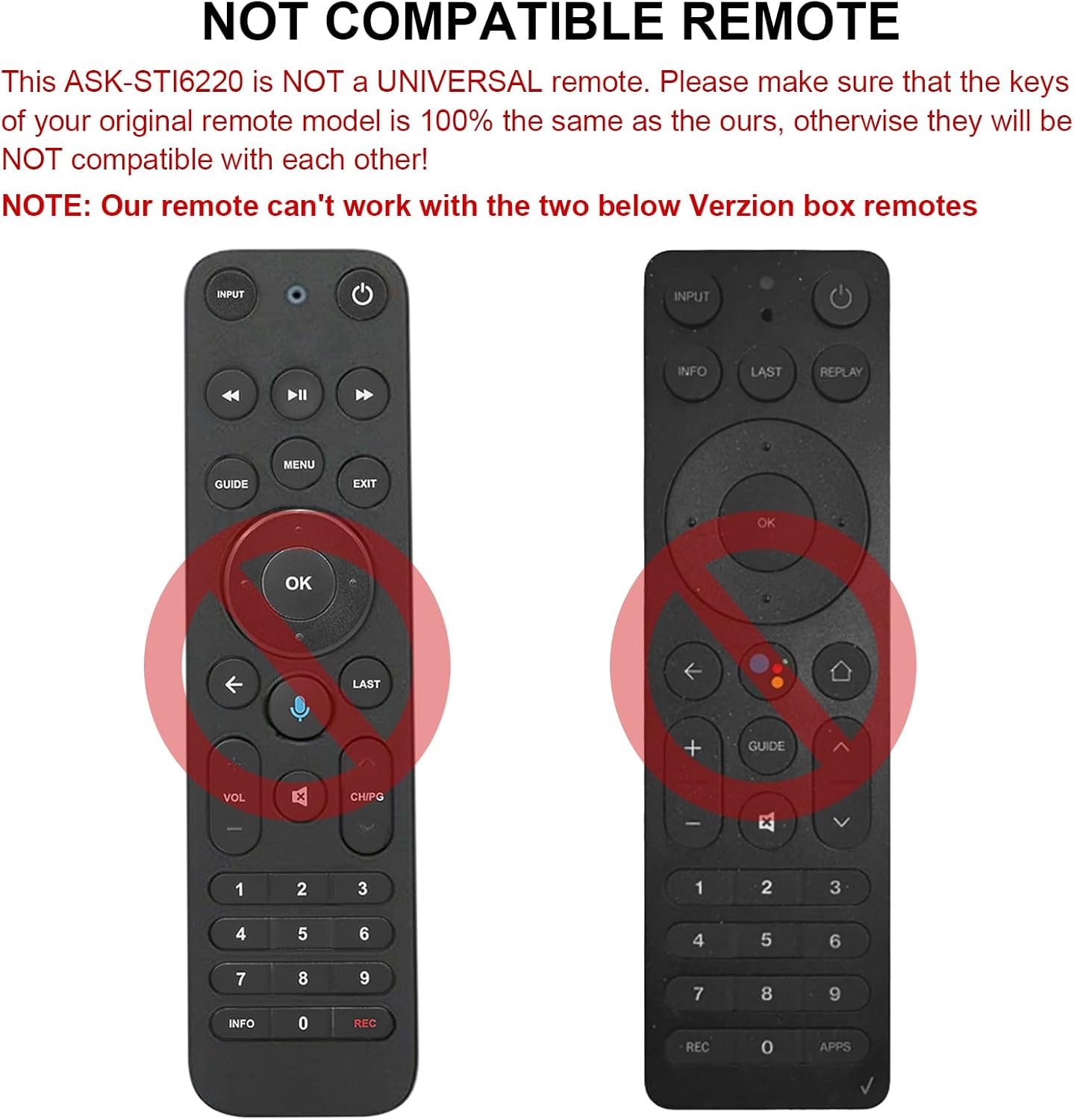
Fíor 2.1: Examples of incompatible Verizon remotes. Ensure your original remote's buttons match the ASK-STI6220 model.

Figure 2.2: The ASK-STI6220 Voice Remote Control, compatible with Verizon Stream TV Box.
3. Socrú agus Suiteáil
3.1 Suiteáil Battery
Éilíonn an cianrialtán dhá chadhnra AAA (nach bhfuil san áireamh). Chun na cadhnraí a shuiteáil:
- Bain an clúdach ceallraí ó chúl an chianrialtáin.
- Insert two AAA batteries, ensuring correct polarity (+ and - ends match the markings inside the compartment).
- Cuir an clúdach ceallraí in ionad go daingean.

Fíor 3.1: Urrann ceallraí le haghaidh dhá chadhnraí AAA.
Video 3.1: Demonstration of battery installation and initial setup for the ASK-STI6220 Voice Remote.
3.2 Treoracha Péireála
To use the voice remote, it must first be paired with your Verizon Stream TV Box. Follow one of the methods below:
- Modh 1: Brúigh an "Fill ar ais" agus "apps" buttons simultaneously to initiate pairing.
- Modh 2: Alternatively, press the "OK" agus "BAILE" buttons simultaneously to initiate pairing.
Nóta Tábhachtach:
- A device can only be paired with one voice remote at a time. Before pairing this new remote, please disconnect your old remote control (e.g., by removing its batteries).
- If pairing fails on the first attempt, try turning your TV Box off and then back on. If you continue to experience issues, clear any existing remote settings on your TV Box before attempting to pair again.

Figure 3.2: Visual guide for pairing the remote control.
4. Treoracha Oibriúcháin
4.1 General Button Functions
The ASK-STI6220 remote features a standard layout for easy navigation and control of your Verizon Stream TV Box:
- Cnaipe Cumhachta: Casann sé an Bosca Teilifíse air nó as.
- Cnaipe Ionchuir: Switches input sources on your TV.
- Ceap Loingseoireachta (Suas/Síos/Clé/Deas/Ceart go leor): Úsáidte le haghaidh nascleanúint agus roghnú roghchláir.
- Imleabhar Suas/Síos: Coigeartaíonn an toirt.
- Cainéal Suas/Síos: Athraíonn cainéil.
- Seinn/Sos, Meall Ar Aghaidh, Athchasadh: Rialuithe athsheinm meán.
- Cnaipe Baile: Filleann sé ar an bpríomhscáileán baile.
- Cnaipe Treorach: Accesses the program guide.
- Ceap Uimhreacha (0-9): Iontráil dhíreach cainéal.
- Cnaipe Faisnéise: Taispeánann sé faisnéis faoin gclár.
- APPs Button: Accesses applications.
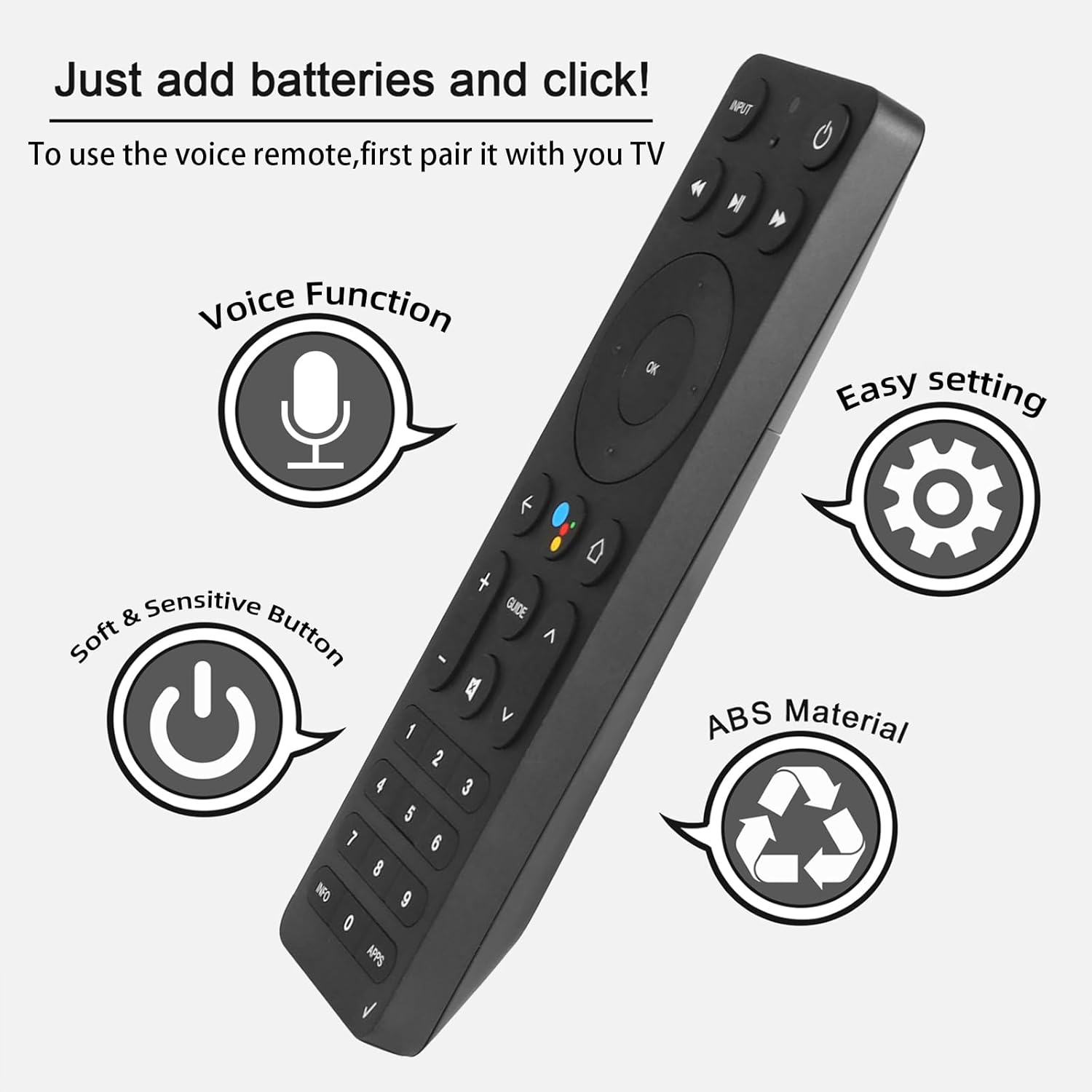
Figure 4.1: Key features and button layout of the remote control.
4.2 Rialú Gutha Chliste
The remote features an intelligent voice function, allowing you to control your TV Box with voice commands. Press the dedicated voice button (often represented by a microphone icon) and speak clearly into the remote.
Exampníos lú orduithe gutha:
- "Launch channels"
- "Lower the volume"
- "Play action movie"
If the voice function does not work correctly, follow these steps:
- Go to the home page of your TV Box.
- Press the "Settings" button on the remote control.
- Select "Remote Controls and Accessories" and then "Remote Controls."
- Select to add a new remote control and follow the on-screen steps to complete the setup.

Figure 4.2: Using intelligent voice search and control.

Figure 4.3: The remote offers a 0.2-second fast response and a 33-foot transmitting distance for accurate control.
5. Cothabháil
Chun fad saoil agus feidhmíocht is fearr do chianrialtáin a chinntiú:
- Keep the remote clean by wiping it with a soft, dry cloth. Avoid using liquid cleaners or abrasive materials.
- Replace batteries promptly when the remote's responsiveness decreases. Always use fresh AAA batteries.
- Avoid exposing the remote to extreme temperatures, direct sunlight, or moisture.
- Do not drop the remote or subject it to strong impacts.
6. Fabhtcheartú
If you encounter issues with your ASK-STI6220 remote control, please refer to the following common solutions:
- Cianda gan freagairt:
- Cinntigh go bhfuil na cadhnraí suiteáilte i gceart agus nach bhfuil siad ídithe. Cuir cadhnraí AAA úra ina n-áit más gá.
- Verify that the remote is properly paired with your Verizon Stream TV Box (refer to Section 3.2).
- Cinntigh nach bhfuil aon bhacainní idir an cianrialtán agus an Bosca Teilifíse.
- Saincheisteanna péireála:
- Confirm that your original remote is disconnected (e.g., by removing its batteries) as only one Bluetooth remote can be paired at a time.
- If pairing fails, try turning the TV Box off and on again, then re-attempt the pairing process.
- Clear existing remote settings on your TV Box before trying to pair again.
- Rialú gutha nach bhfuil ag obair:
- Ensure the remote is successfully paired and the voice function is enabled on your TV Box.
- Follow the voice control setup steps outlined in Section 4.2.
- Labhair go soiléir agus go díreach isteach i micreafón an chianrialtáin.
- Remote not compatible with my device:
- This remote is specifically designed for Verizon Stream TV Box voice remote control V2 ARRIS CCAM21LP1890T2, 2AGOFRC451A, RC451A, STI6220-D315, ASK-STI6220. It is not a universal remote. Please verify your device's model number and compare your original remote's buttons with the ASK-STI6220.

Figure 6.1: Common questions and answers regarding the remote's functionality and compatibility.
7. Sonraíochtaí
| Gné | Sonraigh |
|---|---|
| Branda | CHUNGHOP |
| Uimhir Mhúnla | CEIST-STI6220 |
| Gléasanna Comhoiriúnacha | Verizon Stream TV Box (specific models as listed in Section 2) |
| Líon Uasta na nGléasanna Tacaithe | 1 |
| Gné Speisialta | Ergonomic, Voice Control |
| Dath | As Shown (typically black) |
| Cadhnraí ag Teastáil | 2 cadhnraí AAA |
| Meáchan Mír | 3.2 unsa |
| Toisí Pacáiste | 8.19 x 3.54 x 0.94 orlach |
8. Barántas agus Tacaíocht
For any questions or concerns regarding your CHUNGHOP ASK-STI6220 Voice Remote Control, including pairing, setup, or functionality, please contact the seller directly. Refer to your purchase documentation for specific warranty details, as these may vary.
The manufacturer, CHUNGHOP, is committed to providing support for their products.